Chỉ video
0:22
Không tải được video này.
Bản dịch tiếng Anh của prompt gốc của Adit_Yah.
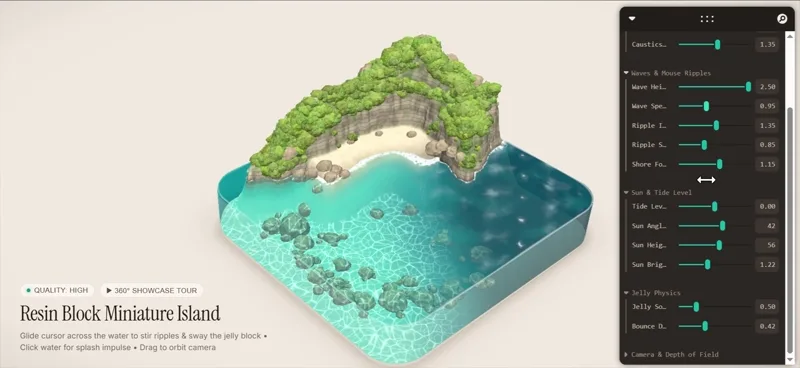
I want to make a full-screen web interactive scene: "Resin Block Miniature Island". Referring to the reference image I uploaded, create a live-photo-style image of a resin cube containing cliffs, a beach, and clear turquoise sea water, achieving that real texture; the whole block should wobble like jelly following the mouse, the water surface should ripple with the mouse, and the water should have a jelly texture.

Tech stack: Vite + React + TypeScript, three + @react-three/fiber v9 + @react-three/drei + @react-three/postprocessing, with leva for the parameter-tuning panel. Generate all 3D content procedurally in code, without loading any model files; for ambient lighting just use drei's Environment presets. Follow the official best practices of R3F and drei.

The scene should have:
- A rounded transparent resin block, where the block itself is the sea water, using MeshTransmissionMaterial to achieve transparency and a turquoise water color going from shallow to deep.
- A sand-colored seabed inside the block, with caustic light spots, scattered with a few rocks, some poking out of the water.
- A dynamic water surface on the block's top face: GPU heightfield simulation, ripples when the mouse passes over, and faint natural undulation when idle; it needs reflections, shallow/deep water color blending, and shoreline foam.
- A procedural island in one corner: noise terrain sculpting steep cliffs and a curve of sandy beach, colored in layers by height and slope, with simple geometry instanced and scattered on the gentle slopes as vegetation.
- Jelly effect: the whole scene wobbles spring-like following the mouse displacement, with the top of the block swaying more than the bottom.
- Product-photography-style presentation: off-white background, telephoto top-down camera, contact shadows, depth of field to create a miniature feel, slight bloom and vignette.
- leva panel: water color, wave height, ripple intensity, sun angle, tide level, jelly stiffness, depth of field.

Requirements: 60fps on desktop, 30fps or above on mobile with automatic degradation; split components by responsibility, with the heightfield simulation as its own hook; get the whole thing working first, then refine materials and parameters.
Bản dịch tiếng Anh do OPCAIOS thực hiện từ bản gốc tiếng Trung.
Another output form GEMINI 4 ARGON Took 13 mins ~2% of weekly quota , the model is really fast . loving it prompt in comment
Bản dịch tiếng Anh do OPCAIOS thực hiện từ bản gốc tiếng Trung.
8dccccf7452b Mã rút gọn SHA-256 của SKILL.md hiện tại, dùng để đối chiếu bạn đang cài đúng bản.Prompt không nhắc tới thư viện, khóa API hay công cụ cụ thể nào mà chúng tôi dò được. Chưa kiểm thử riêng: skill này đóng gói lại prompt công khai của tác giả.
Là bản dịch tiếng Anh của prompt gốc của Adit_Yah cho Gemini 4 Argon, đóng gói thành tệp SKILL.md để agent như Claude Code hay Codex nạp lại khi bạn cần làm việc tương tự.
Bấm "Cài vào agent", chọn agent của bạn rồi dán lệnh được sao chép; hoặc tải ZIP và giải nén vào thư mục skills. Mở phiên mới và mô tả việc cần làm.
Có. Skill này nằm trong nhóm skill Free: xem, sao chép và tải về đều không cần tài khoản. Các skill còn lại cần đăng nhập tài khoản OPCAIOS (miễn phí). Agent và mô hình bạn chạy skill có thể tính phí riêng theo nhà cung cấp.
OPCAIOS tuyển chọn, đóng gói prompt thành SKILL.md và ZIP cài được, viết hướng dẫn và cập nhật; việc đó không mua quyền sở hữu prompt của Adit_Yah. Prompt vẫn thuộc về người sáng tạo.
Video xem trước được tắt tiếng và phát lặp để trang nhẹ. Nếu video không tải được, hãy thử tải lại trang; một số trình duyệt tiết kiệm dữ liệu chỉ hiện ảnh bìa.
Video và prompt thuộc về Adit_Yah. Best Skill chỉ tổng hợp để tham khảo; hãy ghi nguồn tác giả khi bạn dùng lại.