Chỉ video
0:22
Không tải được video này.
Bản dịch tiếng Anh của prompt gốc của Lemomo.
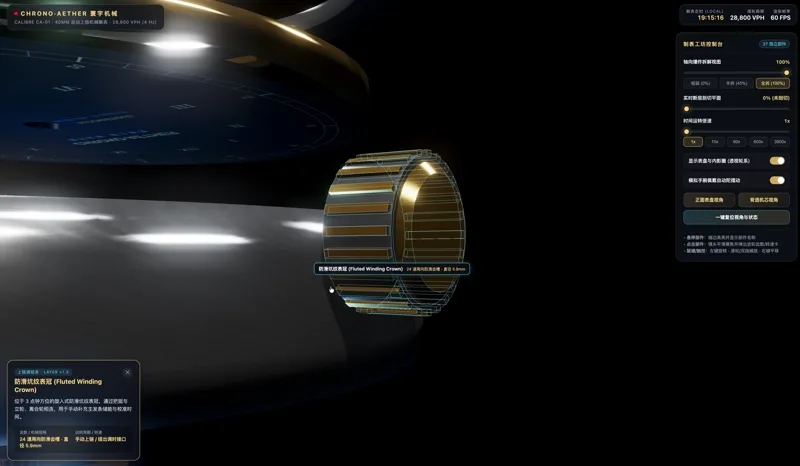
You are a top-tier creative technologist, an expert in Three.js, real-time rendering, and the structure of mechanical watches. Please build a single-file web page, index.html: a 3D model of an interactive, explodable automatic mechanical wristwatch.

[Hard constraints]
- Output only one complete index.html that runs in Chrome by double-clicking, with no build tools or local server.
- Import Three.js via an importmap.
- Do not load any external models, textures, or fonts; generate all geometry and textures procedurally in code.
- Output the complete code. Do not omit anything and do not write "omitted here".

[Model]
- At least 30 separate parts, including: case, lugs, crown, sapphire crystal, dial (indices and a made-up brand name drawn with Canvas), hour hand, minute hand, second hand, mainspring barrel, center wheel, third wheel, fourth wheel, escape wheel, pallet fork, balance wheel and hairspring, automatic rotor, bridges/plates, screws, ruby jewel bearings.
- Gears must have realistic tooth profiles and mesh in the correct positions. First work out each gear's tooth count and the gear ratios, ensuring the second hand makes one turn per 60 seconds, the minute hand one turn per 60 minutes, and the hour hand one turn per 12 hours.
- Size proportions should follow a real watch with a 40mm case diameter.

[Materials and lighting]
- Use PBR materials: brushed and polished stainless steel, gold-plated bridges, blued screws, translucent rubies, and sapphire glass with transmission and refraction (MeshPhysicalMaterial).
- Use RoomEnvironment for environment reflections, and enable ACES tone mapping, soft shadows, and a subtle bloom.

[Animation]
- The hands show the real current local time.
- The movement must run realistically: the balance wheel oscillates back and forth, the pallet fork and escape wheel work together in rhythm, and each gear rotates according to its own gear ratio.

[Interaction]
- Mouse and touch can both rotate, zoom, and pan, with damping.
- When the mouse hovers over a part, outline-highlight it and show the part name.
- When a part is clicked, the camera smoothly focuses on it and an info card pops up stating its name, function, tooth count, and rotation speed.
- The control panel includes:
  - Exploded-view slider (0–100%, smoothly separating the layers along the axis)
  - Section plane slider
  - Time speed multiplier (1x–3600x)
  - Dial show/hide
  - One-click view reset

[UI and performance]
- Chinese-language UI, dark glassmorphism style, with a loading animation, adapted to phone screens.
- Stable 60fps on desktop: use InstancedMesh for repeated parts, and cap devicePixelRatio at 2.
- No errors in the console.

[Workflow]
1. First write the design plan: parts list, scene hierarchy, and the calculation of gear tooth counts and ratios.
2. Then write the complete code.
3. Finally, check against every requirement above one by one; fix anything not done before outputting the final version.
Bản dịch tiếng Anh do OPCAIOS thực hiện từ bản gốc tiếng Trung.
I also quickly built a 3D interactive web page with Gemini 4 Argon. I chose "explodable mechanical wristwatch" as the topic. The reason is that it demands a lot of reasoning: the gears have to truly mesh, the gear ratios have to be calculated correctly, there are many parts, and there's an explode animation. It separates models more easily than common topics like the solar system or cars. The prompt is as follows: You are a top-tier creative technologist, an expert in Three.js, real-time rendering, and the structure of mechanical watches. Please build a single-file web page, index.html: a 3D model of an interactive, explodable automatic mechanical wristwatch. [Hard constraints] - Output only one complete index.html that runs in Chrome by double-clicking, with no build tools or local server. - Import Three.js via an importmap. - Do not load any external models, textures, or fonts; generate all geometry and textures procedurally in code. - Output the complete code. Do not omit anything and do not write "omitted here". [Model] - At least 30 separate parts, including: case, lugs, crown, sapphire crystal, dial (indices and a made-up brand name drawn with Canvas), hour hand, minute hand, second hand, mainspring barrel, center wheel, third wheel, fourth wheel, escape wheel, pallet fork, balance wheel and hairspring, automatic rotor, bridges/plates, screws, ruby jewel bearings. - Gears must have realistic tooth profiles and mesh in the correct positions. First work out each gear's tooth count and the gear ratios, ensuring the second hand makes one turn per 60 seconds, the minute hand one turn per 60 minutes, and the hour hand one turn per 12 hours. - Size proportions should follow a real watch with a 40mm case diameter. [Materials and lighting] - Use PBR materials: brushed and polished stainless steel, gold-plated bridges, blued screws, translucent rubies, and sapphire glass with transmission and refraction (MeshPhysicalMaterial). - Use RoomEnvironment for environment reflections, and enable ACES tone mapping, soft shadows, and a subtle bloom. [Animation] - The hands show the real current local time. - The movement must run realistically: the balance wheel oscillates back and forth, the pallet fork and escape wheel work together in rhythm, and each gear rotates according to its own gear ratio. [Interaction] - Mouse and touch can both rotate, zoom, and pan, with damping. - When the mouse hovers over a part, outline-highlight it and show the part name. - When a part is clicked, the camera smoothly focuses on it and an info card pops up stating its name, function, tooth count, and rotation speed. - The control panel includes: - Exploded-view slider (0–100%, smoothly separating the layers along the axis) - Section plane slider - Time speed multiplier (1x–3600x) - Dial show/hide - One-click view reset [UI and performance] - Chinese-language UI, dark glassmorphism style, with a loading animation, adapted to phone screens. - Stable 60fps on desktop: use InstancedMesh for repeated parts, and cap devicePixelRatio at 2. - No errors in the console. [Workflow] 1. First write the design plan: parts list, scene hierarchy, and the calculation of gear tooth counts and ratios. 2. Then write the complete code. 3. Finally, check against every requirement above one by one; fix anything not done before outputting the final version.
Bản dịch tiếng Anh do OPCAIOS thực hiện từ bản gốc tiếng Trung.
560891524954 Mã rút gọn SHA-256 của SKILL.md hiện tại, dùng để đối chiếu bạn đang cài đúng bản.Các dòng "Ước tính từ prompt" được rút ra bằng cách dò từ khóa trong prompt, không phải kết quả chạy thử. Chưa kiểm thử riêng: skill này đóng gói lại prompt công khai của tác giả.
Là bản dịch tiếng Anh của prompt gốc của Lemomo cho Gemini 4 Argon, đóng gói thành tệp SKILL.md để agent như Claude Code hay Codex nạp lại khi bạn cần làm việc tương tự.
Bấm "Cài vào agent", chọn agent của bạn rồi dán lệnh được sao chép; hoặc tải ZIP và giải nén vào thư mục skills. Mở phiên mới và mô tả việc cần làm.
Có. Skill này nằm trong nhóm skill Free: xem, sao chép và tải về đều không cần tài khoản. Các skill còn lại cần đăng nhập tài khoản OPCAIOS (miễn phí). Agent và mô hình bạn chạy skill có thể tính phí riêng theo nhà cung cấp.
OPCAIOS tuyển chọn, đóng gói prompt thành SKILL.md và ZIP cài được, viết hướng dẫn và cập nhật; việc đó không mua quyền sở hữu prompt của Lemomo. Prompt vẫn thuộc về người sáng tạo.
Video xem trước được tắt tiếng và phát lặp để trang nhẹ. Nếu video không tải được, hãy thử tải lại trang; một số trình duyệt tiết kiệm dữ liệu chỉ hiện ảnh bìa.
Video và prompt thuộc về Lemomo. Best Skill chỉ tổng hợp để tham khảo; hãy ghi nguồn tác giả khi bạn dùng lại.