



When asking AI to write Python code to build a 3D model in Blender, two things often go wrong — and neither is geometry. First, Blender's API changed after the AI model was trained, so the code looks right but runs on the wrong Blender version. Second, the most critical errors in a 3D model are invisible when rendered: the image looks great but the 3D-printed object breaks. This post summarizes and rewrites in Vietnamese the process to fix both problems, in order: pin the version, write directly to data instead of calling UI operations, unify units, count geometry errors with code, then let AI "see" the result.
This post is based on "Opus 5.5 Writes Blender Python for the Wrong Blender - and the Render Won't Tell You" by @0xCodio on X (11/10/2026), rewritten in Vietnamese, condensed and explained by OPCAIOS. All benchmark figures, software versions and security information below are from the original author; OPCAIOS has not independently verified them; cross-check with current Blender documentation before applying to real work.
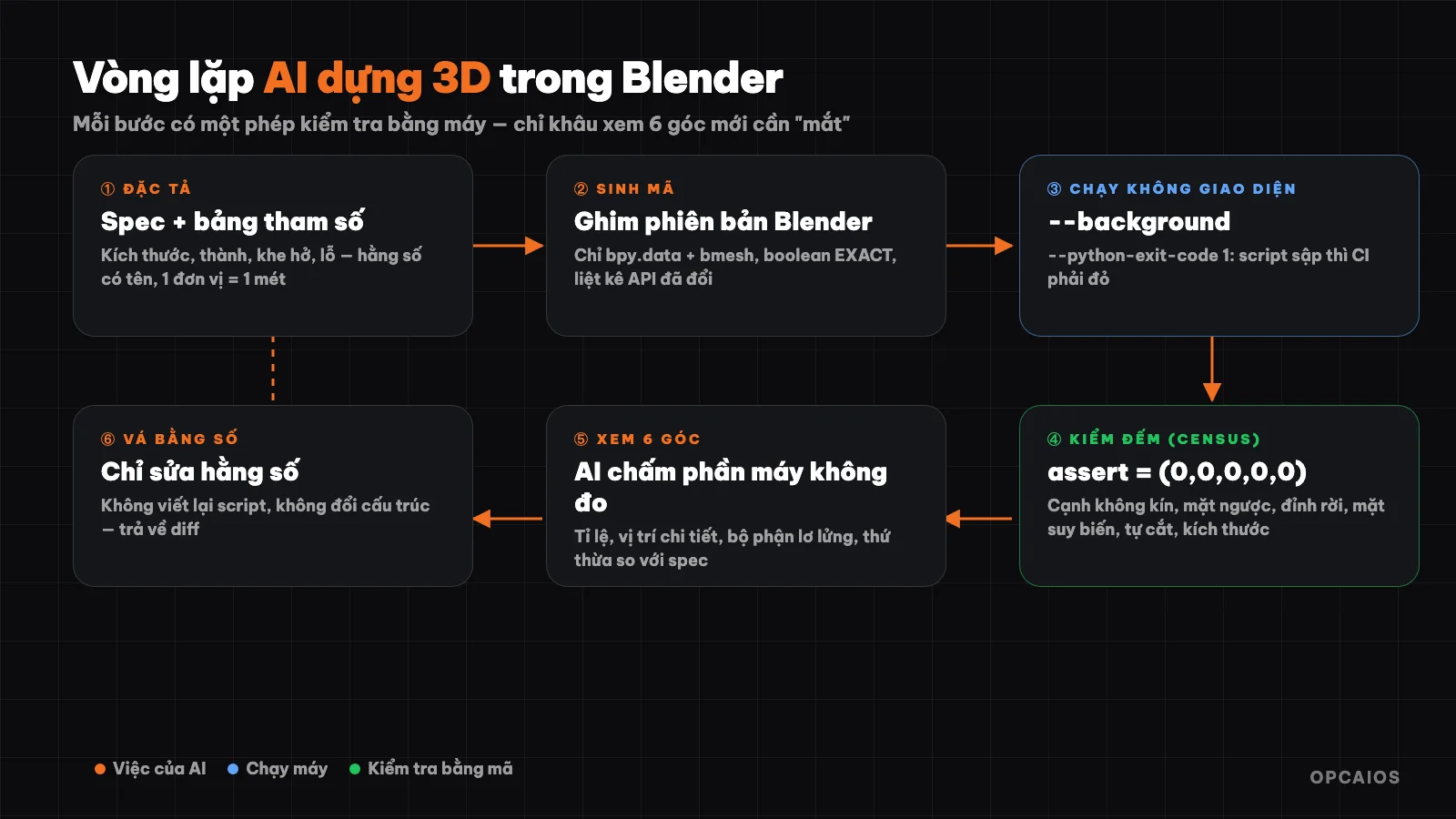
Loop in this post: each step has a machine check, only the "view from 6 angles" step uses the eye (of AI). Diagram: OPCAIOS.
Two errors, not one
Error 1 — aiming at the wrong version. According to the author, one test run 30 tasks of writing Blender code across four Blender versions with ten models, each code snippet was run for real in headless mode and had its own check — a total of 1,190 answers were scored. Results:
- Rate of code that runs: 91% on Blender 3.6, down to just 70% on Blender 5.0.
- Rate of models that correctly say what changed: from 81% down to 35%.
- Three task groups (compositor, boolean solver, sequencer) scored zero on every model on Blender 5.0.
Clearest example: the identifier name of the EEVEE renderer changed from BLENDER_EEVEE to BLENDER_EEVEE_NEXT in version 4.2, then back to BLENDER_EEVEE in 5.0. A model that learned the name change in between gets it wrong now; a model that never learned it happens to get it right by chance. This is not a reasoning error but a wrong target error.
Error 2 — invisible errors when rendering. Non-manifold edges, faces with zero area, parts that cut through each other, hollows inside, walls thinner than a printer nozzle — all still render as a perfect image. The author cites Blender's official MCP page, where they themselves note an AI model once missed a Solidify modifier that doubled the polygon count, because that modifier did not affect the viewport.
Step 1: pin the version before anything else
The current version according to the author is Blender 5.2.2 LTS, and 4.5 is the maintained branch. Python shifted from 3.11 to 3.13 in version 5.1, and the bpy package only runs on one Python version — there is no "close enough" option.
Declare the version right in the prompt, then make the program prove it runs on that version. The author's template system prompt:
Target Blender 5.2 LTS, Python 3.13. Do not use any API removed before it.

Rules:
- bpy.data and bmesh only; no bpy.ops.mesh.* and no bpy.ops.object.*
  except where I have named one
- one Blender unit is one metre; declare MM = 0.001 and use it
- every dimension, clearance and wall thickness is a named module-level
  constant, never inline
- boolean solver is EXACT unless I state the inputs are manifold
- end the script with the census asserts, not with a render
- after the code, list every API you used that changed in 4.0 or later
  and state which release you are targeting for each
(Translation: target Blender 5.2 LTS / Python 3.13; use only bpy.data and bmesh, do not call interface operations; one Blender unit is one metre and declare MM = 0.001; every dimension is a named constant; boolean solver defaults to EXACT; end the script with census checks rather than a render; finally list every API that changed from 4.0 onward and state which version you are targeting for each.)
Run Blender headless with this command:
blender --background --factory-startup \
        --python-exit-code 1 \
        --python build.py -- --out ./dist --mm 20
Two details that cost people a day each:
- Missing
--python-exit-codemeans errors in the script do not change Blender's exit status, so automated test systems (CI) report green even though the script has crashed. - Parameter order matters: place
-oafter the.blendfilename, otherwise opening the file will overwrite the output path. Everything after--is passed to Python viasys.argv.
Step 2: interface operations are only for people; scripts must write directly to data
Per the Blender documentation itself, which the author quotes: operators (bpy.ops.*) do not take data as parameters, only return whether they succeeded, and when run conditions are not met they report RuntimeError: ... context is incorrect without explaining why. When running headless with no interface, every bpy.ops.mesh.* command is looking for an editing mesh context that does not exist.
So make the model write directly to bpy.data and bmesh. Sample prompt for code generation:
Build the part described below as a single Python file.

<spec: outer dimensions, wall, clearances, holes, tolerance, export path>

Output the parameter block first as a table. I will assert against it.
The boolean solver is also a trap because the default is a trap: FLOAT is documented as "does not support overlapping geometry", MANIFOLD only runs on closed meshes, and only EXACT survives messy input. Feeding AI-generated geometry to the default solver is not a bug — it is documented behaviour.
Step 3: scale errors survive every review if you do not name the unit once
A hundred-fold scale error often lurks silently from three facts combining. Pick a unit convention once and state it clearly at the start of the script:
# 1 Blender unit = 1 metre. A 20 mm part is 0.02.
MM = 0.001
The author emphasises the glTF case: the spec mandates metres, Y-axis pointing up, and the exporter has no scale option — Blender units go out at 1:1 ratio, so one unit is one metre. The "what people think — what is true" table according to the author:
| What people think | What is true |
|---|---|
primitive_cube_add() creates a cube with edge 1 unit |
Creates an edge of 2 units; size= is the full edge length |
unit_settings.scale_length = 0.001 means "work in mm" |
Only affects display; geometry, physics and file export ignore it |
| The file exporter carries your units | STL and OBJ carry no units — you must pass use_scene_unit or global_scale |
Step 4: count by code what renders cannot answer
I call this "census": a block of code that runs at the end of the script to count invisible errors and halt the entire process if any exist.
import bmesh
bm = bmesh.new(); bm.from_mesh(obj.data)

nonmanifold = sum(1 for e in bm.edges if not e.is_manifold)
flipped     = sum(1 for e in bm.edges if e.is_manifold and not e.is_contiguous)
loose       = sum(1 for v in bm.verts if not v.link_faces)
degenerate  = sum(1 for f in bm.faces if f.calc_area() <= 1e-4)

from mathutils.bvhtree import BVHTree
tree = BVHTree.FromBMesh(bm, epsilon=1e-5)
selfhit = len(tree.overlap(tree))

assert (nonmanifold, flipped, loose, degenerate, selfhit) == (0, 0, 0, 0, 0)
assert abs(obj.dimensions.x - 0.020) < 1e-5     # correct size as specified
This block checks for: non-manifold edges, flipped face directions, floating vertices, degenerate faces, self-intersecting sections, and correct dimensions against spec. I describe the full check as eleven questions that a render can never answer.
A few technical points worth remembering:
- Measure first, render later. A common mistake is
bpy.ops.object.modifier_apply(modifier="Boolean"); in headless runs, the way to survive is to get the computed mesh:dg = bpy.context.evaluated_depsgraph_get()thenobj.evaluated_get(dg).to_mesh(). - Outside Blender, the library
trimeshhas the propertyis_volume— meaning the object is closed, face order is consistent, and normals point outward. Weaker isis_watertight, and volume only makes sense on a mesh that is already a solid block. - The 3D Print Toolbox no longer ships with Blender but is a community add-on, so an automated pipeline must install it itself. The default thresholds (minimum feature 1 mm, overhang 45°) match the consensus in 3D printing, but only hold if one unit equals one meter.
Step 5: the loop and the prompts that drive it
One iteration consists of: the cached system block, the spec, one code generation, one headless run, the census, and one numeric patch. According to me, such a loop costs a few cents, while one Blender run takes only a few seconds. Pricing is quoted for Opus 5.5 (per 1 million tokens): input 4 USD, output 20 USD, cache read 0.20 USD, batch input 2 USD and batch output 10 USD — check your provider's current rates.
Build images to make a summary, not to judge. Once the census step passes, create a composite of six views of the object and give it to AI only to score what geometry cannot speak of: proportion against the stated size, whether details sit where they should, parts that read as floating or fused, and anything present that the spec did not ask for. A sample critical prompt:
Six orthographic views of one part: front, back, left, right, top,
three-quarter. The census already passed, so do not comment on topology.

Judge only what geometry cannot: proportion against the stated dimensions,
whether features sit where the spec says, parts that read as floating or
fused, and anything present that the spec did not ask for.

List discrepancies against: <parameter table>
The practical way is to render off-screen with GPU instead of a full render, compositing six labeled views into one image. Two constraints: Cycles cannot render off-screen so use EEVEE or Workbench; and Blender 5.2 added gpu.init() correctly to get GPU when running --background.
The last step is numeric patch, not asking AI to rewrite the whole script:
Change constants in the parameter block only. Do not restructure, do not
rename, do not add geometry.

Apply exactly: <discrepancy list>
Return a diff.
About Blender's MCP
According to me: there is now an official MCP server from Blender Lab (add-on v1.0.3, Blender 5.1 and up), and their page itself warns that it will "run code generated by the model inside Blender with no fence" and recommends a virtual machine. The community server has about 28.7 thousand stars on GitHub, talks over TCP usually at localhost:9876 with no auth, no encryption, and once had a path traversal bug fixed in version 1.6.5. My conclusion: treat both as tools for a development machine. If you are new to MCP, read What is MCP? first.
When Importing AI-Generated 3D Models
If the model comes from an AI 3D generator, check more carefully, not less carefully. According to the author, the 2026 trend has moved away from closed geometry: TRELLIS.2 even promotes open geometry and exposed surfaces as a feature — suitable for clothing, vegetation, wrong for anything that will be printed. No paid model commits to being watertight.
The script processing chain after importing, in the correct order: validation check → mesh analysis → repair using bmesh.ops (remove_doubles, recalc_face_normals, holes_fill, dissolve_degenerate) → scale and orient → boolean → finally quadriflow_remesh or voxel_remesh if usable topology is needed.
About the numbers for 3D printing: four public guidelines contradict each other by a factor of two to three on nearly everything. There are only four numbers that all agree on — overhang angle 45°, smallest hole Ø2.0 mm, fitting gap 0.5 mm, minimum wall thickness around 1.0–1.2 mm. Pass those four numbers as named parameters, while any remaining disputed numbers should be default arguments. A hard constant in the code generator is right for one printer and wrong for the next.
Summary
Two things stand between a script that looks done and an object that actually exists are: version pinning and code-based verification. They're not overhead; they're why a loop costing a few cents can be reliable. Apply this pattern outside Blender too: declare your target environment clearly, let machines check what machines can check, and use only eyes (human or AI) for the part machines cannot check.
Source: @0xCodio on X, 11/10/2026 — rewritten and condensed by OPCAIOS; numbers, versions, prices and security information per the original author, not independently verified.
Translated from Vietnamese with AI. Read the original.
Want to apply this in your business?
Book a free 30-minute call (Vietnam time, in English or Vietnamese).