


API (Application Programming Interface) is the "communication gateway" for two pieces of software to talk to each other without a person in the middle: sales software sends an order to accounting software, the bank reports money received to a website, your application calls ChatGPT or Claude to write content. Understanding API is the first step to automating work, because almost every automation tool — n8n, Make, Zapier, AI agent — runs on APIs. This post explains API in everyday language, with real examples from opcaios.org itself.
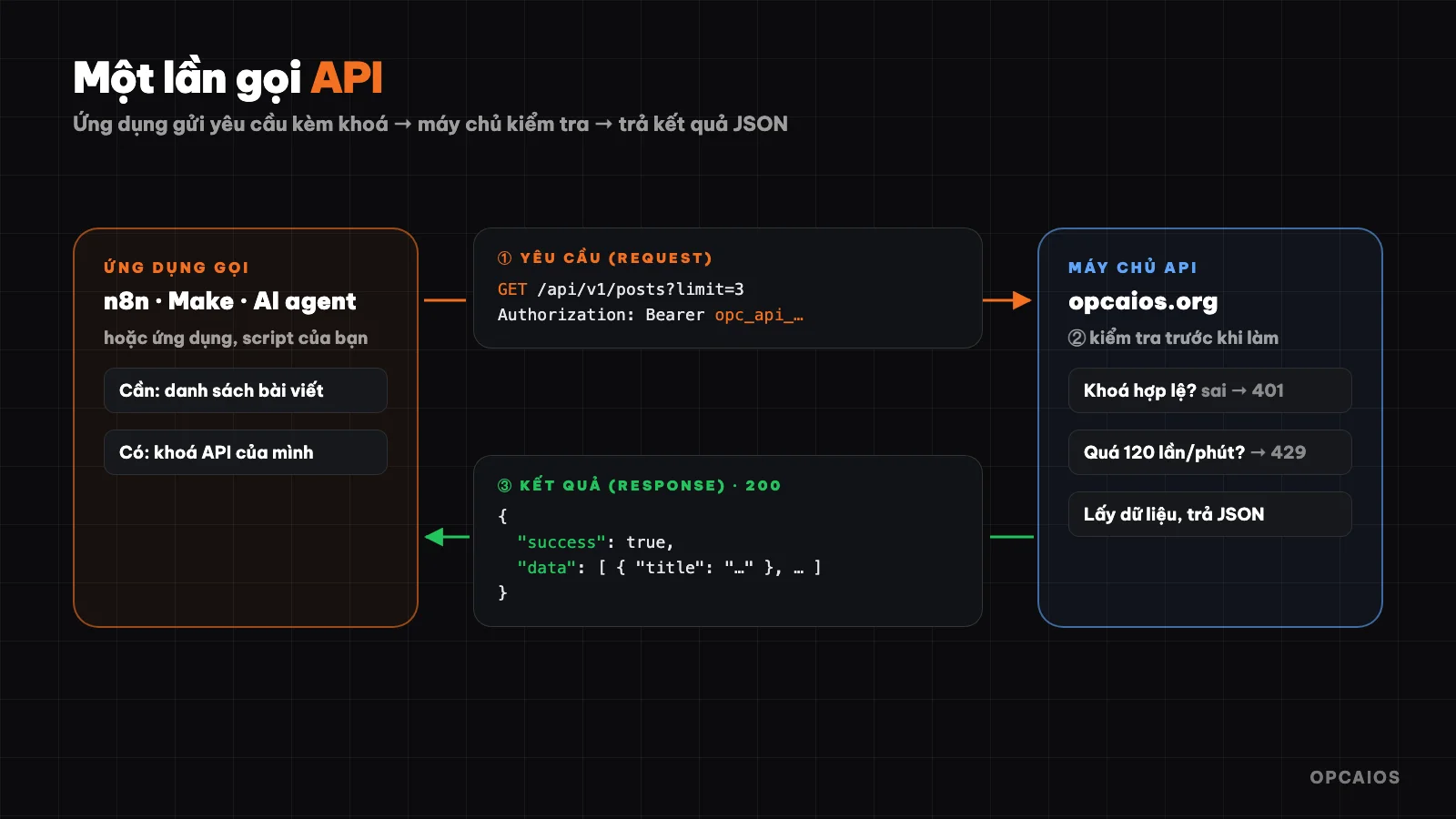
One API call: application sends a request with a key, server checks it and returns the result. Diagram: OPCAIOS.
What is API?
Imagine a restaurant. You (the customer) don't go into the kitchen and cook yourself; you order through a waiter, the waiter takes your request to the kitchen and brings the dish out. You don't need to know how the kitchen cooks, just need to order the right dish from the menu.
API is that waiter:
- Customer is the software that needs data or needs to do something (your application, an n8n workflow, an AI agent).
- Kitchen is the system holding the data or capability (bank, sales software, AI model).
- Menu is the API documentation: lists what requests are allowed, what you need to send and what you will receive.
Thanks to API, each piece of software keeps its inner workings secret, but still opens a well-defined gateway for other software to use.
What does one API call include?
Most APIs today are web APIs running on HTTP — the same protocol browsers use to open web pages. One call includes:
| Component | Meaning | Example |
|---|---|---|
| Endpoint | Address of the "dish" you're ordering | https://opcaios.org/api/v1/posts |
| Method | What you want to do | GET fetch data, POST create new, PATCH edit, DELETE remove |
| Header | Information sent along, most important is authentication key | Authorization: Bearer <key> |
| Body | Data sent up (when creating or editing) | {"fullName": "Nguyễn Văn A", "phone": "09…"} |
| Response | Result returned, usually in JSON format, with status code | 200 success, 401 missing key, 429 too many calls |
JSON is a data format in "name: value" style that both people and machines can read. For example, when calling opcaios.org's API without sending a key, the server returns code 401 with content:
{"success": false, "error": "Missing token. Create token in Admin → Settings → API token."}
API key (token)
An API key is like an access card: the server looks at the key to know who is calling and what they're allowed to do. Some keys are read-only, some can write. Whoever holds the key has the same rights as the key owner, so API keys must be kept like a password.
Rate limit
Most APIs limit the number of calls within a time period to prevent the server from being overloaded. For example, opcaios.org's API allows each key a maximum of 120 calls per minute; exceeding that gives code 429 and you have to try again later.
How is API different from webhook?
- API: you actively ask — "are there new orders?". Asking constantly wastes work, asking rarely is slow.
- Webhook: the other system actively tells you — "just got a new order here". You give them an address, when something happens they send data to that address.
Real example: when a customer transfers money to buy a course on opcaios.org, SePay (bank transaction tracking service) sends a webhook to the website. The website checks the secret key in the request, matches the transfer content with the order code, unlocks the course for the customer and notifies the site owner — no one has to sit and reconcile statements. The website replies 200 so SePay knows it received it, don't send again.
Where is API used in daily work?
- Payment: payment gateways and money transfer tracking services report paid orders via webhook.
- Sales and customer care: forms on website send leads to CRM; CRM sends messages via Zalo OA or email API.
- Advertising and reporting: fetch spending data from Meta Ads, Google Ads to Google Sheets every morning.
- AI: application calls API from OpenAI, Anthropic, Google to write, summarize, classify. Most AI APIs charge by the amount of text (tokens) sent and received.
Don't know how to code but want to use APIs?
You can. Drag-and-drop automation tools handle the technical side for you:
- n8n: open source, you can install it on your own server, has an "HTTP Request" node to call any API.
- Make and Zapier: online services with thousands of pre-built integrations.
The general approach: choose a trigger event (new form submission, webhook arrives, at 8 AM), add an API call step, paste the endpoint and key, connect data with your mouse. For APIs without pre-built integrations, you use the "HTTP Request" step and read the API docs to learn the endpoint, method, and body.
Real example: opcaios.org's API
This site opens a REST API at https://opcaios.org/api/v1 to connect with n8n, Make, Zapier or custom scripts. The site owner creates keys in the admin panel and chooses read-only or read-and-write permissions. A few endpoints:
| Method | Endpoint | What it does |
|---|---|---|
GET |
/api/v1/posts |
List of posts |
POST |
/api/v1/posts |
Create a post (draft by default) |
GET |
/api/v1/submissions |
Form submissions from visitors |
POST |
/api/v1/contacts |
Add a prospect to CRM |
POST |
/api/v1/links |
Create a shortened opcaios.org/go/… link |
Try calling it with curl (replace the key with your real one):
curl https://opcaios.org/api/v1/posts?limit=3 \
  -H "Authorization: Bearer opc_api_xxxxxxxx"
The response always has the form {"success": true, "data": …} or {"success": false, "error": "…"}, so automation tools can easily check success or failure.
How are APIs and MCPs different?
The endpoints above also exist in opcaios.org's MCP server, with the same operations. The difference lies in who uses them:
- API is for software and people writing workflows: you know in advance which endpoint you'll call and in what order.
- MCP is for AI: it wraps operations as "tools" with descriptions, so AI assistants like Claude or ChatGPT can choose which ones to call during a conversation.
An MCP server usually calls an API underneath. Read the post What is MCP? to see how these two connect.
Security notes when using APIs
- Don't paste API keys anywhere public: source code pushed to GitHub, screenshots, group messages, chat windows with AI.
- One key per job, minimum permissions: if a process only needs to read, use a read-only key. If one key leaks, you revoke only that one.
- Webhooks must authenticate: check a secret key or signature in each incoming request, otherwise anyone can fake "payment received".
- Set spending limits on paid APIs: especially AI APIs — a single error loop can make thousands of calls in minutes.
- Keep logs: save every important call so you know what happened when things go wrong.
Frequently asked questions
Does an API cost money?
It depends on the provider. Many APIs are free within limits; AI APIs and data APIs usually charge based on usage. Check the pricing page before wiring it into an automated workflow.
What is a REST API?
REST is the most common API design: each data type has an address (like /posts, /contacts), and you use HTTP methods GET, POST, PATCH, DELETE to fetch, create, edit, and delete.
Where do I get an API key?
In the settings or developer section of the service you want to connect — usually called "API keys", "Developer", or "Integrations".
Should I use an API or a webhook?
Use a webhook if the service supports it when you need to know about an event right away (new order, money arrived). Use an API when you need to fetch or send data on a schedule or on demand. Most workflows use both.
Do I need to learn coding to use an API?
No. With n8n, Make or Zapier, you just need to understand endpoints, methods, keys and JSON at a reading level — exactly what this post explained.
Source: actual code and feedback from opcaios.org API (/api/v1, SePay webhook), verified on 22/10/2026.
Translated from Vietnamese with AI. Read the original.
Want to apply this in your business?
Book a free 30-minute call (Vietnam time, in English or Vietnamese).