


What are Gems in Gemini?
Gems in Gemini are saved versions of Gemini with a name, instructions, and knowledge files, so each time you return you open the right "assistant" instead of typing the request again. What you need to know first: according to Google's help page (read on 04/11/2026), with a personal Google account, Gems will transition to skills, becoming read-only from 17/11/2026 and being removed on 17/12/2026; Business Workspace is scheduled to transition in March 2027. This post does not claim Gems are a long-term tool: it guides you through creating a Gem, attaching files, sharing, listing limitations, comparing with Custom GPT and Claude Projects at a verifiable level, then provides 3 reusable instruction templates for skills. The general introduction to Gemini is in the post What is Gemini?.
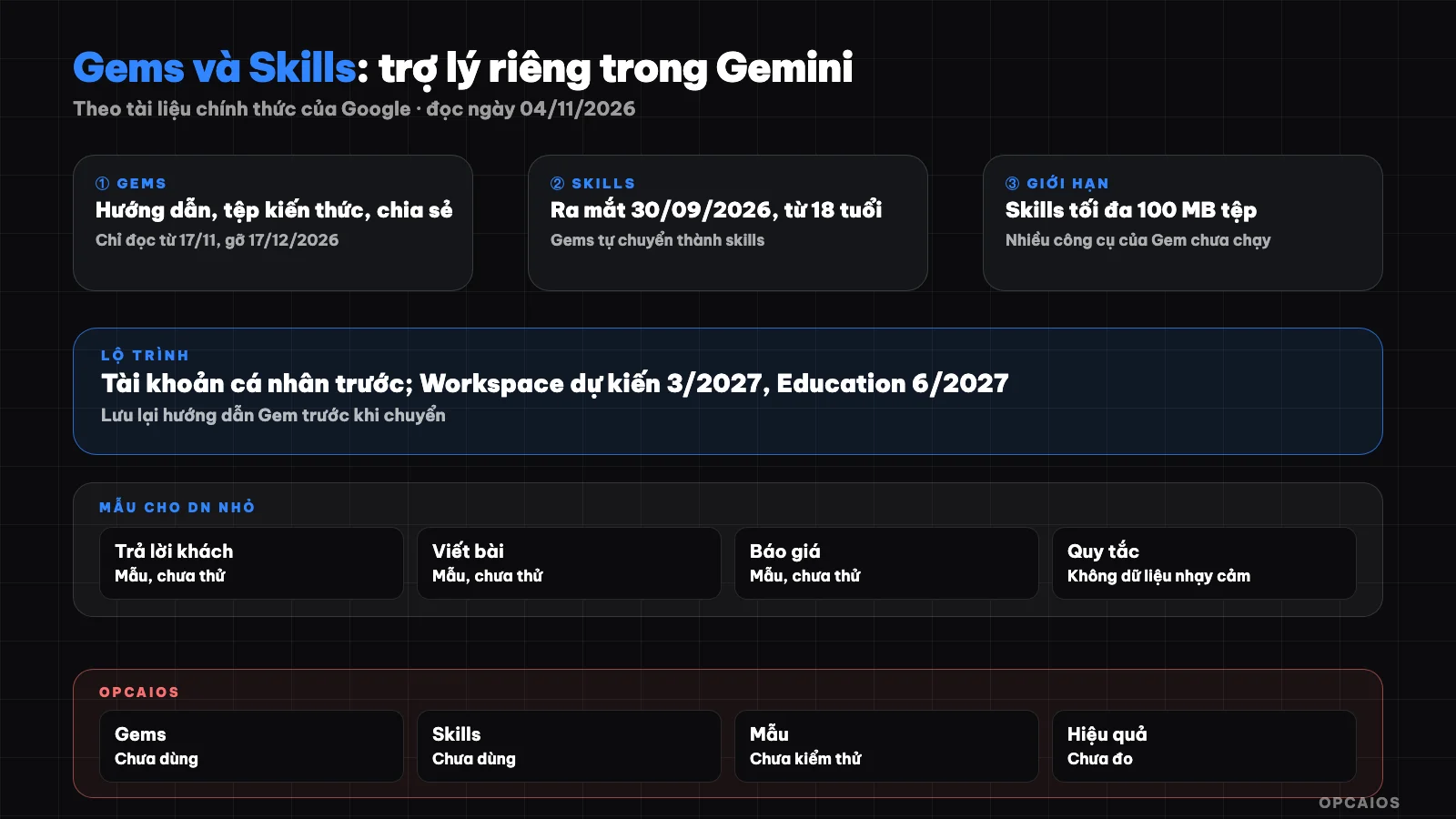
Gems in Gemini: name, instructions, knowledge, sharing and transition roadmap to skills. Diagram: OPCAIOS.
When can I still use Gems in Gemini?
Gems in Gemini still work, but with a personal Google account only for a few more weeks. According to the post "About the transition from Gems to skills" on the Gemini help page (read on 04/11/2026), the timeline is as follows:
- Personal accounts age 18+: from 17/11/2026 Gems become read-only, you can view but not use, edit, or create new ones; on 17/12/2026 Gems and their files are removed.
- Personal accounts under 18: transition later, Google has not announced the date.
- Business Workspace, Enterprise, non-profit organizations: planned for March 2027.
- Education Workspace: planned for June 2027.
Gems are automatically converted to skills, or you can recreate them manually. If you use a personal Gmail, back up the instructions and files of each Gem before 17/12/2026. General concepts are at What is Skill?.
How do Skills in Gemini differ from Gems?
Skills in Gemini are customized, reusable instructions to automate a task, invoked with a / slash right in the conversation, or let Gemini apply them automatically when appropriate. According to the post about the transition (read on 04/11/2026), there are four main differences:
- No need to switch tabs: skills work directly in any conversation, Gems must be opened separately.
- Can combine: multiple skills work together in one conversation.
- Missing tools: Canvas, Deep Research, video creation, music don't yet run with skills.
- Sharing not yet available: Google notes that the skill sharing feature will come "in the coming weeks."
The release notes from 30/09/2026 say skills launched globally for people age 18+, and Gemini can now auto-build a skill from your conversation.
Which Gemini plan has Gems?
Gems are in the free plan: the Google AI pricing page for Vietnam (read on 04/11/2026) lists "Gem" under the Free plan, and Plus, Pro, Ultra plans include all benefits from lower plans. Some premade Gems like Productivity Planner are only available in Google AI Pro, Ultra, and some Workspace plans. See more at Gemini free and paid.
How to create a Gem on desktop per the help page
Creating a Gem on desktop takes six steps, according to the post "Use Gems in Gemini Apps" (read on 04/11/2026):
- Open gemini.google.com, open the sidebar.
- Click Gems. If you haven't created a Gem yet, go to Settings and help then select Gems.
- Click New Gem.
- Enter the name and instructions section.
- Optional: add files under Knowledge.
- Click Save.
The "Use Gemini to re-write instructions" button helps rewrite instructions in more detail; read it again because it may add ideas you don't want. The preview pane on the right lets you try the Gem before saving. A Gem created on web appears in the Gemini app on your phone and in the Gemini section of Google Workspace; use, edit, delete it under My Gems.
How do I attach files and knowledge to Gem?
Gem's knowledge is files attached for Gem to draw on when answering, from your machine or Google Drive. According to the help page (read 04/11/2026), there are four things to know:
- Google Drive files update automatically: Gemini uses the latest version of your Drive file, so if you edit the original file, Gem sees it right away. To use Drive you must turn on Keep Activity and connect Google Workspace with Gemini.
- Add a NotebookLM: you can attach one notebook through the More uploads section, now called Gemini Notebook.
- Turn off citations: the "Disable knowledge citations" option turns off citations to your knowledge files.
- File limits: Gemini's file upload limit page says a maximum of 10 files per message, each non-video file up to 100 MB. The Gems help page does not state a maximum number of files for Knowledge alone, so the number for Gem is not yet verified.
When moving to skills, GitHub files, audio, video, old Office files, and compressed files cannot be transferred; skills are limited to 100 MB of files.
How do I share a Gem with other people?
Sharing a Gem works the same as sharing a Google Drive file. According to the post "Share a Gem from Gemini Apps" (read 04/11/2026), you click Share next to your Gem, enter an email, choose a role, or Copy link. There are two roles:
- Viewer: can use the Gem and see the instructions and uploaded files.
- Editor: can use, edit instructions and files, share further, and delete the Gem.
People you share with see all the instructions and files, so don't leave cost sheets, customer phone numbers, or contracts in a Gem you share outside. If a Gem has a notebook or files not from your machine or Drive, it cannot be shared; a Workspace admin can turn off Gem sharing. For data rules, see 5 rules to protect business data when using AI.
What limits do Gems have?
Gems in Gemini have four limits noted in the official documentation (read 04/11/2026):
- About to be replaced: personal accounts lose Gems on 17/12/2026; skills do not yet have all of Gem's tools.
- Cannot use with Gemini Live: Gems cannot yet be used in voice conversation mode.
- May be removed: a Gem that breaks the Terms of Service or Use Policy is banned.
- Answers can still be wrong: Google advises you to verify before using or posting.
How are Gems different from Custom GPT and Claude Projects?
Gems, Custom GPT, and Claude Projects all save instructions and materials for one task. The table only shows what we read on 04/11/2026:
| Criteria | Gems (Gemini) | Claude Projects | Custom GPT (ChatGPT) |
|---|---|---|---|
| Can create on free plan | Yes (Google AI plan page) | Yes, up to 5 projects | Not yet verified |
| Knowledge files | Machine, Google Drive auto-updating, notebook | Documents, text, code | Not yet verified |
| Sharing | Viewer/Editor, link, public | Team, Enterprise plans only | Not yet verified |
| Near future | Moving to skills | New project version in beta | Not yet verified |
According to Claude's help page "What are projects", paid plans get expanded RAG knowledge capacity up to 10 times. OpenAI's help page blocks our reading tool, and search results show GPT creation rights on personal accounts have changed, so the Custom GPT column is "not yet verified"; please read OpenAI's page directly.
3 sample Gem guides for small businesses
The three samples below are templates created by OPCAIOS that haven't been tested for effectiveness on actual Gems. They are written in four sections: role, task, context, format, so they can be pasted into Gems or skills. Replace the parts in square brackets with your own information.
Sample 1: assistant for replying to customer messages
Role: customer care staff at [store name], selling [product category].
Task: draft a reply to the customer message I paste in; I will read and send it myself.
Context: only use the "Chinh-sach-doi-tra" and "Bang-gia" files. If the file doesn't have an answer, write "Needs owner confirmation", don't guess.
Format: polite, maximum 5 sentences, end with a note of which file the information came from.
Don't: promise discounts or delivery times if the file doesn't mention them.
Sample 2: assistant for writing social media posts in brand voice
Role: content writer for [brand], audience is [audience description].
Task: from the idea I give, write 3 versions of a Facebook post 80 to 150 words each.
Context: follow the "Giong-thuong-hieu" file (words to use, words to avoid).
Don't: make up data, give reviews, imitate customer voices; if data is needed, put [DATA].
Sample 3: assistant for drafting quotes and follow-up emails
Role: business assistant at [service company].
Task: from call notes, draft a summary of needs and a quote based on the "Goi-dich-vu" file, follow-up email to send after 2 days.
Context: only use packages and prices in the file; if it doesn't match, write "Needs custom quote".
Format: table with items, description, unit price; mark assumptions with [ASSUMPTION].
Example assumption: a bakery uses sample 1 with policy files on Drive; when policy changes, just edit the Drive file. Sample 3 suits productized service.
OPCAIOS experience
OPCAIOS hasn't used Gems yet, so this post has no notes on effectiveness. Related to Gemini, our system uses Google Antigravity (running Gemini model) as a coordination agent in parallel with Claude Code and Codex, and the opcaios.org admin panel has Google Gemini provider options for AI writing features. For programming agents, we store guides in separate text files instead of only in one platform's interface; this method works for Gems because when Gems switch to skills you just paste again. We haven't used skills from the Gemini app yet.
Frequently Asked Questions
Will I lose my Gems when Gemini switches to skills?
With a personal Google account, Google automatically converts Gems to skills, according to the help page read on 11/04/2026. From 11/17/2026 old Gems can only be viewed, and on 12/17/2026 Gems and their files are deleted. Audio files, videos, compressed files, old Office formats don't transfer, and files over 100 MB are dropped first. Copy the instructions and download files before the deletion date.
Will my company Google Workspace account be affected right away?
Not yet. According to the post about converting Gems to skills, Workspace Business, Enterprise and nonprofit organizations are scheduled to convert in March 2027, Workspace Education in June 2027. Google also notes that skills are not yet available for work and school accounts and will open later. During this time, Gems on Workspace still appear in the Gemini panel alongside other Workspace apps. The schedule may change, so administrators should monitor the help page.
Do I need to pay to create a Gem?
No. The Google AI plans page for Vietnam read on 11/04/2026 lists Gems in the Free plan. Paid plans mainly increase usage limits and unlock some pre-built Gems or accompanying features. With a personal account, creating new Gems is only possible until 11/17/2026; after that you should convert your instructions to a skill.
Can people I share a Gem with see my documents?
Yes. According to the Gem sharing page, both Viewers and Editors can see the instructions and uploaded files; Editors can also edit, re-share and delete the Gem. When sharing a Gem with files, Gemini asks if you want to share the files too. Don't put customer data, pricing lists or contracts in a Gem you're sharing outside the company.
Should I write short or long Gem instructions?
Instructions should have four parts: role, task, context, format, along with things not to do. Length matters less than clarity: note which files are sources, what to do when information is missing, what the output should look like. Test with 5 to 10 real requests in the preview frame then revise gradually. To learn how to write instructions and build AI workflows for small businesses, see OPCAIOS's AI application training course.
Source: Gemini help support.google.com/gemini: Use Gems in Gemini Apps, Share a Gem from Gemini Apps, About the transition from Gems to skills, file upload limits, usage limits; release notes gemini.google/release-notes; plans page gemini.google/subscriptions (Vietnam version); Claude help "What are projects"; Google blog on Gemini Notebook (read 11/04/2026). Unverified: maximum number of files for Gem Knowledge, create permissions and current Custom GPT limits (OpenAI page not accessible), effectiveness of 3 instruction templates. Experience is from OPCAIOS.
Translated from Vietnamese with AI. Read the original.
Want to apply this in your business?
Book a free 30-minute call (Vietnam time, in English or Vietnamese).