



Hooks trong Claude Code là các lệnh do bạn tự định nghĩa, được Claude Code tự chạy ở những thời điểm cố định trong một phiên làm việc: trước khi gọi công cụ, sau khi sửa file, khi cần bạn chú ý, khi trả lời xong. Theo trang "Automate actions with hooks" trong tài liệu Claude Code tại code.claude.com (đọc ngày 03/11/2026), hook cho tôi quyền kiểm soát có tính xác định: việc chắc chắn xảy ra, không phụ thuộc mô hình AI có "nhớ" làm hay không. Bài này không hứa hook biến Claude Code thành an toàn tuyệt đối: một hook viết sai có thể bỏ lọt lệnh nguy hiểm, và bản thân hook chạy lệnh với toàn quyền tài khoản của tôi. Bài đi qua các sự kiện chính, cách một hook chặn lệnh bằng mã thoát hoặc JSON, ba ví dụ lấy từ tài liệu (chặn lệnh nguy hiểm, định dạng sau khi sửa, thông báo), rủi ro bảo mật, khác biệt với quyền (permissions) và CLAUDE.md, và nói thẳng OPCAIOS mới dùng hook đến đâu.
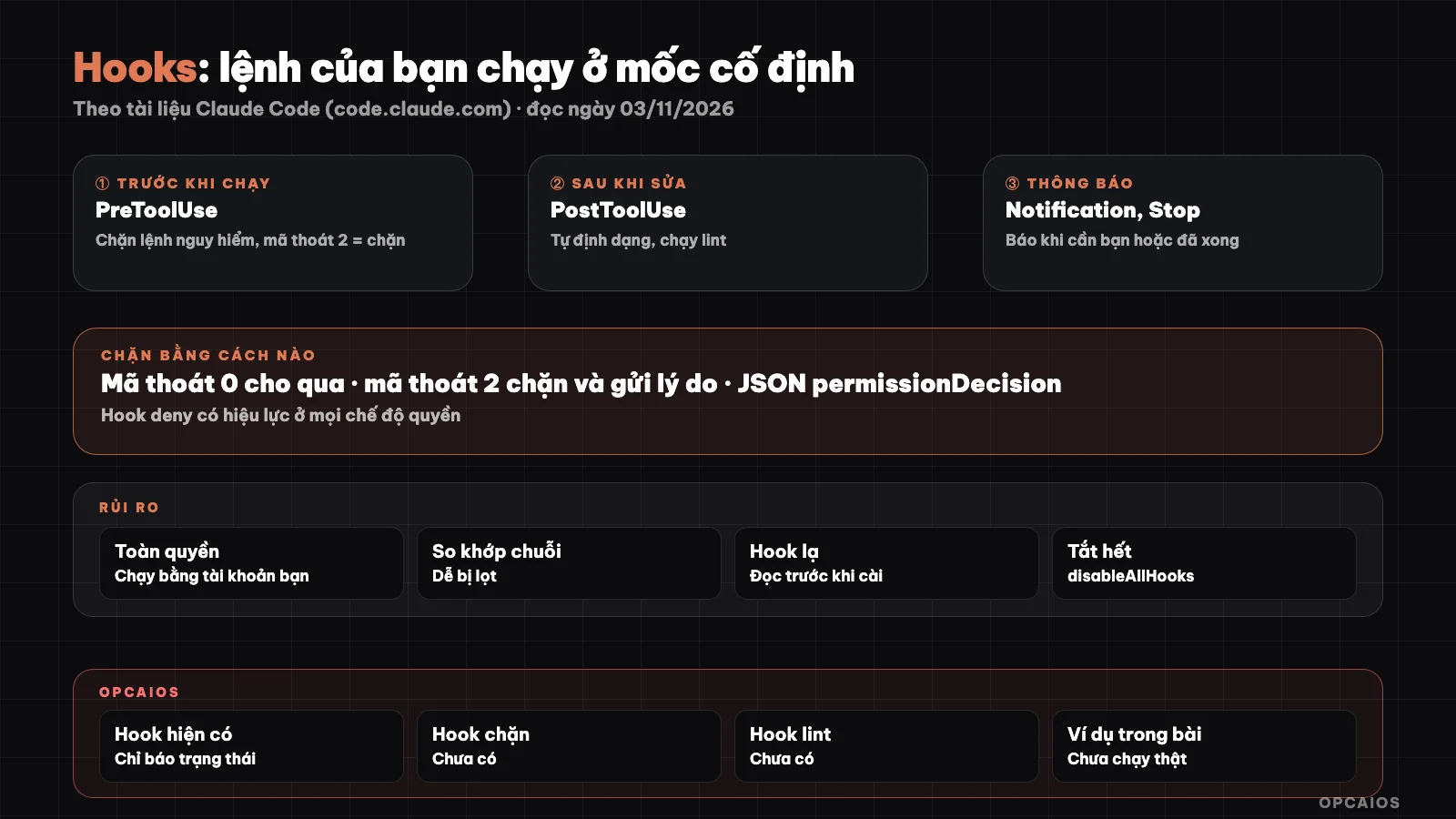
Hook chen vào vòng làm việc của Claude Code: trước công cụ, sau công cụ, khi cần người. Sơ đồ: OPCAIOS.
Hook trong Claude Code là gì và khác gì lời dặn trong CLAUDE.md?
Hook trong Claude Code là một quy tắc được phần mềm thực thi, còn lời dặn trong CLAUDE.md là ngữ cảnh mà mô hình có thể làm theo hoặc bỏ sót. Trang memory của tài liệu Claude Code (đọc ngày 03/11/2026) nói rõ: muốn chặn một hành động bất kể Claude quyết định gì, hãy dùng hook PreToolUse thay vì viết vào CLAUDE.md. Hook được khai báo trong khối hooks của file cài đặt, gồm ba lớp: tên sự kiện (khi nào chạy), matcher (lọc theo tên công cụ, ví dụ chỉ Edit|Write), và danh sách lệnh cần chạy. Kiểu phổ biến nhất là "type": "command", chạy một lệnh shell. Tài liệu còn liệt kê các kiểu khác: gửi dữ liệu tới một URL (http), gọi công cụ của một máy chủ MCP (mcp_tool), nhờ mô hình đánh giá một lượt (prompt), và kiểu agent đang ở dạng thử nghiệm. Người làm một mình nên bắt đầu với kiểu command vì dễ đọc, dễ thử và dễ gỡ. Nếu chưa có file hướng dẫn, đọc trước bài CLAUDE.md là gì.
Những sự kiện hook chính nào cần biết?
Claude Code có hơn ba mươi sự kiện hook, nhưng người mới chỉ cần nắm khoảng tám sự kiện. Bảng dưới tóm tắt từ mục "How hooks work" trong tài liệu (đọc ngày 03/11/2026):
| Sự kiện | Khi nào chạy | Dùng để |
|---|---|---|
SessionStart |
Phiên bắt đầu hoặc tiếp tục | Nạp thêm ngữ cảnh, kiểm tra môi trường |
UserPromptSubmit |
Tôi gửi lời nhắc, trước khi Claude xử lý | Thêm ngữ cảnh, chặn lời nhắc |
PreToolUse |
Trước khi một công cụ chạy, có thể chặn | Chặn lệnh nguy hiểm, bảo vệ file |
PermissionRequest |
Khi một lệnh cần quyết định về quyền | Tự duyệt hoặc từ chối có điều kiện |
PostToolUse |
Sau khi công cụ chạy thành công | Định dạng, lint, ghi nhật ký |
Notification |
Claude Code gửi thông báo (chờ tôi nhập hoặc duyệt) | Báo ra màn hình, điện thoại |
Stop |
Claude trả lời xong một lượt | Báo xong, kiểm tra cuối |
SessionEnd |
Phiên kết thúc | Dọn dẹp |
Tài liệu lưu ý Stop chạy mỗi khi Claude trả lời xong, không chỉ khi hoàn thành cả nhiệm vụ, và PostToolUse không thể hoàn tác vì công cụ đã chạy rồi. Gõ /hooks trong phiên để xem mọi hook đang được cấu hình.
How to Block a Command with a Hook?
A hook blocks a command by exiting with code 2 or by outputting a JSON object to stdout. According to the documentation (read on 03/11/2026), when an event occurs, Claude Code sends JSON data to the script's stdin containing tool_name and tool_input; with the Bash tool, the tool_input.command field contains the shell command about to run. The script decides in three ways:
- Exit code 0: no objection. With PreToolUse, the command still proceeds into the normal permission flow; code 0 does not mean it has been approved.
- Exit code 2: block. Content written to stderr is passed to Claude as a response so Claude can try a different approach. Some events like SessionStart cannot be blocked.
- Other codes: usually non-blocking errors, the action still proceeds. This is a common trap: if a script has a syntax error and exits with code 1, the dangerous command still runs.
For finer control, exit with code 0 and print JSON with permissionDecision as deny, ask, or allow. The documentation recommends choosing one of the two approaches for each hook, not mixing them. When multiple hooks match, the strictest result wins, in the order deny, defer, ask, allow.
Example 1: block a dangerous delete command before it runs
This example follows the "Hook output" sample script in the documentation (the original blocks drop table commands), changing the condition to rm -rf. Save the file as .claude/hooks/block-rm-rf.sh, run chmod +x on it:
#!/bin/bash
INPUT=$(cat)
COMMAND=$(echo "$INPUT" | jq -r '.tool_input.command')

if echo "$COMMAND" | grep -q "rm -rf"; then
  echo "Blocked: rm -rf is not allowed" >&2
  exit 2
fi

exit 0
Register it in your project's .claude/settings.json:
{
  "hooks": {
    "PreToolUse": [
      {
        "matcher": "Bash",
        "hooks": [
          {
            "type": "command",
            "command": "\"$CLAUDE_PROJECT_DIR\"/.claude/hooks/block-rm-rf.sh"
          }
        ]
      }
    ]
  }
}
Limitations to know: string matching is easily bypassed, for example rm -r -f or rm -fr do not contain the exact string rm -rf. A hook like this is an extra safety net, not a replacement for permission rules. The script needs the jq tool to read JSON. The documentation includes more examples blocking edits to .env, package-lock.json, and .git/ directories the same way.
Example 2: auto-format code after each file edit
Formatting after editing is the simplest PostToolUse example: each time Claude uses the Edit or Write tool, the hook gets the file path and runs Prettier. The configuration is taken directly from the documentation (read on 03/11/2026), placed in .claude/settings.json:
{
  "hooks": {
    "PostToolUse": [
      {
        "matcher": "Edit|Write",
        "hooks": [
          {
            "type": "command",
            "command": "jq -r '.tool_input.file_path' | xargs npx prettier --write"
          }
        ]
      }
    ]
  }
}
To run linting instead of formatting, change the command after the pipe. When it runs successfully, the hook prints nothing to the conversation; verify by opening the file just edited. Note this hook only catches changes through Edit and Write; the documentation suggests the FileChanged event if the file is also modified by Bash commands.
Example 3: notify when Claude needs you or is done
Notifications are the safest hooks to practice with. On macOS, the documentation (read on 03/11/2026) provides this configuration for ~/.claude/settings.json:
{
  "hooks": {
    "Notification": [
      {
        "matcher": "",
        "hooks": [
          {
            "type": "command",
            "command": "osascript -e 'display notification \"Claude Code needs your attention\" with title \"Claude Code\"'"
          }
        ]
      }
    ]
  }
}
Linux uses notify-send, Windows has its own PowerShell command in the documentation. To notify when Claude finishes replying, attach a similar command to the Stop event. If the settings file already has a hooks key, add the new event alongside the existing ones, don't replace the whole block.
What security risks does a hook have?
The biggest risk of a hook is that it runs shell commands with full permissions of the user account. The "Security considerations" section in the hooks documentation (read on 03/11/2026) warns that a hook can modify, delete, or read any file your account has access to, so you must read and test every command before adding it. Three practical points:
- Hooks are placed in
.claude/settings.jsonin the repo and go with git, so cloning someone else's repo means you get their hooks too. In interactive sessions, Claude Code keeps the hooks until you accept the trust directory dialog. But in non-interactive modeclaude -por SDK, the directory is considered trusted and hooks in the repo run immediately. Before running-pon an unfamiliar repo, read the.claude/directory or disable hooks with--settings '{"disableAllHooks": true}'. - Hook input is generated by the model and may contain strange characters. The documentation recommends validating input, always wrapping shell variables in quotes, blocking
..in paths, using absolute paths, and avoiding.envand keys. httptype hooks send event data outside; only point to addresses you control.
See also the post security when using AI to write code.
How are hooks different from permissions and CLAUDE.md?
These three mechanisms complement each other, differing in enforcement level and flexibility:
| CLAUDE.md | Permissions rules | Hooks | |
|---|---|---|---|
| Nature | Guidance in context | Allow, ask, deny list executed by Claude Code | Scripts you write, Claude Code runs |
| Is it certain | No, the model may miss it | Yes | Yes, if the script is correct |
| Flexibility | High, written in plain language | Low, follows patterns like Bash(git push *) |
High, can check any condition |
| Works with | Conventions, habits | Outright ban on a command type | Context-aware checks, automation |
According to the permissions page (read on 03/11/2026), rules are checked in order of deny, ask, allow, and a hook exiting with code 2 blocks the command before the permission rules are checked. The hooks page adds that a hook returning deny still works even in permission bypass mode, but a hook returning allow cannot override a deny rule in settings. The documentation also says the hook's if filter is best effort, so for absolute bans use permission rules. A sensible combination: hard deny in permissions, hooks for soft checks and automation, CLAUDE.md for conventions. The permissions mode is discussed in detail in the post plan mode and permissions mode in Claude Code.
OPCAIOS experience
Let me be straight: OPCAIOS has hook configuration in Claude Code, but currently ONLY use it to report session status to a terminal management tool (session started, ended, waiting for permission). Checking on 03/11/2026, we DO NOT have any hooks that block dangerous commands, do not have hooks that auto-run lint or formatting after file changes.
So what is safety based on right now:
- Regular sessions run in automatic mode with Claude Code's safety classifier; there have been times when commands were blocked and I had to rewrite them.
- Hard-to-undo actions (delete, send messages, publish) still require manual approval.
- Rules like "only commit your own files" and "test sync before deploying" are in guidance files and memory, that is, guidance, not enforcement.
The lesson: rules that are only in notes are the first candidates to become hooks or deny rules. We haven't done it yet, so we don't have real experience with blocking hooks to share.
Frequently Asked Questions
Where do I put hooks in Claude Code?
Hooks in Claude Code are declared in the hooks block of the JSON settings file. According to the documentation (read on 03/11/2026), ~/.claude/settings.json applies to all projects on your machine, .claude/settings.json applies to one project and can be committed to git, and .claude/settings.local.json applies to one project but only on your machine. Hooks can also come from your organization's management settings, from plugins, or declared in the frontmatter of skills and subagents. Type /hooks to see all hooks currently running, grouped by event.
Can hooks block every dangerous command?
Hooks cannot block every dangerous command, because hooks only block exactly what your script recognizes. Simple string matching scripts can be bypassed by writing commands differently, and if a script exits with code 1, the action still happens. So use deny rules in permissions for absolutely forbidden commands, use hooks as an extra check layer, and still review changes before pushing to production.
Can I write hooks if I don't know how to code?
People who don't know how to code can still get started with hooks in Claude Code. The documentation says you can describe the hook you want and ask Claude to write it for you. Safe way for beginners: start with notification hooks since they're harmless, read every line of code Claude suggests carefully, try it on a test project first, and only add blocking hooks after you understand exit codes 0 and 2. Don't copy hooks from unknown sources without reading them, because hooks run with full permissions of your account.
Do hooks slow down Claude Code?
Possibly, because each hook is an extra process running. According to the documentation, command-type hooks have a default timeout of 10 minutes, except for some events like UserPromptSubmit which are shorter, and you can adjust this with the timeout field. Format hooks that run after each file edit add time to each edit. Use matcher and the if field to make hooks run only when needed, for example only with the git command.
How do I turn off all hooks if something goes wrong?
Set "disableAllHooks": true in your settings file. The documentation notes that the final value depends on the priority order between settings files, and hooks from your organization's management settings still run unless turned off there. For a one-time run with claude -p on an unfamiliar repo, you can pass --settings '{"disableAllHooks": true}'. If you want someone to guide you through setting up hooks, permissions, and CLAUDE.md for your actual project, check out OPCAIOS's AI application training course.
Source: Anthropic's Claude Code documentation, pages "Automate actions with hooks" (code.claude.com/docs/en/hooks-guide), "Hooks reference" (code.claude.com/docs/en/hooks), permissions and memory, read on 03/11/2026; event names, timeouts, and behavior may change by version; the example of blocking rm -rf is adapted from the documentation's pattern, OPCAIOS only test-ran the script with sample JSON data (exit 2 when there's rm -rf, 0 when there isn't), haven't used it as a real hook yet. The experience is OPCAIOS's.
Translated from Vietnamese with AI. Read the original.
Want to apply this in your business?
Book a free 30-minute call (Vietnam time, in English or Vietnamese).