


MCP (Model Context Protocol) là gì?
MCP (Model Context Protocol) là một chuẩn mở giúp các ứng dụng AI như Claude, ChatGPT hay Cursor kết nối với dữ liệu và công cụ bên ngoài — file trên máy, Google Drive, CRM, website, cơ sở dữ liệu — theo một cách chung. Thay vì mỗi ứng dụng AI phải viết tích hợp riêng cho từng phần mềm, phần mềm chỉ cần làm một "MCP server" là mọi ứng dụng AI hỗ trợ MCP đều dùng được. Bài này giải thích MCP bằng ngôn ngữ đời thường, cách nó hoạt động, cách bắt đầu dùng, và những rủi ro cần biết trước khi cắm AI vào dữ liệu của doanh nghiệp.
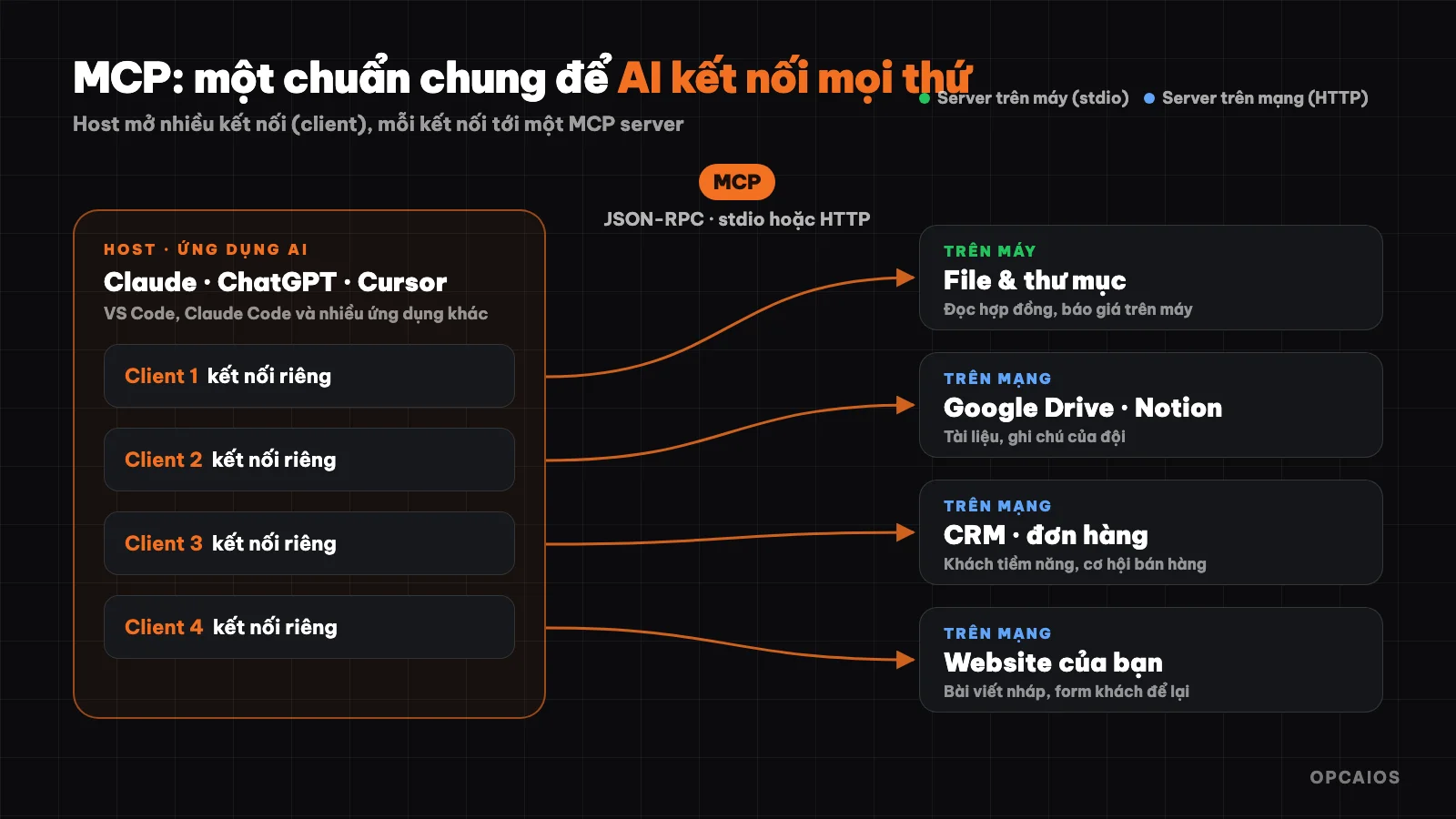
Một ứng dụng AI (host) mở nhiều kết nối MCP, mỗi kết nối tới một MCP server. Sơ đồ: OPCAIOS.
MCP là gì?
Tài liệu chính thức ví MCP như cổng USB-C cho ứng dụng AI: USB-C là một chuẩn cắm chung cho đủ loại thiết bị, MCP là một chuẩn chung để ứng dụng AI kết nối với hệ thống bên ngoài.
Trước khi có MCP, muốn trợ lý AI đọc được dữ liệu bán hàng của bạn, ai đó phải viết tích hợp riêng giữa đúng ứng dụng AI đó và đúng phần mềm bán hàng đó. Đổi sang ứng dụng AI khác là phải làm lại. Với MCP, phần mềm bán hàng chỉ cần một MCP server, và Claude, ChatGPT, VS Code, Cursor cùng nhiều ứng dụng khác đều kết nối được.
MCP do Anthropic công bố cuối năm 2024 dưới dạng mã nguồn mở, và đến nay được hỗ trợ rộng rãi: trợ lý AI như Claude và ChatGPT, công cụ lập trình như Visual Studio Code và Cursor, cùng nhiều ứng dụng khác. Phiên bản đặc tả hiện hành là 2026-07-28 (MCP đặt tên phiên bản theo ngày có thay đổi không tương thích ngược).
MCP giúp AI làm được gì?
Theo tài liệu chính thức, một vài ví dụ:
- Trợ lý AI đọc lịch Google Calendar và ghi chú Notion của bạn để làm việc sát với bạn hơn.
- Claude Code dựng cả một web app từ bản thiết kế Figma.
- Chatbot nội bộ kết nối nhiều cơ sở dữ liệu trong công ty, để nhân viên hỏi số liệu bằng lời thường.
Với một doanh nghiệp nhỏ ở Việt Nam, ví dụ gần hơn:
- Hỏi "tuần này có bao nhiêu khách để lại form trên website?" và AI tự đọc từ hệ thống của bạn thay vì bạn mở từng trang.
- Nhờ AI viết bài blog nháp rồi tự đưa thẳng vào trang quản trị website, chờ bạn duyệt.
- Cho AI đọc thư mục hợp đồng trên máy để tóm tắt điều khoản, mà không phải tải từng file lên khung chat.
MCP hoạt động như thế nào?
MCP có ba vai:
| Vai | Là gì | Ví dụ |
|---|---|---|
| Host | Ứng dụng AI bạn đang dùng | Claude Desktop, Claude Code, ChatGPT, VS Code, Cursor |
| Client | Một kết nối bên trong host, mỗi client nối tới một server | Host tự tạo, bạn không phải làm gì |
| Server | Chương trình cung cấp dữ liệu và công cụ cho AI | Server đọc file, server Google Drive, server CRM, server của website |
Một host có thể kết nối nhiều server cùng lúc. Ví dụ Claude Code vừa nối server GitHub, vừa nối server cơ sở dữ liệu, vừa nối server của website — mỗi kết nối là một client riêng.
Ba thứ một MCP server cung cấp
- Tools (công cụ): hành động AI có thể gọi — tạo khách hàng tiềm năng, gửi email, truy vấn cơ sở dữ liệu, tạo bài viết nháp.
- Resources (tài nguyên): dữ liệu để AI đọc làm ngữ cảnh — nội dung file, bản ghi trong cơ sở dữ liệu, kết quả từ API.
- Prompts (mẫu câu lệnh): những mẫu yêu cầu soạn sẵn, giúp người dùng gọi đúng quy trình mà không phải tự viết lại.
Trong thực tế, tools là phần được dùng nhiều nhất: AI đọc danh sách công cụ server khai báo (tên, mô tả, tham số), tự quyết định gọi công cụ nào, rồi dùng kết quả để trả lời bạn.
Server chạy ở đâu: trên máy hay trên mạng
- Server cục bộ (stdio): chạy ngay trên máy bạn, host khởi động nó như một chương trình con. Phù hợp để đọc file trên máy, điều khiển ứng dụng trên máy.
- Server từ xa (Streamable HTTP): chạy trên Internet, host kết nối qua HTTP, thường đăng nhập bằng OAuth hoặc khoá API. Phù hợp với dịch vụ online như Sentry, Notion, hay website của chính bạn.
Bên dưới, mọi thông điệp đều theo định dạng JSON-RPC 2.0. Bạn không cần biết chi tiết này nếu chỉ dùng — các bộ SDK chính thức đã lo phần đó cho người viết server.
How to start using MCP?
In chat applications (Claude, ChatGPT)
Large AI assistants call MCP servers from a distance via what they call "connectors". You go to the connector settings section, choose an available service or paste the MCP server address, log in, then turn it on in the conversation. No need to install anything on your machine.
In Claude Code (command line)
Claude Code adds a server with the claude mcp add command:
# Remote server via HTTP
claude mcp add --transport http sentry https://mcp.sentry.dev/mcp

# Local server running via npx, passing key through environment variable
claude mcp add my-server -e API_KEY=xxx -- npx my-mcp-server

# View added servers
claude mcp list
By default a server is only used in the current project; add --scope user to use it across all projects, or --scope project to share the configuration with your team via the .mcp.json file.
Check a server before using it
MCP Inspector is the official tool to open a server, see what tools and resources it declares, and test-call each tool. You should test-run with Inspector before plugging an unfamiliar server into an AI application that holds real data.
Real example: opcaios.org's MCP
This website itself has its own MCP server for AI assistants to work with content and customers. The server declares tools such as:
- Content:
list_posts,get_post,check_post_seo,create_post,update_post,get_brand_voice(brand voice). - Customers and sales:
list_submissions(forms customers leave),list_contacts,create_lead,list_deals. - Link shortening:
create_link,get_link_analytics.
The important thing is how permissions are set. Each connection is issued a key with its own rights — read-only or read and write — so an assistant meant only for lookup cannot accidentally edit data; read-only tools are also marked so the AI application knows they change nothing. Beyond that, the management panel has a Review mode: when turned on, all posts AI creates via MCP are only saved as drafts and queued up, going live on the website when the reviewer clicks approval.
Risks to know before using MCP
MCP gives AI permission to touch real data and systems, so you need to be careful like when giving permissions to a new employee. MCP's official security documentation emphasizes a few points:
- Check the source before installing. Local servers run with your permissions on the machine: they can read files, run commands. Only install servers from developers you trust, check the source code or user reviews first.
- Treat tool descriptions as untrusted data. A rogue server can hide instructions in tool descriptions to control AI. Content that AI reads about (email, websites, documents) can also contain embedded commands — called prompt injection.
- Grant minimum permissions. Start with read-only access. Limit which folders the server can access. Each server gets its own API key, don't share admin accounts.
- Keep a review step for non-undoable things. Sending email, deleting data, transferring money, posting publicly — let AI draft them, you press the button.
- Run in isolation when possible. Unfamiliar servers should run in a container or virtual machine, with restricted outbound network access.
Where to start?
- Pick a recurring task each week that needs data from one system — for example, summarizing forms customers leave, or looking up orders.
- Find a ready-made MCP server for that system (many big services already have official servers; see the MCP Registry or list of MCP Servers).
- Connect with read-only access, try it for a week.
- Only open write access once you trust the results, and always include a review step.
If you want to write your own MCP server, Hugging Face's free course is a great starting point — see the post MCP Course Hugging Face: guide from A–Z. Summary information about the protocol is on the Model Context Protocol page in the Utilities library.
Frequently Asked Questions
Is MCP free?
Yes. MCP is an open standard; the specification and official SDKs are all open source. Any costs (if any) come from the AI application you use or the service behind the MCP server.
Is MCP only for Claude?
No. MCP was initiated by Anthropic but is an open standard; ChatGPT, Visual Studio Code, Cursor, and many other applications support it.
How is MCP different from an API?
APIs are proprietary doors for each software, each with its own style. MCP is a standardization layer on top: MCP servers typically call the APIs of the software underneath, but present the results in a common format that every MCP-supporting AI application understands, with descriptions so the AI knows when to use which tool.
Can I use MCP without knowing how to code?
Yes, if you use a connector already in Claude or ChatGPT — just turn it on and log in. Writing your own MCP server or installing a local server requires some command-line knowledge.
Is it safe to use MCP?
Safe to the extent you grant permissions carefully. Only install servers from trusted sources, start with read-only permissions, and keep a review step for any irreversible actions.
Source: official Model Context Protocol documentation (specification 2026-07-28: introduction, architecture, local server security), command claude mcp add --help. Updated 22/10/2026.
Translated from Vietnamese with AI. Read the original.
Want to apply this in your business?
Book a free 30-minute call (Vietnam time, in English or Vietnamese).