



What is prompt caching?
Prompt caching is a feature that allows the API to reuse the beginning (prefix) of a prompt that was processed in previous requests, thereby reducing latency and input costs for long or repeated prompts. According to Anthropic documentation (read on 25/10/2026), one cache read costs 0.1 times the base input price for most models, while one 5-minute cache write costs 1.25 times. This article explains what prompt caching is, how to hit cache, pricing, what invalidates cache, and OPCAIOS's experience.
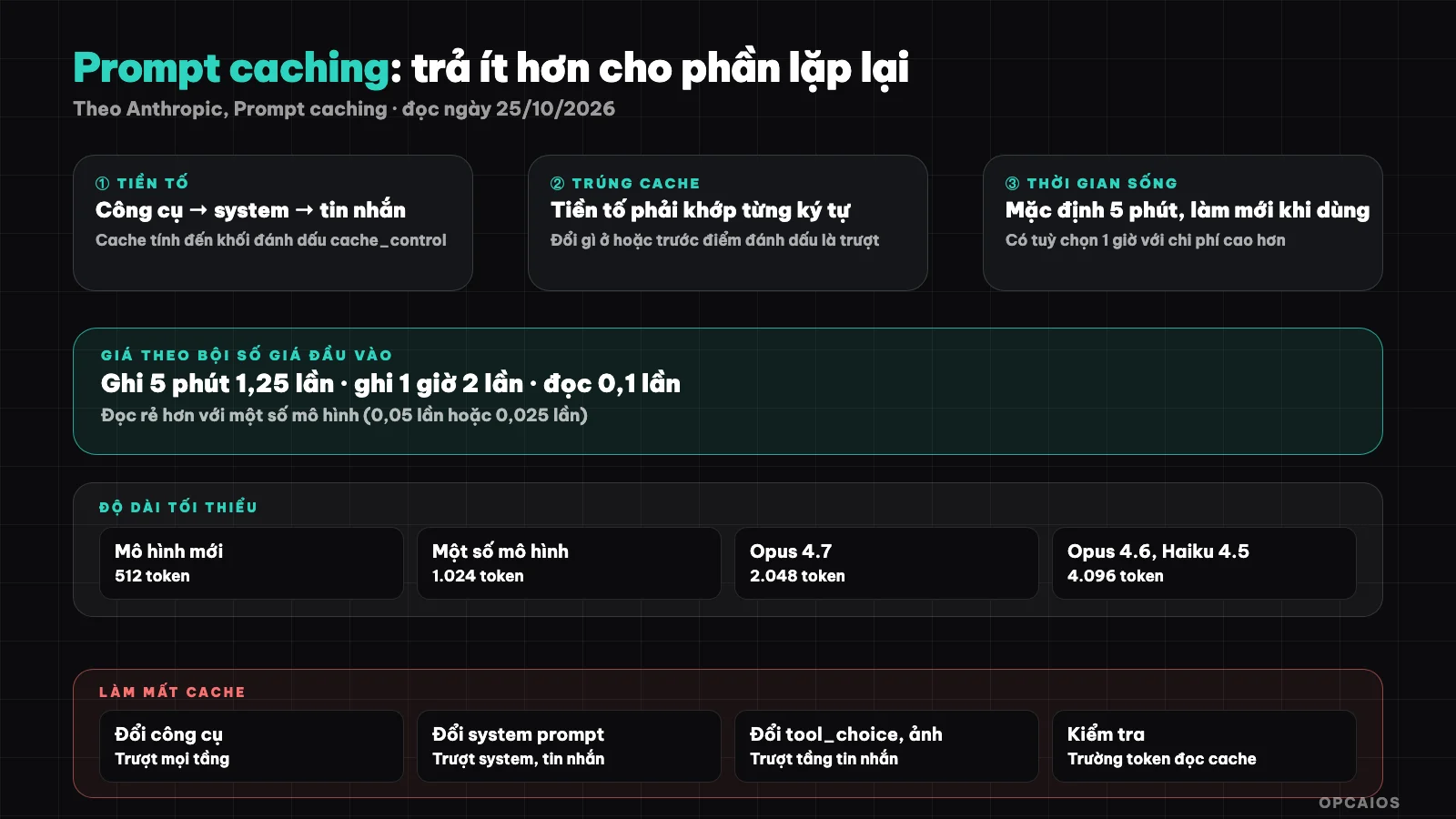
Cache only hits when the prefix matches character for character. Diagram: OPCAIOS.
What is prompt caching and how does it work?
When you mark a point in your prompt, the system saves the processed portion from the beginning to that point; subsequent requests with the same prefix reuse it instead of reprocessing. It reduces cost and latency, while output generation remains the same.
According to the documentation, the order saved is tools, then system prompt, then messages, up to the block marked with cache_control. You can enable it with a top-level field (automatic cache) or set up to 4 explicit breakpoints. Understanding how the model counts text at tokens and context window will help you calculate savings.
When does cache hit?
Cache only hits when the prefix matches exactly; any change at or before the marked point causes it to miss. So put the stable part (instructions, fixed documentation, tool definitions) at the beginning and the changing part (new questions) at the end.
- Default lifetime is 5 minutes, and each use resets the clock without extra cost. There's an option for 1 hour with higher cost.
- The clock runs from when the write or read request starts; a response with a 4-minute stream leaves about 1 minute for reuse.
- There's a minimum length to save: 512 tokens with newer models like Opus 5.5 and Sonnet 5.5, 1,024 or more with some other models (up to 4,096). Shorter prompts still run but don't cache and don't report an error.
Prompt caching pricing
According to documentation read on 25/10/2026, pricing is calculated as a multiple of base input price: 5-minute cache write is 1.25 times, 1-hour cache write is 2 times, cache read is 0.1 times for most models (some models have lower rates: 0.05 times or 0.025 times).
| Item | Multiple of base input price |
|---|---|
| 5-minute cache write | 1.25 times |
| 1-hour cache write | 2 times |
| Cache read | 0.1 times (most models); 0.05 times for Opus 5.5 and Sonnet 5.5 |
Example from documentation: a model with base input price of 3 USD per million tokens would have 5-minute write at 3.75 USD, 1-hour write at 6 USD, read at 0.30 USD. Prices in USD, not including tax and subject to change; check the current pricing page.
Calculating profit and loss: cache write is slightly more expensive than normal processing, so it only pays off when the same prefix is read back enough times within its lifetime.
What invalidates cache?
Changing tool definitions invalidates all layers; changing system prompt invalidates the system and message layers; changing some parameters like tool_choice, adding or removing images, configuring thinking invalidates the message layer. Cache is also isolated by organization and by workspace on some platforms.
Practical consequence: don't insert the current time or random code at the beginning of your prompt because it makes the prefix different each time. Check using fields that report token count in the response: if both cache_creation_input_tokens and cache_read_input_tokens are zero, cache isn't working.
When should you use prompt caching?
Use it when you call many times with the same large stable block: a chat system with a long system prompt, question-answering on the same document, multi-step agent reusing tools and instructions. Not worth it for one-off requests or short prompts below the threshold.
| Situation | Suggestion |
|---|---|
| Many questions on one long document | Cache the document |
| Multi-step agent, stable tools | Cache tools and instructions |
| One-off request, short prompt | Not needed |
| Prompt beginning changes constantly | Rearrange so fixed part is at the beginning |
Related: context engineering and choosing an AI model.
OPCAIOS's Experience
We use AI tools through applications and a model routing gateway, so most caching is handled by the tool; we haven't measured our own cache hit rate or savings yet.
Since we haven't measured it, this post only relays the provider's documentation, not our own numbers. The advice drawn from how caching works: keep the prompt head stable and don't modify the tool between sessions. This also explains why modifying a tool or system prompt mid-session increases costs.
Frequently Asked Questions
Does prompt caching change the quality of answers?
According to the documentation, it only reuses the input processing part; output generation is not affected.
How long does cache last?
Default is 5 minutes and refreshes each time it's used; there's an option for 1 hour with higher costs.
Can any prompt be cached?
No. It must meet minimum length (512 to 4,096 tokens depending on the model) and the prefix must match exactly.
How do I know if caching is working?
Check the token fields in the response: if the number of cache-read tokens is greater than 0, it's a hit.
Can this be applied with other providers?
The mechanism and pricing differ by provider; this post is based only on Anthropic's documentation. Need support optimizing AI costs, see AI application training service.
Source: Anthropic, "Prompt caching" documentation (platform.claude.com), read 25/10/2026; I only read the beginning of the page (around 100,000 characters), haven't read the rest. USD prices don't include tax and may change. Experience is OPCAIOS's, unmeasured.
Translated from Vietnamese with AI. Read the original.
Want to apply this in your business?
Book a free 30-minute call (Vietnam time, in English or Vietnamese).