


What is a Telegram bot?
A Telegram bot is a small application that runs directly within Telegram: users interact with the bot through messages, commands, buttons or Mini Apps, while programmers control the bot using an API over HTTPS. According to Telegram's official page (checked on 23/10/2026), the bot platform has over 10 million bots and is free for both users and developers. This post explains what bots can do, how to create your first bot using BotFather, two ways to receive updates (getUpdates and webhook), message sending limits you need to know, privacy in groups, how to keep your token safe, and real experience from OPCAIOS using Telegram bots to receive business alerts and control CRM with commands.
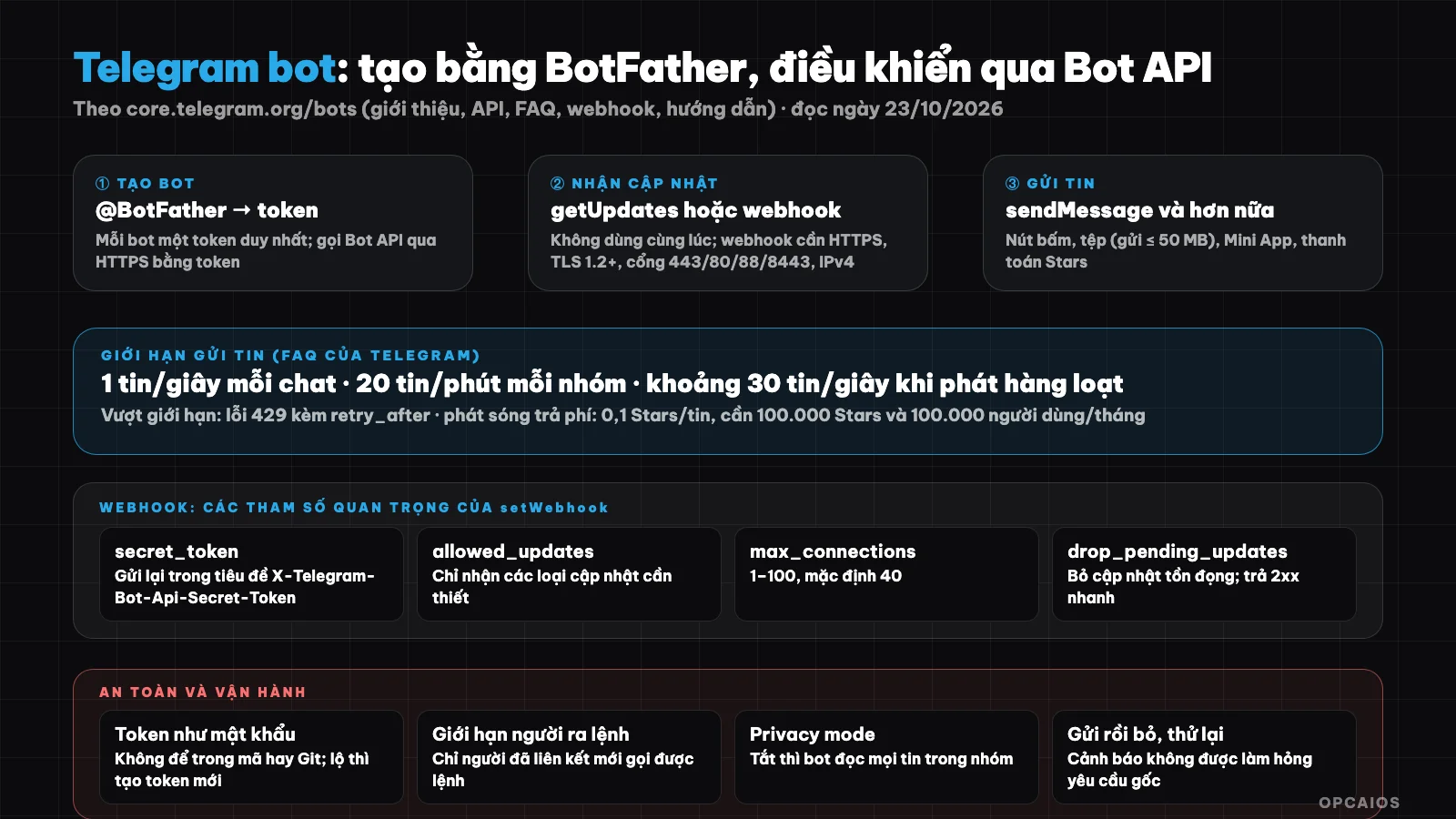
Bot calls Bot API over HTTPS and receives updates via long polling or webhook; token is the key that needs protection. Diagram: OPCAIOS.
What can a Telegram bot do?
A Telegram bot can do many things, because a bot is a small application that calls the Bot API over HTTPS. The bot platform has over 10 million bots and is free for both users and developers, according to Telegram (read on 23/10/2026). Six main groups of tasks:
- Mini Apps: replace an entire website with an application written in JavaScript, with built-in login and notifications through Telegram.
- AI assistants and chatbots right in the conversation, with streaming responses in real time.
- Business management: Telegram Business users connect bots to handle and reply to messages on behalf of a personal account.
- Receive payments: using Telegram Stars for digital goods, or third-party payment providers for physical goods.
- Custom tools, service connections and device control.
- Games.
For example, a small business uses a bot to receive operational alerts, periodic reports, review tasks and quickly look things up with commands. These are the most practical tasks, and OPCAIOS does exactly that with business alert bots.
How do you create your first Telegram bot?
Creating a Telegram bot means talking to @BotFather in Telegram to get an authentication code (token). For example, you send a bot creation command through BotFather, set a name, then receive a token right in the conversation. Each bot has a unique token when created, consisting of numbers and a string of characters, according to Telegram (read on 23/10/2026) and (according to Telegram); every request to the Bot API goes over HTTPS in the format https://api.telegram.org/bot<token>/METHOD_NAME. Both GET and POST are supported, passing parameters via query string, form format, JSON or multipart (when uploading files). The response is always JSON with an ok field; if there's an error there will be a description.
You can try it right away in your browser using the getMe method (after you have a token), but for real applications you should use a library. The "From BotFather to Hello World" guide has examples in C#, Python, Go and TypeScript. A simple message sending command (remember to keep the token in an environment variable, don't paste it into source code):
curl -s "https://api.telegram.org/bot${TELEGRAM_BOT_TOKEN}/sendMessage" \
  -H "Content-Type: application/json" \
  -d '{"chat_id": 123456789, "text": "Hello from bot"}'

## Receive messages using getUpdates or webhook?

There are two ways to receive updates and you can only use one way at a time. According to Telegram's FAQ: **getUpdates** is a polling mechanism (long polling), the bot continuously asks Telegram; **webhook** is a push mechanism, Telegram sends an HTTPS POST request containing JSON to the address you provide as soon as an update arrives. When a webhook is set, getUpdates cannot be used.

| Criteria | getUpdates | Webhook |
|---|---|---|
| Direction | Bot pulls updates | Telegram pushes updates |
| Needs public server | No | Yes, HTTPS and domain |
| Suitable for | Testing, running on personal computer | Running in production on server |
| Confirmation | Use `offset` = last `update_id` + 1 | Return code 2xx |

### What server and parameters does webhook need?

Webhook is how Telegram pushes updates to your HTTPS server, so the server must meet Telegram's requirements (read 23/10/2026). First is the infrastructure: support IPv4 (IPv6 is currently not supported for webhook), receive POST from ranges 149.154.160.0/20 and 91.108.4.0/22 on ports 443, 80, 88 or 8443, use TLS 1.2 or higher, have a valid certificate matching the domain and send complete intermediate certificate chain. Next are the parameters of `setWebhook`:

- `secret_token`: secret string 1 to 256 characters (only letters, numbers, underscores and hyphens); Telegram sends it in the `X-Telegram-Bot-Api-Secret-Token` header in every request so you are sure the request comes from the webhook you set.
- `allowed_updates`: list of update types you want to receive (default receives all types except a few like `chat_member`, `message_reaction`).
- `max_connections`: maximum concurrent connections 1 to 100, default 40.
- `drop_pending_updates`: drop pending updates.

If the server returns a code other than 2xx, Telegram will retry and give up after a reasonable number of attempts. So return code 2xx quickly and do heavy processing in the background; see the processing pattern in [What is webhook?](/en/blog/webhook-la-gi).

## What are Telegram bot sending limits?

Sending limits are the maximum rate at which Telegram allows a bot to send messages without getting error 429. According to Telegram's FAQ (read 23/10/2026), bots can message users for free but there are three default levels:

1. In a single conversation, avoid sending more than one message per second; short bursts are allowed but will then get error 429.
2. In groups, a bot does not send more than 20 messages per minute.
3. For broadcast messages, a bot does not send more than about 30 messages per second.

Error responses have a `retry_after` field that tells you how many seconds to wait. To send more, a bot can enable paid broadcast in BotFather: maximum 1,000 messages per second, each message over the free limit costs 0.1 Stars, and the bot must have at least 100,000 Stars in balance and at least 100,000 active monthly users. Most small bots don't need this level; Telegram recommends spreading broadcast messages over 8 to 12 hours to avoid hitting the limit (per Telegram).

## What messages does a bot receive in a group?

What messages a bot receives in a group depends on privacy mode. All bots receive service messages, all messages in private conversation with the user and all messages in channels where the bot is a member, according to Telegram's FAQ. For messages in groups there are two cases:

1. Bot is an admin or has disabled privacy mode: receives all messages except those from other bots.
2. Bot has privacy mode enabled: only receives commands meant for itself (form `/command@bot_name`), common commands like `/start` if the bot is the last bot to send a message in the group, messages sent via the bot and reply messages to the bot's messages.

For example, a bot reminding tasks for a 20-person group only needs commands so it should keep privacy mode on. Disabling privacy mode means the bot reads all messages in the group, so only disable when really necessary and tell the group members. Also, a bot using Telegram via webhook still follows these same rules.

## How does a bot handle files?

According to the FAQ: downloading files using `getFile` can only be used with files up to 20 MB, and bots can currently send files of any type up to 50 MB; the limit may change. `file_id` can be considered stable long-term. Telegram also provides source code for the local Bot API server (telegram-bot-api) for those who need to run it themselves, according to the documentation.

## How to Keep Telegram Bots Safe?

Keeping Telegram bots safe means protecting the token, because the token is the key to controlling the bot and needs to be treated like a password. Each bot has a unique token, according to Telegram (as of 23/10/2026) and the Bot API documentation (per Telegram). Five habits you need:

1. **Don't put the token in source code, Git repositories, or code running in browsers:** keep it in environment variables or the server's secret store, encrypt it when saving to a database. If it leaks, create a new token through BotFather and revoke the old one.
2. **Check the webhook's `secret_token`** and only accept requests with the correct header.
3. **Limit who can command the bot:** only accept users or groups that have been linked.
4. **Escape content** when using HTML or Markdown formatting.
5. **With AI bots, treat message content as data, not commands** (prompt injection), and grant minimum permissions; see [What is MCP?](/en/blog/mcp-la-gi). If you let AI write code for the bot, reread the token handling section, as in [What is Vibe coding?](/en/blog/vibe-code-la-gi).

## OPCAIOS's experience: business alert bots and CRM command bots

OPCAIOS uses Telegram as a dashboard on the website owner's phone. Two things we've done:

**Alert bot.** The admin panel has a notifications section with about thirty types of events that can be toggled on and off: customer leaves information, books a consultation, order paid, transfer doesn't match order, lead past response deadline, morning summary, weekly report, website or database stops responding, backup missing, AI cost hits threshold, post published. Some technical decisions worth sharing: the bot token is encrypted when saved; each time an alert is sent is "send and forget" so Telegram issues never slow down or break the original request; because the server sometimes has unstable connections to Telegram, network errors are retried twice while error responses from Telegram are not retried; and content is escaped correctly in HTML mode.

**CRM command bot.** Linked staff members (via one-time code) can add customers, take notes, log calls, create tasks, and find customers right from Telegram using short commands. The bot uses a webhook with `secret_token`, only accepts `message` updates, discards stale updates when connecting, refuses to replace another application's webhook without confirmation, and for AI tasks that take tens of seconds, replies in the background so Telegram doesn't resend the webhook. General lesson: keep webhooks responding fast and offload heavy work to the background.

## How to Get Started with Telegram Bots?

1. Open @BotFather in Telegram, create a bot, and save the token somewhere safe.
2. Try `getMe` and `sendMessage` with curl using your chat ID.
3. Write a small program, start with getUpdates while testing.
4. Switch to webhooks on an HTTPS server when running in production, set `secret_token` and `allowed_updates`.
5. Add rate limiting and retry according to `retry_after`.
6. Limit who can command the bot, log activity, and monitor errors. Want to connect the bot to automation workflows, check [n8n](/en/blog/n8n-la-gi) or [Make](/en/blog/make-la-gi), and [What is API?](/en/blog/api-la-gi) for background concepts.

Read more: Automatic Weekly Report for OPC Owners.

## Frequently Asked Questions

### What is a Telegram bot?
It's a small application running in Telegram, controlled via Bot API over HTTPS, able to send messages, receive commands, display buttons and Mini Apps, process payments, and integrate AI.

### Is there a fee to create a Telegram bot?
No. According to Telegram, the bot platform is free for both users and developers. You create a bot through @BotFather and receive a token; costs only arise from your own server or when using paid features like large-scale broadcasting.

### Should I use getUpdates or webhooks?
getUpdates works for testing and personal machines since it doesn't require a public server; webhooks work for production since Telegram pushes updates to your HTTPS server. Don't use both methods at the same time.

### Does a Telegram bot have message sending limits?
Yes: roughly one message per second in a single conversation, 20 messages per minute in groups, and around 30 messages per second for bulk sending; exceeding this returns a 429 error with `retry_after`.

### How do I keep my bot token safe?

Keeping your bot token safe means not exposing it outside your server. The token is a unique string for each bot, according to Telegram (as of October 23, 2026), and every request to the Bot API includes the token in the URL. First, don't put the token in source code or Git; store it using environment variables or an encrypted secret vault. Second, verify your webhook's `secret_token` and restrict who can send commands. Finally, if you suspect the token is exposed, create a new token through BotFather and invalidate the old one. For example, the curl command that sends a message above reads the token from the `TELEGRAM_BOT_TOKEN` environment variable instead of pasting it directly. If you want to learn how to build automation tools that connect Telegram to your systems, check out [OPCAIOS's AI application training course](/services/dao-tao-ung-dung-ai).

*Source: bot introduction page, Bot API documentation, FAQ, webhook guide, and "From BotFather to Hello World" guide at core.telegram.org/bots, read directly on October 23, 2026. Telegram's limits and requirements may change. Configuration experience is from OPCAIOS; we do not disclose tokens, chat IDs, or alert content.*
Translated from Vietnamese with AI. Read the original.
Want to apply this in your business?
Book a free 30-minute call (Vietnam time, in English or Vietnamese).