


What is a Webhook?
A webhook is how one piece of software tells another piece of software right when something happens: a new order arrives, a customer just transferred money, someone filled out a form on the website. Instead of asking "anything new?" every few minutes, you give that system an address, and it sends data to that address the moment the event happens. This post explains webhooks in plain language, how to receive and send webhooks safely, with real examples from opcaios.org.
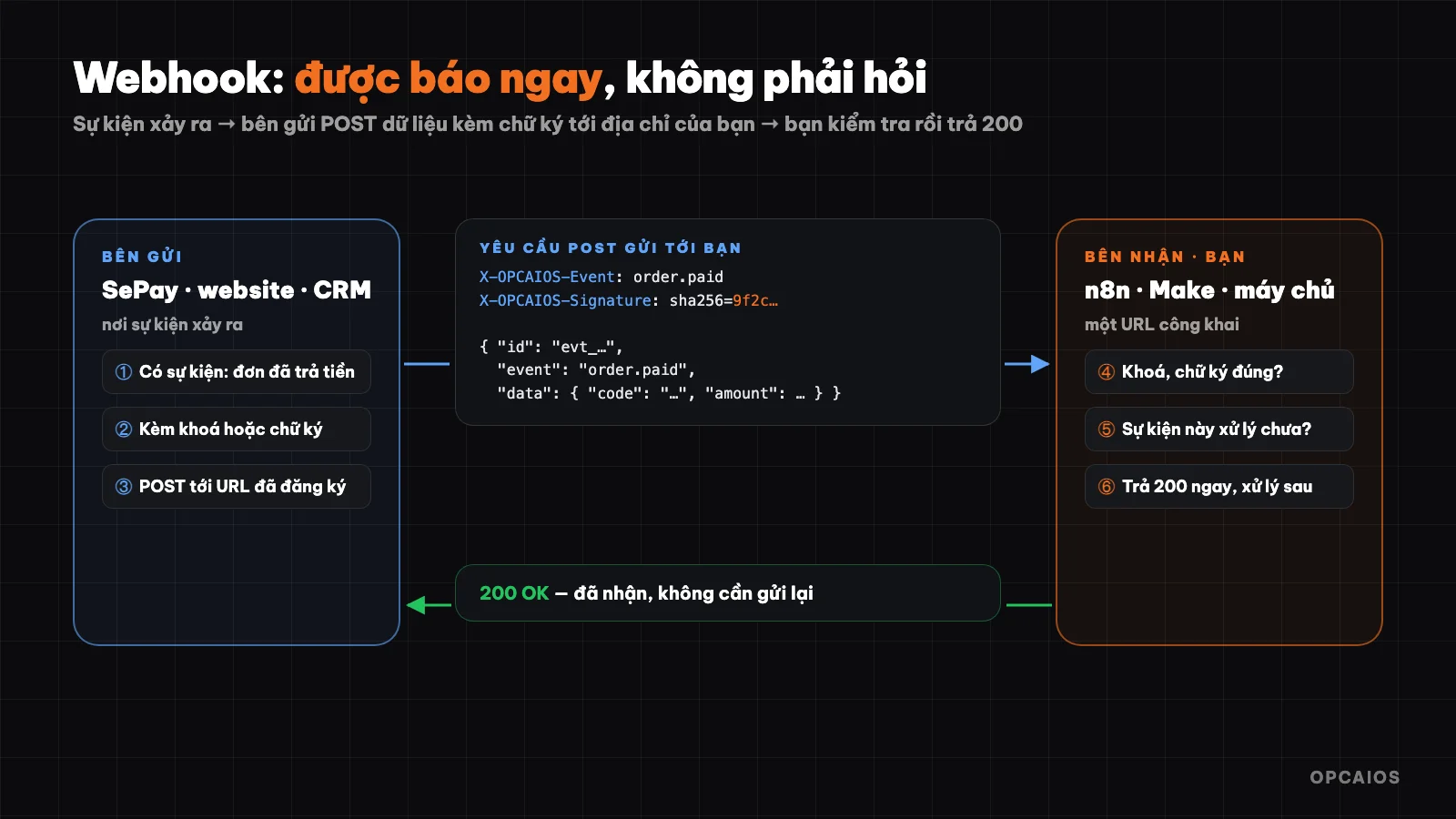
One webhook send: event happens → send data with signature → receiver checks and replies 200. Diagram: OPCAIOS.
What is a webhook?
Let me compare two ways to wait for a delivery:
- Call every 10 minutes asking "has the package arrived yet?" — takes effort, and if it arrives between calls you still find out late.
- Leave your phone number, the shipper calls you when they arrive — no effort waiting, you know right away.
The first way is calling an API in a continuous polling style. The second way is a webhook: you register a URL address, and when the event happens, the other system sends an HTTP POST request containing the event data to that address.
| Continuous API polling | Webhook | |
|---|---|---|
| Who takes the initiative | You ask | The other system tells you |
| Speed of notification | Slow by up to one polling cycle | Nearly instant |
| Uses resources | Many asks with nothing new | Only sends when an event occurs |
| What you need | An API key | A URL address that can receive requests from the Internet |
Where are webhooks used?
- Payments: transfer tracking services or payment gateways tell you "order ABC has been paid".
- Sales: e-commerce platforms, sales software report new orders, cancellations.
- Forms and customers: website reports someone filled in info, CRM reports a new customer.
- Programming: GitHub reports new code pushed to run tests and deploy.
- Messaging: Zalo OA, Messenger, Telegram send customer messages to an auto-reply system.
What does a webhook look like?
A webhook is a normal HTTP POST request with a JSON body. Here's an example webhook opcaios.org sends when someone fills out a form:
{
  "id": "evt_3f9a1c2b7d8e4f60",
  "event": "submission.created",
  "createdAt": "2026-10-22T08:15:00.000Z",
  "data": {
    "form": "lien-he",
    "fields": { "name": "Nguyễn Văn A", "phone": "09…", "message": "I need consultation" }
  }
}
(Sample data.)
Three parts should be in every webhook: an event ID (id) to prevent duplicate processing, an event type (event) to know what to do, and the data (data).
Real example 1: receiving a payment webhook from SePay
When a customer transfers money to buy a course on opcaios.org, SePay (a bank transaction tracking service) sends a webhook to the website. The website does four things:
- Check the key: the request must carry the correct secret key set up in SePay. Wrong key means reject — otherwise anyone could fake a "payment received" request.
- Record the transaction ID before processing: if the same transaction is sent again (due to network hiccup, or SePay resending because it didn't get a response), the next time it's skipped, so the course isn't unlocked twice.
- Match the transfer content with the order code, unlock the course for the customer and notify the site owner.
- Reply with
200so SePay knows it's been received, doesn't send it again.
This is the template for receiving any webhook: verify → prevent duplicates → process → reply quickly.
Real example 2: opcaios.org sends webhooks out
The website also sends webhooks outward to connect with n8n, Make, Zapier or custom systems. The site owner goes to the admin page, pastes the receiving address and picks which events to listen for:
| Event | When it's sent |
|---|---|
submission.created |
New form submission (contact, course, newsletter, comment) |
order.created / order.paid |
New shop order / order has been paid |
contact.created |
New customer in CRM |
deal.won |
Sales opportunity closed successfully |
payment.paid |
Payment link or project billing cycle has been paid |
ticket.created |
New support request for project |
Each webhook has its own signing key (like whsec_…, only shown once when created). Every time it sends, the website includes two headers:
X-OPCAIOS-Timestamp: 1792656900
X-OPCAIOS-Signature: sha256=<HMAC-SHA256(key, "timestamp.body")>
There's a send test button (a ping event) to check the receiving address before using it for real, and the admin page logs the result of the last send (response code, errors if any). The receiver must reply within 10 seconds.
How to Verify a Webhook Signature?
A signature helps the receiver ensure that the request comes from the right place and hasn't been altered in transit. The common approach (called HMAC): the sender and receiver both keep a secret key; the sender uses that key to "hash" the content into a signature; the receiver hashes the received content with the same key and compares.
Example of verifying an opcaios.org webhook signature using Node.js:
import crypto from "node:crypto";

function verify(rawBody, timestamp, signatureHeader, secret) {
  // Reject requests older than 5 minutes, guard against replay attacks
  if (Math.abs(Date.now() / 1000 - Number(timestamp)) > 300) return false;
  const expected = "sha256=" + crypto
    .createHmac("sha256", secret)
    .update(`${timestamp}.${rawBody}`)
    .digest("hex");
  const a = Buffer.from(expected);
  const b = Buffer.from(signatureHeader || "");
  return a.length === b.length && crypto.timingSafeEqual(a, b);
}
Two details easily overlooked:
- Use the raw request body (the string received), not the JSON parsed and then converted back to a string — even a single space difference makes the signature wrong.
- Compare using a safe function (
timingSafeEqual), not===, so an attacker cannot guess the signature through response timing.
In n8n, you do this with a Crypto node (HMAC) then an IF node to compare with the header; or use the built-in authentication option on the Webhook node if the sender uses a static key.
Receive Webhooks Without Coding
- In n8n, Make, or Zapier, create a workflow starting with a Webhook step — the tool gives you a URL address.
- Paste that address into the webhook settings of the sending system (SePay, website, CRM, etc.), choose the event.
- Click send test so the tool receives sample data, then map the fields into the next step: add a row to Google Sheets, send a Telegram message, create a customer in the CRM.
- Enable the workflow. From now on each event will run automatically.
Common Webhook Mistakes
- Duplicate processing: the sender may resend the same event. Always save the processed event ID and skip duplicates — especially critical for payments.
- Slow replies: many senders only wait a few seconds. Upon receiving, reply with
200immediately; defer heavy work (sending email, calling AI) to run later. - No authentication: a webhook address is public on the Internet. Without checking a key or signature, anyone can send fake data.
- Unreachable address: personal computers,
localhost, or internal networks cannot receive webhooks from the Internet. You need a server with a public address (or online services like Make, Zapier, n8n cloud). - No monitoring: webhook errors often happen silently. Log every receipt, and set an alert if no events arrive for a while or errors pile up.
Frequently Asked Questions
Is a webhook an API?
A webhook is API used in reverse: instead of you calling that system, that system calls you. Most automation workflows use both — webhooks to know instantly when an event happens, APIs to fetch more data or take action.
Do webhooks cost money?
A webhook itself is a normal HTTP request, no cost. Costs, if any, come from the receiving service (Make, Zapier, or n8n server plans) or the sending service.
What if my server is down when a webhook is sent?
Depends on the sender: some resend a few times over a period, others send only once. Read the sender's docs, and for critical data like payments, add a periodic reconciliation step using their API.
Are webhooks safe?
Safe when you use HTTPS, verify a key or signature on every request, reject requests that are too old, and protect against duplicate processing.
A webhook is the third piece after API and MCP: API to ask and command proactively, webhook to be notified instantly, MCP so an AI assistant can use both by voice.
Source: opcaios.org webhook code (sends with HMAC signature, receives from SePay), checked 22/10/2026.
Translated from Vietnamese with AI. Read the original.
Want to apply this in your business?
Book a free 30-minute call (Vietnam time, in English or Vietnamese).