


What is AGENTS.md?
AGENTS.md is a regular Markdown file, placed at the root of a project (and can be in subdirectories), containing instructions for AI programming agents: what the project does, which commands to run for a test, code conventions, what not to do. The standard agents.md page (read on 03/11/2026) calls this the "README for agents". What makes AGENTS.md worth using is that many tools read the same file: OpenAI's Codex, Cursor, Gemini CLI, GitHub Copilot coding agent, Claude Code, and dozens of other tools. This post does not promise that AGENTS.md makes agents always compliant: the file is context, not an enforcement mechanism, and OPCAIOS has no metrics on the level of improvement. The post covers: how Codex loads AGENTS.md by level, when Claude Code reads it, how Cursor supports it, what to write, a short template, and how OPCAIOS maintains one source of truth for many agents.
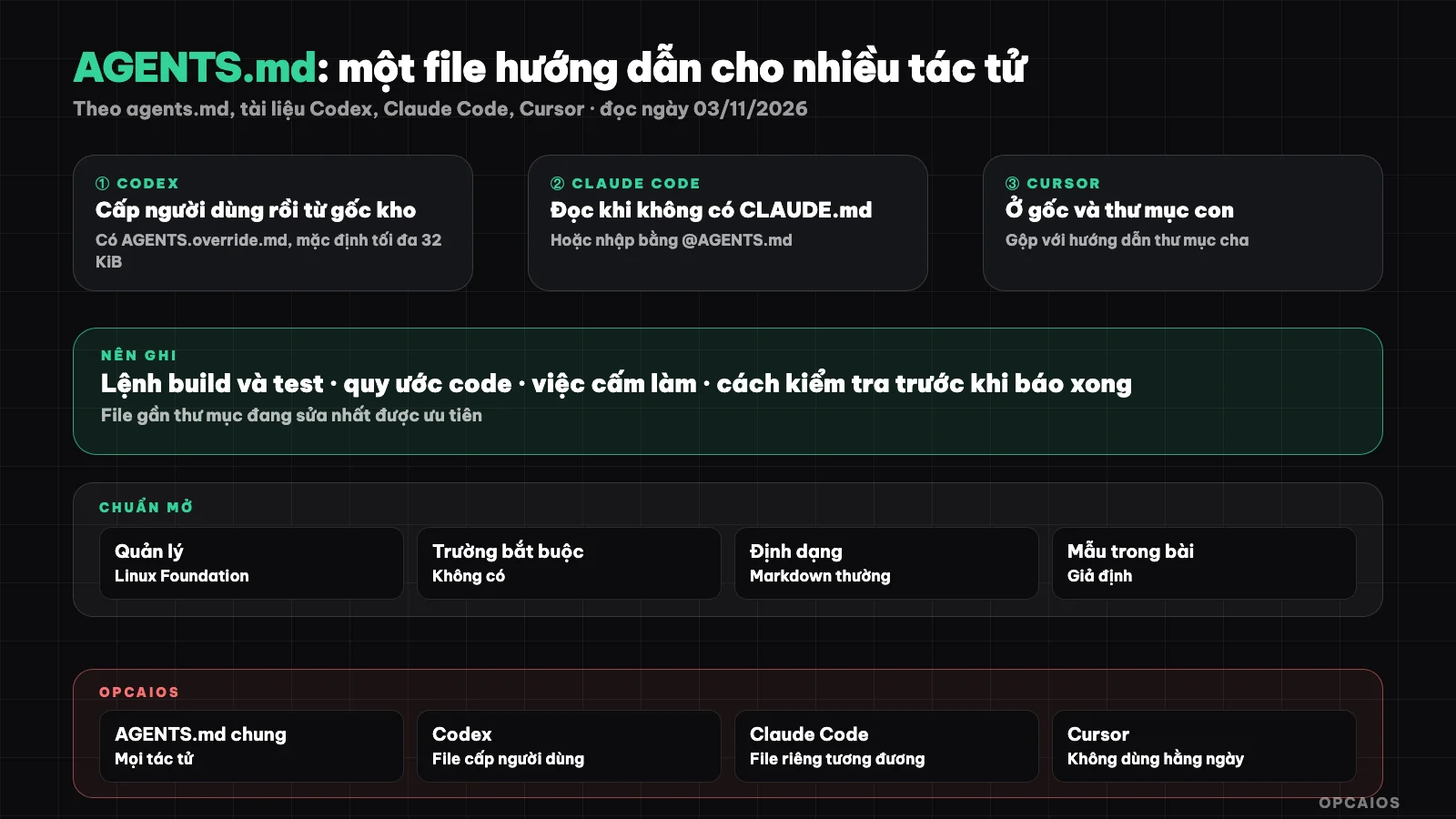
AGENTS.md by level and tools reading together. Diagram: OPCAIOS.
AGENTS.md is the standard of whom and which tools support it?
AGENTS.md is an open format, not owned by any company. According to the agents.md page (read on 03/11/2026), this format is currently managed by the Agentic AI Foundation under the Linux Foundation, and the page lists over 60,000 open source projects that use it. Tools listed on the page include OpenAI Codex, Google Jules, Gemini CLI, Cursor, GitHub Copilot coding agent, VS Code, JetBrains Junie, Devin, Windsurf, Aider, Zed, Warp and many others. This standard has no required fields, needs no frontmatter. The most important rule is when there are multiple nested files, the file closest to the file being edited takes priority, and direct instructions from the user in the chat box stand above all. Claude Code is not in the list we read, but Claude Code's own documentation has an AGENTS.md section (see below).
In what order does Codex read AGENTS.md?
Codex reads AGENTS.md in two tiers: user tier then project tier, and concatenates them into one instruction chain each run. According to the AGENTS.md page in Codex's documentation (developers.openai.com redirects to learn.chatgpt.com/docs/agent-configuration/agents-md, read on 03/11/2026), the specific order is:
- User level: Codex looks in Codex's home directory, default
~/.codexunless you set theCODEX_HOMEvariable. If there isAGENTS.override.mdthen use that file, otherwise useAGENTS.md. At this level only the first non-empty file is taken. - Project level: Codex starts from the project root (usually Git root) then goes down each directory to the current directory.
- One file maximum per directory: try
AGENTS.override.mdin order, thenAGENTS.md, then fallback names declared in configuration. - Concatenate from top to bottom: files are joined from root down, separated by blank lines. The closer a file is to the current directory, the later it appears, so it can override instructions above.
- Empty files are skipped.
The chain is built once each run: after editing AGENTS.md you must restart Codex.
When do you use the AGENTS.override.md file?
AGENTS.override.md is used when you need to completely replace the same-level file without deleting the root file. Example scenario: the payment directory needs completely different rules; place AGENTS.override.md there and Codex uses it instead of AGENTS.md in the same place.
What is the size limit and fallback file names?
Codex stops adding files when total size reaches the project_doc_max_bytes value, default 32 KiB according to documentation read on 03/11/2026. Documentation suggests two approaches when exceeded: increase the limit, or split instructions down into subdirectories. If a project already has a guide file with a different name, declare project_doc_fallback_filenames in ~/.codex/config.toml (documentation example: TEAM_GUIDE.md). To find out which files Codex has loaded, documentation suggests asking Codex directly to list the guide sources. Details about config.toml are in the post config.toml của Codex.
When does Claude Code read AGENTS.md?
Claude Code reads AGENTS.md when the project has no CLAUDE.md. According to Claude Code's "How Claude remembers your project" page (read on 03/11/2026): if the working directory and parent directories have only AGENTS.md, Claude uses AGENTS.md; if there is both CLAUDE.md or CLAUDE.local.md, by default only CLAUDE.md is read; if CLAUDE.md imports AGENTS.md with the line @AGENTS.md, both are loaded. How to build CLAUDE.md and import syntax is in the post CLAUDE.md là gì.
How does Cursor support AGENTS.md?
Cursor supports AGENTS.md at the root of a project and in subfolders. According to the Rules page in the Cursor documentation (cursor.com/docs/context/rules, read on 03/11/2026), AGENTS.md is a plain Markdown file with no metadata, presented as an alternative to .cursor/rules for simple cases. A file in a subfolder applies automatically when working with files in that folder, gets merged with the parent folder's instructions, and more specific instructions take priority. The documentation does not clearly state whether AGENTS.md ranks above or below rules in .cursor/rules. Markdown files usually placed in .cursor/rules are ignored. OPCAIOS does not use Cursor daily, so we have not verified this behavior ourselves; see also What is Cursor.
What should I put in AGENTS.md?
AGENTS.md should contain things an agent cannot guess from the code and will need in every session. The agents.md page suggests these groups: project overview, build and test commands, coding conventions, how to test, security notes, commit or pull request rules, deployment steps. The priority order we suggest:
- Exact commands: install, test run, build. According to agents.md, the agent will try to run the test command written down and fix errors before finishing work.
- Boundaries: folders, auto-generated files, real data must not be touched.
- Custom rules: naming, answer language, commit format.
- Start and end of session: which file to read first, where to log.
- Security: do not write API keys, passwords, server addresses into AGENTS.md because the file is usually committed to the repository. See 5 data security rules when using AI.
Do not write: description of each file, long documentation for people, vague instructions like "write clean code."
Short AGENTS.md template for solo workers
Below is a template by OPCAIOS as an example, not an actual file from any project; replace commands and paths to match your project:
# Instructions for agents

## Project
Online course sales website, Next.js + Postgres. Code in src/, migrations in db/.

## Commands
- Install: npm install
- Test run: npm run dev
- Check before finishing: npm run lint && npm test

## Rules
- Reply in Vietnamese, brief.
- Do not edit files in db/migrations that have run; create a new migration.
- Do not commit .env file or API keys.
- Commit only files you have edited.

## End of session
- Write one line summary to docs/NHAT_KY.md.
Each line is one checkable task.
How do I keep one source of truth for many agents?
One source of truth means common rules are written only in AGENTS.md, while files specific to each tool just point to it and add their own parts. When using Codex, Claude Code, and another agent in parallel on the same repository, the practical approach has four steps:
- Write common rules (commands, boundaries, session procedure) in AGENTS.md at the repository root.
- Create CLAUDE.md containing only the line
@AGENTS.mdand a few things specific to Claude Code. - Keep personal habits (language, answer tone) in the user-level file of each tool, for example
~/.codex/AGENTS.mdfor Codex. - To change a rule, only edit AGENTS.md, then start a new session.
Two conflicting files make it hard to guess which one the agent will follow, so do not copy one rule into multiple files. When many sessions edit the same repository, read more about multiple AI sessions editing one project and the post using Codex and Claude Code together.
OPCAIOS Experience
I use Codex CLI, Codex desktop application, Claude Code, and Google Antigravity in parallel on my main work machine; I don't use Cursor every day. The current file organization method (checked on 03/11/2026):
- One shared AGENTS.md for all agents in the user's root directory and inside the Obsidian notes repository: the order to read documentation at the start of the session, at the end of the session write to the common status file and daily log, banned to leave trash files.
- A user-level AGENTS.md for Codex in Codex's home directory, equivalent to Claude Code's user-level file: reply in Vietnamese, read documentation in order, write the daily log at the end of the session.
- Each session commits only its own files, because multiple sessions share one repository and one Git index; merged commits easily bring along files from other sessions.
- Some projects can only be edited on one specific machine. The reason is real: once an agent deployed from a Windows machine made over 1,500 files show as "changed" just because of different line endings.
What we don't have yet: a measure of how much better agents follow guidelines when they have AGENTS.md, and I haven't independently verified how Cursor reads files. A human still needs to check the final result, see I let an AI agent build and run a website: 10 real lessons.
Frequently Asked Questions
Does AGENTS.md have to be placed at the project root?
Not required, but the project root is where most tools look first. Codex also reads files in subdirectories along the path from the repository root to the working directory, and user-level files in ~/.codex. Cursor reads both the root and subdirectories. For small projects, one file at the root is enough; multi-faceted projects need additional files in each section's folder.
How is AGENTS.md different from README.md?
README is written for people: introduction, how to install, how to contribute. AGENTS.md is written for agents: exact commands to run, boundaries you can't edit, specific conventions, details that would clutter README if put in. The agents.md page recommends separating the two files so README stays clean. You shouldn't copy the entire README to AGENTS.md, but overlapping a few lines like installation commands is fine.
How long should the AGENTS.md file be?
Codex by default only reads a total of 32 KiB from the AGENTS.md string, according to documentation read on 03/11/2026; anything beyond will not be added. Beyond the technical limit, the longer the file, the easier important rules get lost. You should keep the root file short, each line is something you can verify, and move details of each section to AGENTS.md in that section's directory.
Using both CLAUDE.md and AGENTS.md, do they conflict?
They can, if you copy the same rules into both files and then edit them differently. According to Claude Code documentation, when CLAUDE.md exists, Claude Code by default only reads CLAUDE.md, so rules that only live in AGENTS.md will be overlooked. Safe approach: put shared rules in AGENTS.md, CLAUDE.md only has the line @AGENTS.md and Claude Code-specific sections. Edit in one place, every agent sees it.
Should I put API keys or passwords in AGENTS.md?
No. AGENTS.md is usually committed to the repository and loaded into the AI model's context, so anything in it can be considered potentially exposed. Write the name of the environment variable instead of the value, for example "key read from the service's environment variable", and keep the actual value in a .env file outside the repository. If you want someone to guide you in building an instruction file set for multiple agents based on your real project, see OPCAIOS's AI application training course.
Source: agents.md; Codex documentation, AGENTS.md page (developers.openai.com redirects to learn.chatgpt.com/docs/agent-configuration/agents-md); Claude Code documentation, page "How Claude remembers your project" (code.claude.com/docs/en/memory); Cursor documentation, Rules page (cursor.com/docs/context/rules); read on 03/11/2026. List of supporting tools, the number 60,000 projects, and the 32 KiB limit taken from the above pages, may change with updates; the behavior of AGENTS.md in Cursor has not been independently verified by OPCAIOS. The experience is OPCAIOS's.
Translated from Vietnamese with AI. Read the original.
Want to apply this in your business?
Book a free 30-minute call (Vietnam time, in English or Vietnamese).