



config.toml Codex
Codex is a TOML configuration file that Codex CLI, IDE utilities, and the Codex desktop application read when they start: which model to use, how deep the thinking goes, when to ask for permission, which sandbox to run commands in, which MCP servers to connect to. According to the "Config basics" page in the Codex documentation (developers.openai.com redirects to learn.chatgpt.com, read 03/11/2026), CLI and IDE utilities share the same configuration layers. This post does not promise a "best" configuration set: available models and thinking levels depend on the account, and OPCAIOS does not measure quality or cost between levels. Every key and flag in this post has been cross-checked against official documentation and codex --help version 0.162.1. The post covers: where the file lives, priority order, keys worth adjusting, how to override with command-line flags, profiles by work type, API key safety, and OPCAIOS's real configuration at the conceptual level.
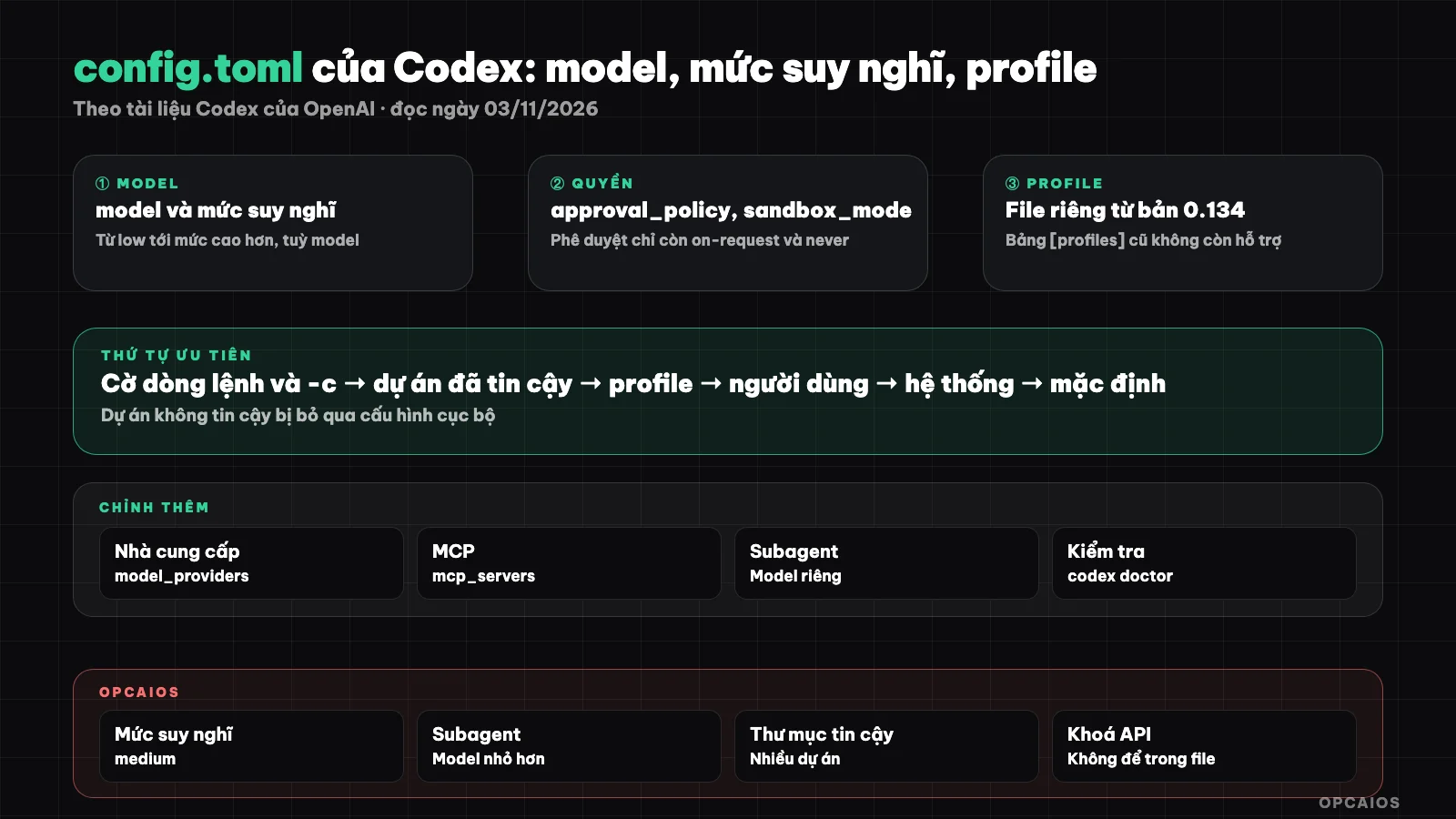
Codex's configuration layers and main key groups. Diagram: OPCAIOS.
Where does Codex's config.toml file live?
Codex's user-level config.toml file lives at ~/.codex/config.toml, inside the Codex home directory (default ~/.codex, changeable with the CODEX_HOME variable). According to Codex documentation read 03/11/2026, there are three other locations: the .codex/config.toml file in each project, the profile file ~/.codex/<name>.config.toml, and the system file /etc/codex/config.toml on Unix. Codex only loads the .codex/ layer of a project when the project is marked trusted; an untrusted project skips local configuration, hooks and rules, but user and system configuration still loads. Trust status is recorded with the projects.<path>.trust_level key with value "trusted" or "untrusted". Version 0.162.1 has a --strict-config flag that reports an error when a file contains unknown keys, and a codex doctor command to diagnose configuration.
Which configuration layer does Codex prioritize first?
Codex merges multiple configuration layers, with higher layers winning over lower ones. The order according to the "Config basics" page (read 03/11/2026), from high to low:
- Command-line flags and
-c/--configoverrides. - The
.codex/config.tomlfile of the project, from the project root down to the current directory, with the nearest file winning (only when the project is trusted). - The profile file selected with
--profile <name>. - The user file
~/.codex/config.toml. - Default configuration pushed down by the workspace administrator (if any).
- The system file
/etc/codex/config.toml. - Built-in defaults.
One easy mistake: the project file cannot override keys tied to the machine. According to the Config Reference page, Codex ignores model_provider, model_providers, notify, profile and a few other keys if they appear inside a project's .codex/config.toml.
Which keys in config.toml are worth adjusting?
The keys below are all in the Config Reference page as of 03/11/2026. I use the placeholder <model-name> in the examples because available models depend on your account.
model = "<model-name>"
model_reasoning_effort = "medium"
approval_policy = "on-request"
sandbox_mode = "workspace-write"

[agents]
default_subagent_model = "<smaller-model-name>"
default_subagent_reasoning_effort = "low"

[projects."/path/to/my/project"]
trust_level = "trusted"
How do I choose a model and reasoning level?
The model key sets the default model; the documentation reminds you to use a model that your account or logged-in workspace has permission to use. The model_reasoning_effort key sets the reasoning level; the documentation lists levels like low, medium, high, xhigh, max, or ultra, but which levels are available depends on the model and application. Higher levels are usually slower and consume more quota, but we don't have separate measurements. The plan_mode_reasoning_effort key sets a separate level for plan mode.
How are approval mode and sandbox different?
approval_policy determines when Codex pauses to ask for permission; sandbox_mode determines what commands can do with files and the network. According to the documentation as of 03/11/2026:
approval_policytakeson-request(the model decides when to ask),never(don't ask, for automated runs), or agranulartable to pick individual question types. Theuntrustedvalue has been removed, andon-failureis marked deprecated.sandbox_modetakesread-only,workspace-write, ordanger-full-access. Withworkspace-write, thesandbox_workspace_writekey group gives you more writable directories (writable_roots) and enables networking (network_access).approvals_reviewerchooses who reviews:user(default) orauto_review(a subagent reviews).
Details on each mode are in the post Codex approval and sandbox modes.
How do I declare a custom model provider?
A custom provider is declared in a [model_providers.<id>] table and selected via the model_provider key. The example below follows the pattern in the Advanced Config page; the URL is for illustration:
model_provider = "proxy"

[model_providers.proxy]
name = "OpenAI via proxy"
base_url = "http://proxy.example.com"
env_key = "OPENAI_API_KEY"
env_key is the NAME of the environment variable holding the key, not the key itself. The documentation also mentions wire_api, http_headers, request_max_retries, and provider-specific codes that cannot be duplicated like openai, ollama, lmstudio. To just change the URL of the built-in OpenAI provider, use openai_base_url.
How do I add an MCP server to config.toml?
An MCP server is declared in a [mcp_servers.<id>] table: command and args for a server running over stdio, url for an HTTP server, env for environment variables, bearer_token_env_var to read a token from an environment variable, enabled_tools / disabled_tools to restrict tools. You can also add it with codex mcp add <name> --url <URL> or codex mcp add <name> -- <command>, view with codex mcp list. For MCP in general, read What is MCP and MCP, skills, and hooks in Codex.
How do I override config.toml with command-line flags?
You override it with command-line flags to change configuration for a single run without editing the file, since flags stand higher in priority order. The flags below are in codex --help version 0.162.1 (as of 03/11/2026):
| Flag | Effect |
|---|---|
-m, --model |
Choose a model for the run |
-c, --config key=value |
Override any key; use dots for nested keys |
-p, --profile |
Layer the file <name>.config.toml on top of user config |
-s, --sandbox |
read-only, workspace-write, danger-full-access |
-a, --ask-for-approval |
on-request or never |
--add-dir |
Add a writable directory outside the working directory |
Example: run once with a higher reasoning level than the default.
codex -c model_reasoning_effort="high"
The value after the equals sign is read as TOML. The flag --dangerously-bypass-approvals-and-sandbox removes all confirmations and sandbox; the help text itself notes to use this only in an isolated environment outside.
How to use Codex Profiles for different types of work?
A Codex profile is a separate TOML file named <name>.config.toml placed next to config.toml, which overlays the user configuration when running codex --profile <name> or codex exec --profile <name>. According to the Advanced Config page (checked 03/11/2026), from Codex 0.134.0 onwards, --profile no longer reads the [profiles.<name>] table in config.toml and the profile = "<name>" key at the top level is also no longer supported. The table below is a suggestion from OPCAIOS, not the OPCAIOS running configuration, and not a recommendation from OpenAI:
| Profile (suggested) | Type of work | Reasoning level | Sandbox | Approval |
|---|---|---|---|---|
doc-code |
Reading, explaining code, Q&A | low |
read-only |
on-request |
sua-nho |
Fixing small bugs, changing text, adding tests | medium |
workspace-write |
on-request |
ke-hoach |
Designing features, large refactoring | high |
read-only |
on-request |
review |
Reading diffs, finding bugs before commit | high |
read-only |
on-request |
tu-dong |
Running codex exec on schedule |
medium |
workspace-write |
never |
Example of a sua-nho profile file, located at ~/.codex/sua-nho.config.toml:
model_reasoning_effort = "medium"
sandbox_mode = "workspace-write"
approval_policy = "on-request"
The tu-dong profile with never should only be used when you understand the risks; see codex exec runs automatically.
How do I avoid exposing API keys in config.toml?
Keeping API keys outside config.toml is the main principle, since configuration files are often copied, shared, or accidentally committed. Practical steps:
- Only write the environment variable NAME in
env_key,bearer_token_env_var,env_http_headers; place actual values in environment variables or a secrets manager. - Do not place provider keys in
.codex/config.tomlof a project; the documentation already skips this key group at the project level. - Before sharing a configuration file, remove machine paths, internal addresses, and project names.
- Do not read, send, or commit login files and session history in Codex's home directory.
See more in security when using AI to write code.
OPCAIOS's experience
OPCAIOS uses Codex CLI version 0.162.x and the Codex desktop application on the main work machine, alongside Claude Code and Google Antigravity. The current Codex configuration (checked 03/11/2026), described at a conceptual level:
- Default model and
mediumreasoning level. Mid-level as the default; difficult work can be increased for one run using-c. We have not yet measured the quality difference or rate limits between levels. - Subagents are configured to use a smaller model to save costs; cost savings have not yet been measured.
- One additional model provider is declared, going through a model routing gateway.
- Multiple project directories are marked as trusted, so that project-level configuration and instructions are loaded.
- User-level instruction file for Codex, equivalent to Claude Code's file; see what is AGENTS.md.
What we have not yet done: have not added codex exec to CI, have not used Codex on the cloud to open pull requests.
Frequently Asked Questions
Will Codex run without a config.toml file?
Yes. Codex uses built-in defaults when there is no file, following the priority order in the documentation. You only need to create ~/.codex/config.toml when you want to change the default model, thinking level, approval mode, sandbox, or add an MCP server. Starting with a few keys and adding gradually will make it easier to find errors than copying a long sample file from the internet.
What thinking level should I set as default?
There is no universal answer, because availability depends on the model and account. OPCAIOS sets medium as the default. Our suggestion: only increase the level for each run when the task is difficult, such as feature design or tricky debugging. The reason is that higher levels are usually slower and consume more quota; we have not measured specific numbers yet. You can try the same task at two levels and compare results before choosing.
Are old guides using the [profiles] table still correct?
No longer correct with the new version. According to the Advanced Config page read on 03/11/2026, from Codex 0.134.0 the --profile flag no longer reads the [profiles.<name>] table in config.toml, and the top-level profile key is also no longer supported. Profiles are now separate files ~/.codex/<name>.config.toml. If you are using the old configuration, convert each profile table to a file, then test with --strict-config to see which keys are no longer accepted.
Can I keep config.toml in the project repository so the whole team can use it?
Yes, through the project's .codex/config.toml file, but it only works when the project is trusted on each person's machine. The project file suits shared settings like sandbox or thinking level. Model provider, notifications, and profile are required by the documentation to be in user configuration, and Codex ignores them if they are in the project file. Never commit API keys to this file.
Does changing config.toml take effect immediately?
You should assume not, until you open a new session. The Codex documentation says you must restart after changing some keys like the fallback guide file name, and the AGENTS.md chain is also only built once each run. The sure way: edit the file, open a new session, ask Codex what configuration it is using, or run codex doctor. If you want someone to help you set up Codex configuration based on how you actually work, see OPCAIOS's AI application training key.
Source: Codex documentation from OpenAI, the Config basics, Advanced Config, Config Reference and AGENTS.md pages (developers.openai.com redirects to learn.chatgpt.com/docs), plus codex --help, codex exec --help, codex mcp add --help from Codex CLI 0.162.1, read on 03/11/2026. The list of thinking levels, approval values, and profile rules may change with updates; quality or cost between thinking levels has not been verified; the profile table is OPCAIOS's suggestion. The experience is OPCAIOS's.
Translated from Vietnamese with AI. Read the original.
Want to apply this in your business?
Book a free 30-minute call (Vietnam time, in English or Vietnamese).