


What is Antigravity CLI?
Antigravity CLI is Google's command-line tool, invoked with the agy command, that uses the same agents, accounts and customization as the Antigravity application but runs directly in your terminal: it has an interactive interface (TUI) for direct work and a print mode (headless) to call agents from scripts, Git hooks or CI. The general introduction is in the post What is Antigravity?; this post only goes deep into antigravity cli. We don't claim the CLI replaces the desktop application and we don't measure speed or accuracy; the flags and commands below come from the official documentation and agy --help version 1.4.12, read on 03/11/2026, where documentation contradicts itself this is noted clearly. The post covers installation, print mode, continuing conversations, run mode, CI, migration from Gemini CLI and AI credits.
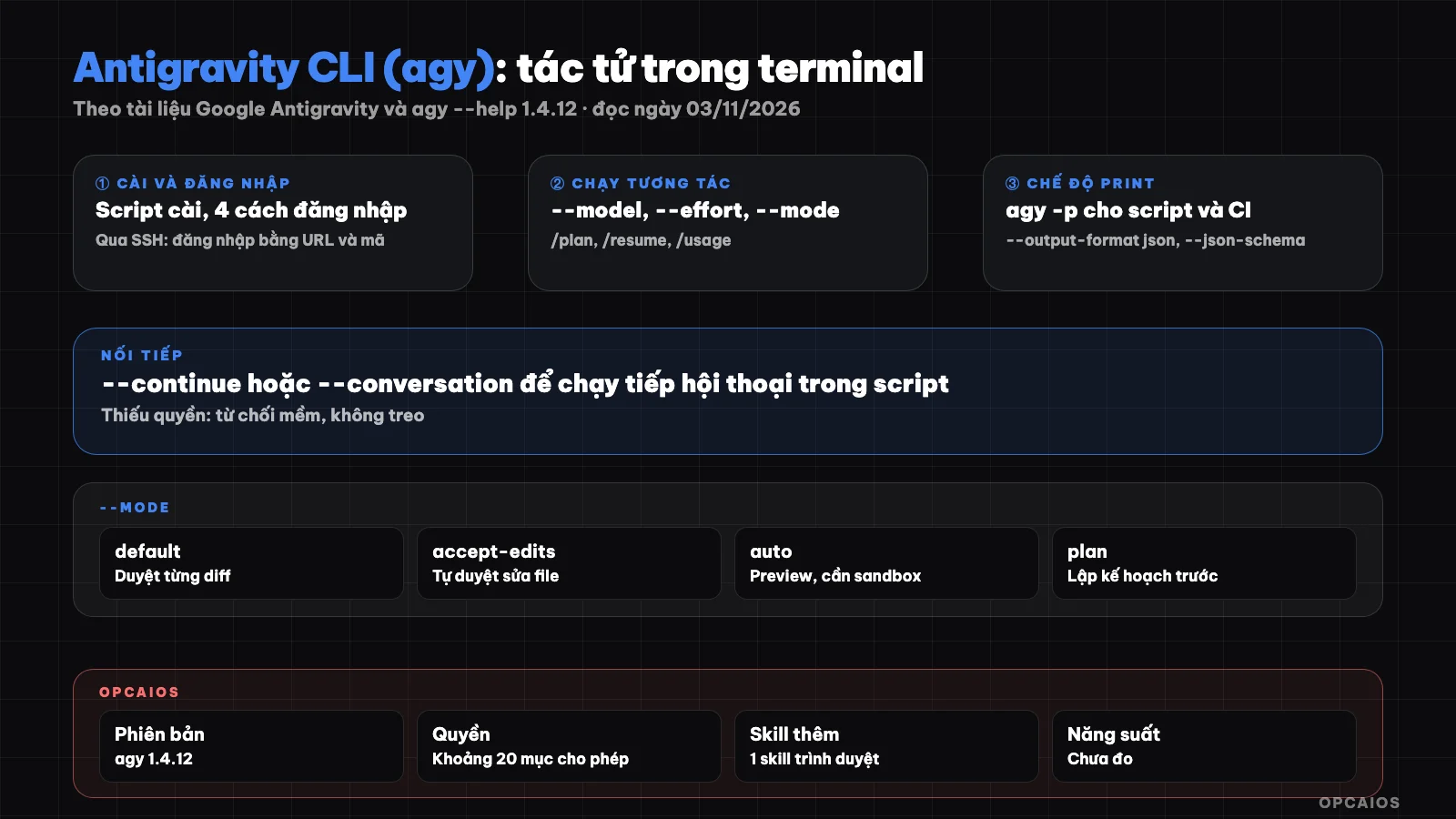
From installation to running agents in scripts: the main layers of Antigravity CLI. Diagram: OPCAIOS.
How do I install Antigravity CLI?
I install Antigravity CLI using Google's automatic install script, following the Getting Started page in the Antigravity documentation (read on 03/11/2026). On macOS, Linux and Googlebook, the install command is a single curl line that fetches install.sh then runs it with bash; on Windows there's a PowerShell version (install.ps1) and a CMD version (install.cmd). I check with agy --version; on the first run, the CLI asks whether to trust the current directory. The install script accepts two flags: --skip-aliases to not touch old aliases in my shell profile and --skip-path to not automatically add to PATH. Later, agy update updates the CLI, and agy install reconfigures PATH with the same two flags plus --dir. The /docs/install page now redirects to Authenticate: the application, CLI, IDE utilities and SDKs share a single login layer, so logging in one place means the others on my machine work too.
curl -fsSL https://antigravity.google/cli/install.sh | bash
agy --version
What are the different ways to log in to Antigravity CLI?
Antigravity CLI has four ways to authenticate, according to the Authenticate page (read on 03/11/2026):
- Local keyring: The CLI looks for a session in the operating system's key store; if not found it opens a browser to log in to my Google account.
- SSH: The CLI prints a URL, I open it on my machine, log in, then paste the confirmation code back into the remote terminal.
- Gemini API key: I set
modelProvidertogeminiin the CLI's settings.json and export theGEMINI_API_KEYvariable. Just setting the variable has no effect, and the CLI doesn't read.envfiles. - Google Cloud ADC: for enterprises, enabled with
AGY_ADC_AUTH=true.
What are the main agy commands?
Antigravity CLI's commands come in three groups, according to the CLI reference page and agy --help (read on 03/11/2026):
| Group | Example | Used for |
|---|---|---|
| Subcommands | agy models, agy agents, agy mcp, agy plugin, agy update |
View models, agents, manage MCP, plugins |
| Startup flags | --model, --effort, --mode, --add-dir, --sandbox |
Configure a session |
| Slash commands | /plan, /goal, /rewind, /fork, /resume, /usage |
Control the running session |
Running agy opens the TUI in the current directory; inside the TUI, @ suggests file paths, ! at the start of a line runs a terminal command, Shift+Tab switches modes. Long-term configuration lives in settings.json, opened with /config; startup flags only override the current session.
How does the print (headless) mode of Antigravity CLI work?
Print mode, also called headless, is a way to run Antigravity CLI non-interactively: send a request, get a result, then exit, according to the Headless mode page (read on 03/11/2026). Called with -p or --print, --prompt. The answer goes to stdout, while errors, permission notices, and progress go to stderr, so I can assign the result directly to a shell variable. The --output-format flag has three values: text (default), json (one object when done, containing conversation_id, status, response, duration_seconds, num_turns and usage token counts) and stream-json (one event per line: one init, multiple step_update, one result). Headless uses a saved login session; in CI where I haven't logged in, the command exits with an authentication error instead of hanging.
agy -p "In one sentence, what is a git rebase?" --output-format json | jq -r '.response'
When do I use --json-schema and --print-timeout?
--json-schema forces the answer into a JSON Schema format, accepting a schema string, a .json file path, or a simple type name; the parsed result sits in structured_output. This is more reliable than telling the agent to "return JSON" and then parsing the string myself. --print-timeout sets a time limit, for example 15m. Note: agy --help and the CLI reference state the default is 0s (wait until done), but the Headless mode page states the default is to wait at most 5 minutes. Since the documentation conflicts, I always set the value explicitly in scripts.
How do I continue a conversation in a script?
Continuing a conversation in Antigravity CLI uses two flags, because each headless run remembers nothing by default, according to the Headless mode page (read on 03/11/2026). --continue (short form -c) reopens the most recent conversation, while --conversation <ID> opens the specific conversation with an ID taken from the conversation_id field of a previous run. According to the Managing conversations page, history is tied to the working directory: running agy from a directory shows only that directory's sessions. Each --continue is a new process. When I need multiple turns in one process, I use --input-format stream-json with --output-format stream-json: my script writes each JSON line with event: "user" to stdin, each line runs one turn and returns a result event; closing stdin ends it. The documentation says this way is faster than calling --continue repeatedly; we haven't measured it yet.
How do --mode and --effort differ?
--mode decides how far the agent goes on its own, while --effort decides how deeply the model reasons. According to the Choose an execution mode page (read on 03/11/2026), there are four modes:
- default: shows me diffs before editing files, asks before running commands.
- accept-edits: auto-reviews file edits in the workspace, still asks before running commands.
- auto (Preview): auto-reviews file edits, runs commands in a sandbox, auto-evaluates commands outside the sandbox; non-reversible commands still ask. Needs a terminal sandbox, available from version 1.3.5 on macOS, Linux and 1.4.4 on Windows, not yet for business accounts.
- plan: researches and plans before writing code.
The allow, ask, deny rules in /permissions still take priority over the mode. For --effort, agy --help lists low, medium, high, xhigh, max; the /effort page explains most models only have three levels. In headless, a wrong --model name makes the command exit with a non-zero code instead of silently switching models.
What should I watch out for running agy over SSH, Git hooks, and CI?
Running Antigravity CLI outside my personal machine requires solving three things: login, permissions, and error handling. Over SSH I use the URL flow and confirmation code; in CI there's no browser, so I use a Gemini API key or ADC. According to the Headless mode and CLI best practices pages (read on 03/11/2026), I should:
- Use
--output-format jsonand checkstatuswithjq; onlySUCCESSis success. - Set
--print-timeoutexplicitly. - Allow only the commands I need with
permissions.allow, don't use--dangerously-skip-permissionson machines with real data. - Think about
--sandbox; from version 1.4.4 onwards, this flag has no effect if the machine has no sandbox. - Pin
--modelso results don't change when the default model changes.
Example scenario: a Git hook calls agy -p to compose a commit message from the diff, I read it again before committing. The best practices page has an example using the --cwd flag, but this flag doesn't appear in agy --help version 1.4.12. This approach is close to codex exec.
How to Switch from Gemini CLI to agy?
Switching from Gemini CLI to Antigravity CLI mostly happens automatically on the first run, according to the Migrating from Gemini CLI page (read 03/11/2026): the CLI lists assets to choose from, transfers tokens into the keyring, and maps settings display. Things I need to check manually:
| Thing to migrate | Gemini CLI | Antigravity CLI |
|---|---|---|
| Extension | Extension | Plugin, via agy plugin import gemini |
| Project skill | .gemini/skills/ |
.agents/skills/ (rename folder manually) |
| MCP configuration | In settings.json | Separate file mcp_config.json |
| Remote MCP server URL | url or httpUrl |
serverUrl |
| Rules file | GEMINI.md, AGENTS.md | Keep as is |
The documentation notes only partial compatibility. Details on MCP and plugin are in MCP and skill in Antigravity; on rules files, see What is AGENTS.md?.
How do AI credits work in CLI?
AI credits are extra credit when your package limit runs out, according to the CLI AI credits page (read 03/11/2026). The status bar shows remaining credits; /credits opens a detailed table, /usage shows your package limit usage. The useG1Credits key, default false, decides whether the CLI uses credit when the package limit is exhausted or not, and it does not exist for business accounts. I have not read the credit pricing table so I won't mention price. With scheduled scripts, keeping this key off means the script stops when the limit runs out instead of silently spending credits.
OPCAIOS experience
On my main Mac, I installed CLI agy version 1.4.12 alongside Antigravity app 2.28.x, Antigravity IDE 2.5.x, Claude Code and Codex. In OPCAIOS's system, Antigravity is the orchestrating agent: it manages infrastructure, assigns and tracks tasks. CLI configuration has an allowlist of about 20 items and a few trusted work folders, rather than browsing everything; CLI has one additional installed browser skill. General rules live in AGENTS.md, while GEMINI.md at the user level has only one line asking for Vietnamese answers. I have not put agy -p into CI yet, have not used Remote Control, and have not measured productivity.
Frequently Asked Questions
Does Antigravity CLI require installing the Antigravity application?
The Getting Started page guides you to install CLI via a separate script, independent of the desktop application, and the Authenticate page describes a shared login layer for the application, CLI, IDE and SDK. Some third-party posts say you need to install the application first, but I don't see that requirement in the documentation I read on 03/11/2026. In CI, you can use a Gemini API key or ADC instead of account login.
In print mode, does the agent automatically run shell commands?
No, not by default. No one clicks browse in headless, so tools that need browsing get "soft rejected": execution continues, exits with code 0 and prints a message to stderr listing the blocked tool name. Reading and writing files in the workspace are allowed; shell commands only run when there's a permissions.allow rule in settings.json, for example command(git). See more at safe mode in Antigravity.
Should I use --dangerously-skip-permissions?
Only use it in isolated environments you can discard, like temporary containers or virtual machines, with code and prompts you completely trust. This flag allows every command, including file deletion and network calls. A safer way is to add permissions.allow rules for the specific commands you need, combined with --sandbox. See security when using AI to write code to choose your risk level.
Can the Gemini CLI extension run on agy?
Most of it converts: agy plugin import gemini converts the old extension into a plugin, old commands into skills and MCP server into entries in mcp_config.json. The documentation notes only partial compatibility. After import, run agy plugin list to see which components were recognized.
Where should I start learning to use Antigravity CLI in real workflows?
Start in default mode in a test directory, get comfortable with browsing diffs and /rewind, then move to accept-edits or plan. Next write a small agy -p script with --output-format json, check status and set --print-timeout. Only expand permissions once you understand what the agent does. If you want structured guidance on safely bringing agents into your daily work, see AI application training from OPCAIOS.
Source: Google Antigravity documentation at antigravity.google/docs (getting-started, install, cli/reference, cli/using, cli/headless, cli/best-practices, cli/credits, cli/gcli-migration, cli/modes, cli/conversations, cli/commands/effort) and agy --help version 1.4.12 (read 03/11/2026); unverified: actual default of --print-timeout, speed of stream-json, AI credits pricing. Experience is from OPCAIOS.
Translated from Vietnamese with AI. Read the original.
Want to apply this in your business?
Book a free 30-minute call (Vietnam time, in English or Vietnamese).