



How to Write Effective Prompts
Writing an effective prompt is a way of giving instructions to AI that are clear enough that a stranger reading it could also do the work right: who reads the result, what they need, what data it's based on, what format it should take, and how to verify it. This post reads the official prompt guides from Anthropic, OpenAI, and Google dated 04/11/2026, pulls out the common points, then proposes OPCAIOS's 5-part framework with 6 before-and-after examples for office work. We'll be straight with you: the 5-part framework is our suggestion, not yet compared against other methods with controlled tests, so we don't promise it gives results better by how much. All examples are hypothetical, not real people. A good prompt can't replace checking the results. The post has a table of common points, a template framework, six copyable prompts, common mistakes, and how to iterate.
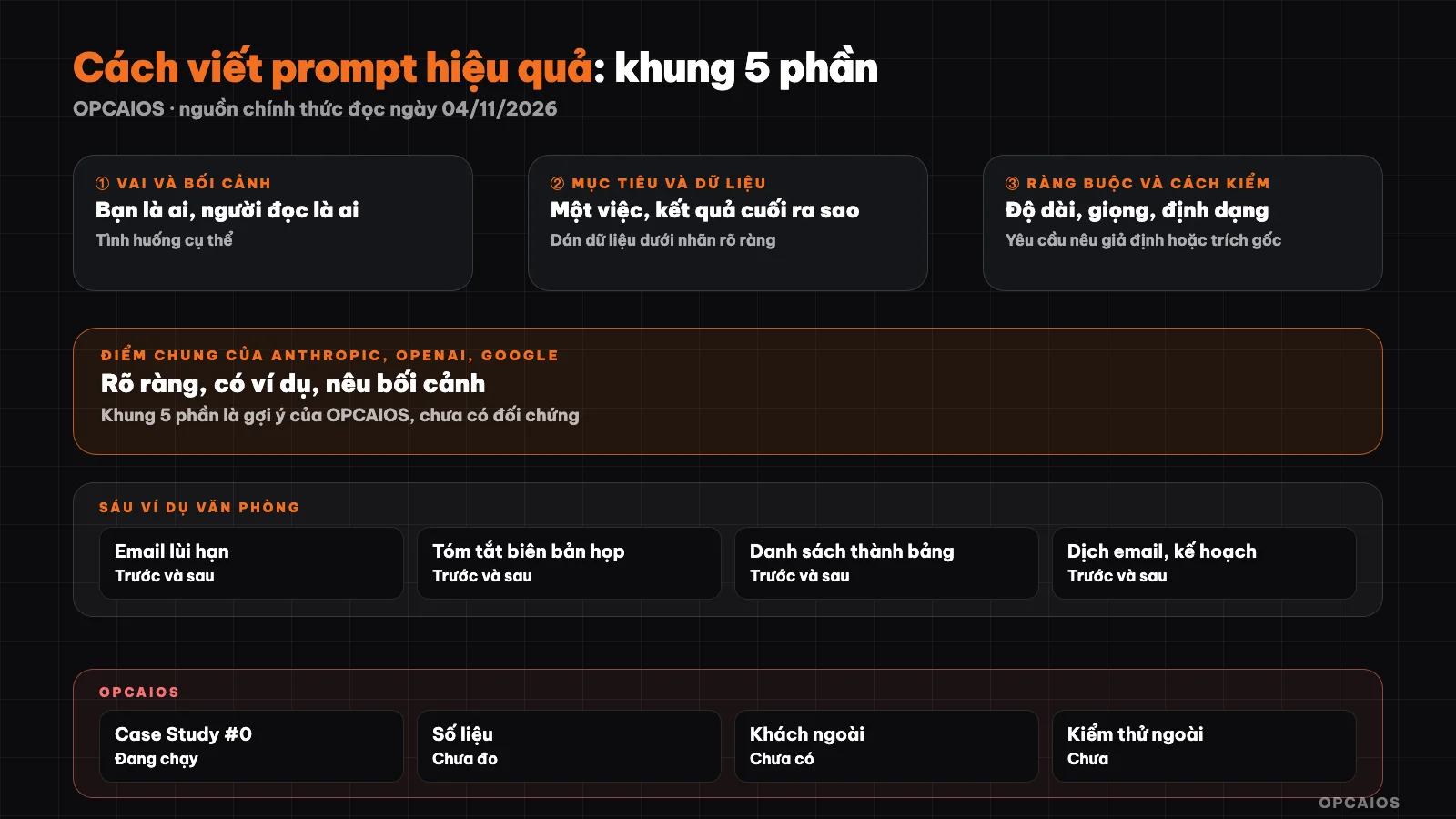
5-part framework and prompt-editing loop. Diagram: OPCAIOS.
What is an effective prompt?
An effective prompt is one that gives results you can use right away or with only light edits, because the person writing it has made clear what the model can't guess on its own. The model doesn't know who you're writing for or what tone of voice you want. Anthropic's guide compares Claude to a new hire who's very skilled but doesn't yet know your work practices, and suggests a test: give the prompt to a colleague who knows little about the work; if they're confused, the model will be too. So length is not the measure: a short prompt that gives the reader enough, along with goal and format, usually beats a long rambling one. The original definition is in the post What is a prompt; this one focuses on how to write.
Where do the official guides from the three companies agree?
All three advise: be clear, give context, provide examples, specify format, and try many times over. The table sums up the docs read on 04/11/2026; they write for programmers using APIs, but the principles work for chat windows too.
| Common point | Anthropic (Claude) | OpenAI | Google (Gemini) |
|---|---|---|---|
| Be clear and specific | Section "Be clear and direct" | GPT models need more explicit guidance | "Clear and specific instructions" |
| Context | Explain the reason for the request | Add relevant data to the prompt | "Add context" |
| Examples | Should be 3 to 5 diverse examples | Few-shot learning | Always advise few-shot, warn that too many examples cause rote learning |
| Structure | XML tags to separate instructions, data | Markdown and XML | With Gemini 3: XML or Markdown |
| Output format | State format clearly, constraints | Suggest order: identity, instructions, examples, context | "Response format", "Constraints" |
| Iterate and verify | Need success criteria before refining | Write tests to measure behavior | "Prompt iteration strategies" |
Differences by source: OpenAI writes that models reason well with high-level goals, but GPT models need precise guidance; Google advises Gemini 3 to state goals short and drop extra persuasion. We haven't tested on our own yet.
What does OPCAIOS's 5-part framework contain?
The 5-part framework consists of: role and context, goal, input data, constraints and format, verification method. We group the common points into five boxes to fill in, so you don't forget any when in a hurry. The "verification method" part is where we add emphasis: make the AI list assumptions or cite sources so you have somewhere to check. This is not a standard from any company. For simple work like looking up a word, these five boxes are overkill; just ask straight.
- Role and context: who you are, who the reader is, what the situation is.
- Goal: one specific task, what the final result looks like.
- Input data: content to process, paste in brackets or under a clear label.
- Constraints and format: length, tone, structure, what's forbidden.
- Verification method: ask the AI to list assumptions it added, cite source passages, or self-check.
Template block to fill in:
Role and context: [I am ... The reader is ... Situation: ...]
Goal: [one task, final result]
Input data:
"""
[paste content]
"""
Constraints and format: [length, tone, structure, what not to do]
Verification method: [list assumptions you added / cite source passage for each idea / report where info is missing]

## Six before/after examples for office work

Each example is a hypothetical; the part in square brackets is where you fill in. Remove sensitive data before pasting.

### 1. Email requesting payment extension

Before: "Write an email requesting a payment extension."

After:

```text
I run a small shop and need to write to a regular customer [Customer name].
Goal: request a 7-day extension on invoice [Number]. Reason: supplier delayed delivery.
Constraints: Vietnamese, polite, under 120 words, apologize once, end with asking the customer to confirm.
How to check: below the email, list information you added that I didn't provide.
2. Summarize meeting notes
Before: "Summarize this meeting."
After:
You are an editor. The reader is a manager who didn't attend the meeting.
Goal: summarize the notes below.
Data: """[paste notes]"""
Format: maximum 5 bullet points of decisions, then a table of tasks with columns Person, Task, Deadline. If the notes don't mention person or deadline, write "unclear", don't guess.
How to check: for each decision, quote the original sentence from the notes.
3. Turn messy list into a table
Before: "Make a table from this mess."
After:
You process order data. Below are chat lines with customer names replaced by codes.
Goal: convert into a Markdown table with columns Customer code, Product, Quantity, Notes.
Data: """[paste the lines]"""
Constraints: leave empty cells if information is missing, don't guess quantities.
How to check: state the number of input lines, number of rows in the table, and report if they differ.
4. Short comment for weekly report
Before: "Write a report comment."
After:
I write a weekly report for the director. The reader needs the conclusion in 30 seconds.
Goal: write a comment paragraph around 120 words.
Data (verified): [paste data table]
Constraints: only use numbers in the table, don't mention causes if the table doesn't have them, start with one concluding sentence.
How to check: list each number you used with its source cell.
5. Translate email to English
Before: "Translate to English."
After:
I'm sending this email to a foreign partner for the first time, so the tone should be polite and concise.
Goal: translate the Vietnamese email below to English.
Data: """[paste email]"""
Constraints: keep names, numbers, dates unchanged; don't add ideas.
How to check: after the translation, mention places where you had to choose between two interpretations.
6. Two-week plan
Before: "Plan the promotion."
After:
I work alone with 10 hours per week. Small shop, budget [amount].
Goal: a 2-week plan for an end-of-month promotion.
Format: table with columns Week, Day, Task, Hours.
Constraints: total hours don't exceed 10 per week; tasks needing approval should be marked clearly.
How to check: sum hours per week and report the result.
Common mistakes when writing prompts for AI
Common mistakes are missing the reader, cramming many tasks together, and pasting data that shouldn't be pasted. The six mistakes below are our list; not yet surveyed.
- Pasting sensitive data: customer names, account numbers, contracts. Replace with codes first and read the post protecting business data when using AI.
- Not stating the reader: boss and customer need different tones.
- Asking many things at once: cramming summary, translation, and planning into one go often makes every part shallow. Separate each run.
- Not asking for sources or assumptions: you can't tell where AI added things.
- Pasting long documents without pointing out which part matters.
- Writing long to be sure: adding emphasis instead of information. Google advises removing extra persuasion when using Gemini 3.
How do I iterate a prompt to get better results?
Iterating a prompt means running it, reading the result, changing one factor, running again; changing each thing to see which change works. Two tricks to use right away. One: ask AI to ask back with "If information is missing, ask me at most 3 questions before writing". Two: edit yourself the way Anthropic's documentation describes: draft, review against your criteria, then revise from the review; you do it in three messages by hand. Once you have a good version, save it for next time. Ways to add deeper context are in the post What is context engineering.
OPCAIOS experience
The website opcaios.org was built by one person (Le Quoc Nghia) with AI agents, and Nghia uses Claude in Vietnamese for work. We haven't measured whether a 5-part prompt framework produces better results than a short prompt, and haven't compared quality across models. This post describes how we work, not proven results.
Frequently Asked Questions
How long should a prompt be?
There is no standard length. Official documentation emphasizes clarity, context, and formatting, not word count. A simple task needs one or two sentences; a task with readers, data, and constraints needs all five parts. If the result is wrong because of missing information, add information instead of adding emphasis.
Can the same prompt work for Claude, ChatGPT, and Gemini?
Usually it works because the general principles are the same, but the results will differ. OpenAI and Google also provide their own guidance by model type. We have not made a systematic comparison; try the same prompt on the tools you use, compare results, then adjust for each tool if needed, since each company has its own guidance.
Should I ask AI to play the role of an expert?
Stating a role helps guide tone and detail level; Anthropic's documentation says even one sentence of role makes a difference. But a role does not add real knowledge. An "AI tax expert" can still be wrong, so for tax, legal, or financial matters only use it for reference and ask a real expert. The safe approach is to state the role with a request to list what needs verification.
Is the five-part framework required to have all five parts?
No. This is an OPCAIOS checklist, not a standard from any company. For small tasks, skip parts you don't need. You should keep the reader and the checking method, because missing these two parts usually makes the result generic and hard to review. When you see the result going off track, check which part is missing before rewriting the whole prompt.
Where can I learn to write prompts in Vietnamese as a beginner?
Start with your own daily work: pick a task, write it using the five-part framework, run it, revise three times. See also the post learning AI for beginners and the official documentation of the tool you use. Writing in Vietnamese or English both work; we have not compared the two. We have not reviewed any Vietnamese prompt courses for this post.
Next Steps
Open OPCAIOS's prompt library, pick a template close to your task, then fill it in again using the five-part framework in this post.
Source: Anthropic (Prompt engineering overview, Prompting best practices), OpenAI (Prompt engineering guide), Google (Gemini prompting strategies), read 04/11/2026; only drew common points and rephrased. Not verified: whether the five-part framework is more effective than other ways of writing, differences between models with Vietnamese, quality of Vietnamese prompt courses. Examples are hypothetical. Experience is from OPCAIOS.
Translated from Vietnamese with AI. Read the original.
Want to apply this in your business?
Book a free 30-minute call (Vietnam time, in English or Vietnamese).