



Auditing AI software costs means listing every paid tool, comparing it to actual usage and value created, then canceling, downgrading, or consolidating subscriptions that don't justify themselves. For a one-person company (OPC), charges of $10 to $100 each month add up fast since new AI tools arrive constantly and most use subscription or usage-limit pricing. For instance, in the scenario at the end of this post, eight tools like Claude Max, Cursor, Bolt, and Instantly came to roughly $243 per month. The "cut 50%" target in the headline is a number to set for yourself, not a guaranteed result: actual savings depend on how many overlapping or underused tools you have. This post covers a seven-step audit process, a sample inventory table, a scenario with clear math (assumptions based on prices listed on 24/10/2026), signs of "tool buying addiction," and OPCAIOS experience.
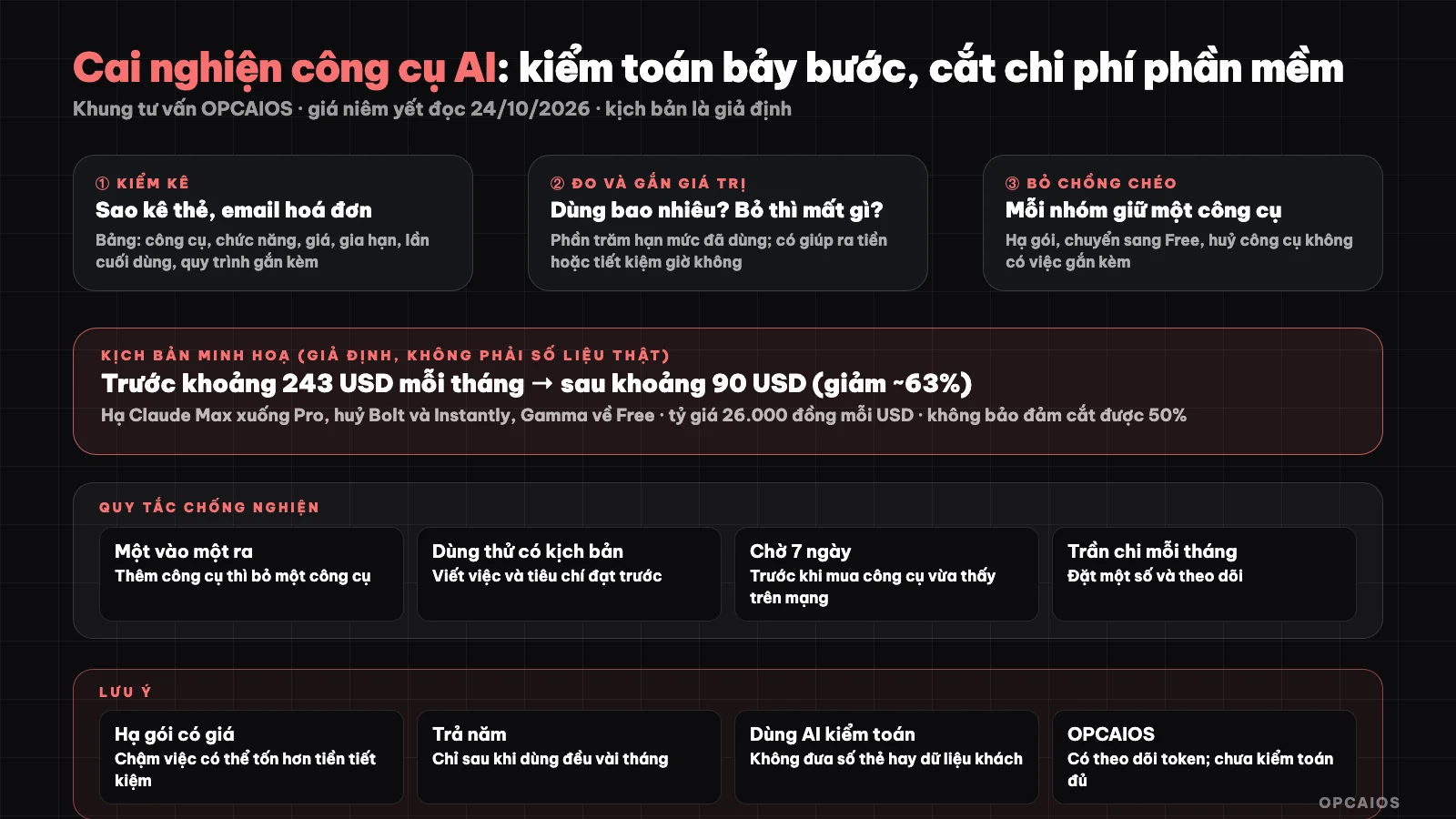
Inventory, measure, link value, remove overlap, downgrade, schedule. Diagram: OPCAIOS.
Signs of "tool buying addiction"
- Sign up for a new tool after every AI video when you haven't finished using the old ones yet.
- One job gets done by two to three tools.
- Pay for a high tier "to have more quota" but never hit the limit of the lower tier.
- Forget renewal dates and get charged for a whole year.
- Free trial turns into paid without anyone noticing.
- Can't answer: "what did this tool help me earn or save this past month?"
What does the seven-step audit process cover?
The process runs in order through seven steps, taking only a few hours per cycle for a one-person company:
- Inventory: get your card statement, invoice emails, app stores; write each charge into a table (template below). Don't paste card numbers or sensitive info into AI tools.
- Measure usage: last time used, times per month, percentage of quota used.
- Link to value: which workflow does this tool sit in; what's lost if you drop it; does it help bring in money or save work hours.
- Find overlap: group by function (AI assistant, coding, design, automation, lead finding, email); keep one main tool per group.
- Downgrade or cancel: downgrade if you haven't hit the quota; switch to free tier if it's enough (see Free AI Tech Stack); cancel tools with no linked work.
- Schedule renewals: put renewal dates on your calendar 7 days before; pay yearly only after steady use for a few months.
- Review monthly: 15 minutes at the start of the month; only add new tools when you drop an old one or have a measured reason.
Sample inventory table
| Tool | Function | Price per month | Cycle, renewal date | Last used | Workflow attached | Overlaps with | Decision |
|---|---|---|---|---|---|---|---|
| (name) | (group) | (convert to đồng) | (month or year) | (date) | (specific task) | (other tool) | Keep, downgrade, cancel |
Scenario: how much can audit save? (assumption, not OPCAIOS data)
This scenario is a hypothetical calculation showing possible savings. Say a one-person company pays for these tools (list prices from official sites read on 24/10/2026; assumed rate 26,000 đồng per USD and 30,000 đồng per EUR, before tax):
| Item | Price per month (USD, approximate) | Decision after audit |
|---|---|---|
| Claude Max | 100 | Downgrade to Pro 20 (haven't hit Pro limit) |
| Cursor Premium | 30 | Keep |
| Bolt Pro | 18 | Cancel, use free tier for mockups |
| Gamma Plus (203,200 đồng) | 8 | Downgrade to Free (accept Gamma watermark) |
| n8n Starter (20 EUR) | 23 | Keep |
| Brevo Starter | 10.8 | Keep |
| Instantly Growth | 47 | Cancel (haven't run outreach campaigns yet) |
| Canva Pro (150,000 đồng) | 6 | Keep |
| Total before | about 243 | |
| Total after | 20 + 30 + 0 + 0 + 23 + 10.8 + 0 + 6 = about 90 |
In this scenario savings are about 63%, from $243 down to $90 per month. That number doesn't mean you will cut 50% or 63%: if you only pay for three tools and use them fully, savings could be much less. Also weigh the risk of downgrading: if lower quota slows your work, the time cost may beat the money saved. Different calculation at Cost for OPC.
Rules to Prevent Getting "Hooked" Again
- One in, one out rule: when adding a new tool, you must remove one tool from the same category.
- 30-day trial rule with a scenario: before trialing, write down the specific task you'll test and the success criteria; when the period ends, make a decision.
- Monthly spending cap: set a maximum number and track it.
- Prioritize tools with spending limits and alerts to avoid surprise bills.
- Wait 7 days before buying a tool you just saw on social media.
- Use a separate card or account for tools to make auditing easier.
- Record in one place only the inventory table and renewal dates.
Using AI to Audit
You can ask an AI assistant to find overlaps in your inventory table and suggest free tool replacements. Only provide the tool name, features, and price—don't share card numbers, names, or customer data; and verify prices on official pages since AI can get facts wrong.
OPCAIOS's Experience
For AI costs, we have a feature on our website that tracks token usage and expenses by month, lets us set spending limits, alerts us when we're getting close, and refuses to generate more content once we hit the cap, so model costs don't exceed our budget. We haven't run a full audit of all our paid tools following these seven steps, we don't publish our total monthly software spending, and we don't have data on actual savings, so the scenario above is an assumption, not our results. One lesson from writing this series: AI tool prices change fast and many pricing pages aren't consistent between the pricing table and the FAQ, so each renewal you should re-read the pricing page.
Frequently Asked Questions
What is an AI tool cost audit?
An AI tool cost audit is listing every paid tool, comparing it against actual usage and value delivered, then downgrading, canceling, or consolidating subscriptions that don't justify their cost. For a one-person company, this usually starts by pulling credit card statements and invoice emails from the past three to six months, entering them into a table with columns for tool name, function, price, renewal date, and last used date. A hypothetical example: a table with eight items like Claude Max ($100), Cursor Premium ($30), and Instantly Growth ($47) each month, totaling around $243. After grouping by function, keep one main tool per group; any tool not tied to a specific task gets canceled. Finally, schedule a 15-minute review at the start of each month so new charges don't accumulate again.
Can you cut costs by 50%?
Cutting 50% is an achievable target when you have many overlapping tools, but it's not a guaranteed result. In the hypothetical scenario in the post, total spending dropped about 63%, from $243 down to $90 per month, thanks to three decisions: downgrading Claude Max to the Pro plan, canceling Instantly because no campaigns had been run yet, and dropping Bolt Pro to use the free tier. Conversely, someone paying for only three tools and using them to their limits might cut very little or not at all. For example, if downgrading slows down your work by many hours each week, the time cost could exceed the money saved. OPCAIOS doesn't have real data on typical savings rates, so the 50% figure should only be used as a starting point for your own audit.
Should you pay monthly or annually?
Pay monthly first, and only switch to annual after using a tool consistently for a few months. Annual payments are usually cheaper, but they lock up cash and make refunds difficult, while AI tools change pricing and limits quickly. Hypothetical example: pay annually for a $20-per-month tool and drop it after three months—the annual payment is still gone. Write the renewal date on your calendar seven days before and review the pricing page before each renewal.
Which tools should you keep?
Keep a tool if it ties to a process that generates revenue or measurably saves work hours, and it doesn't overlap with another tool in the same group. Hypothetical example: in the post's scenario, Cursor, n8n, Brevo, and Canva were kept because each serves a distinct purpose; Instantly was canceled because no campaigns had been run. Ask yourself: which process does this tool fit into, what breaks if I remove it, and is a free tier enough. For free tools as alternatives, see Free AI Tech Stack.
How often should you review?
Review once a month, around 15 minutes at the start of the month, plus one extra review before each major renewal date. First, open your inventory table and match it against last month's credit card statement to spot surprises, like a trial that turned into a paid subscription. Next, record the last-used date for each tool; any tool untouched for 30 days is a candidate for cancellation. Then check renewal dates in your calendar, since the recommendation is to flag them seven days ahead so you have time to decide. Finally, apply the one-in-one-out rule: add a new tool only if you're dropping one from the same group. To learn how to manage your AI tools, check out OPCAIOS's AI application training course.
Source: pricing listed from the official pages of Claude, Cursor, Bolt, Gamma, n8n, Brevo, Instantly, Canva on 24/10/2026, excluding tax, subject to change; currency conversion is OPCAIOS's assumption; the scenario is illustrative, not actual data. The audit process is OPCAIOS's advisory framework. Experience is from OPCAIOS.
Translated from Vietnamese with AI. Read the original.
Want to apply this in your business?
Book a free 30-minute call (Vietnam time, in English or Vietnamese).