


What is Clarity Upscaler?
Clarity Upscaler is an open-source project using Stable Diffusion to upscale and sharpen images, increasing resolution while "drawing" additional details. The author presents it as a free alternative to Magnific. According to GitHub API (read 04/11/2026), the philz1337x/clarity-upscaler repository was created on 15/3/2024, has around 5,166 stars and 532 forks, with AGPL-3.0 license; the most recent code push was on 6/3/2025, meaning the repository has been barely updated over the past 20 months. The open-source version is free but requires GPU; the author also sells the ClarityAI.co application, API, and Flux-based upscaling that are not open-source. This article explains how Clarity Upscaler works, four ways to use it, costs, licensing, and when to choose it.
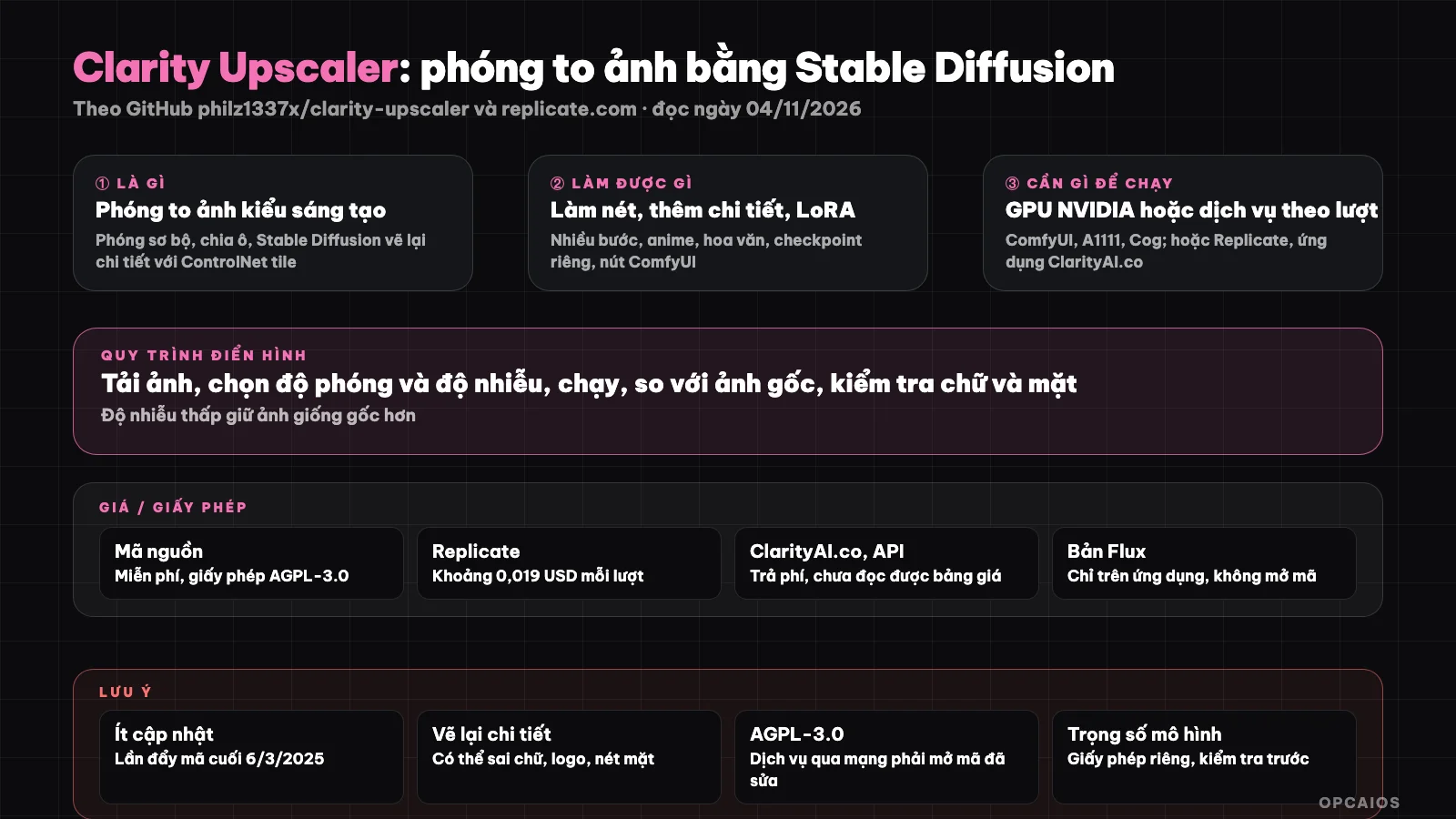
Clarity Upscaler upscales then has Stable Diffusion redraw details by tile. Diagram: OPCAIOS.
What is Clarity Upscaler and who created it?
Clarity Upscaler is a "creative" image upscaling tool: instead of just stretching pixels, it uses a diffusion model to generate new details for the larger image. The author is a programmer using the name philz1337x on GitHub and X. The README on GitHub (read 04/11/2026) clearly states the business model: the author creates open-source AI applications, and to have funds for maintenance, also makes paid versions from that same code.
Technically, the repository contains code based on Stable Diffusion WebUI (AUTOMATIC1111) with a cog.yaml file to package it for running via Cog on Replicate. Sample parameters in the README show the process: preliminary upscaling using the 4x-UltraSharp model, dividing the image into multiple tiles using Tiled Diffusion, then having a Stable Diffusion 1.5 model redraw each tile with ControlNet tile to preserve layout, with low noise around 0.35. This way the image gets larger while still resembling the original, with added texture like skin, leaves, fabric.
What can Clarity Upscaler do?
Clarity Upscaler upscales and sharpens images, with additional options the author gradually added throughout 2024. According to the changelog in the README on GitHub (read 04/11/2026):
| Feature | Description from README |
|---|---|
| Creative upscaling | Increase resolution and draw additional details using Stable Diffusion |
| Multi-step upscaling | Upscale multiple times in sequence for very large images |
| Preserve similarity to original | April 2024 update improved similarity to original |
| Custom LoRA and checkpoints | Load custom LoRA and safetensors files |
| Anime, pattern images | Separate mode for anime and repeating patterns |
| Sharpen, format conversion | Sharpen images, export to jpg, png, or webp |
| ComfyUI nodes | Use in ComfyUI via paid API or free workflow |
Upscaling using a diffusion model differs greatly from traditional upscaling. Tools like Real-ESRGAN learn to restore pixels so results stay close to the original, adding few fictional details. Clarity Upscaler instead has Stable Diffusion imagine additional details based on prompts like "masterpiece, best quality, highres" in the sample parameters, so images typically look sharper and have richer texture, but can also alter small details like facial features, text, or patterns. That's why the README emphasizes noise and ControlNet parameters: they determine how much the image gets "creative." According to the README, the Flux version the author sells from March 2025 is advertised as better with faces and text, but it's not open-source. For product images with logos or text, you should carefully check the results before using them.
Is Clarity Upscaler Free, What's the Price and License?
Clarity Upscaler code is free under AGPL-3.0, but running it yourself requires an NVIDIA GPU; using the convenience version means paying. There are three cost categories: hardware when self-hosting, pay-per-run on Replicate, and the ClarityAI.co application.
| Item | Information | Source, Read Date |
|---|---|---|
| Source code | Free, AGPL-3.0 | GitHub API, 04/11/2026 |
| Self-hosted | Requires GPU; cog.yaml enables GPU and uses PyTorch |
cog.yaml, 04/11/2026 |
| Replicate | Around 0.019 USD per run, roughly 52 runs per 1 USD, GPU A100 40GB, typically completes in around 17 seconds | replicate.com, 04/11/2026 |
| ClarityAI.co application, API, ComfyUI node via API | Paid; pricing table not accessible | clarityai.co, 04/11/2026 |
| Upscaling with Flux | Only on application and API, source not open | README, 04/11/2026 |
Prices exclude tax and may change; Replicate pricing varies by input image. The ClarityAI.co page requires JavaScript so our reading tool couldn't retrieve the pricing table. AGPL-3.0 has one important note: if you modify the code and let others use it over the network, for example by offering an image upscaling service on a website, you must disclose the modified code to those users. Additionally, model weights like Stable Diffusion checkpoints, LoRAs, and upscaling models have their own licenses that need to be checked before commercial use. This is not legal advice.
How Do I Start Using Clarity Upscaler?
Clarity Upscaler has four usage methods, and the README recommends newcomers to Cog choose easier methods. Two free methods are ComfyUI and A1111; two paid but easier methods are the ClarityAI.co application and ComfyUI node via API. According to the README on GitHub (read 04/11/2026):
- First, if you only need a few images, use the ClarityAI.co application or the version on Replicate, no installation needed.
- Next, if you already use ComfyUI, download the
philz1337x/ComfyUI-ClarityAIrepository and open the free workflow file inside; or install the "Clarity AI" node via ComfyUI Manager and enter the paid API key. - If you use Stable Diffusion WebUI (A1111), follow the sample parameters in the README: Juggernaut Reborn checkpoint, Tiled Diffusion, ControlNet tile and 4x-UltraSharp model.
- Finally, if you're comfortable with Cog, download the weights and call predict:
cog predict -i image="link-to-image"
Before the command above, the README requires running download_weights.py. Example (hypothetical): an online seller has product photos taken on a phone at 1,000 pixels, wanting to print large banners; they try a few images on Replicate at per-run pricing, compare with Real-ESRGAN upscaling, then choose which version preserves the text on packaging correctly.
Limitations, Risks, and Legal Notes for Clarity Upscaler
The biggest limitation of Clarity Upscaler is that the repository has been inactive for about 20 months, with new work moving to a closed version. According to GitHub API (read 04/11/2026), the last code push was 6/3/2025, only to add the Flux version link to README; the repository is not marked archived.
- Maintenance: dependencies like PyTorch 2.0.1 and Python 3.10 in
cog.yamlare outdated; installing on new machines may cause errors; bugs reported on GitHub may not be addressed. - Image details changed: diffusion models can distort faces, text, logos. Don't use upscaled images as evidence, legal documents or identification photos.
- Input image copyright: upscaling someone else's image doesn't give you rights to that image.
- Photos of real people: portrait images are personal data; when uploading to an application or Replicate, the image leaves your machine. Get permission from people in the image and read the data policy of the service.
- AGPL license and weights: see the section above before including in commercial products.
These legal points are general reference only, not legal advice; we have not cross-checked the terms of ClarityAI.co, Replicate, and original legal documents.
Comparing Clarity Upscaler with Other Options
Clarity Upscaler sits between traditional upscaling tools and paid services like Magnific. The table below is general description, not measurement.
| Option | Strengths | Weaknesses |
|---|---|---|
| Clarity Upscaler (self-hosted) | Free, lots of detail, customizable parameters | Requires GPU, infrequent repository updates, prone to detail changes |
| Real-ESRGAN | Fast, faithful to original, lighter | Less new detail added, images can look flat |
| ClarityAI.co, Flux version | Easy to use, author advertises better results with faces and text | Paid, source not open |
| Magnific and similar services | Convenient interface, no installation needed | Subscription pricing, images processed on company servers |
When should you use Clarity Upscaler?
Clarity Upscaler works well when you need large, detail-rich images for illustrations, AI images, or landscape photos and can accept details being redrawn. It's less suitable when accuracy matters more than aesthetics.
| Situation | Recommendation |
|---|---|
| AI-generated images needing large-format printing | Suitable, try low noise parameters first |
| Product images with text, logos | Try Real-ESRGAN first, compare carefully |
| Have GPU and already use ComfyUI | Use free workflow in ComfyUI |
| No GPU, only a few images | Use Replicate or pay-per-use apps |
| Offering upscaling service to clients | Read AGPL-3.0 and model weights license carefully |
OPCAIOS experience
We recently added Clarity Upscaler to the Repo list in the Utilities section of opcaios.org after reading the README and checking the repository status; we haven't tested it yet, so this section outlines the criteria we use to consider it, not an evaluation after use. The criteria have four points. First, is the repository still being updated: here the answer is no, the last code push was 3/6/2025, so we see it as more of a technical reference than a long-term tool. Next, the AGPL-3.0 license is more restrictive than MIT if deployed on the web. Third, there's a hidden cost in GPU when running it yourself. Finally, can it replace the tool we're already using: we downloaded the Real-ESRGAN repository to our work machine to try increasing image resolution, haven't brought it into our daily workflow yet, so Clarity Upscaler will be a comparison option when we need more detail.
Read more: What is ComfyUI?, What is Real-ESRGAN?, What is GitHub?, 5 best AI image sharpening tools 2026.
Frequently Asked Questions
How is Clarity Upscaler different from Real-ESRGAN?
Real-ESRGAN is an upscaling model that learns to restore pixels, producing results faithful to the original image and running fast. Clarity Upscaler uses an upscaling model like 4x-UltraSharp to do an initial upscale, then has Stable Diffusion redraw each tile with ControlNet tile, so it adds more details and texture. In exchange, Clarity is slower, needs a more powerful GPU, and can get text or faces wrong. According to the cog.yaml on GitHub (read 04/11/2026), the realesrgan package is in the dependency list. Many people use both: Real-ESRGAN for images that need to be faithful, Clarity for illustration images.
Does Clarity Upscaler need a GPU?
If you run it yourself, yes. The cog.yaml file on GitHub (read 04/11/2026) enables GPU and uses PyTorch 2.0.1 with xformers, meaning it targets NVIDIA cards. The README does not list minimum VRAM, and we have not measured it. On Replicate (read 04/11/2026), the model runs on an A100 40GB GPU, usually finishing in about 17 seconds per run. If you do not have a GPU, the practical way is to use Replicate at per-run pricing or the paid ClarityAI.co application; both mean your images are sent to external servers.
Is Clarity Upscaler still being developed?
The open-source repository is nearly idle. According to GitHub API (read 04/11/2026), the most recent code push was 6/3/2025, and that commit only added a link to Flux upscaling in the README. The repository has not been marked archived, so it can still be downloaded and used. According to the README, new features like Flux are only on the author's paid application and API. So if you need a tool maintained for the long term, treat the open version as a starting point and be prepared to fix dependency issues when installing on a new machine.
Can I use Clarity Upscaler for commercial work?
The code is AGPL-3.0, which permits commercial use, including processing images for clients. The important condition is that if you modify the code and let others use it over the network, you must provide them the modified code. Beyond the code, each model weight like Stable Diffusion checkpoints, LoRAs, and upscaling models have their own licenses, which may have usage restrictions. The input images must also be images you have the right to use. We have not cross-checked each weight license in the sample parameter set; this is reference only, not legal advice.
Can someone without coding knowledge use Clarity Upscaler?
Yes, in two easiest ways the README suggests: use the paid ClarityAI.co application, or use the Replicate version which only needs you to upload an image. If you want it free, you need to get familiar with ComfyUI or Stable Diffusion WebUI, download the models, and have a machine with a GPU; this does not require writing code but takes patience to set up. The Cog method is for people comfortable with the command line. An agent like Claude Code can help with setup if you review each command. To learn how to use AI for images and daily work, see OPCAIOS's AI application training course.
Source: GitHub philz1337x/clarity-upscaler (README, cog.yaml, file list, commit history, API, read 04/11/2026), model page on replicate.com (read 04/11/2026); not read/not verified: ClarityAI.co pricing table (page needs JavaScript, unreadable), minimum VRAM, licenses of each model weight, quality versus Magnific; star count and pricing may change. Experience is from OPCAIOS.
Translated from Vietnamese with AI. Read the original.
Want to apply this in your business?
Book a free 30-minute call (Vietnam time, in English or Vietnamese).