



What is GitHub?
GitHub is a platform for building software: a place to store source code in the cloud, track the history of changes, collaborate, review, test automatically and deploy. GitHub serves every stage of the software development lifecycle, from planning to operation, according to GitHub's official documentation (checked 23/10/2026), and is used by students, programmers, project managers, security teams, data scientists and many others. GitHub is built on Git, an open source version control system written by Linus Torvalds. This post explains what GitHub is, how it differs from Git, main features (Actions, Pages, Copilot, Codespaces), plans and pricing, how to get started, and things to watch out for when working with AI agents, along with real experience from OPCAIOS.
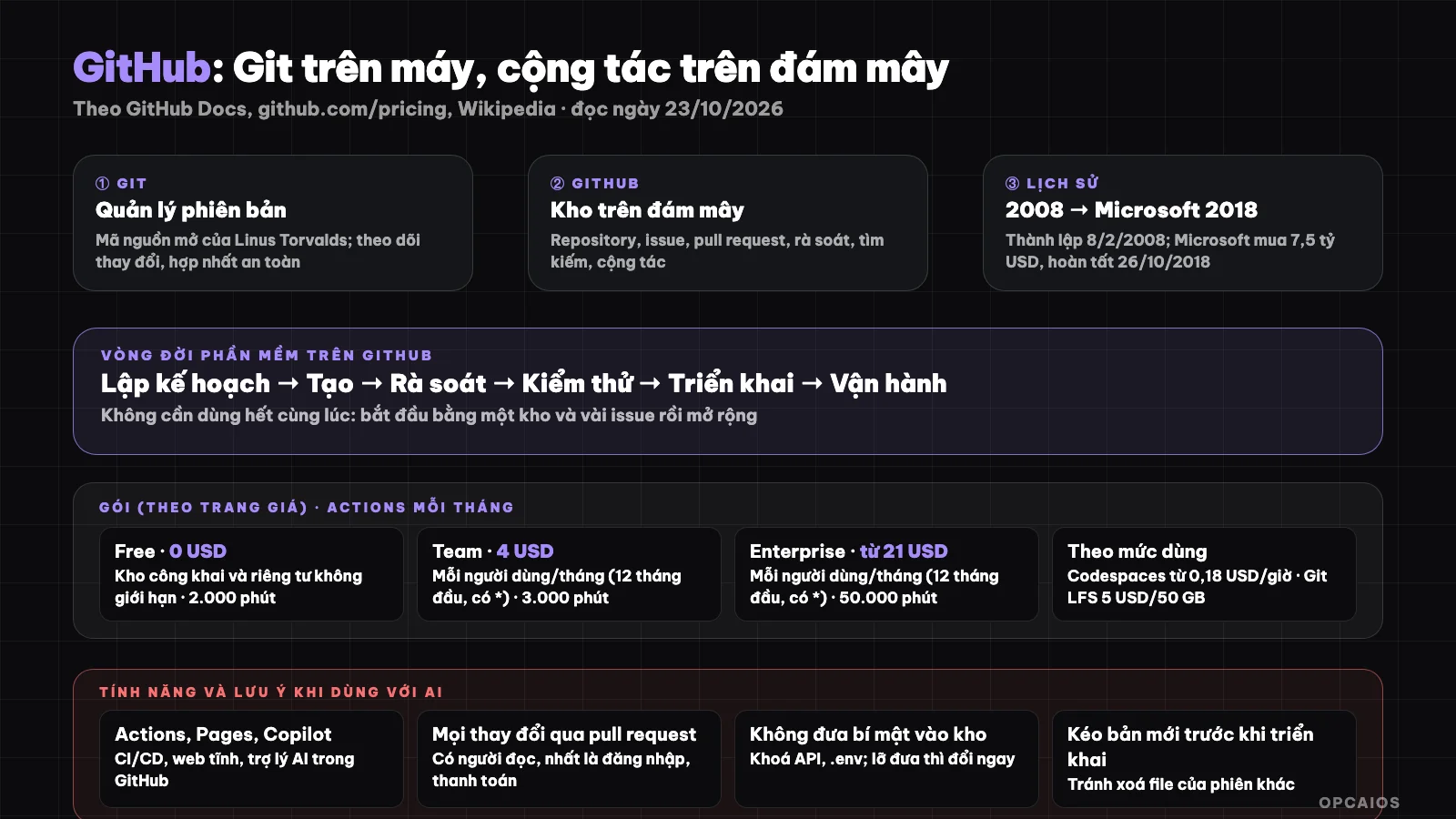
Git manages versions on your machine; GitHub stores repositories in the cloud and adds collaboration, testing, deployment tools. Diagram: OPCAIOS.
What is GitHub and how does it differ from Git?
GitHub is a service for storing Git repositories in the cloud and adding collaboration tools, while Git is software for tracking changes to files. Git is an open source version control system, according to GitHub documentation (read 23/10/2026) and (per GitHub): you work on a copy of the project, record the history of changes and merge work with others safely. GitHub builds on Git by storing Git projects, called repositories, in the cloud, along with planning and collaboration tools. The Git platform software was written by Linus Torvalds, the creator of Linux, according to Wikipedia; the user interface was written by the GitHub team using Ruby on Rails and Erlang. The main purpose of GitHub is to support version control and issue tracking in software development. For example, the first time you run git commit is entirely on your machine, then git push to push the repository up to GitHub.
What are the basic concepts of GitHub?
| Concept | Meaning |
|---|---|
| Repository | A place that contains the project and the complete history of changes |
| Commit | A single recording of changes, with a description |
| Branch | A parallel workspace to try features without touching the main branch |
| Pull request | A proposal to merge changes, so others can review and comment |
| Issue | An item to track work, bugs or ideas |
| Fork | A copy of someone else's repository to your account to contribute |
What stages of software does GitHub support?
According to GitHub's documentation, the platform supports six stages of the software development lifecycle: planning (tracking work, setting milestones), creating (writing and storing code, safe feature development, timeline of changes), reviewing (proposing changes, discussing, applying feedback), testing (automatically checking each change before merging), deploying (automated deployment process, release management) and operating (monitoring, managing dependencies, finding and fixing security vulnerabilities). You don't need to use everything at once: many people start with one repository and a few issues then expand gradually.
What are the main features of GitHub?
- GitHub Actions: a CI/CD (continuous integration and continuous deployment) platform that allows you to automate build, test and deployment processes. You create workflows that run for each pull request or deploy when merging; GitHub provides Linux, Windows, macOS virtual machines, or you can use your own machines.
- GitHub Pages: a static website hosting service that takes HTML, CSS, JavaScript directly from the repository, can run through a build step then publish.
- GitHub Copilot: an AI assistant that helps you write, understand and ship software: suggests code as you type, answers questions about source code, reviews changes and does tasks you assign; because it sits within GitHub it works with existing issues, pull requests and automation.
- GitHub Codespaces: a pre-configured development environment in the cloud, opened from a browser.
- GitHub Packages: store your software packages or use as a dependency for other projects.
- Security: Dependabot automatically creates pull requests to update dependencies, along with tools to scan vulnerabilities and secrets.
What GitHub Packages and Pricing Are There?
GitHub has three main packages: Free, Team, and Enterprise. According to GitHub's official pricing page (checked on 23/10/2026):
| Package | Price | Highlights |
|---|---|---|
| Free | $0 per month, forever | Unlimited public and private repositories; GitHub Actions 2,000 minutes per month; Packages 500 MB |
| Team | $4 per user per month (marked "in the first 12 months", with asterisk *) | Everything from Free, plus Codespaces, repository rules, Actions 3,000 minutes per month, Packages 2 GB |
| Enterprise | From $21 per user per month (marked "in the first 12 months", with asterisk *) | Security, compliance, flexible deployment; Actions 50,000 minutes per month, Packages 50 GB |
The pricing page notes that Actions minutes and Packages storage are free for public repositories. For example, a team of 5 users on the Team plan pays 5 × $4 = $20 per month at listed price. Additionally, Codespaces charges $0.18 per compute hour and $0.07 per GB storage per month; Git LFS costs $5 per month for 50 GB of bandwidth and storage. The asterisk and "first 12 months" condition are not explained clearly in what we read; check the official pricing page before purchasing.
How Did GitHub Come About?
GitHub was founded in 2008 and was acquired by Microsoft in 2018. According to Wikipedia (read on 23/10/2026), GitHub was established on 8/2/2008 under the name Logical Awesome LLC, and the website launched on 10/4/2008. There are two notable milestones in the deal:
- 4/6/2018: Microsoft announced its intention to acquire GitHub for $7.5 billion.
- 26/10/2018: the deal was completed.
According to Microsoft, GitHub continues to operate independently as a community, platform, and business. At that time some people were concerned about how Microsoft handled previous deals; this is an opinion recorded by Wikipedia, not a proven fact. Additionally, Wikipedia notes that the underlying platform software is Git written by Linus Torvalds, while the user interface was written by the GitHub team using Ruby on Rails and Erlang. A hypothetical example: a project created in 2026 still uses Linus Torvalds's Git, only the repository is hosted on Microsoft's GitHub.
How Do I Get Started With GitHub?
The minimum process has six steps:
- Create an account on github.com.
- Create a repository for your project; you can keep it private.
- Clone the repository to your machine and create a new branch for changes:
git clone https://github.com/<account>/<repository-name>.git
cd <repository-name>
git switch -c new-feature
- Record changes by selecting the right files to add:
git add path/file-1 path/file-2
git commit -m "Brief description of changes"
git push -u origin new-feature
- Open a pull request on GitHub, describe your changes and ask others to review.
- Merge and deploy after it is approved and testing passes.
GitHub's documentation also has guides for using the GitHub Desktop application if you want to avoid the command line.
What Should I Keep in Mind When Working With AI Agents on GitHub?
Working with AI agents on GitHub means letting the agent write code quickly but keeping control through pull requests, testing, and permissions. GitHub Copilot is built into GitHub so it works with existing issues, pull requests, and automation, according to GitHub (read on 23/10/2026) and Copilot documentation (per GitHub). Five habits you should have:
- Every change made by AI should go through a pull request and be reviewed by someone, especially in login, payment, and personal data sections. See What is Vibe Coding?.
- Never put secrets in the repository: API keys, passwords,
.envfiles. Even if the repository is private, treat any secret pushed as exposed and change it immediately. - Grant minimum permissions to tokens, applications, and agents; see What is MCP?.
- Use branch rules and automated testing (Actions) so no one, including agents, can merge straight into the main branch without passing checks.
- Pull the latest version before deploying from the main branch of the shared repository.
For example, if an agent using GitHub Copilot fixes the login section, someone needs to review the pull request before it is merged.
My Experience with GitHub at OPCAIOS
The source code for opcaios.org is stored on GitHub, and multiple sessions (people and AI agents) work on the same repository. Two practical lessons:
- Commit only the files you edited: when multiple sessions work simultaneously, use
git commit -- <path>instead ofgit add ., since the staging area is shared. - Pull the latest version before each deployment: you must fetch the main branch from the shared repository and merge it into your working version. On October 23, 2026, a deployment from a local copy that hadn't pulled another session's new commits deleted a file on the server and broke the build; the website kept running the old version thanks to the zero-downtime switching mechanism.
Additionally, the shared repository on GitHub is the source of truth that every session must sync with. Understanding this, the example above shows that one forgotten sync was enough to break the build. We deploy through our own process rather than using GitHub Actions for this yet.
Frequently Asked Questions
What is GitHub?
It's a software development platform: store source code in the cloud, track changes with Git, collaborate using pull requests and issues, and automatically test and deploy with Actions.
How are GitHub and Git different?
Git is an open-source version control software that runs on your machine. GitHub is a cloud service that stores Git repositories and adds collaboration tools like pull requests, issues, Actions, and Pages.
Is GitHub free?
Yes. The Free plan has unlimited public and private repositories, 2,000 minutes of Actions per month, and 500 MB of Packages, free forever. Team plans start at 4 USD and Enterprise at 21 USD per user per month according to the current pricing page; check the detailed terms.
What are GitHub Actions and GitHub Pages for?
Actions is a CI/CD platform to automatically build, test, and deploy code. Pages is a hosting service for static websites pulled directly from the repository.
What should I do when letting an AI agent edit code in a GitHub repository?
Letting an AI agent edit code in a GitHub repository means having the agent work like a new colleague, so it needs to be checked. First, have the agent work on a separate branch instead of the main branch. Next, require all changes to go through a pull request reviewed by a person, especially for login, payment, and personal data sections. Then, run automated tests with GitHub Actions; GitHub's Free plan has 2,000 minutes per month according to the pricing page (checked October 23, 2026). Finally, don't store secrets in the repository and grant minimum permissions to the token. For example, OPCAIOS commits only the files that each working session edits, as described in the experience section. If you want to learn a safe workflow with AI, see OPCAIOS's AI application training.
Source: GitHub Docs ("About GitHub and Git", GitHub Actions, GitHub Pages, GitHub Copilot) and the pricing page github.com/pricing, read directly on October 23, 2026; Wikipedia "GitHub" (history, Microsoft acquisition, technology). Prices and limits may change; terms for the "first 12 months" tier have not been clarified. The process experience is OPCAIOS's.
Translated from Vietnamese with AI. Read the original.
Want to apply this in your business?
Book a free 30-minute call (Vietnam time, in English or Vietnamese).