



Claude Code is a tool from Anthropic that lets Claude work directly on your computer: read files in a folder, suggest changes, edit files and run commands, asking your permission at each step. According to the official documentation, it runs in the terminal, and there are also desktop applications, VS Code extensions and JetBrains integrations. This Claude Code guide for beginners is written for non-programmers, like small business owners or content creators. We don't promise you'll be proficient after one session, we don't promise how many hours you'll save (not yet measured), and we don't guarantee every step will run smoothly on your machine. The guide has a 5-step roadmap, a table of tasks you should and shouldn't delegate in the first week, and the real limitations.
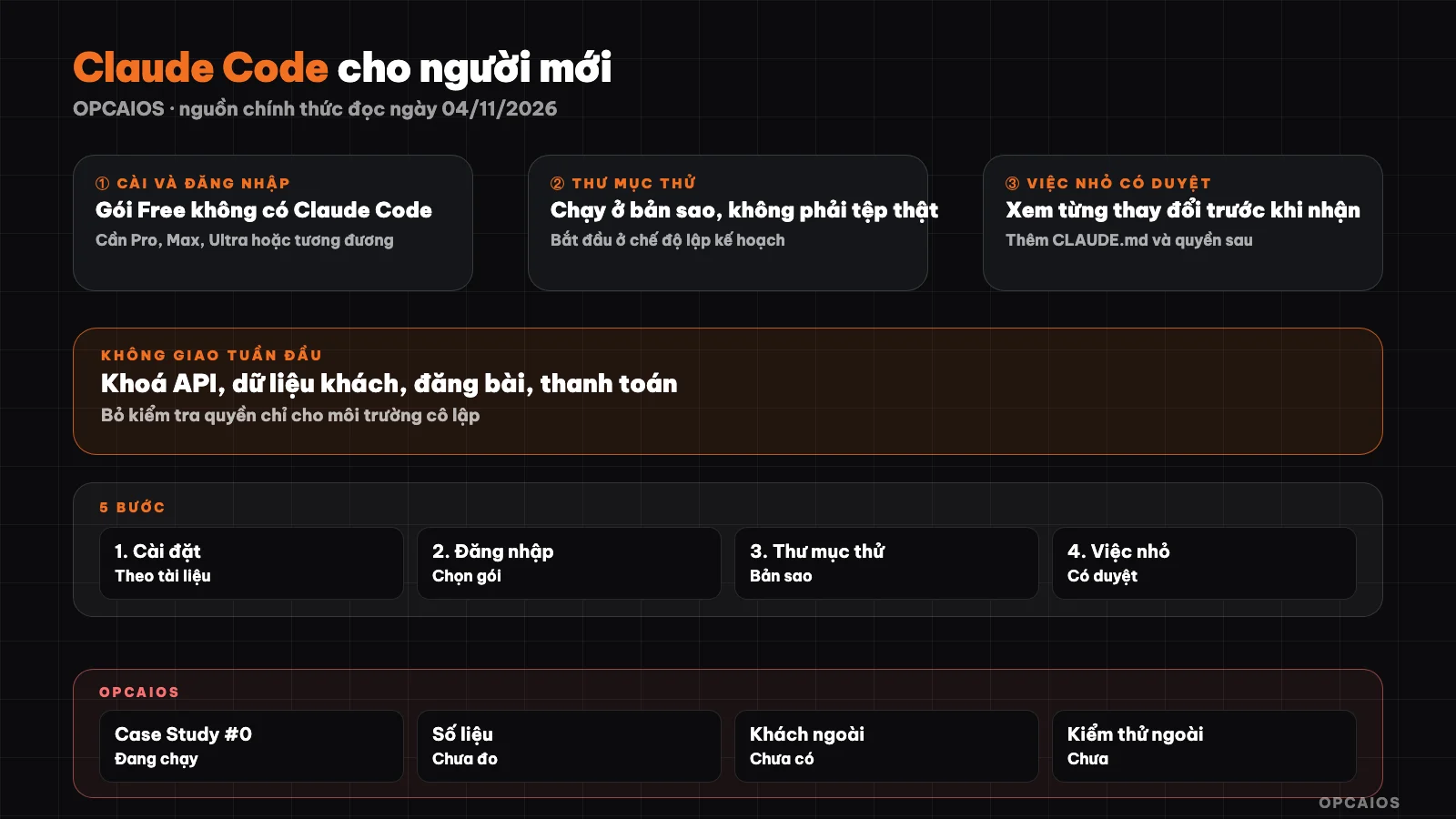
5-step roadmap going from a test folder to long-term setup. Diagram: OPCAIOS.
What is Claude Code and who should use it?
Claude Code is an AI agent that runs on your computer, different from the web chat interface in that it directly reads and edits files in the folder you open. You type a request in plain language, for example "summarize the files in this folder"; Claude Code reads the necessary files, proposes changes and asks if you agree. Anthropic's documentation says you don't need to know programming to get started. People who should try it are those with a real folder of files to process: notes, documents, spreadsheets, small websites. The full definition is in the post What is Claude Code.
What do you need before you start?
You need a paid account or an API account, a capable machine and a terminal window (or desktop application). According to the official setup page read on 04/11/2026, the Free plan on claude.ai does not have Claude Code.
| Item | What the official documentation says |
|---|---|
| Operating system | macOS 13.0+; Windows 10 build 1809+; Ubuntu 20.04+, Debian 10+, Alpine 3.19+ |
| Hardware | 4 GB RAM or more, x64 or ARM64 |
| Network | Internet required; only in countries Anthropic supports |
| Account | Pro, Max, Ultra, Team, Enterprise, Console (prepaid API) or Bedrock, Google Cloud, Foundry |
The claude.com/pricing page read on 04/11/2026 displays prices in USD, no region specified, prices before tax: Pro 20 USD per month if paid monthly (17 USD per month if paid yearly, charged 200 USD once), Max 100 USD, Ultra 200 USD per month. The page says prices may change. We have not yet checked the price converted to đồng, VAT, and have not measured whether one plan is enough for how many tasks. Details in the post Claude Code costs.
5-Step Roadmap from Installation to First Task
The order goes from low risk to high: install, test in a fake directory, then only touch real files.
Step 1: Do you need to know programming to install?
No, but you have to paste one command line into the terminal. On macOS, press Cmd + Space, type Terminal and hit Enter. On Windows, press Win + X and choose PowerShell. Then paste the original command from the official page:
# macOS, Linux, WSL
curl -fsSL https://claude.ai/install.sh | bash
# Windows PowerShell
irm https://claude.ai/install.ps1 | iex
Both commands download a script and run it right away, so only use the correct address from Anthropic's documentation. Homebrew (brew install --cask claude-code) and WinGet (winget install Anthropic.ClaudeCode) are alternatives but don't auto-update. After installing, open a new terminal and run claude --version; it printing a version number means success. If you're nervous about the terminal, Claude's desktop app has a Code tab.
Step 2: Log in and pick a plan
Type claude and hit Enter. The first time, Claude Code opens your browser so you can log in with your Claude or Console account; to switch accounts later, type /login. The lowest tier with Claude Code is a reasonable try; this is not financial advice and we don't yet know if the usage limit is enough for your work.
Step 3: Run in a test directory
Create a separate directory just for testing, copy a few sample files into it (not the originals), then open Claude Code there:
mkdir claude-thu
cd claude-thu
claude
Claude Code works in the directory you're in when you type claude, and according to the permissions page, reading files in that directory doesn't need permission. So don't open it in your Desktop or home directory full of private files.
Step 4: Do one small task with review
The first task should be read-only. Start with claude --permission-mode plan, or press Shift + Tab during the session to switch modes. Note: according to the permissions page, from Claude Code 2.1.283 onward, interactive sessions start in Auto mode by default, where a helper model checks risk instead of asking you; that page warns Auto cuts down on questions but doesn't guarantee safety. In the first week, we recommend Manual (ask before most file edits and command runs) or plan mode (only propose, block file edits until you review). Example prompt:
Read 3 note files in this directory. Make a table: filename, topic, 3 main points.
Don't edit or create any files yet. Show me the plan first.
When asked for permission, read carefully before choosing Yes; press Esc to stop. If you edit by mistake, /rewind restores files that Claude's file tool changed, but it doesn't catch files changed only by Bash commands or other programs, and doesn't touch Git. See more at plan mode and permissions in Claude Code.
Step 5: Add CLAUDE.md and permissions
CLAUDE.md is a Markdown file for Claude to read at the start of each session, instead of you explaining again. Location: ./CLAUDE.md or ./.claude/CLAUDE.md for that directory, ~/.claude/CLAUDE.md for all directories. Docs recommend under 200 lines and remind it's context, not a hard rule. Example template:
# Guide for this directory
- Answer in Vietnamese, short sentences.
- Always show the plan first, wait for my approval, then edit files.
- Don't delete or rename files; if needed, list them and ask me.
- Don't read or write .env files or the "rieng-tu" directory.
- If unsure about something, write "not sure", don't guess.
To block for real, use permission rules because Claude Code enforces them. Type /permissions to add one, for example deny Read(./.env). Limits: rules apply to the file tool and common file commands, not every subprocess; absolute blocking needs a sandbox. Details in What is CLAUDE.md.
What You Should and Shouldn't Hand Over to Claude Code in the First Week
The table below is a suggestion from OPCAIOS and has not been tested with any user groups yet.
| Task | First Week | Why and How to Test |
|---|---|---|
| Summarize and sort backup folder contents | Should | Read-only; cross-check against original files |
| Create a simple HTML page to open in a browser | Should | Included in official examples; can be deleted if broken |
| Batch rename backup files | Careful | Have it list first, proceed only after you approve |
| Edit real files when not backed up | Should not | Rewind doesn't catch all changes |
| Files containing API keys, passwords, customer data | Should not | Content read into the session gets sent to the model |
Enable --dangerously-skip-permissions |
Should not | Removes all permission checks; only for isolated environments |
| Post articles, send emails, process payments | Should not | Cannot be undone; a real person presses the final button |
| Legal, tax, financial content | Should not | Needs an expert; AI is for reference only |
Where Does Your Data Go When You Use Claude Code?
Claude Code runs on your machine but sends prompts and model output over the network, per the Data usage page read on 04/11/2026. File content that Claude reads into the session may go along with it (inferred from how it works). Policy varies by account type: Free, Pro, Max, Ultra have an option to allow training (if allowed, kept 5 years; if not, 30 days); Team, Enterprise, API do not train under commercial terms and keep data for the standard 30 days. Check your privacy settings yourself before passing real data. More in the post security when using AI to write code.
OPCAIOS's Experience
The website opcaios.org was built by one person (Le Quoc Nghia) together with AI agents; Claude Code, Codex, and Antigravity are used side by side in different roles. There is one Obsidian vault and one shared rule file for all agents (document reading order at session start, logging at session end). Case Study #0 is running on Nghia himself. We have no productivity figures yet, no outside clients, and have not measured hours saved. This post describes a safe approach, not proven results.
Frequently Asked Questions
Is Claude Code free?
No. According to the official settings page read on 04/11/2026, the Free plan on claude.ai does not include Claude Code. You need a paid plan, a Console account billed per usage, or access through a supported cloud provider. Pricing may change, so check the pricing page before signing up.
Can someone with no coding knowledge use Claude Code?
Yes, if willing to learn a few steps: open a terminal, paste a command, type claude, read carefully, and review each change. The official docs say no coding background is needed to get started, and there is a desktop app instead of terminal. Caveat: results can still be wrong, so you verify at the end.
What mode should I start with to be safe?
Plan mode or Manual in the first week. Plan mode only researches and proposes, blocking file edits until you approve; Manual asks before most file or command changes. New setups start in Auto by default, so press Shift + Tab to switch, or start with claude --permission-mode plan. Bypass mode is only for isolated environments.
Can Claude Code accidentally delete my files?
Yes, if you allow that action or if a command runs outside the tracked scope. /rewind restores files that Claude's file editor changed, but does not catch files changed only by Bash commands or other programs, and does not restore backups or Git history. Work on a copy and read each approval request carefully.
How is Claude Code different from ChatGPT or Gemini on the web?
Claude Code directly manipulates files and runs commands in your folder, with a permission mechanism; web chat usually just takes and returns text. We have not compared output quality. To choose between code tools, see Claude Code, Cursor or Codex CLI.
Next Steps
If you want to talk quickly about the first task you should hand over to Claude Code in your own work, book a chat with us.
Source: Claude Code docs from Anthropic (quickstart, setup, terminal guide, permission modes, permissions, memory, checkpointing, data usage) and claude.com/pricing, read on 04/11/2026; ran claude --version and claude --help to cross-check flag names. Not verified: price conversion to dong and taxes in Vietnam, actual limits per plan, accuracy with Vietnamese, desktop app, setup steps on Windows. Experience is OPCAIOS's.
Translated from Vietnamese with AI. Read the original.
Want to apply this in your business?
Book a free 30-minute call (Vietnam time, in English or Vietnamese).