


Claude Code is what? Claude Code is Anthropic's agentic coding tool: you describe what needs to be done in plain language, Claude Code reads the source code in your project directory, edits multiple files, runs commands in the terminal, works with git and reports back the results. According to the official documentation at code.claude.com (read on 25/10/2026), Claude Code runs in the terminal, in VS Code and JetBrains, in desktop applications and on the web. This post is an overview section of "what it is": Claude Code consists of what components (permission modes, CLAUDE.md, skills, hooks, subagents, MCP), how to install it, how much it costs, and how a non-programmer can use it daily. The post does not promise that you will be able to build software on your own without understanding anything, does not compare performance between models, and does not provide traffic or revenue figures for OPCAIOS. The detailed safe process is in the post programming agent for people who don't know code; this post just draws the map.
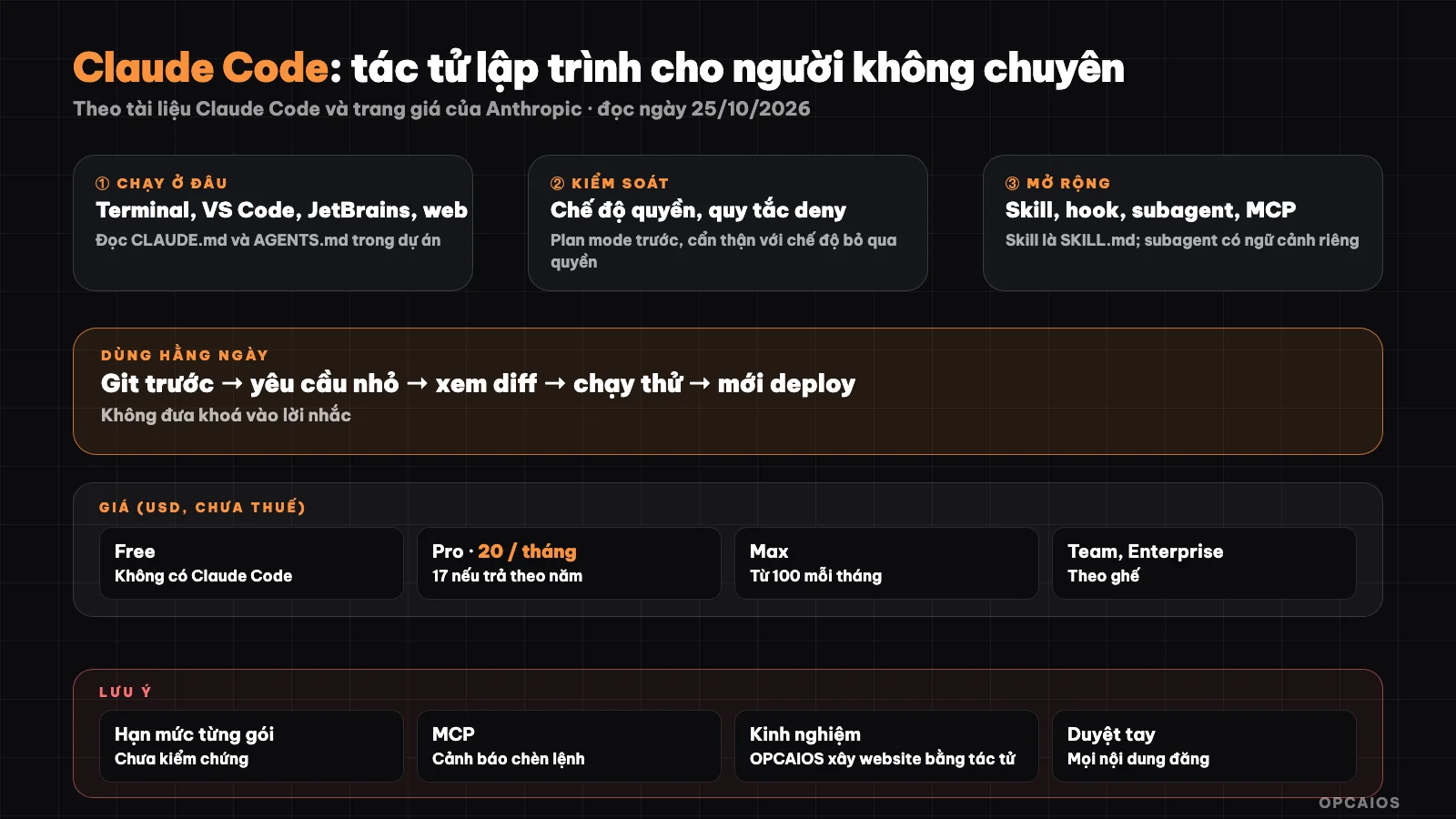
You make a request, Claude Code acts in your project according to the permissions you give, you review the results. Diagram: OPCAIOS.
How is Claude Code different from a typical AI chatbot?
Claude Code differs from a chatbot in that Claude Code acts directly in your machine or code repository, rather than just answering with text for you to copy yourself. A chatbot like the Claude chat interface on the web provides code snippets, but you have to manually paste them into the right file, run tests yourself and fix errors yourself. According to Anthropic's overview page (read on 25/10/2026), Claude Code reads the entire project, makes a plan, edits code across multiple files, runs commands to verify, creates commits and opens pull requests with git. Because Claude Code has permission to edit files and run commands, the risk is also higher than a chatbot: a wrong command could delete data or break what's running. Therefore non-programmer users need to understand three things before delegating work: permission modes, the CLAUDE.md instruction file, and the habit of reviewing changes before pushing to production. This is the most important boundary between "asking AI to write a code snippet for you" and "delegating a task to an AI agent".
How do I install Claude Code?
According to the official documentation (read on 25/10/2026), the recommended installation method on macOS, Linux and WSL is the following command:
curl -fsSL https://claude.ai/install.sh | bash
On Windows PowerShell, the documentation uses the command irm https://claude.ai/install.ps1 | iex; there is also Homebrew (brew install --cask claude-code) and WinGet. After installation, open a new terminal window, verify with claude --version, then go to your project directory and type claude:
cd your-project
claude
On first run, Claude Code requires you to sign in. If you don't want to use the terminal, use the desktop application (included Claude Code, needs a paid plan) or the web version at claude.ai/code.
How much does Claude Code cost?
Claude Code requires a paid Claude plan or an Anthropic Console account; the Free plan does not include Claude Code. According to the official pricing page claude.com/pricing (read on 25/10/2026), the levels are as follows:
| Plan | Price shown | Includes Claude Code |
|---|---|---|
| Free | 0 USD | No |
| Pro | 20 USD/month if paid monthly, 17 USD/month if paid yearly | Yes |
| Max | From 100 USD/month (available in 5x and 20x tiers) | Yes |
| Team | Standard seat 25 USD/month paid monthly or 20 USD per year; premium seat 125 or 100 USD | Yes |
| Enterprise | 20 USD/seat/month plus usage fees at API rates, minimum 20 seats | Yes |
Prices do not include tax, may change, and usage limits for each plan are not listed in this table. If you are considering the total cost of AI tools, see also the post audit AI tool costs.
What is Permission Mode in Claude Code?
Permission mode is a setting that decides what Claude Code can do on its own and when it needs to ask you. According to Anthropic's permission mode page (read on 25/10/2026), there are six modes:
- default (Manual): read files without asking; edit files, run commands and access the network must wait for your approval.
- acceptEdits: edit files on its own and run common file commands in the working directory.
- plan: only research and propose a plan; cannot edit until you approve the plan.
- auto: run on its own, with its own classification model that considers safety on your behalf.
- dontAsk: refuse any action that needs asking, only run what was allowed before.
- bypassPermissions: run everything without asking; the documentation warns to use only in isolated environments like containers or virtual machines with no internet.
Non-specialists should start with plan mode for big tasks and default for small tasks, read the plan before allowing edits. Avoid bypassPermissions on machines with real data, because the documentation clearly states this mode does not protect against prompt injection.
How are CLAUDE.md, skill and hook different?
CLAUDE.md, skill and hook are three ways to teach Claude Code to follow your wishes, differing in how "mandatory" they are. According to official documentation (read on 25/10/2026):
| Component | What it is | When to use |
|---|---|---|
| CLAUDE.md | A Markdown file at the project root that Claude Code reads at the start of each session (can read AGENTS.md instead) | General rules: project structure, things not to do, how to run tests |
| Skill | A directory containing SKILL.md with a description section; Claude loads it on its own when the request matches the description, or you call it with /skill-name |
Repeated workflows: write articles, deploy, review |
| Hook | A shell command that runs automatically at certain times like PreToolUse, PostToolUse, Stop, SessionStart | Things that must always happen, not depending on whether the AI "remembers" or not |
Personal skills sit in the user's skills directory, project skills sit in .claude/skills/ to share via git. An important difference: CLAUDE.md and skill are guidelines that the model can overlook, while hook is a rule that runs for sure. Details on how to write a skill are in the post What is Skill.
How do Subagent and MCP help?
Subagent is a specialist AI assistant that Claude Code hands part of the work to, running in its own context window and sending only a summary back to the main conversation. According to Anthropic's subagent page (read on 25/10/2026), each subagent has its own system prompt, tool permissions and limits; the subagent cannot see your conversation history, and the subagent's usage still counts toward the total limit with the main session. Claude Code comes with a built-in Explore subagent (search in code, read-only), Plan and general-purpose; you can define more yourself using Markdown files in .claude/agents/.
MCP (Model Context Protocol) is an open standard for Claude Code to connect outside tools like Google Drive, Jira, Slack or databases. The documentation guides adding servers with the claude mcp add command, and warns to only connect servers you trust, because servers reading outside content can lead you into a prompt injection trap. See also What is MCP.
How do non-specialists use Claude Code every day?
Non-specialists use Claude Code most effectively when they treat Claude Code as a new engineer joining the team: give small, clear tasks with a way to check them, and review the results yourself before sharing with others. A suggested daily workflow includes these steps:
- First, describe the desired result in plain language, with things not to touch.
- Next, have Claude Code make a plan in plan mode, read the plan, ask again if you do not understand something.
- Run a test on your machine (build, test) before pushing to the real website.
- Commit the right changed files, read the change description.
- Finally, write down what you learned in CLAUDE.md or skill so you do not have to repeat it next time.
Example scenario: Lan sells a small course and wants to add a frequently asked questions section to the sales page. She asks Claude Code to propose a plan, sees the plan edits just one page, lets it do the work, opens a test run on her machine, then deploys. This is a hypothetical example, not a real person.
OPCAIOS's Experience
Website opcaios.org was built and is operated by one person (Lê Quốc Nghĩa) mainly using programming agents, including Claude Code. The habits below come from our project notes, described at a conceptual level:
- Commit only to the paths that were edited. Multiple agent sessions work on the same code directory; there was a time when a commit accidentally included changes from another session.
- Build test and dry run before deploying. There was a time when a deployment deleted files from another session, the build broke; the website still ran thanks to an old version being kept.
- Blog writing skill. The process of writing articles (researching official sources, writing, scoring, building images, inserting drafts) is packaged as a skill so every session does it the same way.
- Subagent writing in parallel. Each subagent writes a few articles into its own folder; the main session checks links and reports, then only inserts the draft. This article was written that way.
- Manual review. An article is only scheduled for posting when the website owner says "approved".
Longer lessons are in the article letting AI agents build and operate a website: 10 real lessons. We do not measure and do not publish the hours saved.
Read more: 7 Claude Code skill sets best in 2026, 6 tools to run multiple AI agents writing code at once best in 2026.
Frequently Asked Questions
Can I use Claude Code if I don't know how to program?
You can use it for small and clear tasks, but you still need to learn a few foundational concepts: project directories, git, test running on your machine, and reading the plan before letting it edit. Claude Code does the typing part, but you are responsible for deciding right and wrong and checking the results. Non-professionals should start with a side project or copy, use the plan mode, and not let the agent touch customer data or payments until you understand the changes clearly.
Is Claude Code free?
According to Anthropic's official pricing page read on 25/10/2026, the Free plan does not come with Claude Code. The cheapest plan with Claude Code is Pro, 20 USD/month if paid monthly or 17 USD/month if paid yearly; Max, Team, Enterprise plans are higher. You can also use it through an Anthropic Console account and pay per API usage. The price does not include tax and may change, so check the pricing page again before buying.
How is Claude Code different from Cursor?
Cursor is a code editor with built-in AI, while Claude Code is an agent that runs in many places: terminal, VS Code and JetBrains utilities, desktop apps, web. Claude Code's documentation even has links to install the Claude Code utility for Cursor itself, so the two tools don't exclude each other. Choose the tool based on how you like to work: you prefer to delegate by speaking and review results, or you prefer to edit each line yourself with suggestions. See more What is Cursor.
Is it safe to let Claude Code run commands on my machine?
It is safe to the extent you control permissions. The default mode requires you to approve before it edits files or runs commands; the bypassPermissions mode removes all confirmation steps and the documentation warns to only use in isolated environments. Don't put API keys or passwords in code, only connect to MCP servers you trust, and always have backups. Detailed rules are in the article securing business data when using AI.
Where should I start learning Claude Code?
Start with the overview and quickstart in the official documentation, install Claude Code, then do a small task on a test project: edit a page, add a section, test it. Then write a short CLAUDE.md file recording your conventions, and when you see a task repeat for the third time, package it as a skill. Anthropic also has a free self-paced course on Claude Academy. If you want someone to guide you on your actual work, see AI application training course from OPCAIOS.
Source: Claude Code documentation from Anthropic at code.claude.com (overview, setup, permission modes, skills, hooks, subagents, MCP) and pricing page claude.com/pricing, read on 25/10/2026; usage limits for each plan not verified; pricing and features may change. The experience is OPCAIOS's.
Translated from Vietnamese with AI. Read the original.
Want to apply this in your business?
Book a free 30-minute call (Vietnam time, in English or Vietnamese).