



Using Codex and Claude Code at the same time
Using Codex and Claude Code at the same time means assigning tasks to two programming agents from different companies—Codex from OpenAI and Claude Code from Anthropic—on the same system, with each agent holding a clear role instead of both jumping into one task. This approach leverages different strengths and separate usage limits for each tool, and allows one agent to check the work of the other. The price is having common ground rules. This post does not rank the two tools, does not promise time or money savings because we haven't measured them, and the role division table in this post is just a suggestion. Features are based on official documentation and codex --help version 0.162.1, read on 03/11/2026. Git technical details like worktree and line ending normalization are already covered in the post many AI sessions editing one project; this post focuses on how to divide the work.
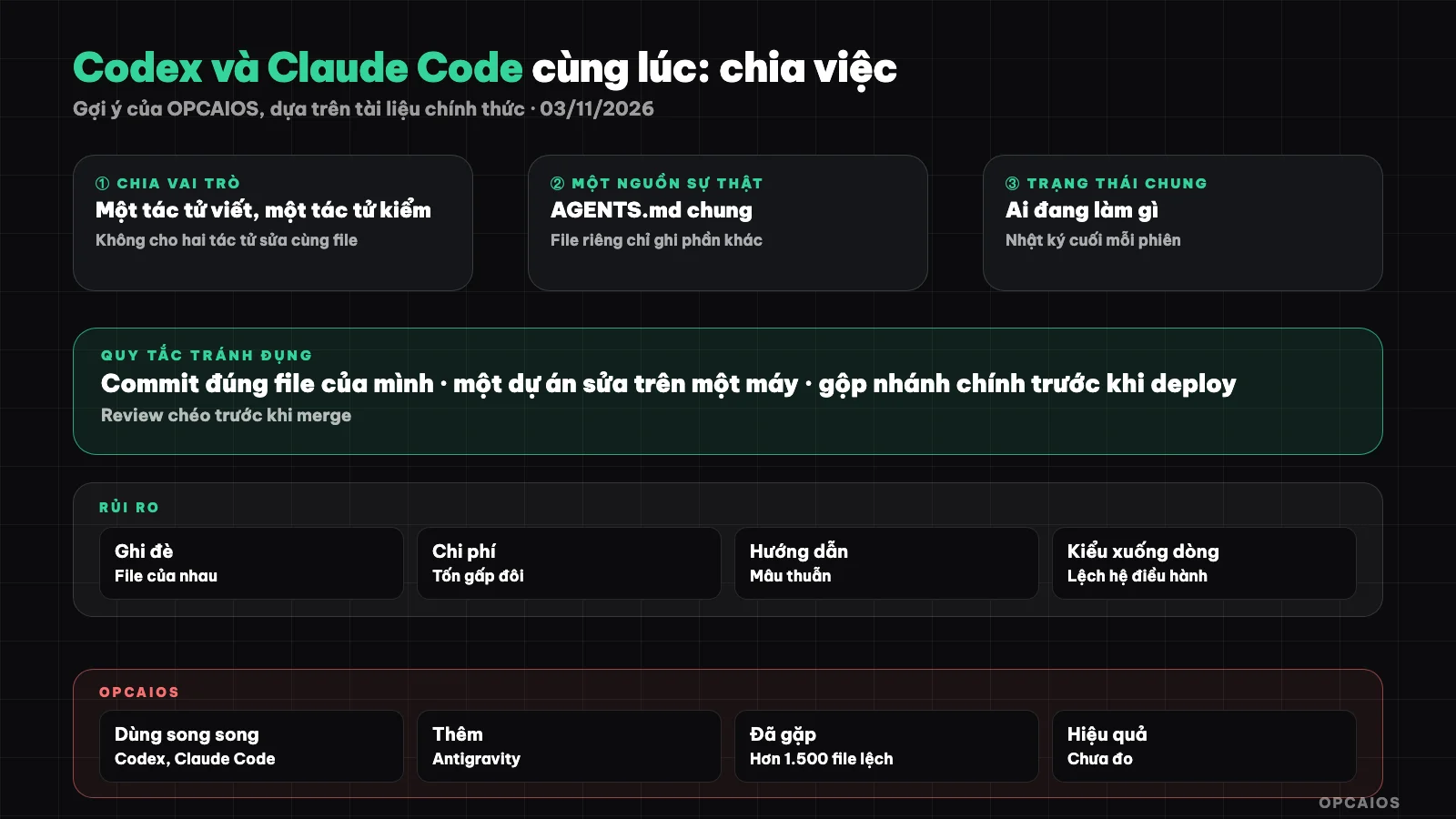
Two agents, one set of rules: guidelines, state, commits and cross-review. Diagram: OPCAIOS.
Why would one person use both Codex and Claude Code?
One person uses both Codex and Claude Code for three practical reasons: the two tools have different strengths and ways of working, each tool has separate usage limits by their own company's plan, and an agent from a different company is a natural checker for the other agent's work. First, Codex has codex exec for non-interactive runs, codex review and cloud version; Claude Code has subagent, skill, hooks and its own planning mode. Second, when one tool hits its usage limit, work can continue on the other tool if both read the same context. Third, different models from different companies means a mistake one model misses, the other sometimes catches. This is reasoning, not measured data. A detailed comparison of the two tools, with pricing, is in the post Claude Code, Cursor or Codex CLI.
How to divide work between Codex and Claude Code by role?
Dividing by role means each kind of task has one "main" agent, and the other agent only reads or reviews. The table below is OPCAIOS's suggestion, not a rule from OpenAI or Anthropic:
| Task type | Main agent (suggestion) | Other agent does what |
|---|---|---|
| Large feature spanning many files | One fixed agent for the whole feature | Review changes before merging |
| Code review | Agent who did not write that code | Fix based on comments |
| Scheduled job with no one watching | Agent with non-interactive run mode you're used to | Does not participate |
General principle: one file at one time has only one main agent.
How should one shared AGENTS.md file and files for each agent be arranged?
One shared AGENTS.md is where you write once the rules all agents must follow, while separate files only contain what is special for each tool. According to the AGENTS.md page in Codex documentation (learn.chatgpt.com, read on 03/11/2026), Codex reads AGENTS.md from the Codex directory of the user, default ~/.codex, then from the project root down to the current directory; a closer file overrides a farther file, total size default max 32 KiB by the project_doc_max_bytes key. According to Claude Code's memory page (code.claude.com, read on 03/11/2026), Claude Code reads AGENTS.md when there is no CLAUDE.md; if there is CLAUDE.md it only reads CLAUDE.md, unless that file imports AGENTS.md with @AGENTS.md. The suggested arrangement has 3 levels:
AGENTS.mdat project root: build commands, test commands, directory structure, prohibitions.CLAUDE.mdwith just@AGENTS.mdline plus a few things specific to Claude Code.- User-level file for each tool (
~/.codex/AGENTS.mdfor Codex, Claude Code user file): answer language, order of reading documents at session start.
Detailed syntax is in the posts what is AGENTS.md and what is CLAUDE.md.
How do shared status files and logs help two agents coordinate?
A shared status file is a short document that both Codex and Claude Code read at the start of a session and update at the end, since the two agents don't share memory with each other. A good status file has four sections:
- Service status, with the real time of the last check.
- Open incidents and who is handling them.
- Ongoing work: which agent is editing which area, so the other avoids it.
- Recent log, one line per completed task, with a line limit so the file doesn't bloat.
The daily log records more detail: what was done, what remains unfinished. Rules for reading these two files go in a shared AGENTS.md. Note: the log is historical evidence, not current state; before using a gateway or a deploy result recorded in it, the agent must still verify it in reality.
What are the commit rules and "one machine one project" to avoid collisions?
The right commit rule means that in each session, whether Codex or Claude Code, you only put into commit the files that session changed, with file paths listed right on the commit command. The reason: when two agents share one working directory, they share the commit staging area, and a plain commit command will pull in files from the other agent. Both tools have ways to split the directory: codex --help in version 0.162.1 has a --worktree flag to run a session in a new git worktree, and Claude Code has the same flag. The post many AI sessions editing one project goes deep into git commands; here I'll just lay down the coordination rules:
- Each agent gets one branch or one worktree when doing long-running features.
- Commits have file paths, review the commit before pushing.
- Merge the main branch fresh before deploying.
- Only edit code for one project on one machine, if you have multiple machines.
The fourth rule is often skipped: an agent on Windows and one on Mac both editing one project easily spawn fake changes in bulk because of different line endings and tool versions.
How do Codex and Claude Code do cross-review?
Cross-review is so the agent who didn't write the code reads the changes and finds bugs before merging, taking advantage of the fact that two different vendor models see problems differently. Codex has a codex review command that runs non-interactive review, per codex --help in version 0.162.1; Claude Code can be given a diff to read like any other request. The suggested process has 4 steps:
- Agent A finishes writing, commits on their own branch.
- Agent B reads the diff of that branch, only writes comments, does not edit code.
- The owner reads the comments, drops the wrong ones, sends them back to Agent A to fix.
- Run tests then merge.
Step 2 is the most important: the reviewing agent who gets to edit will make both sides edit on top of each other. AI comments can also be wrong; the owner decides at the end.
What are the risks of using two agents at once?
Using two agents at once has three main risks: overwriting each other's work, wasting double, and conflicting instructions. In detail:
- Overwrite: two agents edit one file, the agent saving later deletes the part the earlier agent wrote without raising an error. Fight it with "one file one owner".
- Waste double: give the same task to both "to see who does better" and you burn limits on both plans and have to read two results.
- Conflicting instructions: AGENTS.md says one thing, CLAUDE.md says another, each agent does their way. Fight it by keeping common rules in one place, files for each agent just add on.
For example, not a real person: someone told Codex to fix the payment page and forgot to write it in the status file, a Claude Code session opened later saw the old bug and fixed it a different way, and now the two fixes collide.
OPCAIOS's Experience
Using Codex and Claude Code at the same time is what OPCAIOS, the website opcaios.org run by a single person, is doing. These are real facts, verified on 03/11/2026:
- The main work machine has Codex CLI version 0.162.x and the Codex desktop application, used in parallel with Claude Code and Google Antigravity.
- There is a shared AGENTS.md for all agents in the user's home directory and in the Obsidian notes repository; Codex has an additional user-level AGENTS.md, with content equivalent to Claude Code's user-level instruction file: respond in Vietnamese, read documents in order at session start, write a log at session end.
- The agents sync through a shared state file and daily log; each session commits only its own files.
- Some projects have a rule that code can only be edited on one specific machine. This rule came about after seeing over 1,500 different files caused only by line ending differences, when an agent deployed from a Windows machine.
- Codex is configured to use "medium" thinking level by default and delegates subagents to a smaller model to save costs.
- OPCAIOS once had one agent review another agent's work, but has not yet measured its effectiveness, and does not regularly use Codex for code review.
We have not compared quality or costs between the two tools on the same task, so we do not recommend fixed roles.
Frequently Asked Questions
Can Codex and Claude Code edit the same file at the same time?
Not simultaneously. The two agents don't know what each other is editing, so the agent that saves last can delete the work of the previous agent without warning. If you must share a file, do it sequentially: A finishes, commits, updates the status, then only then pass it to B. Better yet, give each agent its own branch or worktree. Codex CLI has a --worktree flag according to codex --help version 0.162.1.
Can Claude Code read Codex's AGENTS.md?
Yes, according to Claude Code documentation read on 03/11/2026, but with conditions. Claude Code reads AGENTS.md when the project has no CLAUDE.md in the working directory or parent directory. If CLAUDE.md already exists, Claude Code only reads CLAUDE.md, unless there is a line @AGENTS.md in it to import. The user-level files of the two tools are separate and must be written for both.
Does using two tools cost twice as much?
It depends on how you use them and each company's pricing; this post doesn't mention prices because they change, the price table is in the post Claude Code, Cursor or Codex CLI. It does actually cost twice as much when you assign the same task to both. If you divide roles clearly, the cost is the sum of two subscriptions, in exchange for more quota and a reviewer from another vendor.
Where should the state file be placed?
Place it where every agent on every machine can read it, and write its path in the shared AGENTS.md so the agent knows to read it at session start. It can be in the code repository, or a notes repository like Obsidian if multiple projects share it. Keep the file short, move old log lines to an archive file. Do not write keys, passwords, or tokens in this file.
Should a beginner use two agents right from the start?
No. You should master one agent first, have an AGENTS.md, have the habit of committing only the right files and reading diffs, then add a second agent. If the rules are not solid yet, two agents will only double the mess. Start the second agent in the safest role, which is read-only review. The post safe process for people who don't know how to code has the foundational steps. If you want guidance setting up a multi-agent process, see OPCAIOS's AI application training course.
Source: Codex documentation on learn.chatgpt.com (AGENTS.md page, redirected from developers.openai.com/codex), codex --help from Codex CLI 0.162.1, Claude Code documentation on code.claude.com (memory page), read on 03/11/2026. Not verified: the effectiveness of cross-review, cost when running in parallel, how Codex desktop handles worktree; features may change per version. The role division table is a suggestion. The experience is OPCAIOS's.
Translated from Vietnamese with AI. Read the original.
Want to apply this in your business?
Book a free 30-minute call (Vietnam time, in English or Vietnamese).