


What is Gemini API and where should you start?
Gemini API is the programming interface for your software to send requests to Google's Gemini models, while Google AI Studio is the website where you try prompts, create API keys, view rate limits and enable billing for Gemini API itself. The general introduction to Gemini is in the post What is Gemini?. This post does not promise a free package sufficient for a real product, does not guarantee prices will remain the same, is not legal advice; all numbers read from the official page on 04/11/2026, calculated in USD, not including tax, may differ when paying from Vietnam. The post goes through getting keys, packages, rate limits, pricing, data, OpenAI-compatible endpoints and risks of key exposure.
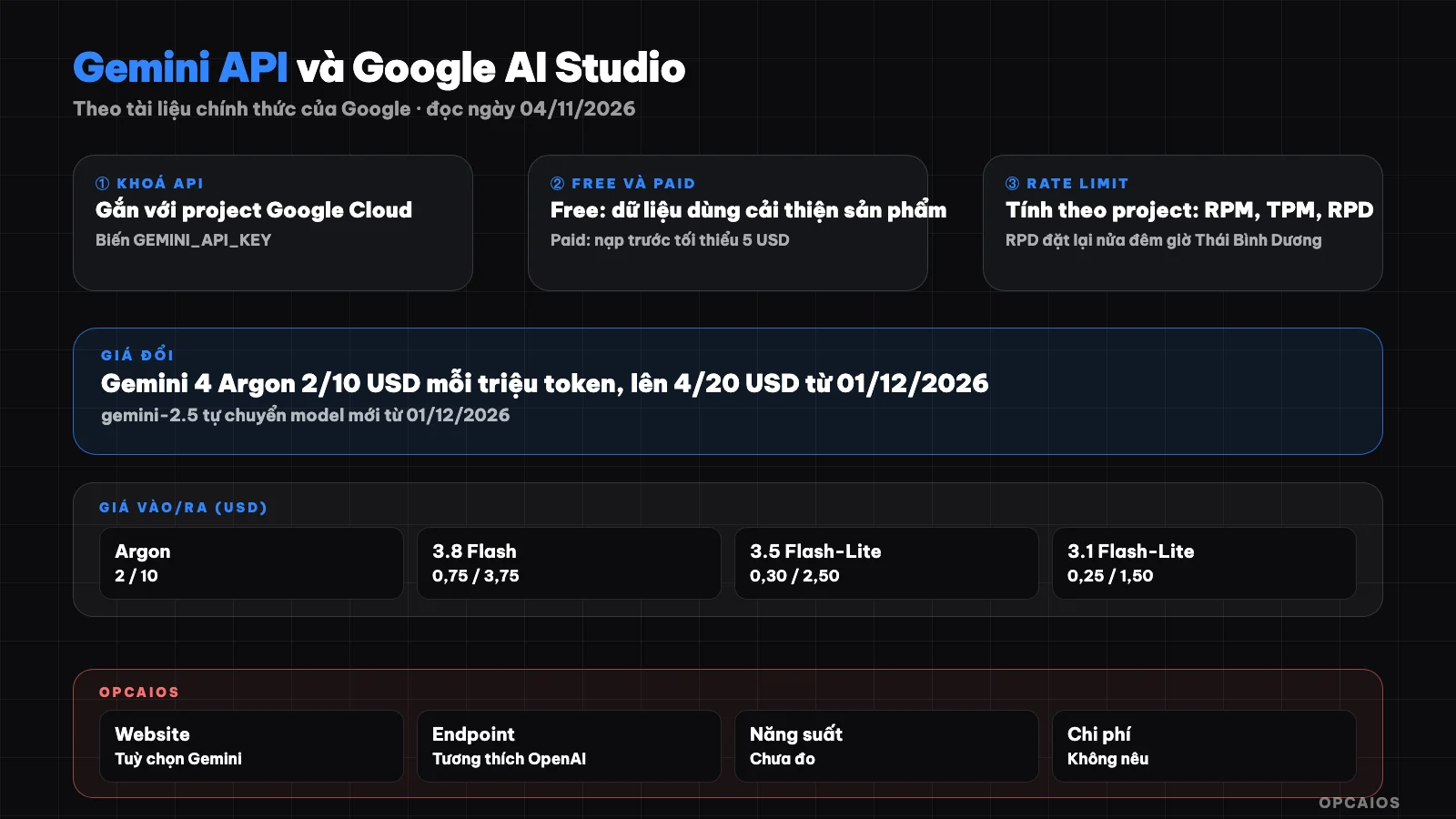
From AI Studio to your first API call: key, package, rate limit and security. Diagram: OPCAIOS.
How are Google AI Studio and Gemini API different?
Google AI Studio is a web dashboard, while Gemini API is the gateway for source code to call the model. According to the Gemini API documentation on ai.google.dev (read on 04/11/2026), each Gemini API key is tied to a Google Cloud project, where billing, collaborators and permissions are managed; new users who accept the terms in AI Studio get a default project and an API key created automatically. Applications or tools like n8n call Gemini API over HTTP. The supplementary terms of Gemini API (effective from 23/03/2026) state that AI Studio and Gemini API are for developers using them for work purposes, not for consumers, and users must be 18 years old or older. If the API concept is still new, see What is API.
How do you get a Gemini API key?
You get a Gemini API key in AI Studio; the list of available regions read on 04/11/2026 includes Vietnam. The steps follow the documentation:
- Sign in to Google AI Studio with your Google account, accept the terms.
- Open the API keys page; new users already have a default project and one key.
- Create a separate project for each application if you want to separate costs.
- Put the key into the
GEMINI_API_KEYenvironment variable (orGOOGLE_API_KEY, this variable is prioritized if both are set), don't paste it into the code.
The documentation also notes that from 28/05/2026, newly created keys in AI Studio are by default "authorization key": tied to a service account, pre-limited to Gemini API, with a fast mechanism to block exposed keys. Gemini API rejects "standard" keys without limits; standard keys that have already been limited still work.
How are the free and paid packages of Gemini API different?
The Free and Paid packages of Gemini API differ in models, rate limits, features and how Google uses data. According to the Pricing page (read 04/11/2026):
| Criteria | Free | Paid |
|---|---|---|
| Model | Some models | Has the most powerful models |
| Token | Free | Pay per million tokens |
| Features | AI Studio | Context caching, Batch API saves 50% |
| Data | Used to improve the product | Not used to improve the product |
According to the Billing page, upgrading to Paid requires linking a billing account and prepaying a minimum of 5 USD into your Prepay balance; when the balance reaches 0, keys in the project are rejected until you top up again. Comparison of packages for Gemini application users is in the post Gemini free and paid.
How is Gemini API rate limit calculated?
Gemini API rate limit is the number of requests and number of tokens that can be sent within a time period, calculated per project not per key. According to the Rate limits page (read 04/11/2026), there are three main metrics: requests per minute (RPM), input tokens per minute (TPM) and requests per day (RPD); exceeding any limit causes an error, RPD resets at midnight Pacific Time. This page does not post a fixed number table for each model but directs users to see the rate limits currently applied in AI Studio, with a note that rate limits are not guaranteed. The tier table reads:
| Tier | Conditions | Tier spending cap | Cap per 10 minutes |
|---|---|---|---|
| Free | Project is active | Not applicable | Not applicable |
| Tier 1 | Billing account linked | 250 USD | 10 USD |
| Tier 2 | Paid 100 USD, over 3 days | 2.000 USD | 200 USD |
| Tier 3 | Paid 1.000 USD, over 30 days | 20.000 to over 100.000 USD | 200 USD |
You should set a monthly spending limit for your project in AI Studio right away when you enable billing.
What is the Gemini API pricing by model today?
Gemini API pricing is calculated per million tokens and varies by model, with several models having announced price increases. The table below shows the Standard pricing for some text models from the Pricing page on 04/11/2026; Google notes that price changes typically take effect 30 days after posting.
| Model | Free | Input (USD/1 million tokens) | Output (includes thinking tokens) |
|---|---|---|---|
| Gemini 4 Argon | No | 2.00; from 01/12/2026 is 4.00 | 10.00; from 01/12/2026 is 20.00 |
| Gemini 3.8 Flash | Yes | 0.75; from 01/01/2027 is 1.50 | 3.75; from 01/01/2027 is 7.50 |
| Gemini 3.1 Pro Preview | No | 2.00 (prompt up to 200k tokens) | 12.00 |
| Gemini 3.5 Flash-Lite | Yes | 0.30 | 2.50 |
| Gemini 3.1 Flash-Lite | Yes | 0.25 (text, images, video) | 1.50 |
Note: thinking tokens count toward output; Grounding with Google Search has 5,000 free requests per month shared across Gemini 3 and above models, then 14 USD per 1,000 requests. The Pricing page also states that Gemini 2.5 Flash and 2.5 Pro have been discontinued for selection in AI Studio; from 01/12/2026, requests to gemini-2.5-flash automatically switch to Gemini 3.5 Flash-Lite, requests to gemini-2.5-pro automatically switch to Gemini 3.8 Flash, and are charged at the new model pricing.
Is free tier data used to improve products?
Yes. The supplemental terms for Gemini API (read on 04/11/2026) classify free AI Studio use and the unpaid quota portion of Gemini API under "Unpaid Services". For this group, Google uses submitted content and responses to provide, improve, develop products and machine learning technology; reviewers can read inputs and outputs after data is separated from account and project. The terms warn against sending sensitive, confidential, or personal information to unpaid services. For "Paid Services" (projects with an active billing account), Google does not use prompts and responses to improve products, only keeping time-limited logs to detect policy violations. AI Studio is classified as a paid service even when it costs nothing, if the account has access to a project with an active billing account attached. This is a summary, not legal advice. See also 5 rules for protecting business data when using AI.
What command do I use to call Gemini API for the first time?
The minimal call according to the Quickstart page (read 04/11/2026) is a POST request to the interactions endpoint, passing the key through the header. The section below is copied from the documentation and requires the GEMINI_API_KEY variable to have the key:
curl -X POST "https://generativelanguage.googleapis.com/v1beta/interactions" \
  -H "x-goog-api-key: $GEMINI_API_KEY" \
  -H 'Content-Type: application/json' \
  -H "Api-Revision: 2026-05-20" \
  -d '{
    "model": "gemini-3.8-flash",
    "input": "Explain how AI works in a few words"
  }'
We did not run this command when writing the post; the model name and Api-Revision value may change, so get the latest version from the Quickstart page.
How do I use Gemini API's OpenAI-compatible endpoint?
The OpenAI-compatible endpoint allows code using the OpenAI library to call Gemini models by changing three things: the API key, base URL, and model name. According to the OpenAI compatibility page (read 04/11/2026), the base URL is https://generativelanguage.googleapis.com/v1beta/openai/, the key is passed via the Authorization: Bearer header, the chat path is chat/completions, and the documentation has examples for Python, JavaScript, and REST with the model gemini-3.8-flash. Google recommends that if you are not already using the OpenAI library, call the Gemini API directly.
What are the risks if a Gemini API key is exposed, and how do I handle it?
An exposed Gemini API key means others can consume your project's quota, incur charges, and access private resources; Google's documentation advises treating the key like a password. The rules on the API keys page (read 04/11/2026):
- Do not put the key in Git.
- Do not embed the key in web or mobile applications on the client side; call the API through a server in between.
- Read the key from an environment variable; in production, use a secret store like Google Cloud Secret Manager.
- Enable billing alerts and set a spending limit for the project.
- Restrict the key to Gemini API only, and by IP or application if possible.
If you suspect a key is exposed: create a new key, redeploy your application with the new key, revoke the old key once the new one runs smoothly, then review your billing logs and usage. See also security when using AI to write code.
Experience at OPCAIOS
The opcaios.org admin panel has a "Google Gemini" provider option for AI writing features, routed through the OpenAI-compatible endpoint described above; it is an available option, we do not claim to use it daily. In a test run on 03/11/2026, an internal short video creation tool used a Gemini Flash Image generation model to produce illustration images; the results had errors (repeated images, one image with wrong character), so we have not used it in production. We have not measured the cost or long-term stability of the Gemini API. The only lesson I dare to say: separate keys by application, keep keys on the server, never in browser-side code.
Frequently Asked Questions
Is Gemini API free?
There is a Free tier with free tokens for some models, according to the Pricing page read on 04/11/2026. Gemini 3.8 Flash and Gemini 3.5 Flash-Lite have a Free column marked free, while Gemini 4 Argon and Gemini 3.1 Pro Preview are not available in the Free tier. The Free tier has quota limits, and input data may be used to improve Google's products, so it is only suitable for testing with non-sensitive data.
Are rate limits calculated per key or per project?
According to the Rate limits page read on 04/11/2026, rate limits apply per project, not per API key, so creating additional keys in the same project does not increase the quota. To separate quotas, create a separate project for each application. Your specific rate limits can be seen on the Rate limit page in Google AI Studio, because Google does not publish a fixed number table and explicitly states that rate limits are not guaranteed.
How much does a Gemini API paid plan start from?
According to the Billing page read on 04/11/2026, upgrading to a paid plan requires linking a billing account and prepaying a minimum of 5 USD (or equivalent) to a Prepay balance, after which you pay per actual token usage depending on the model. Tier 1 has a spending cap of 250 USD; upgrading to Tier 2 requires having paid 100 USD and waiting 3 days. The actual amount paid from Vietnam may differ due to tax and exchange rates; not yet verified.
Can I use the OpenAI library to call Gemini?
Yes. The OpenAI compatibility page read on 04/11/2026 shows that the OpenAI library for Python, JavaScript, and REST can call Gemini models by switching the key to a Gemini key, switching the base URL to Google's v1beta/openai/ endpoint, and switching the model name, for example gemini-3.8-flash. Google still recommends calling the Gemini API directly if you are not already using the OpenAI library, because some proprietary features are only available in the native API.
How do I start integrating Gemini API into my business process?
Pick a small, repetitive task with non-sensitive data, like summarizing articles or classifying emails. Try it on AI Studio first, then call the API through an automation tool, set a spending limit, and measure results for a few weeks before scaling up. See also an AI system that runs itself. If you want guided training, check out OPCAIOS's AI application training course.
Source: Gemini API documentation (address ai.google.dev now redirects to aistudio.google.com/docs) including (Pricing, Rate limits, API keys, Billing, Quickstart, OpenAI compatibility, Available regions) and Gemini API Additional Terms of Service effective 23/03/2026 (read on 04/11/2026); not yet verified: responses to sample commands (not run), specific Free tier limits per model (only shown in AI Studio), actual amount paid from Vietnam; pricing and model names may change after the read date. The experience is OPCAIOS's.
Translated from Vietnamese with AI. Read the original.
Want to apply this in your business?
Book a free 30-minute call (Vietnam time, in English or Vietnamese).