


What is Gemini Live?
Gemini Live is a voice conversation mode in the Gemini app on your phone: you speak, Gemini answers by voice, you can interrupt mid-response, and you can turn on the camera or share your screen so Gemini can see along with you. A general introduction to Gemini is in the post What is Gemini?. This post addresses two things straight away: the Gemini Live help page as read on 04/11/2026 does not clearly state whether Gemini Live supports Vietnamese conversations, and OPCAIOS has not used Gemini Live in our work so we have no data or quality assessment. The post goes through how it works, camera and screen, languages, plans and devices, privacy, use cases, and limitations.
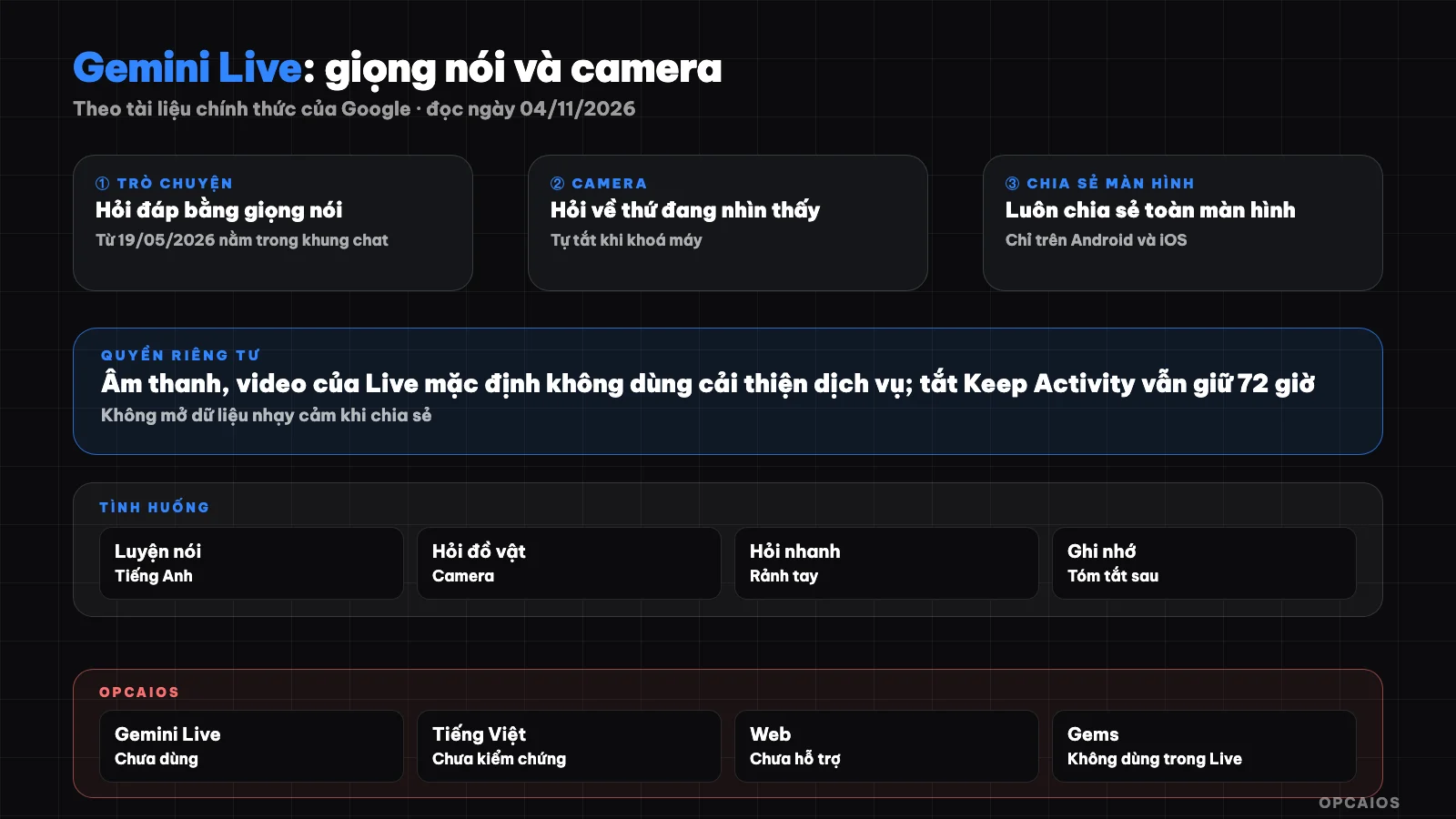
Gemini Live: voice, camera, screen and where data is saved. Diagram: OPCAIOS.
How does Gemini Live work?
Gemini Live works like a phone call with an AI assistant right inside the Gemini app on your phone, instead of typing a question and waiting for a paragraph answer. According to Google's Gemini Live help page (as read on 04/11/2026), you speak naturally, Gemini answers by voice and you can interrupt when the answer goes off track. According to the release note from 19/05/2026, Gemini Live is no longer a separate screen but is integrated into the chat frame on Android and iOS, so you can switch between speaking and typing in the same conversation; the update was rolled out gradually worldwide. Gemini Live also currently shows maps and weather cards while speaking. Three actions to distinguish: muting only turns off the microphone, pausing stops the session and turns off the camera, ending closes the session and leaves a transcript. Subtitles can be turned on in settings. According to the help page, memory from old conversations is currently only available in English in the US.
How do you share camera and screen in Gemini Live?
Sharing the camera in Gemini Live means turning on your phone's camera while chatting so Gemini can see what you're pointing at, while sharing the screen means letting Gemini see your entire phone screen. According to the Gemini Live help page for iPhone and Android (as read on 04/11/2026), you can switch between front and back camera. The camera turns off automatically when you pause the session, leave the app or lock the screen, and does not turn back on automatically when you return. For screen sharing, there are three things to know:
- You must turn on notifications for Gemini Live to be able to share your screen.
- Gemini Live sees your entire screen, not a specific app or area.
- Sharing stops when you pause the session or lock the device, to continue you must press share again.
The second point is important: if a message notification or authentication code pops up while sharing, Gemini will see it too, so close sensitive apps and turn on do not disturb first.
Does Gemini Live speak Vietnamese?
Whether Gemini Live speaks Vietnamese is a question that the official help page as read on 04/11/2026 has not directly answered. There are three verifiable facts. First, the Gemini mobile app status page lists Vietnamese in the app's language list, with no asterisk (asterisks mark languages lacking "Hey Google" command and some action features). Second, the Gemini Live help page has a Vietnamese version, but only notes that voice switching does not support some languages, with no separate language list for Live. Third, Google's blog post from 03/10/2024 says Gemini Live expanded to over 40 languages on Android and can use up to two languages on the same device, but the post does not name each language. Honest conclusion: Vietnamese is in the Gemini app, but the quality and level of Vietnamese support specifically in Gemini Live we have not verified. The most reliable way is to try a few Vietnamese sentences on your own device.
What plan and device do I need to use Gemini Live?
Gemini Live is available on the free plan according to the plan comparison at gemini.google/subscriptions (read on 04/11/2026, displayed for Vietnam): the Free column shows Gemini Live is available. The paid plans on that page include Google AI Plus 132,000 ₫/month, Google AI Pro 489,000 ₫/month, and Google AI Ultra from 2,250,000 ₫/month; the page does not clearly state whether these prices include tax, and prices may change. For detailed plan comparison, see Gemini free and paid. Device requirements according to the help page:
| Requirement | Details (read 04/11/2026) |
|---|---|
| Platform | Gemini app on Android or iPhone, iPad |
| Web browser | Gemini Live is not yet available in the web app |
| Android | From Android 9, RAM from 2 GB, does not support Android Go, cannot be accessed from Work Profile |
| Account | Personal Google account, or work or school account with permission to use Gemini |
| Age | 13 years old or the minimum age as regulated by each country |
How does Gemini Live save your recordings and activity?
Gemini Live saves audio recordings and transcripts according to the Gemini app's privacy policy, and where they are saved depends on your Keep Activity settings. According to the Gemini Apps Privacy Hub page (read on 04/11/2026), here are five key points to understand:
- Keep Activity on: conversations and shared content are saved to Gemini Apps Activity, Google uses this activity to improve the service, including model training.
- Auto-delete timeframe: default 18 months, can be changed to 3 or 36 months, or auto-delete can be turned off.
- Keep Activity off: Live conversations are still kept in your account for a maximum of 72 hours for responding, processing feedback and safety, and are not used for training unless you send feedback.
- Audio, video and shared screen: according to this page, by default not used to improve Google services; there is a separate setting, separate from Keep Activity, to allow or disallow this.
- Reviewers: a portion of the conversation is reviewed by people after being separated from your account; this portion is kept for a maximum of 3 years and is not deleted when you delete your activity.
The help page also reminds you to get permission from others before including them in a Live conversation. For business data, read more 5 data security rules when using AI.
What is Gemini Live actually useful for?
Gemini Live fits well with situations where you need your hands free or need to show AI a specific object, when typing is slow or inconvenient. The four situations below are suggestions based on features Google describes, all are hypothetical and not yet OPCAIOS's experience:
- Practice speaking before closing a sale: a store owner (hypothetically) practices answering questions about price, asks Gemini to play a difficult customer and give feedback.
- Ask about something in front of you: point the camera at a printer control panel, product label or wiring diagram to ask step by step.
- Have it read the screen: share a screen of a confusing settings page and ask what to click, remember to close sensitive apps first.
- Log tasks while driving: ask to add a task to Google Tasks or save a note to Keep by voice.
Results still need to be checked again. If you want to build an entire assistant system for your business, see AI helps one person run a business.
What are the limitations of Gemini Live?
Gemini Live has limitations in platform, accompanying features, and work accounts, according to the help page and overview page read on 04/11/2026. List of verified limitations:
- Cannot use Gems in Gemini Live, and according to the overview page also cannot access Notebooks; for Gems see Gems in Gemini.
- Live does not support Omni and Lyria; to use them you must exit voice mode back to text chat.
- Not available on the Gemini web app.
- Cannot start Live when the screen is locked; to continue after locking the device you must turn on Gemini on the lock screen and the Live notification.
- Work and school accounts can only use Calendar, Keep and Tasks in Live.
- Cannot undo actions when Live is running in the background, and with Samsung app.
- Some features are rolled out gradually, your device may not have seen them yet.
OPCAIOS's Experience
OPCAIOS has not used Gemini Live yet: we haven't tried voice conversations, haven't shared our camera or screen with Gemini, and haven't checked the quality of Vietnamese in Live. The real Gemini in OPCAIOS's system is elsewhere: Google Antigravity runs the Gemini model as an orchestrating agent, alongside Claude Code and Codex; the main Mac machine has Gemini CLI; the website admin panel has a Google Gemini provider option for AI writing features. If we try Gemini Live, the plan (not yet results) is to check Keep Activity first, test Vietnamese with questions that don't contain customer data, and only share the screen after closing email, banking, and CRM.
Frequently Asked Questions
Is Gemini Live free?
Yes. The plan comparison table at gemini.google/subscriptions read on 04/11/2026, displayed for the Vietnam region, shows the Free plan includes Gemini Live. You only need a Google account, the Gemini app on Android or iPhone, and to be old enough according to the rules. Paid plans like Google AI Plus, Pro, Ultra mainly differ in model, limits, and storage capacity. Try the free version before buying a plan just for Live.
Can you use Gemini Live on a computer?
Not yet. The Gemini Live help page (read on 04/11/2026) clearly states Gemini Live is not yet in the Gemini web app, only in the Gemini app for Android, iPhone, and iPad. On a computer, you can still type with Gemini through the web app, but voice conversations with camera and screen sharing require a phone or tablet. If you read this post after some time, check the help page again because Google updates features regularly.
Does Gemini Live record conversations?
It processes audio recordings and transcripts. According to the Gemini Apps Privacy Hub, if you turn on Keep Activity, conversations are saved to Gemini Apps Activity and auto-deleted after 18 months by default; if you turn it off, Google still keeps it for up to 72 hours. Audio, Live video, and shared screen are not used by default to improve the service, and there are separate settings to change this. The part kept by reviewers is kept for up to 3 years, even when you delete activity. This is reference information, not legal advice.
Should you share your work screen with Gemini Live?
Only if the screen contains no sensitive data. Gemini Live sees the entire screen, including pop-up notifications, so authentication codes, customer messages, and financial figures can all get in. Safe way: close unrelated apps, turn on do not disturb, only open the page you need to ask about, stop sharing as soon as you're done. With a work account, ask your admin first.
How is Gemini Live different from typing with Gemini?
It's different in how you interact, not in what it knows. Gemini Live works when your hands are busy, when you need to point a camera at a real object, or when you want to practice speaking. Typing works when you need long answers, need to use Gems, need to paste documents or compare multiple options. Want to learn how to choose the right AI tool for each task in your business, check out OPCAIOS's AI application training course.
Sources: Gemini Live help page (support.google.com/gemini, Android, iPhone and Vietnamese versions), Gemini mobile app status page, Gemini Apps Privacy Hub, gemini.google/overview/gemini-live, gemini.google/subscriptions (Vietnam region) and gemini.google/release-notes (section 19/05/2026), Google blog post dated 03/10/2024 on expanding Gemini Live languages (read on 04/11/2026); not verified: whether Gemini Live supports Vietnamese conversations and the quality, complete language list for Live, whether prices include tax; Experience is OPCAIOS's.
Translated from Vietnamese with AI. Read the original.
Want to apply this in your business?
Book a free 30-minute call (Vietnam time, in English or Vietnamese).