


Graph engineering is the skill of drawing an AI workflow into a diagram made of nodes (each node is a task) and arrows (which task must wait for which), so that tasks that don't depend on each other run at the same time. Instead of arranging steps in a long line, you split them into multiple parallel branches and then merge the results back together. The process runs faster, has fewer points of failure, and creates a place to put independent checking steps for each result.
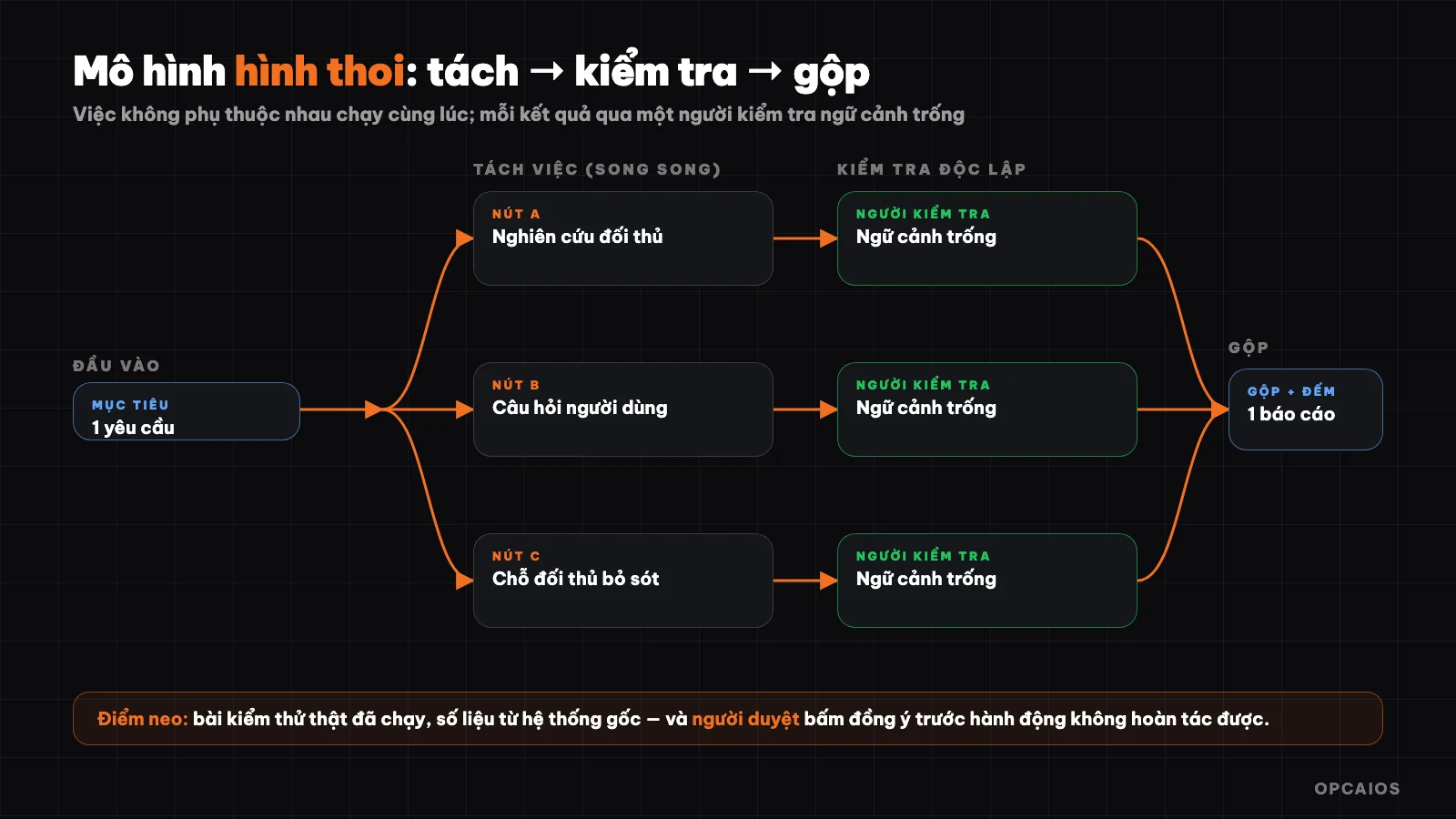
The "diamond" model in graph engineering: split work, run in parallel, check by a different AI, merge back. Diagram: OPCAIOS.
This post is based on ideas from "Graph Engineering explained: what it is, when to use it and when not to" by Anatoli Kopadze (@AnatoliKopadze) on X (24/7/2026). OPCAIOS rewrote it with separate presentation, added Vietnam examples and real experience. Speed and cost figures are from the original author; OPCAIOS has not verified them independently.
What is graph engineering?
Graph engineering is designing an AI workflow as a graph: a plan drawn out so you can see two things—what tasks need to be done and which task must wait for which. The concept has only two parts.
- Node: a single task done by one AI agent, with one input and one output. Example: researching a competitor's price, writing a draft, checking a claim.
- Edge: an arrow connecting two nodes, meaning the next task needs the result of the previous one so it must wait. The arrow only means something when real data flows through it.
For a node to work in the graph, it needs a "contract": a task with clear bounds, defined input, and output in fixed form. A node that returns free-form text only the reader can understand; a node that returns fixed form, say price, package, source, date, then the next node can read it straight without guessing. The idea is not new: workflow coordination systems have used dependency diagrams for many decades, and what's new is only applying it to AI agents.
What is a phantom edge and how do you find one?
A phantom edge is an arrow in the workflow but no data flows through it, so the wait there just wastes time. The test has only one question, asked at each step: does this step really need the result of the step right before it? If yes, keep the order. If no, the two tasks can run at the same time.
Example: the request "check file A for errors, then check file B for errors" reads like a sequence, but checking file B doesn't actually use the result of file A. The two tasks only run one after the other because the person who wrote it typed them in that order. Run in parallel, the total time equals the time of the slower file, not the sum of both files added together.
Nearly every workflow has two or three phantom edges. The original author estimates a 40-step sequential process might come down to only 3–5 real dependencies when redrawn, meaning from minutes down to seconds with the same amount of work. This is a rough estimate from the author, not a measurement; real speed depends on each workflow. The insight still holds: the bottleneck is usually how you lined things up, not the AI model.
The diamond model: split work, check, merge
The diamond model is the most common design template in graph engineering, with three phases: split work into multiple parallel branches (fan out), merge and reduce results using code (reduce), then have a final agent write an answer from the merged part (synthesize). Between phase one and two there is usually an extra checking step.
The diamond appears in most serious agent systems. The deep research feature of many AI assistants runs by this exact template: one agent plans research angles, helper agents gather in parallel, results are checked, then one report reaches the user. When you spot this template, the question shifts from "how do I get the agent to do more steps" to "where do I split, where do I merge," and the second question opens more ground.
Two design tips come with it: use cheap models for tedious nodes (gathering, extracting), use strong models on nodes that need judgment (checking, synthesizing); and let the merge part run in code, because code doesn't burn tokens. On how to pick a model by task, see the post Which AI model should I choose?.
Why Does the Verifier Need Its Own Context?
The verifier must be a different agent, starting from an empty context, because AI grading itself is usually too lenient with itself. According to the original author, all of AI's self-evaluation tests show that the model misses most of its own errors.
If the verifier uses the same conversation as the worker, that is not verification anymore, just nodding at yourself in a different font. A graph where every agent shares one context is essentially a single-threaded loop wearing a graph costume: broken in the old way, just slower and more expensive.
Principles for the verification node:
- Input is only a claim that needs checking, without the work history of the person doing it.
- New, empty context, has never seen the work being graded.
- Check against real signals: not "the agent said it's done" but "the test actually ran and passed."
- Three perspectives: is it correct, is it still fresh, is the source real. Three different angles catch what ten identical angles miss.
Where Does the Graph Usually Break?
The graph breaks in three places, each with a specific fix.
Context overflow. Spin up thousands of nodes then dump all results into one final step and you blow past the context limit before synthesis starts. Fix: consolidate by layer, split results into batches, summarize each batch then merge the summaries, never merge raw data dumps.
False independence. Two nodes look independent because the request doesn't mention each other, but both write to the same file or call the same rate-limited API. That is a hidden edge. Fix: give each agent its own workspace, say each agent its own git worktree, and track shared resources not just shared data.
Silent dead nodes. In a chain, one failed step stops the whole chain, painful but visible. In a graph, one dead node among two hundred can slip into a report that looks complete. Fix: each merge step counts received results against expected, and warn when short instead of running on half the data.
When Not to Use a Graph?
A graph buys breadth, not better judgment. When the work is not broad, a line has never been the problem. Skip the graph in these cases:
- Small or singular work, like adding a function or fixing a bug: orchestration just adds cost, one agent does it faster and cheaper.
- You want to review each step: graphs are built to run wide while you are away, tight control works against that.
- You don't know what you are looking for yet: exploration fits better with one agent you steer than a team locked into a plan.
- Steps really do depend on each other: forcing a graph onto sequential work just spends more money without going faster.
Quick way to tell is the fake-edge test: if you cannot find two pieces of work with no arrow between them, there is no graph to build, and a loop is enough.
Cost and "Anchors": A Graph Is Only Honest When There Is Something Undeniable
A graph costs more than a normal conversation, because orchestration is cheap but agents still use tokens and a team of agents uses a lot. The original author tells of one public example using this method to rewrite a large software runtime in about 11 days with up to 64 agents running at once, costing around 165,000 USD in usage and needing a designer, continuous oversight; this number has not been verified by OPCAIOS. The lesson is not in the number but in two things: set a hard cap on agent count in the first run, and watch cost before scaling.
More important is the anchor. A graph of verification nodes that read each other and read each other's reports can still be "consistent but unverified": audit matches numbers to financial data, but both come from one system. Graph structure does not buy truth by itself. You need anchors that cannot be argued with: a test actually ran and passed, revenue actually hit the bank, a customer actually stayed. A graph is only honest when measured against things you cannot negotiate.
Is opcaios.org's Automated SEO Post Workflow a Graph?
Yes, a small and completely sequential one. This is our actual experience, not a hypothetical example. Our website's daily automated SEO post runs: pick a topic, write an outline, write the post, score SEO and GEO (rewrite once if the score is low), then a single AI call that only reads the finished post and lists claims needing human verification, like numbers, prices, dates.
Two points of the process match the lesson above. The step of listing claims is a checker with its own context: that AI doesn't see the writing process, only reads the result. And there's a human review gate: every post is only in draft form, the reviewer clicks agree and only then does it go live; AI doesn't post on its own. This process is sequential because each step needs the result of the previous one, true to the spirit of the fake edge test: no work worth splitting in parallel, so no need to force it into a wide graph.
How to Write a "Graph Specification" in Vietnamese?
A graph specification is a request paragraph describing the goal, parallel work, merge steps, verification steps, storage location and human review gate, so an agent can build the workflow correctly. Example for creating a draft SEO post, with the reviewer still as the final step:
GOAL: a finished post draft ready to rank for topic [topic]

WORK RUNNING IN PARALLEL:
  1. what high-ranking pages currently cover
  2. real questions users actually ask about the topic
  3. what those pages miss
MERGE:      three results into one outline, then write a full draft
CHECK:      one independent verifier, empty context, mark every
            claim without a source
STORE:      directory draft-folder/, write list of marked claims at start of file
HUMAN REVIEW GATE: never post anything on its own
According to the original author, with Claude Code you can start a request with the word "workflow" to have the tool build a whole agent team from one sentence; this feature changes by tool version, so check the current Claude Code documentation. No matter what tool you use, the principle stays: first run stays small (say 20 files), give each agent its own space, report the count of results you get back, and keep yourself as the final reviewer.
Where to Start on an Evening?
The cheapest way to start needs no new tool, just paper and pen:
- Draw the AI workflow you're already using as boxes connected by arrows.
- At each arrow, ask: does the next step really use the result of the one before? Delete arrows that carry no data.
- Group boxes with no more dependencies into a layer running in parallel, then add a merge step.
- Put one checker with its own context before the merge, and one real anchor point (test case, data from the original system).
- Run a test on a small part, write down the cost, then expand.
If you build the workflow with a tool like n8n or a script calling an API, the same principle applies: run independent branches at the same time, count results at the merge step, and keep a review gate before any action that can't be undone.
Frequently Asked Questions
How is graph engineering different from a loop?
A loop is one agent improving something over and over: try, check, adjust, do again. Graph engineering connects many loops and many jobs into a network, where verification and edit points feed each other instead of one agent grading itself.
Do you need to know programming to do graph engineering?
Not required to understand and design, since the step of drawing a diagram and asking "is there real dependency" only needs paper and pen. To run it for real, you use ready-made tools like Claude Code, n8n or Make; writing code only matters when you want fine control.
Is an agent graph always faster than a sequential workflow?
No. A graph is faster when work has many independent pieces. If steps really depend on each other or work is small, a graph just adds coordination cost with no speed gain.
How do you avoid a graph costing more than expected?
Set hard limits on agent count and file count for the first run, track the cost of one run before scaling up, and use cheap models for dull nodes. The merge step should run by code instead of AI.
Where should I start learning?
Start with the fake edge test on a workflow you're already using. Want to build an AI workflow for a small team, check out OPCAIOS's AI Application Training course.
Source: idea and example numbers from @AnatoliKopadze's post on X (24/7/2026), not independently verified; the Automated SEO Post example is OPCAIOS's experience.
Translated from Vietnamese with AI. Read the original.
Want to apply this in your business?
Book a free 30-minute call (Vietnam time, in English or Vietnamese).