



What are "faceless" TikTok or Reels channels?
Faceless channels are short-form video channels where the creator does not appear on camera: images come from stock footage, photos, animations, avatars, or AI-generated videos; voiceovers are synthetic voices or your own voice. For one-person businesses, this model reduces production barriers, but it does not solve the hardest part: having watchable content and transparent policies about AI content. This post introduces six tools (ElevenLabs, HeyGen, CapCut, Runway, Descript, InVideo) with prices read from official pages on 24/10/2026, the production process, and TikTok's rules for labeling AI content.
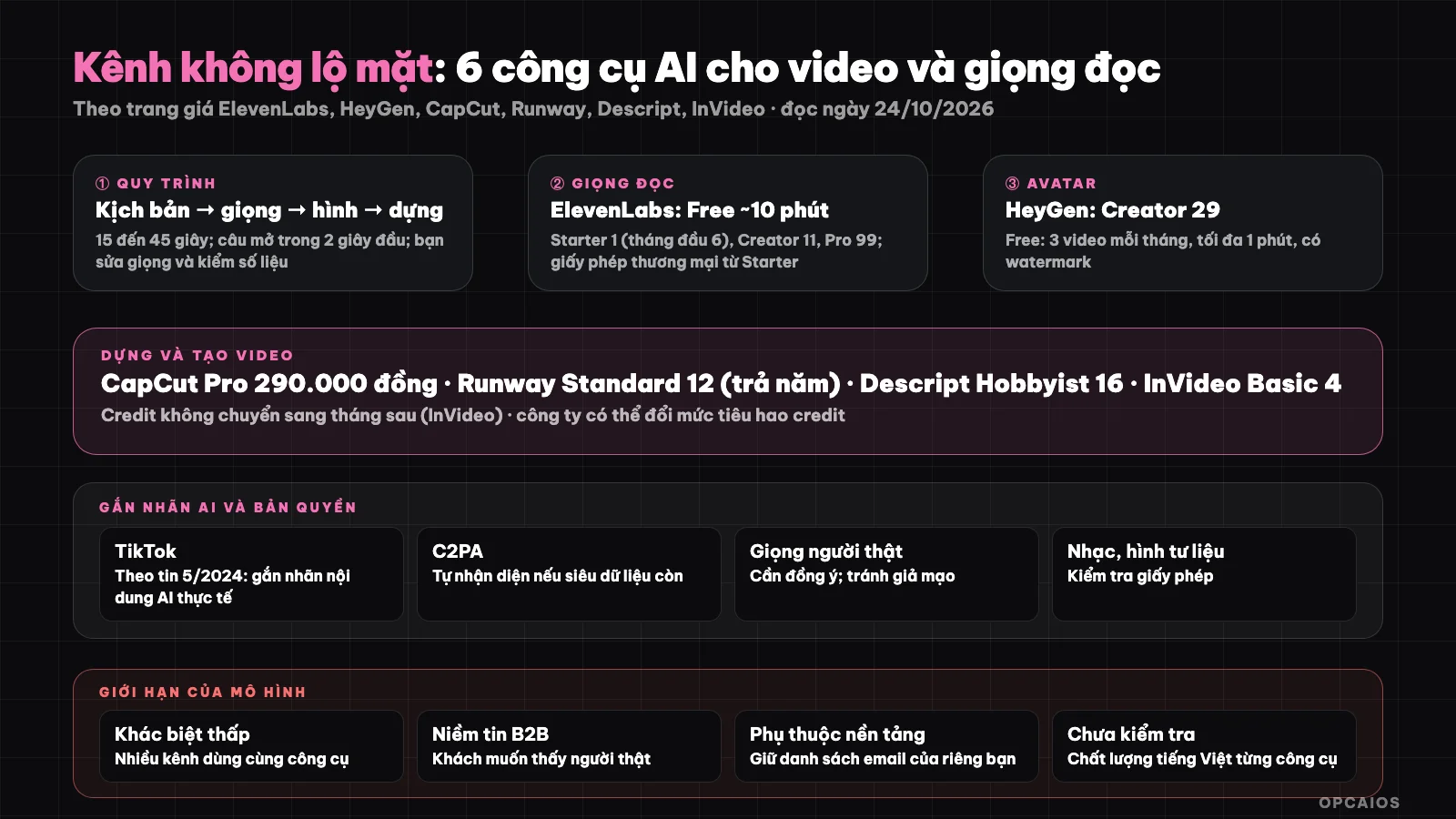
Process: script, voice, images, editing, posting; always label actual AI content. Diagram: OPCAIOS.
Process for producing a faceless video
- Idea and script (15 to 45 seconds): one idea, hook in the first 2 seconds; write with an AI assistant but you edit the tone and verify the numbers (see One-person marketing room).
- Voiceover: synthetic voice or your own voice.
- Images: stock footage, real screenshots, animations, avatars, or AI video.
- Editing, subtitles, music: combine and add automatic subtitles.
- Check copyright, label AI, post, and measure.
How much do ElevenLabs, HeyGen, and CapCut cost?
ElevenLabs, HeyGen, and CapCut are three tools for voiceover, avatars, and video editing. Prices in USD excluding tax (CapCut in Vietnamese đồng), read from official pages on 24/10/2026, may change:
| Tool | What it does | Free plan | Typical paid price |
|---|---|---|---|
| ElevenLabs | Synthetic voiceover, voice cloning | About 10 minutes of voiceover (10,000 credit) | Starter $1 (first month $6), Creator $11 (first month $22), Pro $99; commercial license from Starter |
| HeyGen | Video avatar speaking | 1 minute per video, 3 videos per month, has watermark | Creator $29 ($24 if paid yearly), 600 credit, 1080p, remove watermark |
| CapCut | Edit video, subtitles, templates | Yes (free templates, basic tools) | Pro 290,000 đồng per month or 1,890,000 đồng per year, 650 AI credit |
ElevenLabs has a commercial license from the Starter plan; the pricing page does not clearly state terms for the Free plan so you need to read the terms before using it commercially. HeyGen's pricing page does not state the total number of video minutes by plan. Example scenario: a channel needing only voiceover for 30-second videos could try ElevenLabs' free plan (about 10 minutes) before paying $11 for Creator.
How much do Runway, Descript, and InVideo cost?
Runway, Descript, and InVideo are three tools for creating video with AI, editing from text, and generating video from prompts. Prices in USD excluding tax, read on 24/10/2026, may change:
| Tool | What it does | Free plan | Typical paid price |
|---|---|---|---|
| Runway | Create video and images with AI | 125 credit one time | Standard $12 (paid yearly) or $15, 625 credit per month; Pro $28 or $35 |
| Descript | Edit video and audio by editing text | 1 hour media, export 720p, has watermark | Hobbyist $16 (paid yearly) or $24, 10 hours, 1080p |
| InVideo | Create video from prompts | We could not read the free plan | Basic $4, Pro $15 (paid yearly), Ultra $40; credit does not carry over to next month |
InVideo's pricing page has inconsistencies about Basic plan price ($4 or $5) and states that the company may change credit consumption at any time. For example, if you only edit short talk videos, Descript's Hobbyist plan gives 10 hours of media and 1080p export at $16 per month when paid yearly.
Choose a tool by your needs
| You need | Suggestion |
|---|---|
| Natural-sounding Vietnamese voiceover for video | ElevenLabs (listen to Vietnamese voices before paying) |
| A "virtual" host speaking directly | HeyGen (check Vietnamese quality) |
| Quick editing, subtitles, templates for social media | CapCut |
| Creative footage or AI-generated motion graphics | Runway |
| Podcast or talk video edited by text | Descript |
| Video created quickly from one idea | InVideo |
We have not checked the Vietnamese quality of each tool so we do not rank them; listen and try the free plans.
Labeling AI Content on TikTok and Copyright
According to news reports (from May 2024; policies may have changed): TikTok requires creators to label AI-generated content, provides tools for labeling, warns that incorrectly labeled content may be removed, and uses C2PA's Content Credentials standard to automatically detect and label AI content uploaded from other platforms, with the limitation being dependent on whether metadata is retained. We cannot access TikTok's official help page (the page does not display content when read automatically), so please read the current regulations yourself. Safe practice rules: label when using avatars, synthesized voices, or realistic-looking AI videos; do not impersonate real people or real voices without consent; check music and asset licenses; avoid making false claims in content.
Limitations of the "Faceless" Model
- Low differentiation: advantages come from scripts, expertise, and proprietary data.
- Trust: B2B clients usually want to see real people.
- Platform dependency: algorithms and policies change; keep your own email list (see What is email marketing?).
- Accumulated costs: many paid tools add up (see How to audit and cut software costs).
OPCAIOS Experience
Our machines have CapCut and DaVinci Resolve for editing, and we also have an in-house voiceover tool running on GPU servers (not yet used for public channels); we have not operated any "faceless" TikTok or Reels channels at real scale and have not used all six tools in this article, so this article is based on official pricing pages and news reports. We do not publish view counts or growth figures.
Read more: Step-by-step create an automated TikTok/Shorts channel using HeyGen, Suno, and CapCut from A to Z; How to "hack" organic reach on Facebook using AI algorithm analysis.
Frequently Asked Questions
What is a faceless channel?
A faceless channel is a short video channel on TikTok or Reels where the creator does not appear on camera. The visuals come from stock footage, actual screenshots, animations, avatars, or AI-generated video; the voiceover is either synthetic speech or the channel owner's own voice. This model lowers the production barrier for a solo business, but it doesn't solve the hardest part—having content worth watching. Example: a 30-second video explaining a work tip, with voiceover from ElevenLabs, actual screenshots, and auto-subtitles in CapCut. First write the script, then record the voice, then edit, finally tag it as AI-generated content and post. The main limitation is low differentiation, since many channels use the same tools.
What tools do I need at minimum to start?
At minimum you need two things: an editing tool with subtitles, like CapCut with its free plan that includes templates and basic tools, and a voiceover source, like ElevenLabs' free plan (around 10 minutes) or your own voice. According to the official pricing page as of 24/10/2026, these two free plans are enough to make a few test videos. Only add Runway or HeyGen when your script really needs it. You should test Vietnamese voices before paying, since OPCAIOS has not checked the Vietnamese quality of each tool.
Do I have to tag AI-generated content?
Yes. According to news from May 2024 (the policy may have changed), TikTok requires tagging AI-generated content and warns that untagged content may be removed. OPCAIOS cannot read TikTok's official help page when reading automatically, so check the current rules yourself. The safest approach is to tag when using avatars, synthetic voices, or realistic-looking AI video.
Can I use AI voice commercially?
It depends on the tool and plan, so read the terms before posting a monetized or ad-supported video. According to ElevenLabs' official pricing page (as of 24/10/2026), commercial licensing starts with the Starter plan (price in the table above); the page does not clearly state the terms for the Free plan. For example, a channel selling services should use a plan with commercial licensing instead of the free plan. Also, do not clone a real person's voice without their consent, and tag AI-generated content when the voice sounds like a real person. This is general guidance, not legal advice.
Can you make money with a faceless channel?
We don't have data to confirm; it depends on content and channel monetization. To learn how to build a content production workflow with AI, see OPCAIOS's AI application training course.
Source: official pricing pages of ElevenLabs, HeyGen, CapCut (Vietnamese), Runway, Descript, InVideo, accessed 24/10/2026; news about TikTok's AI labeling policy (from 5/2024, official page not yet accessed). Prices exclude tax and may change. Experience is from OPCAIOS.
Translated from Vietnamese with AI. Read the original.
Want to apply this in your business?
Book a free 30-minute call (Vietnam time, in English or Vietnamese).