



Making Motion Graphics with Claude
Making motion graphics with Claude means using Claude Code to write code (HTML, React, or p5.js) that describes each frame, then using tools like FFmpeg to build it into a video with music, voiceover, and logo, without needing to open After Effects. According to Hamza Khalid, author of the "AI in Public" tutorial series (posted on X on September 30, 2026, with over 312 thousand views according to X), the secret lies in the setup rather than the prompt: the prompt accounts for only 10% of the result, the setup accounts for 90%. This post rewrites that tutorial section in Vietnamese, including all images and videos from the original, and compares each code repository and each installation command on GitHub as of October 23, 2026.
The author's 25-second brand introduction video, built with Claude Opus 5.5: every frame and sound is code. Video: Hamza Khalid (AI in Public), taken from the original post on X.
Cover of the original post. Image: Hamza Khalid.
What is motion graphics by code?
Motion graphics by code is a way to create animated text, shapes, and interfaces using source code: each frame is drawn from HTML, CSS, canvas, or React, then a build tool combines the frames into an MP4 file. Because everything is text, a code-writing model like Claude can read, edit, and run it again, instead of having to drag and drop in graphics software.
According to the author, the reason to spend a weekend learning this is that video has become cheap very quickly: he mentions someone who paid over $1,000 for a launch video a year ago, then last week made a video with Claude in less than 30 minutes (this is a statement from the author of the original post, not independently verified). Anthropic released Claude Opus 5.5 on September 22, 2026, and according to the author, within hours of that his timeline was filled with introduction videos and music videos built from code, mostly captioned "one prompt."
Why does "one prompt" actually require 90% setup?
The prompt accounts for only 10% of the result, the setup accounts for 90%: that is Hamza Khalid's argument in his post on September 30, 2026 on X. What determines whether a video looks good or rough is the branding, reference materials, and rules that Claude is given before starting. The author cites a comment from Thariq (from Anthropic's Claude Code team): the post says "Claude one-shot this," but the prompt behind it is about 10,000 characters long, with skills, examples, and API keys. To verify for himself, the author took a prompt circulating online, ran it as-is, and got "mediocre" results. There were two errors:
- The character's head was floating because it had no neck and body below.
- The text color clashed with the background to the point of being hard to read.
In the end, for example: the same prompt but with a brand folder containing a logo and color scheme means Claude doesn't need to choose colors on its own.
"Claude Pop": the 6-second opening of a music video built from code, taken from the original post. Video: Hamza Khalid.
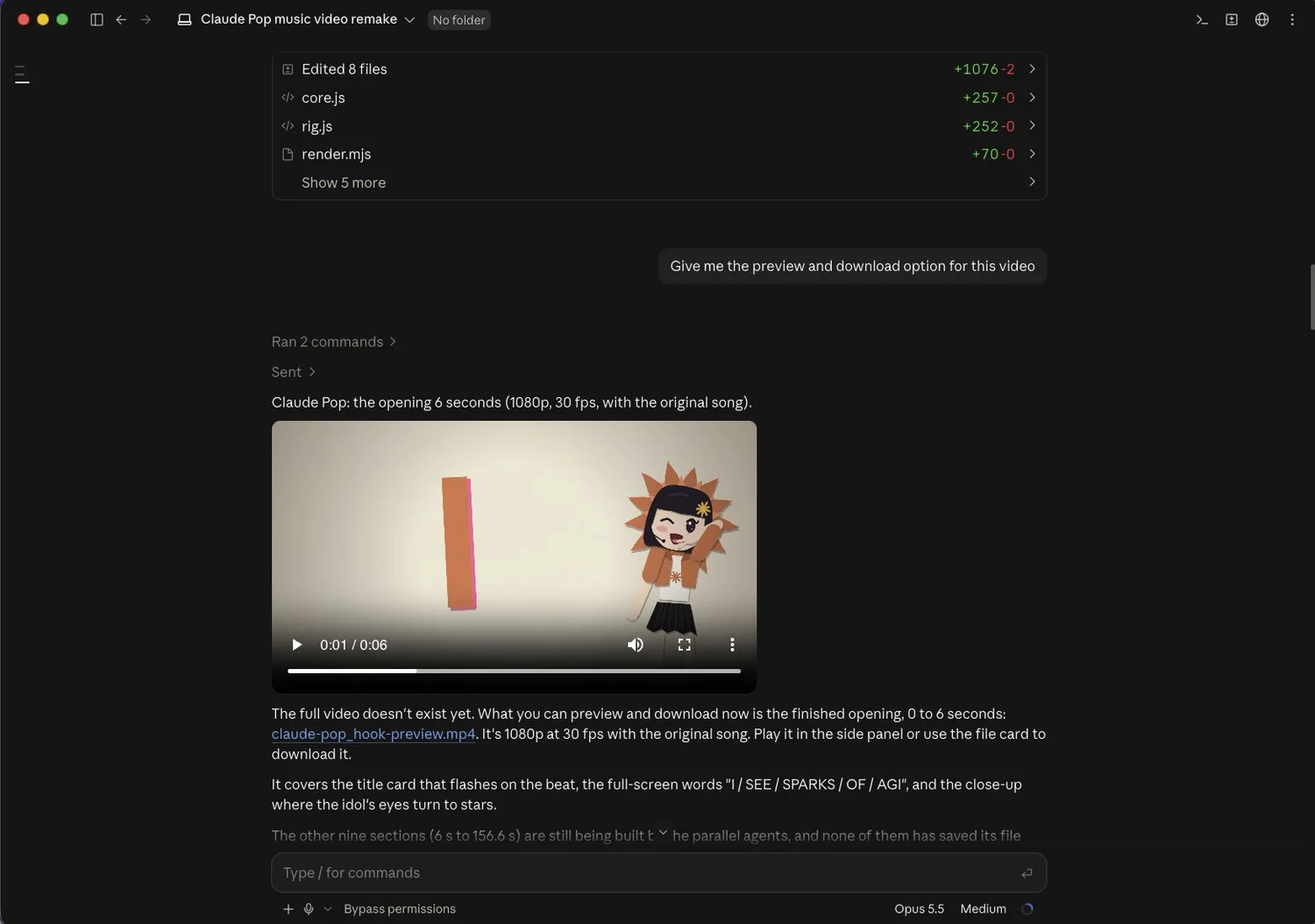
Claude Code rebuilds the "Claude Pop" music video, with a 6-second preview right in the chat window. Image: Hamza Khalid.
Step 1: Create a brand folder to use as your video workshop
A brand folder is where every video starts: Claude Code works inside the folder you open, so putting your reference library, skills, brand files and shared render files all in one place means later videos can build on earlier ones. This takes about a minute. Here are the steps in Claude Code:
- Open Claude Code.
- Click on the No folder box (or the name of the folder currently selected).
- Click Open folder.
- Click New Folder.
- Name it after your brand (I named mine
video-motion-lab) and click Create. - The new folder is now selected, and that's your workshop.
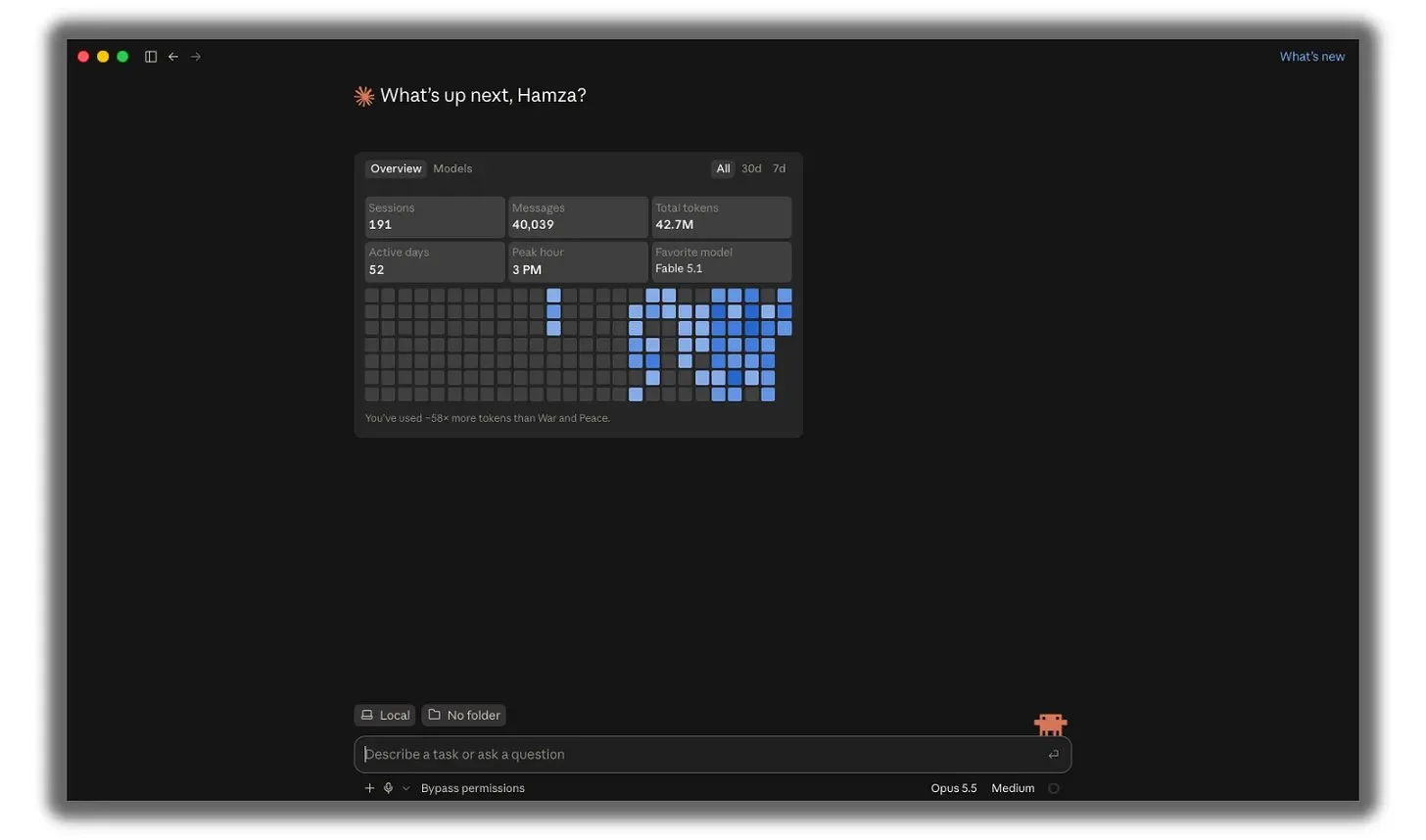
Step 1: open Claude Code. Photo: Hamza Khalid.
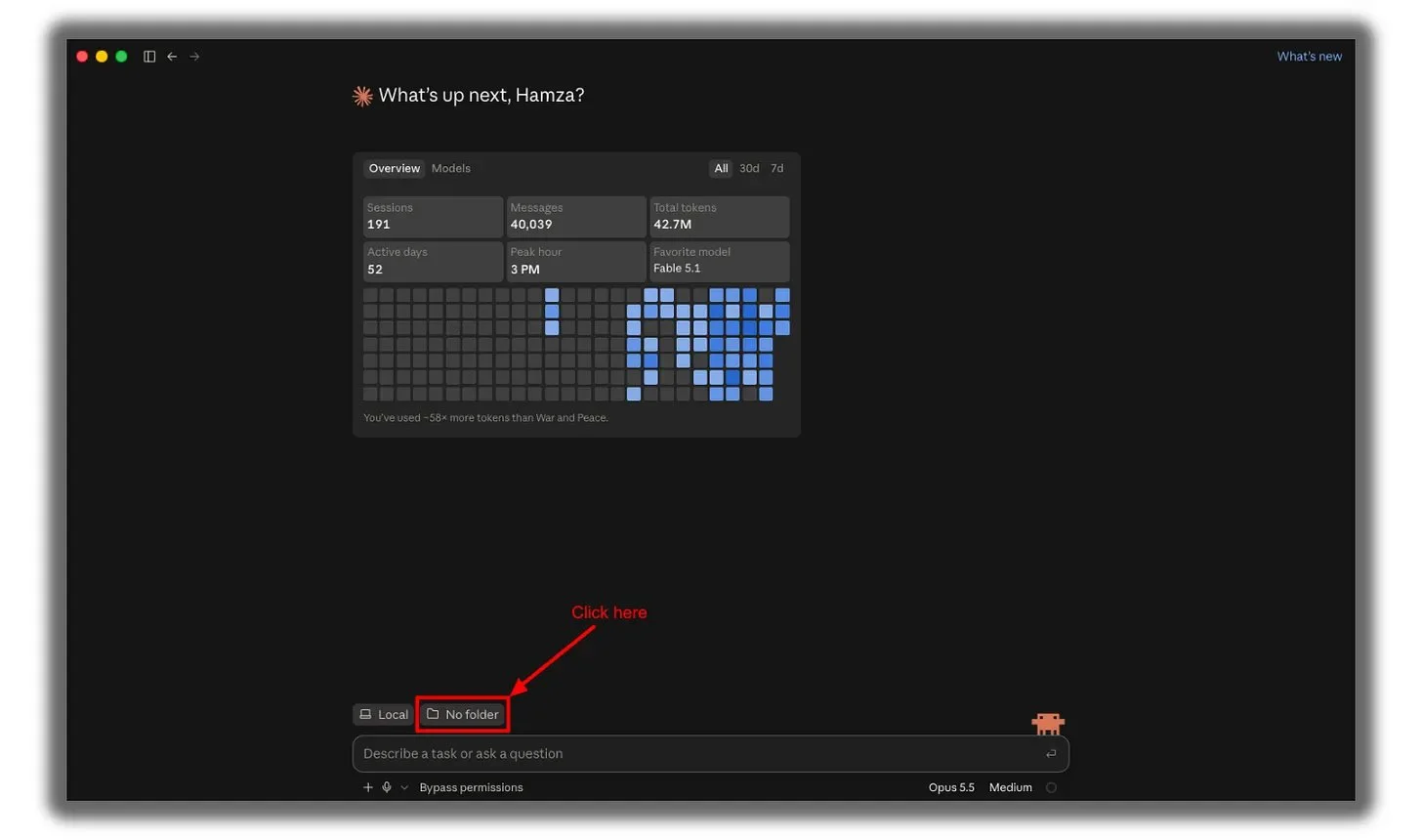
Step 2: click on the No folder box. Photo: Hamza Khalid.
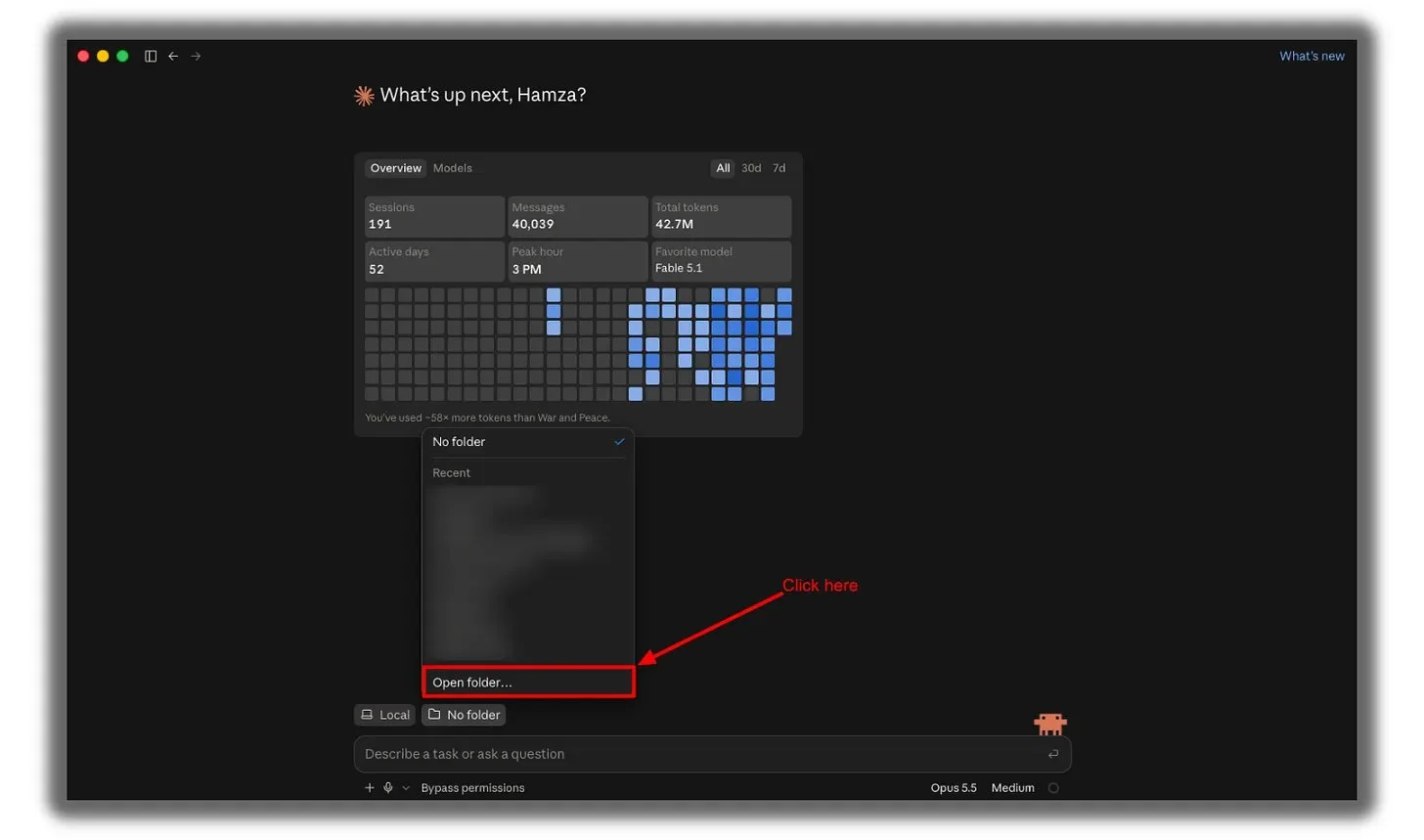
Step 3: select Open folder. Photo: Hamza Khalid.
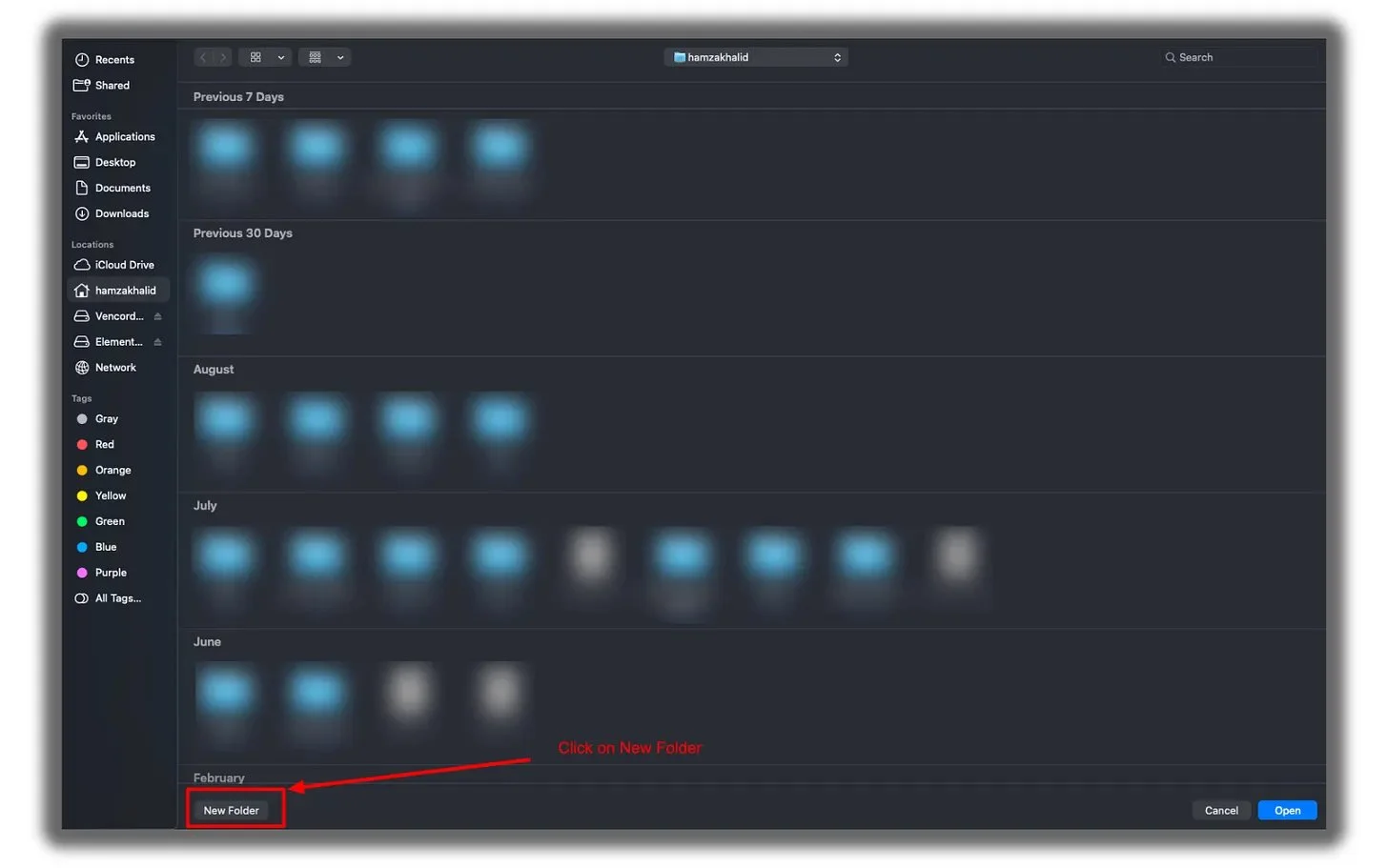
Step 4: click New Folder. Photo: Hamza Khalid.
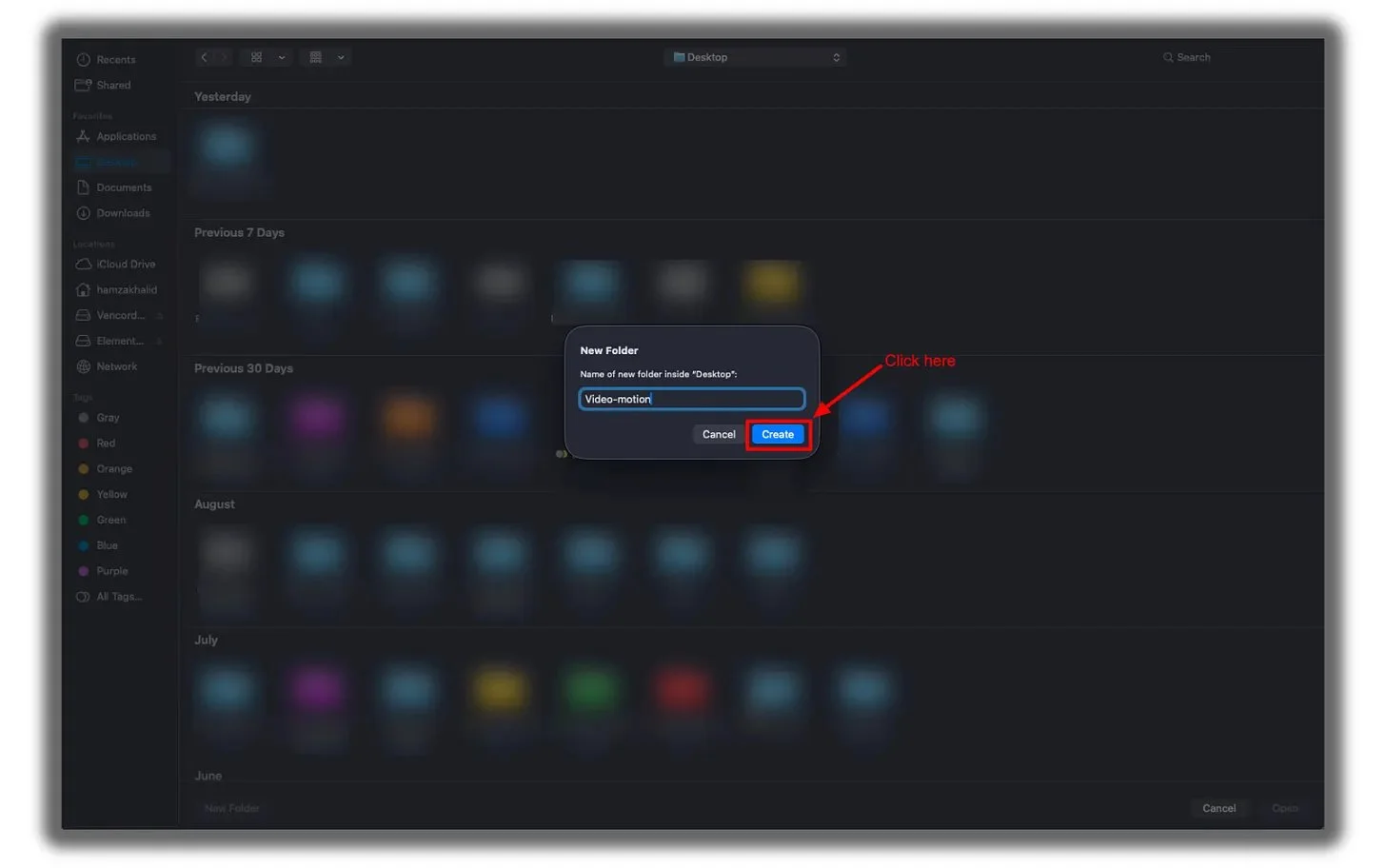
Step 5: name it and click Create. Photo: Hamza Khalid.
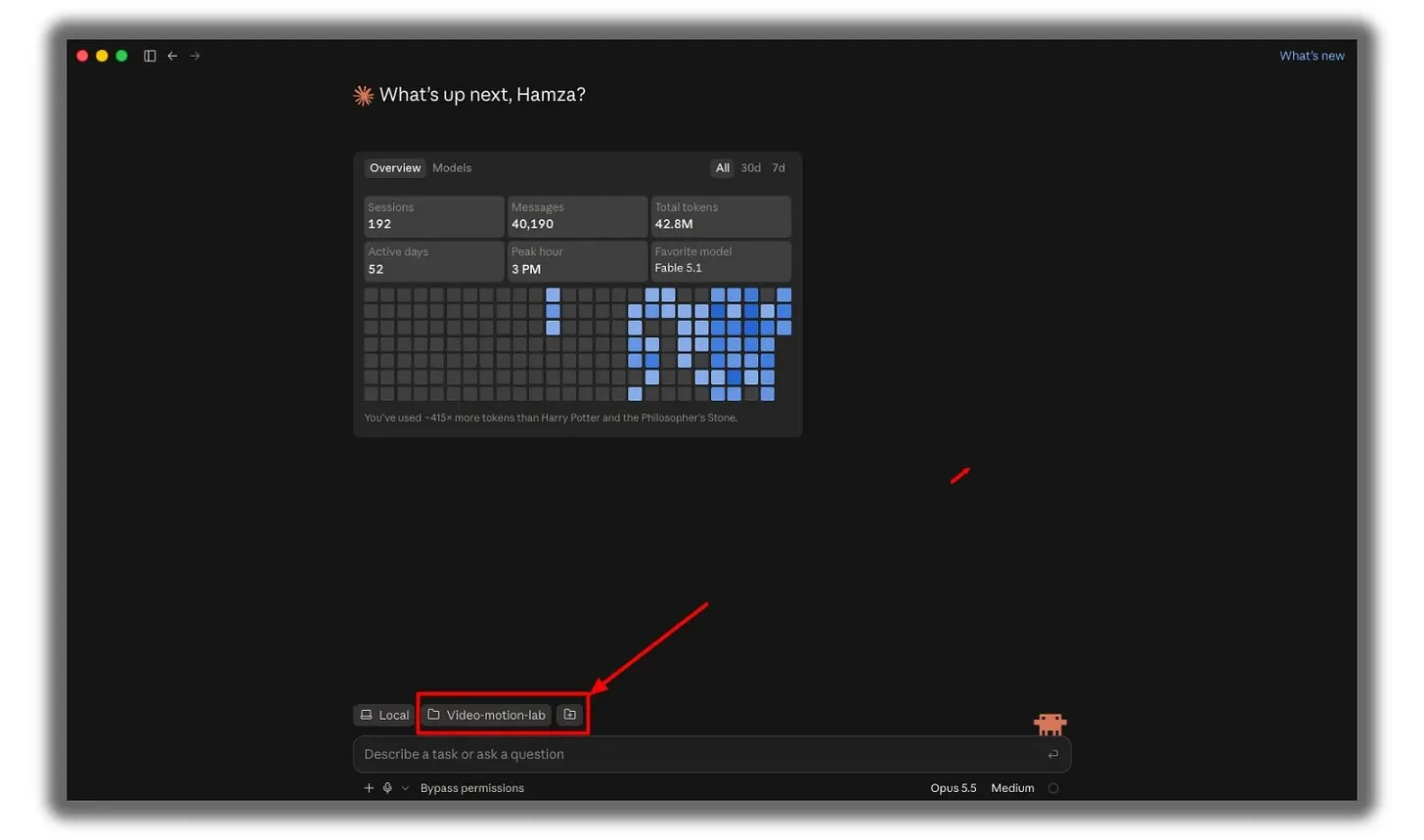
Step 6: the folder is now selected. Photo: Hamza Khalid.
Step 2: Which code reference repositories should I show Claude?
Claude needs to see how video code is built, because the model relying only on memory will choose the "average" animation it has ever seen. The author used 8 reference sources, each handling one part of the work: music video, starter kit, canvas animation, HTML framework, React framework, feature film, command library and dataset. OPCAIOS checked each repository on GitHub on October 23, 2026, according to GitHub's description and star count in the table:
| Role | Source | Description (according to GitHub) | Stars, license |
|---|---|---|---|
| Music video | JohnHeibel/PDoomVideo | Source code for the "I'm Upping My P(doom)" music video made with Claude Opus 5.5 | around 2,500 stars, license not specified |
| Starter kit | JohnHeibel/ClaudeAnimationBase | Hand-drawn animation starter kit using p5.js and p5.brush, character Clawd, 31 emotions | around 1,580 stars, MIT |
| Canvas animation | buildwithhanif/claude-animation-skill | 2D hand-drawn animation written in code, pure Node and FFmpeg | 42 stars, MIT |
| HTML framework | heygen-com/hyperframes | "Write HTML, render video, for AI agents" | around 70,000 stars, Apache-2.0 |
| React framework | Remotion Skills | Remotion's skill set (source code at remotion-dev/skills) | around 5,500 stars |
| Feature film | WinterArc21/Battle-of-Austerlitz-Film | 5-minute film using WebGL, synthesized audio and voiceover | 25 stars |
| Command library | guanmo-ai/awesome-ai-motion | Curated videos and animations with source code, commands | around 410 stars |
| Dataset | athemeroy/awesome-claude-5-5-videos | List of Claude 5.5 videos with sources, commands, tools | around 730 stars, CC-BY-4.0 |
Two small notes. First, the last repository in the original post was named awesome-opus-5-5-videos but has now been renamed to awesome-claude-5-5-videos (the old link still redirects). Second, Remotion is a documentation site, not a repository that can be "cloned" like the others, so it gets installed through skills in the next step.
How do I clone all eight repositories at once?
You don't need to clone each repository one by one; cloning is downloading a code repository from GitHub to your machine. The author wrapped this into a single command to paste into Claude Code (Anthropic), along with a request to check for Node.js 22 or higher, git and FFmpeg before cloning, and to use GIT_LFS_SKIP_SMUDGE=1 for HyperFrames to skip large sample videos. According to the author's screenshot, 8 repositories take up around 560 MB. A condensed version of that command:
In this directory, create a subdirectory "repos" and clone into it the following repositories:
https://github.com/JohnHeibel/PDoomVideo
https://github.com/JohnHeibel/ClaudeAnimationBase
https://github.com/buildwithhanif/claude-animation-skill
https://github.com/heygen-com/hyperframes
https://github.com/WinterArc21/Battle-of-Austerlitz-Film
https://github.com/guanmo-ai/awesome-ai-motion
https://github.com/athemeroy/awesome-claude-5-5-videos

For HyperFrames, skip large sample videos (use GIT_LFS_SKIP_SMUDGE=1).
Before cloning, check for Node.js 22+, git and ffmpeg; install any that are missing.
Once done, list each repository with a line explaining what it's for.
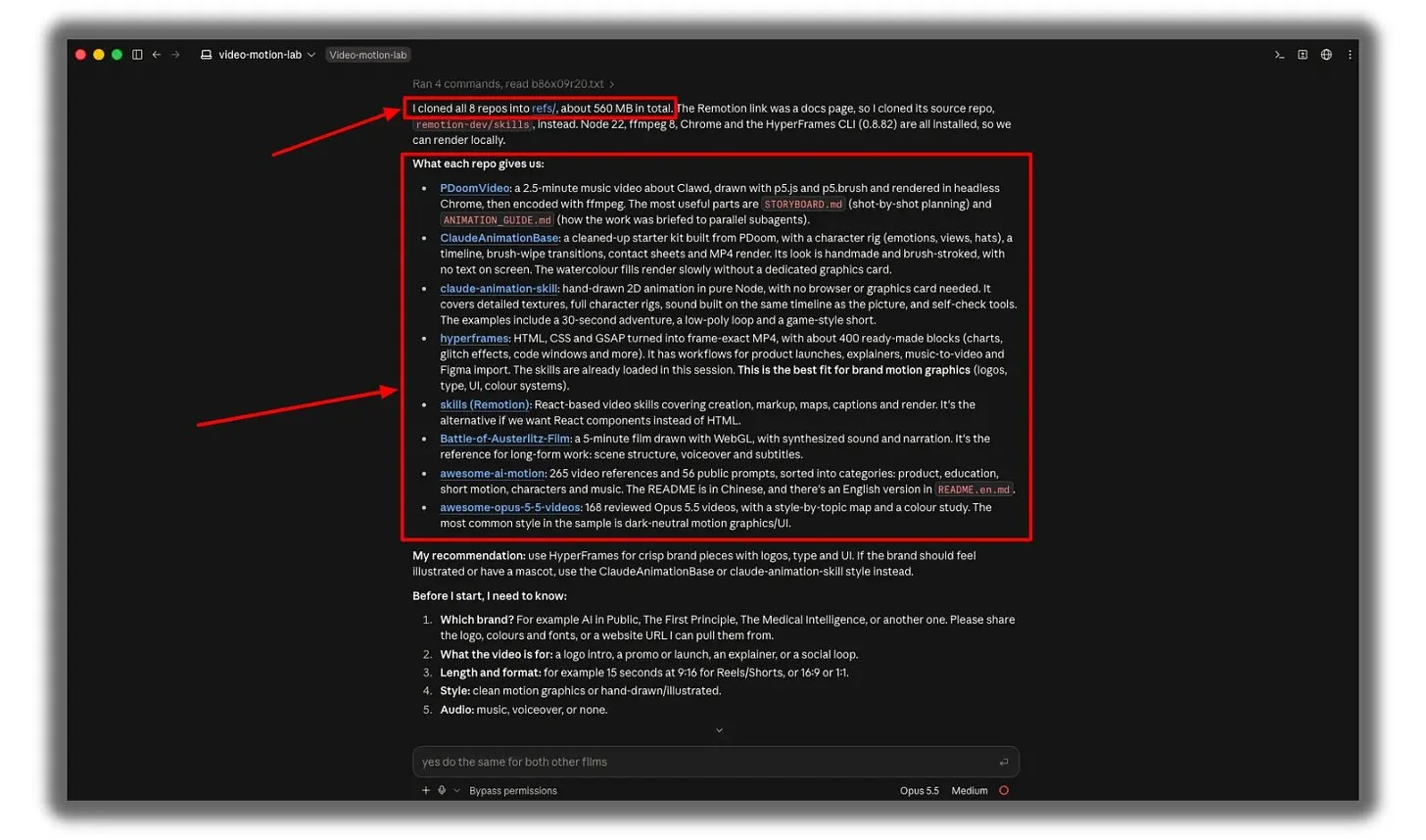
Result: Claude finished cloning the repositories (around 560 MB according to the author's screenshot), summarized each one and suggested using HyperFrames for brand design, ClaudeAnimationBase for mascot illustration style. Photo: Hamza Khalid.
Step 3: What skills should I install so Claude doesn't have to guess?
Skills are instruction packages that teach Claude the working rules for each framework. Code repositories show Claude what a good product looks like, while skills provide the rules so it works the way each framework expects. Paste the following commands one by one into your terminal:
npx skills add remotion-dev/skills
claude plugin marketplace add heygen-com/hyperframes
claude plugin install hyperframes@hyperframes
claude plugin marketplace add buildwithhanif/claude-animation-skill
claude plugin install claude-animation@claude-animation-skill
Cross-check with each project's documentation: the npx skills add remotion-dev/skills command is correct as shown on the Remotion documentation page; the two HyperFrames plugin commands and the two claude-animation commands are correct as shown in their READMEs. The claude-animation README also requires running npm install in the skills folder after installation, and needs Node 20 or higher plus FFmpeg.
Should I use HyperFrames, Remotion, or claude-animation?
Choose based on the video type you want, exactly as Claude outlined in the author's screenshot:
- HyperFrames (HTML, CSS, GSAP): best for sharp branded videos with logos, text, UI, and color schemes; comes with hundreds of pre-built components like charts, noise effects, and code windows.
- Remotion (React): choose this if you want to build with React components instead of HTML.
- ClaudeAnimationBase and claude-animation-skill: good when your brand needs a hand-drawn feel, with characters or mascots; the downside is that watercolor strokes render slowly without a dedicated graphics card, and the README recommends asking Claude to use other effects instead when running on integrated graphics.
What do I need to prepare before telling Claude to make a video?
You need a short brand summary: Claude will ask you about exactly these things before starting, according to the author's screenshot:
- Which brand: logo, colors, fonts, or website address so Claude can fetch them itself.
- What the video is for: logo intro, ad, product intro, explainer video, or social media loop.
- Length and aspect ratio: for example 15 seconds vertical 9:16 for Reels or Shorts, or horizontal 16:9, or square 1:1.
- Style: clean motion graphics or hand-drawn illustration.
- Audio: music, voice-over, or none.
The rest of the original process (detailed brand summary, CLAUDE.md file, exact commands to build the video, and how to fix render errors) the author keeps in his newsletter, so this post doesn't have the original versions of those parts. Practical tip: keep brand rules in CLAUDE.md so each new video reads them again, and ask Claude to write a shot list before writing code; the ClaudeAnimationBase README also recommends this, along with trying both very broad and very detailed instructions.
Important notes before you follow along
Important notes before you follow along are five points about hardware, licensing, and data reliability:
- Hardware requirements: Node.js 22 or higher (HyperFrames), git, and FFmpeg; ClaudeAnimationBase also needs Google Chrome. The repositories total about 560 MB according to the author's run.
- Reasoning level affects detail: according to ClaudeAnimationBase's README, test videos all used Opus 5.5 at xhigh reasoning level, and higher levels mean more intricate and detailed scenes.
- Licensing: some repositories don't list a license (for example PDoomVideo); if you reuse someone else's work in a commercial product, check the license or ask the author.
- The author's data: numbers about views, costs, and time are stories in the original post, not independently verified.
- OPCAIOS's experience: the diagrams and cover images on this blog are also built with code (writing HTML then screenshotting with headless Chrome), except they are static images instead of videos.
If you're new to this, read Which AI model should I choose? to weigh costs by task, What is Claude Sonnet 5.5? for a faster and cheaper option, and AI writes code in wrong version to learn why you should give AI reference materials before asking it to write code.
Frequently Asked Questions
Do you need to know design to make motion graphics with Claude?
Not necessarily. According to the original author, you only need a brand image or a product sales page URL and a command, but the results depend largely on directory setup, reference libraries, and skills like those in this article.
What do you need to install for Claude to build video with code?
You need Claude Code, Node.js 22 or higher, git, and FFmpeg; depending on the framework you might also need Chrome. Then install the skills for Remotion, HyperFrames, and claude-animation using the commands in Step 3.
How are HyperFrames and Remotion different?
HyperFrames builds video from HTML, CSS, and GSAP, suited for brands with logos, text, and interfaces. Remotion builds with React components. Choose based on the language you're comfortable with and the type of video you want to make.
Why does running a viral command prompt as-is still produce bad video?
Because Claude lacks brand identity, templates, and rules so it has to guess. The author tried running a viral command exactly as written and got a floating character head, text color clashing with background; pre-setup helps avoid that.
If you want to learn how to use AI for real work, where do you start?
You should start with a small repeatable process that has clear setup like this article. According to Hamza Khalid, setup accounts for 90% of results, so first create a brand directory, then let Claude see the reference library and install skills, finally write the command to build the film. For example, a small shop could make one 15-second 9:16 intro video for Reels using Claude Code (Anthropic) before scaling to a series. See OPCAIOS's AI application training course.
Source: article by Hamza Khalid (AI in Public) on X, x.com/humzaakhalid/status/2105203643758895454, posted 30/9/2026; images and video taken from the original article as requested, belong to the author; original article only published the first part of the guide. Code repository, install commands and Claude Opus 5.5 release date (22/9/2026) checked against GitHub, Remotion page, and Anthropic announcement page on 23/10/2026. Figures on views, cost, and time are from the author, not verified.
Translated from Vietnamese with AI. Read the original.
Want to apply this in your business?
Book a free 30-minute call (Vietnam time, in English or Vietnamese).