


Oh My Pi (the omp command) is an open source coding agent that runs in your terminal: you give it tasks in plain language, it reads code, edits files, runs commands and checks results like a programmer. Unlike Claude Code or Codex, Oh My Pi isn't tied to any AI company — you choose from over 60 providers, including models that run right on your machine.

Oh My Pi (omp): coding agent running in terminal. Image: official project README.
What is Oh My Pi?
Oh My Pi is a command-line coding agent, released under the MIT license, developed by Stencil Labs based on Pi — a minimal agent by Mario Zechner. The development team kept Pi's "terminal first" approach and added everything a programmer needs, with the motto "coding agent with IDE built in".
Instead of just reading and editing files as text, Oh My Pi uses the same tools that code editors use: language servers (LSP) for renaming and symbol lookup, real debuggers to pause your program at errors. According to the GitHub README, the current toolset includes 31 built-in tools, 14 LSP operations and 28 debugger operations. The project is continuously updated and has over 35,000 stars on GitHub (as of October 2026).
See a summary and installation instructions at the Oh My Pi page in the Tools library.
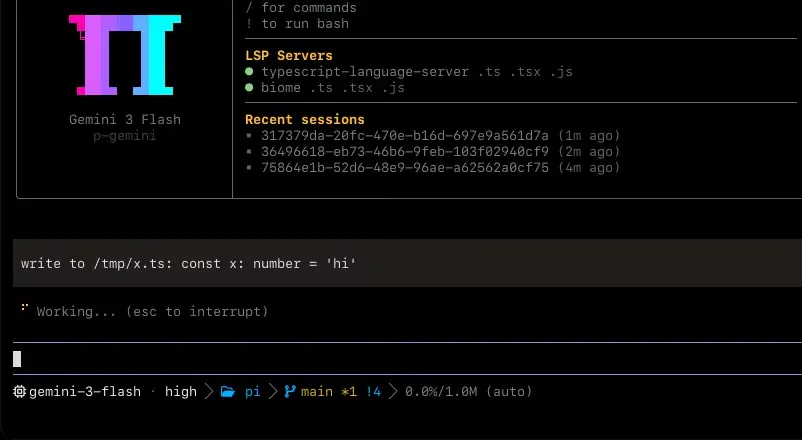
The omp startup screen: model in use (Gemini 3 Flash), connected language servers and recent work sessions. Image: official README.
How is Oh My Pi different from Claude Code and Cursor?
The biggest difference is model choice. Claude Code uses Anthropic's models; Cursor is a GUI editor with plan-based pricing. Oh My Pi is free software that runs in your terminal, and you pay the model provider directly for the one you choose — or pay nothing if you run a model on your machine.
| Criterion | Oh My Pi | Claude Code | Cursor |
|---|---|---|---|
| Form | Command line (terminal), with Zed integration | Command line, has IDE and web versions | GUI editor |
| Source code | Open (MIT) | No | No |
| AI model | Over 60 providers, subscription plans, models run on machine | Anthropic's models | Multiple models per Cursor's plans |
| Software cost | Free | Requires paid Claude plan or API | Free and paid plans available |
| Best for | People comfortable with terminal, wanting model independence | Users of the Claude ecosystem | People who prefer visual interface |
If you're just starting out and aren't used to the command line, Cursor is still easier to approach. Oh My Pi is worth trying when you've used a coding agent before and want to cut costs or avoid depending on one company.
What AI models can Oh My Pi work with?
Oh My Pi organizes model sources into four groups, according to the official README:
- Direct API and middleware: Anthropic, OpenAI, Google Gemini, Google Vertex, xAI, DeepSeek, Mistral, Groq, Amazon Bedrock, Azure OpenAI, OpenRouter, Hugging Face and many other providers.
- Subscription plans: log in with
/loginusing GitHub Copilot, Cursor, GitLab Duo, Kimi Code, GLM Coding Plan… - Run on your machine: Ollama, LM Studio, llama.cpp, vLLM — no API key needed.
- Custom endpoint: any service following the OpenAI standard, set in
~/.omp/agent/models.yml.
Each session has multiple model "roles": default for regular work, smol for cheap subagents, slow for deep thinking, plan for planning mode. This way you can let a cheap model do most of the work and only call an expensive one when you really need to. Oh My Pi also supports fallback chains: when your primary provider hits rate limits, the session switches to the next model.
What are the most noteworthy features?
The seven features below make the clearest difference compared to an ordinary code-writing chatbot.
Hashline — edit code by "fingerprint". Instead of typing out the entire code section you want to change, the model just points to it using a content hash. This avoids the familiar "string not found" error loop, and if the file has been modified in the meantime, the old edit is rejected before it can corrupt the code.
LSP attached to every edit. When you ask to rename a function or move a file, Oh My Pi goes through the language server so import statements and file exports get updated at the same time — like a rename operation in your editor.
Real debugger. The agent can attach lldb to a C program with memory errors, dlv to a hanging Go service, or debugpy to a Python process, then stop at the exact error location and read variable values.
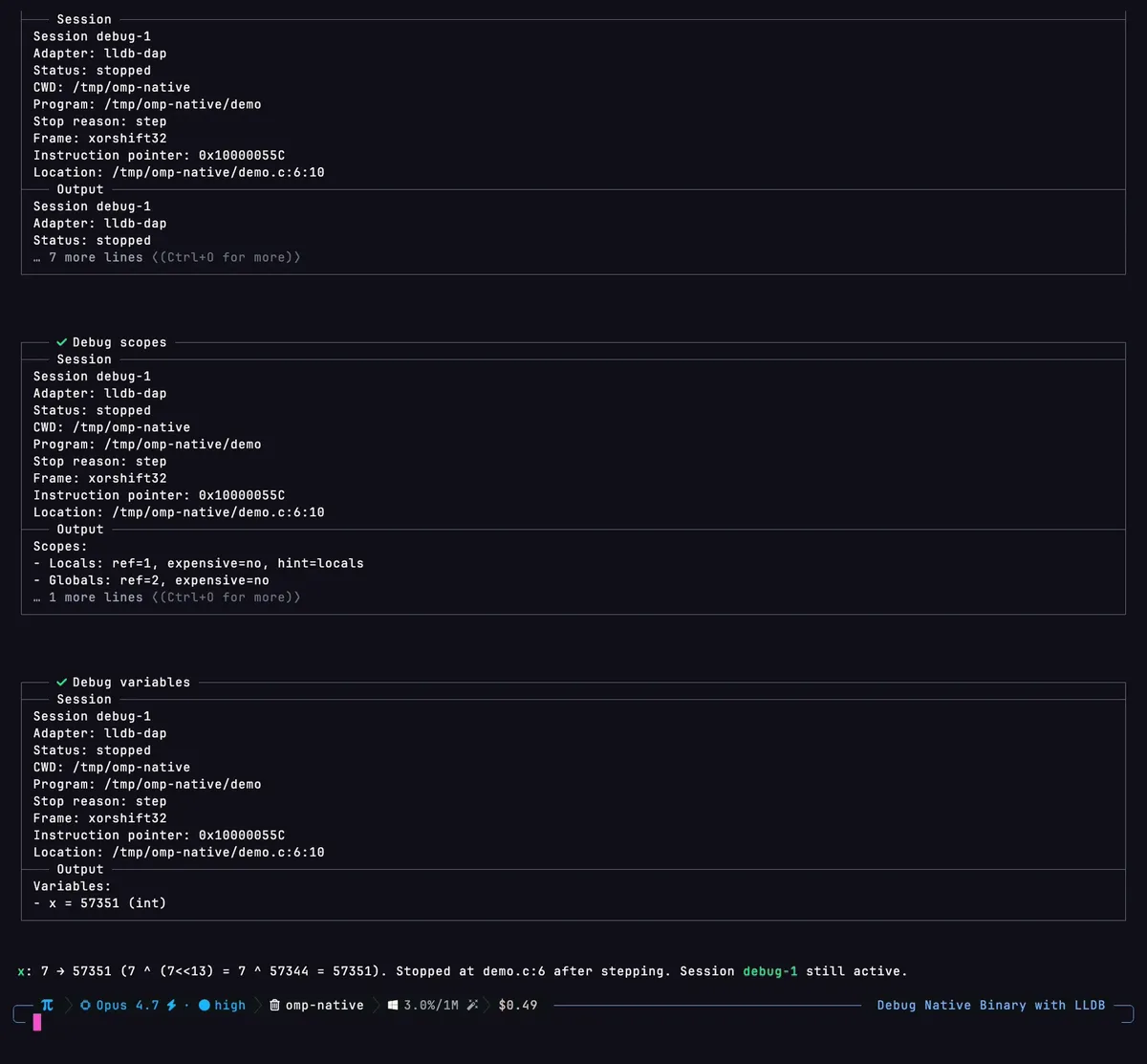
omp attaching lldb to a C program, stopping at the function causing the error and reading variable values. Photo: omp.sh.
Subagents running in parallel. The task tool divides a large job among multiple child agents, each running in its own copy of the project (worktree) so they don't step on each other. Press Alt+A to open Agent Hub and see what each agent is doing.
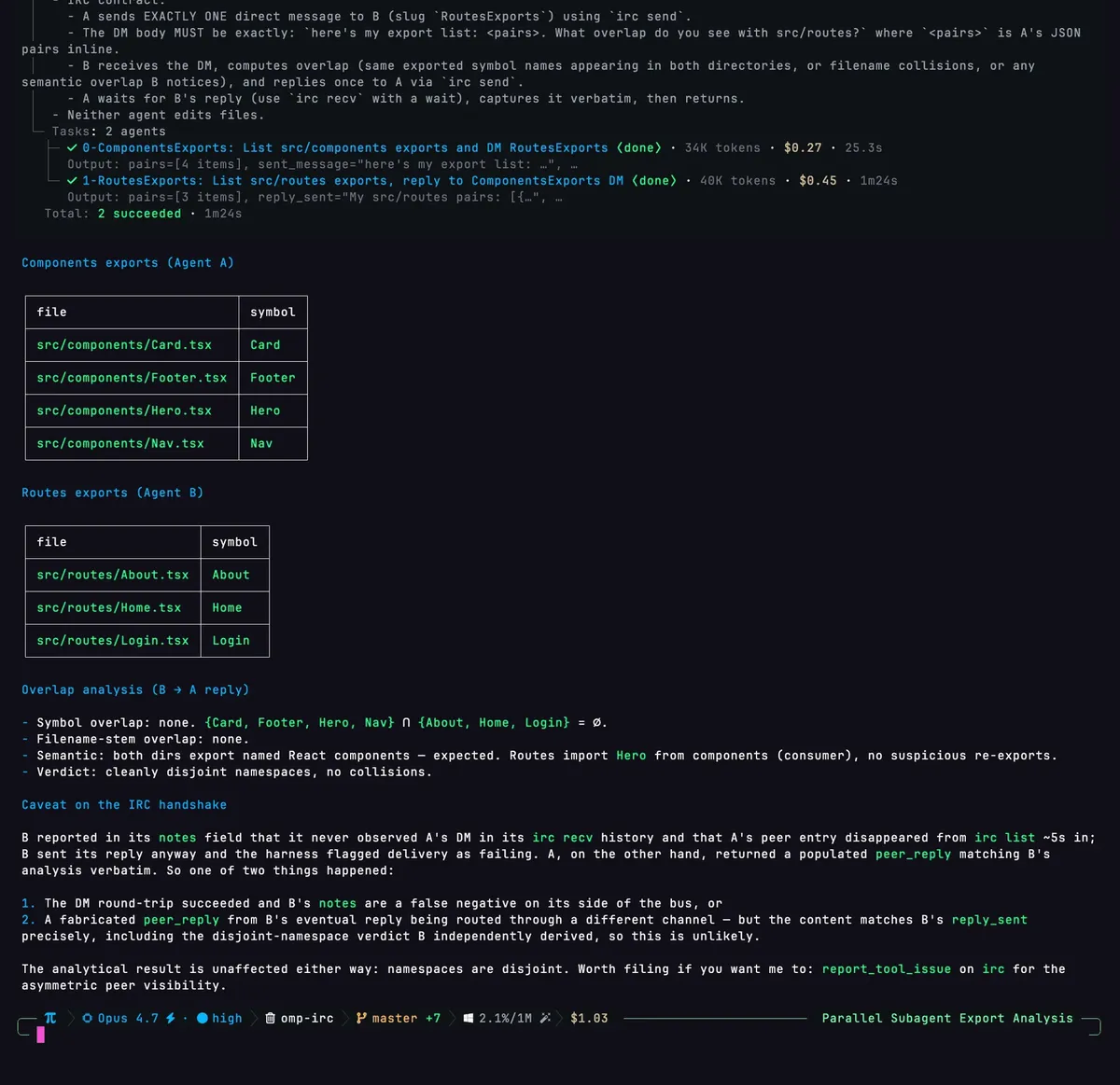
Two subagents running in parallel, each showing token count, cost and time; results are merged into a table. Photo: omp.sh.
Browser, web search and GitHub built in. The agent can control Chromium or a Chrome tab you have open, search across 23 sources, and read pull requests or issues on GitHub just like reading a file.
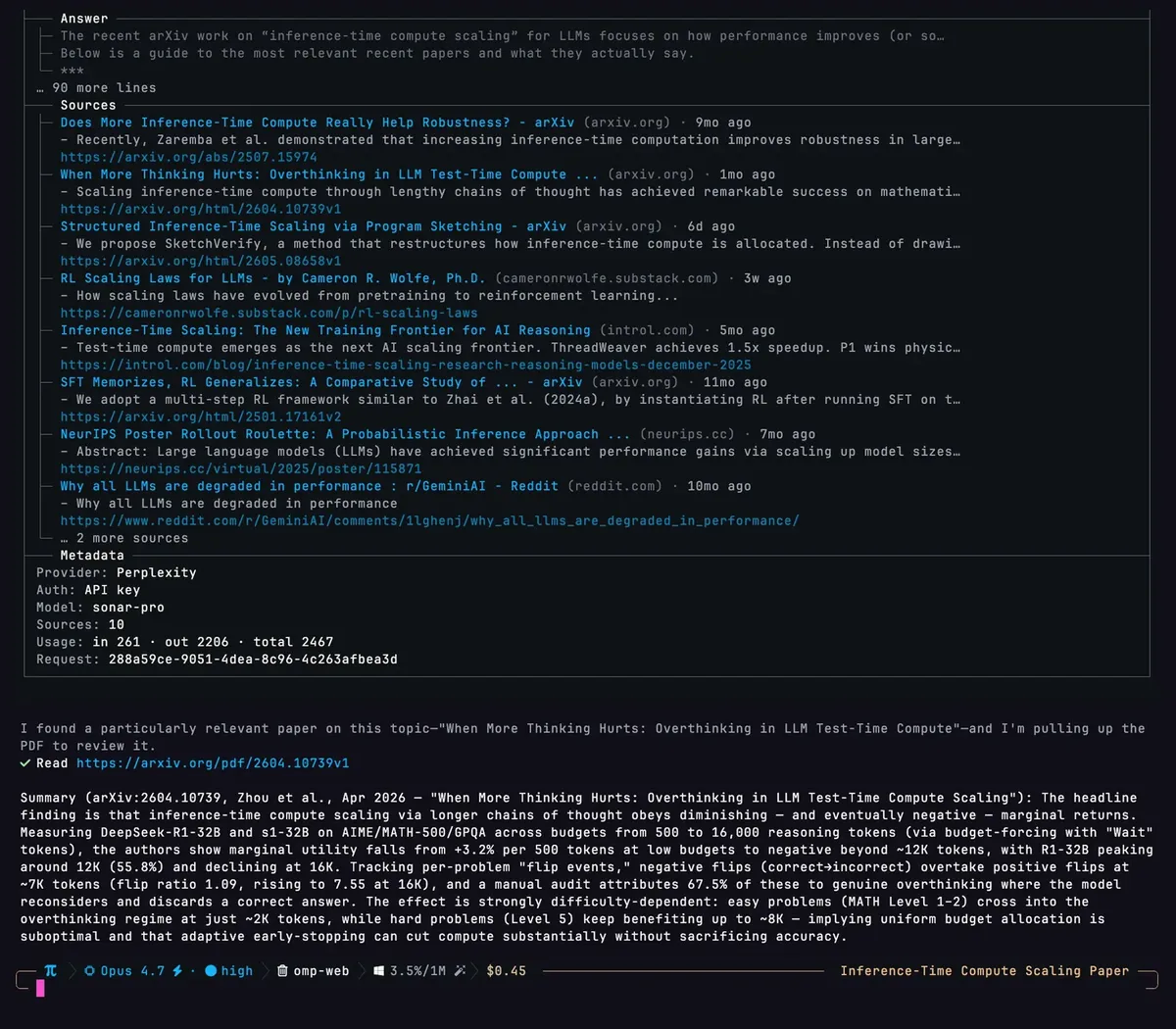
The web_search tool returns ranked sources, the agent opens a PDF paper on arXiv and summarizes the key findings. Photo: omp.sh.
Structured review and commit. The /review command gives you a conclusion on whether to push the changes or not, with each issue ranked from P0 to P3. The omp commit command splits unrelated changes into multiple small commits in the correct dependency order.
Memory and session sharing. The agent records knowledge about the project for use in later sessions (this feature is off by default, turn it on in settings). The /collab command creates a link or QR code so others can view or jointly control the running session.
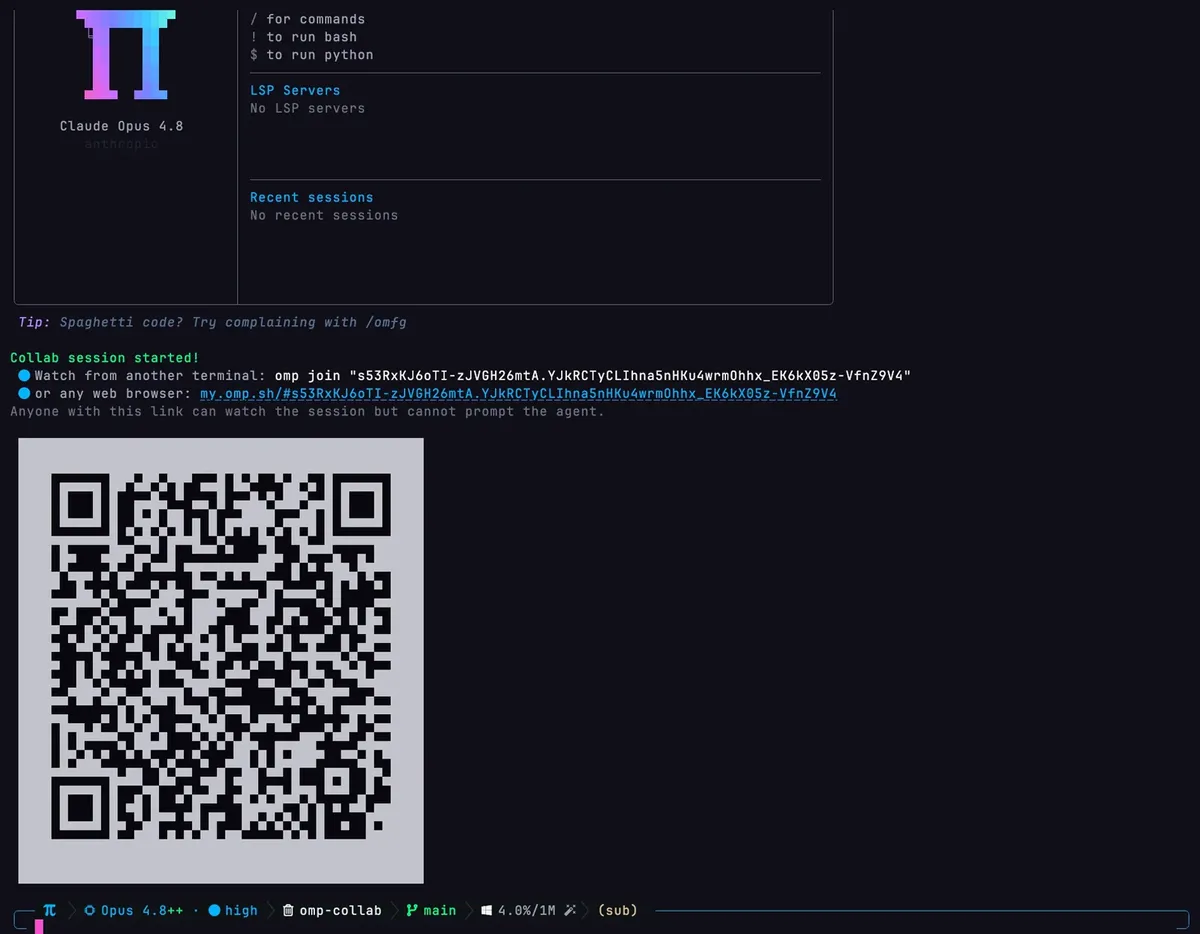
/collab view creates a view-only link and QR code: others can follow the session but cannot command the agent. Photo: omp.sh.
One convenience for people who have used other tools: Oh My Pi can read existing rule files like AGENTS.md, Cursor rules or .clinerules, so you don't have to rewrite your configuration.
How do you install Oh My Pi?
Oh My Pi runs on macOS, Linux and Windows with a single build, no WSL needed. Install with one command:
- macOS / Linux:
curl -fsSL https://omp.sh/install | sh - Windows (PowerShell):
irm https://omp.sh/install.ps1 | iex - Homebrew:
brew install can1357/tap/omp
After installation, run omp setup to choose your default model, then open a terminal in your project directory and type omp. Give tasks in plain language, for example: "Read this project and summarize the architecture, list the 3 most error-prone places." Switch models mid-session with /model.
Can you use Oh My Pi with a cheap model or run it locally?
Yes, and that's why many people choose Oh My Pi. With a locally-run model via Ollama or LM Studio, you don't need an API key and don't pay for model calls — in exchange, quality depends on the model and your machine's setup.
If you're using a gateway that aggregates multiple models to the OpenAI standard (like 9Router, LiteLLM or your own vLLM server), just declare it in ~/.omp/agent/models.yml:
providers:
  my-gateway:
    baseUrl: http://127.0.0.1:20128/v1
    api: openai-completions
    apiKey: <your key>
    models:
      - id: model-name
        name: My model
Verify with omp models my-gateway, then pick that model in omp setup or /model. A sensible way for solo workers: cheap model for the smol role (subagent), strong model for the slow role.
Are there Oh My Pi reviews and tutorials worth watching?
If you want to see Oh My Pi running in practice before installing it, here are 4 videos on YouTube (in English, you can turn on auto-translated subtitles). These are the video creators' perspectives, not OPCAIOS evaluations.
1. Comprehensive test and comparison with Claude Code — AI Stack Engineer channel, "This Free Terminal Agent Made Me Delete Claude Code (Oh-My-Pi Full Test)".
2. Learn all of Oh My Pi in 56 minutes — Superposition channel, "Learn the Entire Oh My Pi in 56 Minutes". Good if you've already installed it and want to go through all the features.
3. Quick overview — Fluid Coding & AI channel, "Oh My Pi (omp.sh): The Terminal Agent With the IDE Wired In".
4. Subagent, RPC mode and deterministic code patching — Alex Hitt channel, "Oh My Pi GitHub Tutorial: Subagents, RPC Mode, and Deterministic Code Patching".
Oh My Pi updates very quickly, so the interface and commands in videos may differ from your installed version; when there are differences, trust the official documentation.
Who should use Oh My Pi, and who shouldn't yet?
Oh My Pi works well for people comfortable with the terminal and able to read code: freelance developers, technical staff in small businesses, people using Claude Code or Codex who want to actively choose models to reduce costs.
You shouldn't start with Oh My Pi if you've never used a command line, can't read code, or need a visual interface to see changes. In that case, an AI-powered code editor like Cursor will be easier; once you get comfortable working with a coding agent, you can move on to Oh My Pi.
If your business wants to bring coding agents or AI into your workflow but doesn't know where to start, OPCAIOS offers an AI application training program and AI Automation system building services tailored to your actual needs.
Frequently asked questions
Is Oh My Pi free?
Yes. Oh My Pi is open source software under the MIT license and has no fees. The only cost is paying for AI model calls to your chosen provider; if you use models running on your machine through Ollama or LM Studio, you won't have this expense.
Does Oh My Pi support MCP?
Yes. Oh My Pi automatically finds MCP servers declared in the configuration of other tools and in your project's .mcp.json file. If you don't want to load MCP configuration from your project, you can disable it with the mcp.enableProjectConfig setting.
Does Oh My Pi run on Windows?
Yes. The same Oh My Pi build runs on macOS, Linux, and Windows (both x64 and ARM machines), no WSL needed. On Windows, install with the PowerShell command irm https://omp.sh/install.ps1 | iex.
How is Oh My Pi different from Pi?
Mario Zechner's Pi is a minimal coding agent that runs in the terminal. Oh My Pi is developed from Pi, keeping that approach but adding many built-in tools: LSP, debugger, subagent, browser, web search, code review, memory, and session sharing.
Is it safe to use Oh My Pi with company code?
Your code is sent to the model provider you choose, so privacy depends on that provider's policies. If you need to keep code completely internal, use models that run on your machine or private servers; always review changes before committing.
Conclusion
Oh My Pi is worth considering if you want a powerful coding agent without being locked into an AI company: it's free, open source, runs with cheap models or on-device models, and comes with IDE tools like LSP and debugger. In return, it requires you to be comfortable with the terminal and able to read code.
Getting started: install with one command at omp.sh, run omp setup, pick a cheap model and try giving it a small task in your project — for example summarizing the architecture or writing a test for a function.
This article is based on Oh My Pi's official documentation (README on GitHub, omp.sh) as of October 2026; features and provider list may change across versions. Illustrations are taken from the project's README and omp.sh; videos belong to the named YouTube channels.
Translated from Vietnamese with AI. Read the original.
Want to apply this in your business?
Book a free 30-minute call (Vietnam time, in English or Vietnamese).