


What is image creation with Gemini? Creating images with Gemini means typing a description in words (a prompt), possibly with a reference image, so that the Gemini app or Gemini API generates a new image or edits an existing one; creating videos works similarly. General background is in the post What is Gemini?. Most important to say first: the model names have changed, Imagen and Veo are now old names. According to official documentation read on 04/11/2026, Imagen has stopped working on Gemini API and is replaced by the Nano Banana family; the video section in the Gemini app now centers on Gemini Omni, while Veo 3.1 is still introduced by Google DeepMind but the preview versions of Veo on Gemini API have reached end of life. This post does not promise images or videos ready to use right away for advertising, and is not legal advice. The post covers current model names, limits by plan, SynthID watermark, content policy, copyright, prompt writing tips and real experience with many errors from OPCAIOS.
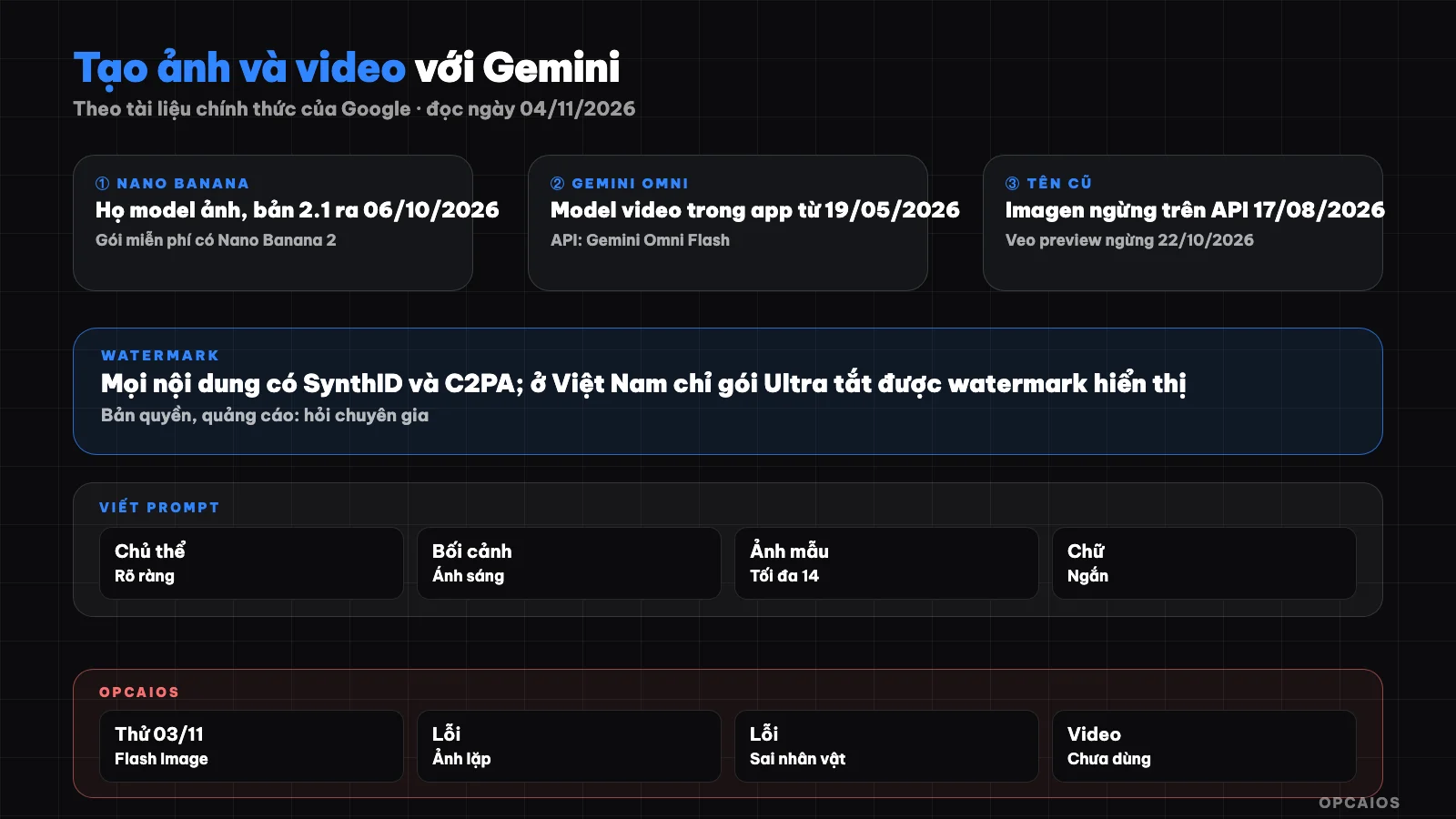
Creating images and videos with Gemini: models, watermark and steps to check before use. Diagram: OPCAIOS.
What are Imagen, Veo and Nano Banana called now?
Nano Banana is the trade name for the family of models that generate and edit images built into Gemini, while Gemini Image is the technical name of the same family; Imagen is the old line of image generation models that has ended on Gemini API. According to the Deprecations page of Gemini API (read on 04/11/2026), imagen-4.0-generate-001, Ultra and Fast versions have the earliest end date of 17/08/2026, with the replacement model listed as gemini-nano-banana-2.1. The Imagen page in the documentation states directly that Imagen has ended, use Nano Banana instead. The table of image and video model names readable today:
| Trade name | Model code on API | Note from documentation |
|---|---|---|
| Nano Banana 2.1 | gemini-nano-banana-2.1 |
Latest, released 06/10/2026, better text in images, maintains consistency across multiple edits |
| Nano Banana 2 | gemini-3.1-flash-image |
Previous version, documentation recommends switching to 2.1 |
| Nano Banana 2 Lite | gemini-3.1-flash-lite-image |
Cheapest and fastest, not optimized for multiple reference images |
| Nano Banana Pro | gemini-3-pro-image |
4K images, complex layouts, accurate text |
| Nano Banana | gemini-2.5-flash-image |
Old version, earliest end date 15/03/2027 |
| Gemini Omni Flash | gemini-omni-1.1-flash |
Generate, edit, extend video, includes audio |
| Imagen 4 | imagen-4.0-generate |
Ended |
The Models page of Gemini API read on 04/11/2026 no longer lists Veo; Gemini Omni Flash is the only video model there. Many people still search by the names Imagen and Veo, but newcomers should learn the Nano Banana family for images and Gemini Omni for video directly.
Can Veo still be used, what is Gemini Omni?
Gemini Omni is a tool for creating and editing video through conversation in the Gemini app, launched on 19/05/2026 according to the release notes page. The release applies to people aged 18 and above with a Google AI plan, scope varies by region. Regarding Veo, three official sources read on 04/11/2026 say not entirely the same:
- The Veo page from Google DeepMind still calls Veo 3.1 the leading video model, with native audio, outputs 1080p and 4K, sample video 8 seconds long, has a try button in Gemini, Flow and Gemini API.
- The plans page of the Gemini app lists Veo 3.1 Lite as limited trial for the Google AI Pro plan, alongside Gemini Omni Flash.
- The Deprecations page lists preview versions
veo-3.1-generate-preview, Fast and Lite versions with earliest end date 22/10/2026, replaced bygemini-omni-1.1-flash; the official Veo versions remain on Gemini Enterprise Agent Platform.
Practical conclusion: with the Gemini app, look for Omni; for developers, check the models page on the day you deploy. API details see the post Gemini API and AI Studio.
How many images and videos does each Gemini plan generate?
The limits for creating images and videos in the Gemini app are no longer fixed in absolute numbers but calculated as multiples of a baseline level, and video is the type that consumes the limit most. According to the "Gemini Apps limits & feature availability" page (read on 04/11/2026), there is a baseline level with no plan, AI Plus is 2x, AI Pro is 4x, and AI Ultra is 5x or 20x AI Pro depending on the plan; the limit refreshes every 5 hours until hitting the weekly cap and can change without notice. The gemini.google plan page displays the following for Vietnam on 04/11/2026:
| Plan | Displayed price (VND/month) | Images and videos per page |
|---|---|---|
| Free | 0 | Create images with Nano Banana 2; no video creation |
| Google AI Plus | 132.000 | 2x, video creation available, 200 Google Flow credits |
| Google AI Pro | 489.000 | 4x, Nano Banana Pro, 1.000 Flow credits, Veo 3.1 Lite trial |
| Google AI Ultra | From 2.250.000 | Highest level, 10.000 or 25.000 Flow credits |
Prices can change and may differ when purchased through app stores. More detailed analysis of each plan in the post Gemini free and paid.
How do SynthID watermark and visible watermark work?
SynthID is a hidden watermark developed by Google DeepMind, embedded in images, videos, and audio created by Google's AI, invisible to the naked eye but recognizable by Google's tools. According to the help page "Manage watermark settings in Gemini Apps" (read on 04/11/2026), all content created or edited using Gemini Apps has SynthID and Content Credentials metadata (C2PA). The image documentation for Gemini API also notes that all generated images have SynthID. The visible watermark is separate, with four points:
- On the web, go to Settings, Media Watermark to turn it on or off; this setting only controls the visible watermark.
- Turning off the visible watermark does not remove SynthID and C2PA.
- In India, South Korea, and Vietnam, the option to turn off is only available for AI Ultra plan; other users in these countries always have the visible watermark.
What does the content policy block?
The Gemini app's content policy is a set of general principles applied to text, images, and video, with no separate rules for image generation. The policy guidelines page on gemini.google (read on 04/11/2026) lists six categories:
- Content threatening child safety.
- Dangerous activities, such as instructions for self-harm or weapon making.
- Violence and gore that is shocking or gratuitous.
- Misinformation that could cause harm to health, safety, or finances.
- Harassment, incitement, discrimination.
- Sexual content.
Additionally, Google's Terms of Service prohibit using AI content to make others believe it was created by humans.
Can I use Gemini images for advertising?
This section is for reference only, not legal advice. Google's Terms of Service (effective 30/07/2026, read on 04/11/2026) state that certain services allow generating original content and Google does not claim ownership of that content. Not claiming ownership does not mean the image is necessarily protected by copyright, nor does it guarantee the image does not resemble someone else's work. The Gemini API Terms also say Google may generate content that is the same or similar for others. Five steps to check before putting an image in advertising:
- The reference image you upload must be an image you have the right to use.
- No third-party logos, characters, or faces.
- Do not misrepresent the product's function.
- Keep the watermark and metadata, clearly mark that the image was created by AI when the advertising platform requires it.
- Read the advertising policy of the platform you plan to run on; Vietnam's regulations on labeling AI content in advertising we have not verified.
How one marketer uses AI, see the post solo marketing agency with AI.
How to Write Image Generation Prompts with Gemini to Get Usable Images?
A good image generation prompt is a specific scene description, not a string of isolated keywords. Gemini API's image generation documentation (read 04/11/2026) recommends describing the scene in detail; for photorealistic images, mention frame type, subject, context, lighting, camera angle and lens; for illustrations, mention style, material, line quality, color palette; then refine gradually through multiple conversation turns. Five tips to apply:
- Write in order: subject, action, context, lighting, camera angle, style.
- State aspect ratio based on where you'll post—for instance 9:16 for vertical video, 1:1 for square posts.
- If you want text in the image, write the text and its position clearly, then check Vietnamese spelling with diacritics.
- Keep characters consistent using reference images; documentation states up to 14 images maximum, Nano Banana 2.1 accepts up to 4 character images.
- Refine one point per turn: "keep everything the same, just change the background to cream color".
Example for a bakery: "Close-up shot of a freshly baked baguette on a wooden table, morning sunlight from the window on the left, 45-degree camera angle, 50mm lens, blurred background, 4:5 aspect ratio."
OPCAIOS Experience
OPCAIOS has an internal short-form video production tool. In a test run on 03/11/2026, this tool used a Gemini Flash Image model to generate illustration images for each scene. The results still had errors: some images repeated between scenes, and one image drew the character incorrectly. Three lessons learned:
- Batch image generation from a script needs a review step—go through each image before assembling the video.
- Character consistency across multiple scenes is the hardest part; you need a fixed reference image instead of just a text description.
- Model names in your code must be checked against the Deprecations page, because the Gemini family changes model codes fairly fast.
We have not used Veo or Gemini Omni for actual video, we have not measured cost per image, and we have no data on advertising effectiveness from AI images.
Frequently Asked Questions
Is image generation with Gemini free?
Yes, at basic tier. According to Gemini app rate limits (read 04/11/2026), image generation with Nano Banana 2 works even without a paid plan, but the rate limit is standard, resets every 5 hours, and has a weekly cap. Regenerating images with Nano Banana Pro and video generation require Google AI Plus tier or higher.
Is Imagen still usable?
Not on Gemini API: the Imagen page lists Imagen models as discontinued and recommends using Nano Banana, the Deprecations page lists 17/08/2026 as the earliest discontinuation date for Imagen 4. The pricing page and Google DeepMind model page (read 04/11/2026) no longer mention Imagen.
Can you remove the watermark from Gemini images in Vietnam?
According to the watermark help page (read 04/11/2026), in Vietnam only AI Ultra tier users see the option to turn off watermark display. Even if turned off, SynthID embedding and C2PA metadata remain, and Google has detection tools. Using outside tools to remove marks does not make the image not AI, and may violate terms against misleading viewers.
Do I own the copyright to images created with Gemini?
Google's terms state Google does not claim ownership of content you create, but that doesn't answer whether the image is legally protected, since this depends on each country's law. Google can also generate similar images for other people. This is not legal advice; for major ad campaigns or brand assets, consult an intellectual property lawyer.
Where should a newcomer start making images with Gemini?
Start in the Gemini app with the plan you have, pick one specific task like a post cover image or product illustration. Write your prompt in order—subject, context, lighting, camera angle, style—then refine one point at a time through multiple turns. To learn systematically how to integrate AI images and video into your content workflow, see OPCAIOS's AI application training course.
Source: Gemini API docs (models, image-generation, imagen, deprecations), Google DeepMind (models page, Gemini Image, Veo), gemini.google (subscriptions, release notes, policy guidelines), Gemini Apps Help (limits & feature availability, Manage watermark settings), Google Terms of Service (read 04/11/2026). Not verified: exact image and video counts per tier, maximum Gemini Omni video length in app, Vietnam regulations on AI labeling in ads, image pricing on Gemini API. Experience is OPCAIOS's.
Translated from Vietnamese with AI. Read the original.
Want to apply this in your business?
Book a free 30-minute call (Vietnam time, in English or Vietnamese).