



AI agents building and operating websites means handing over most of the work of writing features, deploying, and maintaining to a programming agent (an AI agent that can read code, edit code, run commands), while the person keeps the role of setting requirements, reviewing, and taking responsibility. OPCAIOS did exactly that with the website opcaios.org, and this post contains 10 lessons drawn from project memory notes and source code. Each lesson comes from a real incident or rule, along with the fix. If you work alone and are considering this approach, read along with system for an AI running alone and programming agent for people who don't know code.
What data is this post based on and what does it not have?
The honest part first: OPCAIOS does not have a nice milestone to show off. The current notes span from late September to late October 2026, that is about one month of notes, so "several months" in the title is just a way of speaking based on general recognition, not a precisely measured figure. The only source is OPCAIOS project memory notes and source code, read on 25/10/2026. OPCAIOS does not publish revenue or traffic numbers, has not measured the time saved compared to doing it by hand, and this post does not promise that AI will run your website in your place. For example, when a feature has not run through end-to-end, the note says straight up "not yet checked end to end" instead of reporting it as done.
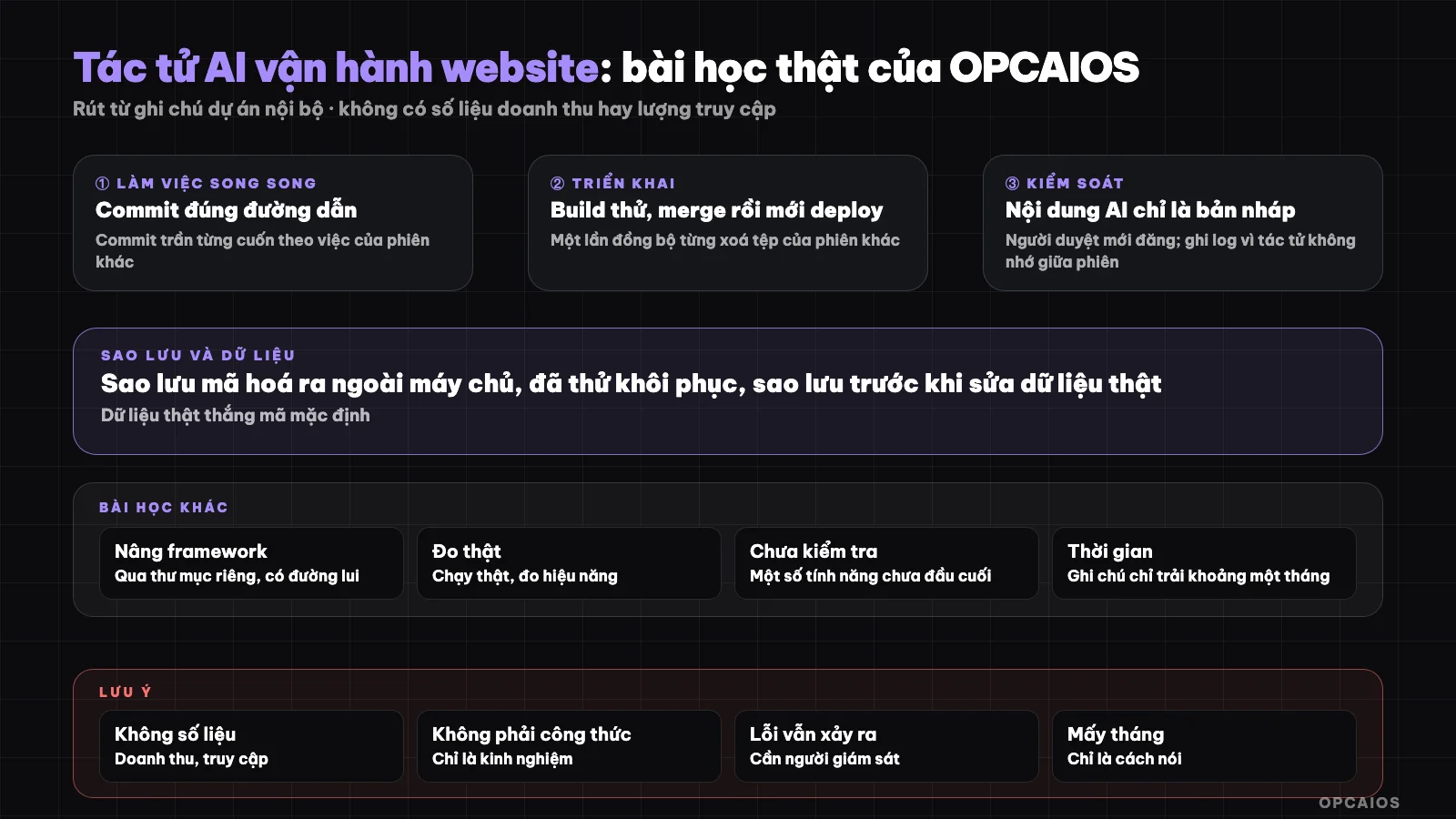
Working loop between person and agent: each step has a checkpoint. Diagram: OPCAIOS.
What parts does OPCAIOS website have and who wrote the code?
The website opcaios.org has a blog, a document and template store, courses, an internal CRM, email sequences, SEO/GEO tools suite and many management pages. Almost all code was written by the programming agent on request from the website owner, using Next.js as the framework, Postgres database and a private server run by pm2. Many sessions run at the same time in the same code folder. It is precisely the detail "many sessions in the same folder" that created most of the lessons below, such as two accidental file commits (lesson 1) and one time accidentally deleting files on the server during deployment (lesson 2). Also, the agent does not remember anything between sessions, so every rule must be in the project notes (lesson 10).
10 Lessons
1. When multiple sessions share one code repository, commit only the correct path of your own work
When multiple sessions share a Git repository, the safety rule is to commit only the correct path of your own work. OPCAIOS project notes, working through Anthropic's Claude Code, recorded the same error twice in 2026. The first time, a regular commit command pulled in pending work from another session and pushed it to the remote GitHub repository. The second time, just running git add on my file was not enough, because a bare commit took everything that the other session had already staged. For example: a config file that another session had half-edited went along with your commit without you knowing. The process I drew out has 3 steps:
- Check
git diff --cached --statto see what work is pending. - Put the path list right on the commit command, like
git commit -m "..." -- <path>. - Check the history of unfamiliar files before pushing to the remote repository.
The second time, OPCAIOS caught the error before pushing because of step 3, then reverted the commit and redid it. Anthropic's Claude Code agent doesn't know this on its own, so the rule must be written into the project notes.
2. Merge the latest version and run a sync test before deploying
Safe deployment means merging the latest version from the shared repository and running a sync test before pushing to the server. OPCAIOS's process uses rsync to sync the code directory to the server, with an option to delete files that are no longer in the source. In one deployment in 2026, another session had pushed a file to the shared repository but the website owner's machine didn't have it yet, and that deployment deleted the file on the server, causing a type error in the build. Thanks to the safe build mechanism in lesson 3, the page still ran the old version. From then on the process has 4 steps:
- Get the latest version from the shared GitHub repository.
- Merge if the latest version is ahead of my machine.
- Run rsync in dry-run mode.
- Read carefully every line "will delete" for files I didn't write.
In practice, that accidental deletion happened while working with Anthropic's Claude Code, and only showed up because the build reported an error. One small detail also deserves noting: an empty dry-run result from a broken network looked like "nothing will be deleted", so I had to check that the actual command really succeeded.
3. Build in a separate place first, then swap
Building in a separate directory first, then swapping, is the most important safety net when an agent writes code, because the agent will sometimes write code that doesn't compile. OPCAIOS initially built in place. During that 1 to 2 minute window, users hit errors because static files disappeared. The solution was a build script into a separate directory while the running version still served visitors, keeping the old static files. The process has 3 tasks:
- Build the new version into a separate directory, without touching the running version yet.
- Swap directories and restart with pm2 when the build succeeds.
- Roll back by swapping the directory back if something goes wrong.
If the build fails, the page stays untouched. For example, that type error build in lesson 2 (written with Claude Code) didn't show visitors an error page, because the old version kept serving until the new version passed checks. With Anthropic's Claude Code or any other agent, this is what should be done first.
4. Upgrading a major framework version must go a separate route
Upgrading a framework's major version needs its own process, because the build script usually isn't enough. Libraries are shared between old and new versions, so rolling back doesn't undo the upgrade. For the Next.js 15 upgrade with React 19 in October 2026, OPCAIOS followed 4 steps:
- Build the new version in a separate directory.
- Test on a different port and turn off background jobs.
- Switch with a script that can auto-rollback.
- Keep the old version for a few days in case we need to go back.
An extra lesson when working with Claude Code is that the agent can write code the old way because it knows the old API, for example page parameters became async in Next.js 15. So after an upgrade, the new code rules must be written into the project notes so future sessions don't write wrong. With Anthropic's Claude Code, the new code rules live in the project notes, not in the agent's memory.
5. AI often misremembers versions, so write the real version into the notes
The example above shows this: the model tends to write the way it saw most often in that version. We solved it by writing short notes "which version the project is on, which code rules follow", so every session reads before writing. Similarly, all easy-to-age information like ports, old deployment results must be checked again on the live system before using, because notes are only reference.
6. Check by actually running, not just reading code
The agent is very confident when it says "done". For features that haven't run end-to-end, our notes write straight "not end-to-end tested" (for example the reward flow when already logged in, or the order webhook when there's no local database). For the interface and speed, we use a local running version in fake data mode and measure with a real browser. For example: a loop drawing an effect kept writing to CSS variables on a large block and made the page visibly slow; only when measuring did we see it, reading code was hard to spot. One note we also drew: measuring speed locally is very noisy, so take the median of many runs instead of trusting one run.
7. Content written by AI must be reviewed by a person before posting
Our automatic SEO article system creates only a draft each day and puts it in the review queue. It scores SEO/GEO, rewrites once if the score is low, then stops. There are two reasons: search tool policy on mass-produced content, and the website owner's rule not to put made-up numbers or promises on pages. We didn't turn on auto-post mode. Read more at audit AI content before posting.
8. Real data beats default code, and you must back up before editing
One lesson easy to misunderstand: content on system pages is stored in the database, so editing the default value in code doesn't change the running page. The agent edits code and says "changed" but the page stays the same. Our way to handle it: when adding content to code, also merge into real data, and always back up the old value before editing data on the server. That's why backups with names and timestamps are kept after each data edit.
9. Backups must be encrypted, sent outside the server, and tested for restore
Website backups are encrypted before pushing to cloud storage, kept by time limit and already test-restored. The decryption key phrase is kept in two separate places, because losing both places makes the backups useless. We only trust a backup after successfully restoring it once. Read more at secure business data when using AI.
10. Keep logs and notes, because the agent's memory doesn't carry over between sessions
Each session starts almost from zero, so all lessons above only live through project notes, system state, and daily logs. One detail worth remembering: once a session's temp directory was deleted partway through, so the draft being written had to be kept somewhere solid until deployment was done. Besides, we set aside a separate security review (limit allowed sources, check the origin of write requests, limit shared usage frequency) and write the results as rules, so the next agent doesn't have to reinvent it.
Summary table
| Task | Where the agent tends to fail | Safeguard |
|---|---|---|
| Committing multiple sessions | Accidentally includes someone else's files | Clear paths in commit command |
| Deployment | Deletes files from another session | Merge, run sync test, read deletion lines |
| Build | Broken code, error pages | Build to separate directory then swap |
| Versioning | Written against old API | Document versioning rules in notes |
| Content | Fabricated data, bulk posting | Draft, reviewer approval |
| Data | Code changes but pages don't update | Backup then update both real data |
OPCAIOS experience
What we can affirm consists only of what's in the notes: the above incidents did occur, the accompanying rules did apply. We haven't measured the time saved compared to manual work, and we have no revenue or traffic data to prove "effectiveness". This approach works when you're willing to write rules and review outputs, not if you want to "hand it off and forget". Some parts we haven't verified end-to-end, and the notes make that clear.
Frequently asked questions
Can an AI agent fully operate a website on its own?
From our experience, no. It writes code and runs repetitive tasks, but deployment, content review, backups and decisions still need a person. We have no evidence for a "fully self-running" model.
Which rule should I start with?
The rule to start with is building to a separate directory, then swapping and having a rollback path. This is the cheapest safety net against AI-written code errors, since the agent will sometimes generate code that doesn't compile. On opcaios.org, this approach saved us once when a deployment accidentally deleted files—the old version kept serving users while the new one reported a data type error. The suggested order for beginners has 3 steps. First, set up builds in a separate directory and learn rollback by swapping directories. Next, turn each incident into one rule line in your project notes, since the agent remembers nothing between sessions. Finally, add a sync test run and read the "will delete" lines before each deployment. Example scenario: you're new to a small website, working with Claude Code and an agent like Anthropic's Claude Code—start with step 1 before thinking about CRM or email chains.
How do I avoid conflicts when multiple sessions work at once?
Only commit to your own paths, merge the latest version before deploying, and run a sync test to read deletion lines. If possible, give each session its own branch or directory.
Should content the AI writes post on its own?
We choose not to: every auto-generated SEO post is a draft awaiting manual review. That's our choice, not a legal rule.
What should I learn if I'm starting out?
New people should learn how to assign work, read results and check them, before learning to code. These three skills underpin all 10 lessons here, because Anthropic's Claude Code agent writes most code on opcaios.org while people stay in charge of requests, review and accountability. The suggested path has 3 steps. First, practice writing requests clear enough for the agent to get one small task right. Next, practice reading results and testing in a real browser, since the agent is very confident when it says "done" even if the feature isn't fully working. Finally, practice writing a rule into your project notes after each incident, the way OPCAIOS did with the wrong-file commit error and the wrong-file deletion error. For example, after a broken build, write "build to separate directory first" in the notes instead of just fixing the error and moving on. You can see OPCAIOS's AI application training course.
Source: OPCAIOS project memory notes and internal source code (read 25/10/2026); not verified: exact runtime hours, effort savings, revenue and traffic (we don't measure/don't publish); experience is OPCAIOS's.
Translated from Vietnamese with AI. Read the original.
Want to apply this in your business?
Book a free 30-minute call (Vietnam time, in English or Vietnamese).