


Business Data Security When Using AI: What Is It?
Business data security when using AI is a set of rules that decide which data goes into AI tools, where it goes, who can access it and for how long, so that customer and business secrets don't leak through prompts, uploaded files, plugins or agents with access. The five rules below are a practical framework for small business owners. Hypothetical example: pasting 500 customers into a chatbot takes only 1 minute, but cleaning up the consequences can take dozens of hours. On Vietnamese law, according to summaries by PwC and EY (read on 25/10/2026), the Personal Data Protection Law (Law No. 91/2025/QH15) takes effect from 01/01/2026 and Decree 356/2025/NĐ-CP guides implementation, replacing Decree 13/2023/NĐ-CP; we have not read the original text and this is not legal advice, please cross-check with the official text or ask a lawyer.
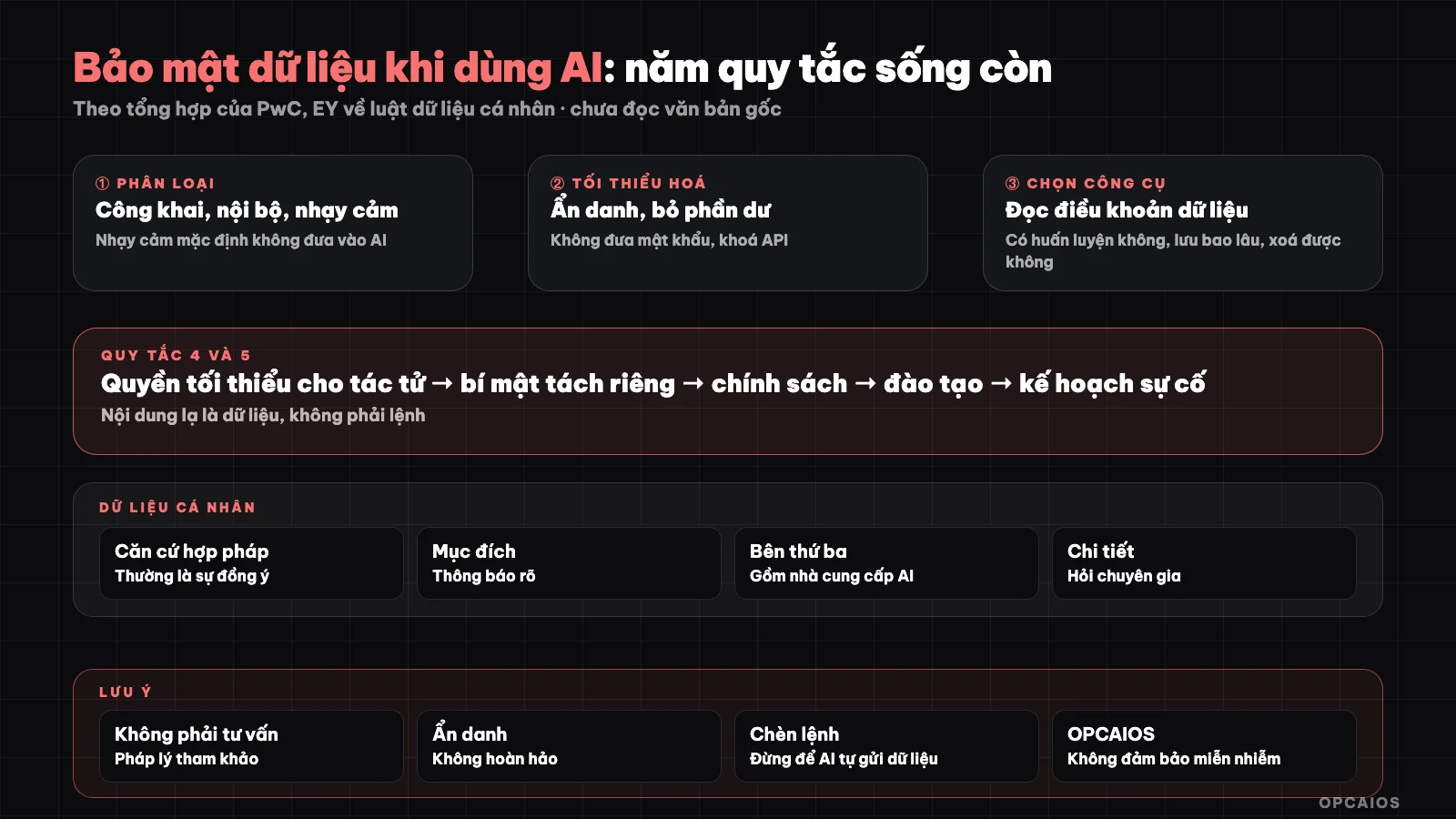
Five rules: classify, minimize, choose tools, control access, processes. Diagram: OPCAIOS.
Rule 1: How to Classify Data Before Using AI?
Data classification is dividing information into three simple groups before putting it into any AI tool like ChatGPT, Claude or Gemini:
| Group | Example | Use with cloud AI |
|---|---|---|
| Public | Published blog posts, public price lists | Allowed |
| Internal | Processes, internal documents, reports | Allowed after consideration and with tools that commit to data |
| Sensitive | Customer personal data, contracts, finances, passwords, API keys, health information | By default do not share; only share when there are measures and grounds |
Just this rule alone stops most incidents: an employee or you paste a customer list into a chat box. First, label each folder; next, write the label into your policy; finally, review every quarter. Hypothetical example, not a real incident: a shop has 500 customers and pastes the entire spreadsheet into a chatbot to draft emails, and 100% of the phone number column is exposed outside control. After classification, employees in 2026 only paste anonymized lists.
Rule 2: What Is Data Minimization and Anonymization?
Minimization is putting into AI only the data needed for the exact task, and anonymization is replacing identifying information with symbols. Hypothetical example: instead of pasting 1,000 customer rows with 12 columns, paste only 50 rows and 3 needed columns, meaning reducing roughly 95% of exposed data, and only 1 in 20 columns can recognize a customer (5%). If one incident costs $2,000 then that's more than the ChatGPT plan fee of $20 per month in 2026. Five things to do:
- Put in only the data part needed for the task, don't paste an entire database or file with extra columns.
- Replace names, phone numbers, emails, addresses with symbols (customer A, customer B) before putting into AI; merge back after.
- With documents, delete irrelevant parts before uploading.
- Never put passwords, API keys, recovery codes into prompts.
- Finally, remember that anonymization is not perfect: merged data can still identify a person, especially with small, rare data.
Rule 3: Choose Tools and Configure Data: What to Check?
Checking tools means reading and noting how an AI service handles data before using it for internal data. Five questions that need answers from OpenAI, Anthropic, Google or other providers:
- Is your data used to train models, and is there an option to turn it off.
- Where is data stored, for how long, who can see it.
- Is there a business plan with separate commitments.
- Can you delete history and data.
- What are the certifications and data processing terms.
For sensitive work, consider models running locally (Ollama and Open WebUI), with the caveat of lower quality. We do not rate each provider in this post; terms change, please read the current version. Hypothetical example: write a table with 5 questions for 3 tools in about 2 hours, before paying $20 per month for whichever plan you pick.
Rule 4: How do I control permissions, secrets, and agents?
Permission control means giving agents, plugins, and accounts only the minimum permissions they need. First:
- Agents and plugins that read directories, email, databases: grant minimal permissions, prioritize read-only, limit directories; review results before allowing writes or sends.
- API keys and secrets: store in secret vaults or the tool's credentials, not in prompts, notes, or code pushed to shared repos; remove keys and real data before sharing templates (selling prompts and n8n templates).
- Unfamiliar content is data, not commands: websites, emails, files you give AI to read may contain malicious instructions to trick AI into sending data outside (prompt injection attacks). Don't let AI send data to addresses found in the content on its own, and require confirmation before actions with outside impact. We once found a documentation page with such instructions in our work and did not follow them. Example scenario: an agent reads 20 emails, 1 email (5%) contains a hidden command asking to send a price list to an unfamiliar address; read-only permissions and the confirmation step in Google Workspace or equivalent tools block 100% of automatic sends.
- Accounts: enable two-factor authentication, one account per person.
- Revoke permissions when someone leaves.
Rule 5: What does a process, training, and incident plan include?
Security process is a set of repeating tasks that help the whole team do things right without depending on one person's memory. Six components:
- One-page policy: which tools are used, which data goes in, who reviews new tools.
- Training with specific examples of what not to do.
- Logs: record who used what for which data at a reasonable level.
- Incident plan: if data leaks, who does what, who to notify, notification deadline per regulations; contact legal expert.
- Data deletion: rules for deleting history, uploaded files, recordings after a time limit.
- Contract with customer: make clear you use AI and how you handle data; many business customers will ask.
Example scenario: a one-page policy and 30-minute training for 5 staff take about 3 hours of work, much lower than a data leak incident for 500 customers costing $2,000 and 20% of old customers leaving.
Personal data: the basics
- You need a legal basis to process personal data, usually explicit consent, notification to the data subject about purpose and processing method.
- Sensitive personal data has stricter requirements.
- Transferring data to third parties (including AI providers) is a processing activity that needs consideration, especially if data goes abroad.
- Details, penalties, and records needed depend on current regulations; ask an expert. See Legal checklist.
OPCAIOS experience
We use AI agents with access to directories and systems, so we apply the above principles in practice: secrets and credentials are separated from document and code repos; sensitive data does not go into shared notes; actions with outside impact need confirmation; content read from the web is treated as data, not commands. We also conducted a security review of our website. We do not guarantee the system is immune to all incidents, and we have not read the original text of new laws.
Frequently asked questions
Can I put my customer list into ChatGPT or another AI tool?
Not by default; only if anonymized or with a legal basis, suitable tool, and verified data settings.
Does AI use my data to train?
Depends on the service and plan; read the current terms and settings.
Does the new personal data protection law apply to small businesses?
According to public summaries, the law takes effect from 01/01/2026; ask a legal expert about specific application.
What is a prompt injection attack?
Unfamiliar content (web, email, file) contains instructions that trick AI to do what you don't want; see Rule 4.
Where do I start?
From a one-page policy and data classification. See OPCAIOS AI application training course.
Source: public summaries by PwC and EY of Personal Data Protection Law No. 91/2025/QH15 and Decree 356/2025/NĐ-CP (read on 25/10/2026; original text not read); not legal advice. Experience is OPCAIOS's.
Translated from Vietnamese with AI. Read the original.
Want to apply this in your business?
Book a free 30-minute call (Vietnam time, in English or Vietnamese).