


What is Antigravity 2.0?
Google Antigravity is Google's agent-first programming platform, launched on November 18, 2025 alongside Gemini 3 in the form of a code editor with Agent Manager. On May 19, 2026 at Google I/O, Google announced Antigravity 2.0: a standalone desktop application (not an IDE) for running multiple agents in parallel, defining subagent workflows and scheduling background tasks, accompanied by Antigravity CLI (the agy command) replacing Gemini CLI for individual users and an SDK. The original editor still exists under the name Antigravity IDE.
The post covers: 1) how three different products differ; 2) features of version 2.0; 3) pricing and limits, according to Wikipedia and Google; 4) known security risks; 5) how to choose and OPCAIOS's experience using Antigravity. For example, programmers who prefer the terminal can choose CLI, while those needing to coordinate multiple agents should use the 2.0 application.
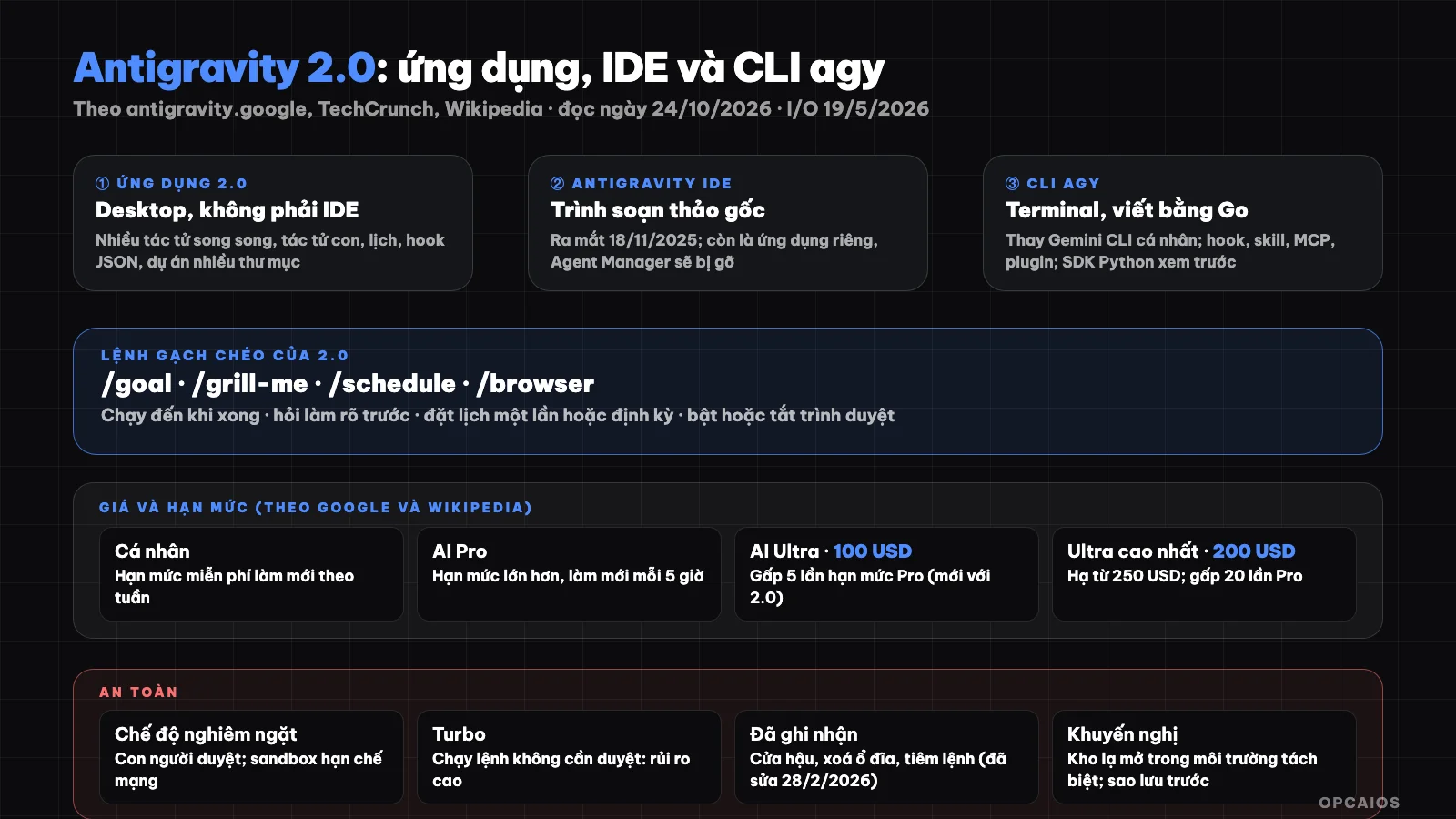
Three frontends for one agent platform: the 2.0 application, IDE and CLI. Diagram: OPCAIOS.
What is Antigravity and what products are there?
According to Wikipedia, Antigravity was released on November 18, 2025 as a free preview on Windows, macOS and Linux; Google calls it an "agent-first" platform. Google did not announce the original platform of the editor, but programmers suspect the editor is based on VS Code, and some found traces of Windsurf's Cascade agent system. Wikipedia also notes the context: in July 2025 Google paid $2.4 billion to license Windsurf technology and hired the company's CEO. OPCAIOS has not verified information from Wikipedia against Google sources.
As of October 2026, according to Wikipedia, the product family consists of five parts:
- Antigravity 2.0 application: a standalone desktop application (Windows, macOS, Linux) for coordinating multiple agents.
- Antigravity IDE: the original code editor, now an optional separate application.
- Antigravity CLI: a command-line tool written in Go, the
agycommand. - SDK: a Python toolkit for building custom agents on the same framework.
- Extensions: for VS Code, Visual Studio, JetBrains, Zed, Xcode.
According to Google's official announcement, the 2.0 application is "a completely separate desktop application" from the IDE but keeps the core principles of Agent Manager. To distinguish them: the 2.0 application icon has a white background, while the IDE has a black grid background.
What features does Antigravity 2.0 have?
Antigravity 2.0 is Google's standalone desktop application with seven main features, according to Google's announcement (May 19, 2026) and TechCrunch.
- Dynamic subagents: the main agent creates and calls subagents for each narrow task, keeping the context window small and running in parallel.
- Asynchronous task management: tasks and commands run without blocking the main agent.
- JSON hooks: insert logic to intercept and control agent behavior.
- Scheduled tasks: set cron for agents using the
/schedulecommand or the Scheduled Tasks interface. - Projects: replacing "workspace"; one project contains multiple folders and has its own settings and permissions.
- Direct speech transcription: microphone converts speech to text immediately.
- Slash commands:
/goal,/grill-me,/schedule,/browser.
For example, the /goal command runs until complete without asking in between, while /grill-me asks for clarification before proceeding. Google says Remote Control and agents deployed in the cloud are coming soon. According to TechCrunch, version 2.0 also integrates Google AI Studio, Android and Firebase, and the Gemini 3.5 Flash model runs most of the experience.
How is Antigravity CLI (agy) different from Gemini CLI?
According to Google, CLI is "the lightest way to call, track and interact with Antigravity agents right from the terminal", using the same agents as the 2.0 application and receiving features like projects, worktree support and sidebar management. According to Wikipedia, CLI replaces Gemini CLI for individual users. According to a third-party tutorial (danicat.dev, read on 24/10/2026, personal opinion):
- CLI is rewritten in Go, closed source; requires installing the 2.0 application because they use the same authentication mechanism.
- Supports hooks, skills, MCP, sub-agents and plugins; does not match 100% of Gemini CLI features.
- Plugins are based on Gemini CLI's extension system: Gemini CLI extensions can be installed into
agy, butagyplugins do not run in Gemini CLI. - Automatic config migration is not always successful; the author had to manually rewrite some extensions.
The same source mentions Gemini CLI's discontinuation date as 18/6/2026; we have not found this date on the official page so we consider it secondary information. On tool protocol, see What is MCP?; on skill conventions for agents, see Skill anatomy in Claude Code.
How much does Antigravity cost and what are its limits?
Antigravity has no separate subscription plan, according to Wikipedia and Google (checked on 24/10/2026). First, individuals have a free quota that renews weekly. Google AI Pro and Ultra subscribers have higher quotas that renew every 5 hours, plus purchasable credits. Next, with version 2.0, Google adds a $100 monthly AI Ultra plan, 5 times the quota of AI Pro, and lowers the highest Ultra plan from $250 to $200 per month, 20 times AI Pro, according to TechCrunch. Finally, from mid-2026, organizations can use 2.0 and CLI with Gemini Enterprise accounts. Wikipedia lists selectable models including Gemini 3.1 Pro, various Gemini Flash, Claude Opus and Sonnet (4.6 and 5.5) and GPT-OSS-120B, of which Claude 5.5 is only for paid subscribers; see What is Claude Sonnet 5.5?. For example, individuals testing can start with the weekly free quota. The model list and pricing change frequently, so check the current page, since OPCAIOS has not fully read the official pricing page.
What risks and safety modes does Antigravity have?
Antigravity has two operating modes: strict mode and Turbo, according to Wikipedia. Strict mode (before called Secure Mode) requires humans to review agent actions and run commands in network-restricted sandbox; Turbo mode runs terminal commands without review. Three issues have been publicly reported:
- Late 2025: Mindgard researcher raised the possibility of installing backdoors from a malware repository.
- December 2025: a user in Greece reported Turbo mode deleting an entire disk after a cache cleanup request.
- 28/2/2026: Pillar Security disclosed a command injection vulnerability via the file finding tool, which has been fixed.
The common lesson for all programming agents: avoid command execution mode without review on machines with important data, open unfamiliar code repositories in isolated environments and back up before delegating destructive tasks. For example, machines holding customer data should use strict mode. Also see What is Vibe code? and What is Herdr? on how to run multiple agents with control.
Should I choose the 2.0 application, IDE or CLI?
| Need | Recommendation |
|---|---|
| Orchestrate multiple agents, schedule, work on projects across multiple directories | 2.0 application |
| Both edit code manually and have agents help in the same editor | Antigravity IDE or use 2.0 alongside your preferred IDE |
| Run agents in terminal, scripts, SSH | CLI agy |
| Build custom agents following your process | SDK (see documentation, currently in preview) |
Google recommends using 2.0 alongside your preferred IDE, and says the IDE will remain but Agent Manager in the IDE will be removed in a later version. IDE users will be asked whether to keep the IDE when updating.
OPCAIOS's experience
In OPCAIOS's internal system, Antigravity is the main orchestration tool on Mac. According to checks on the machine, we currently have both "Antigravity" application (version 2.25.0), "Antigravity IDE" application (2.5.5) and CLI agy (1.4.6); we took these numbers from application info and check commands, and have not yet confirmed they correctly correspond to the "2.0" name in announcements. We use a shared instruction file, skill repository and logging process so different agents (Antigravity, Claude Code, Codex) follow one set of rules. We have not yet used the SDK or 2.0's scheduled tasks in production and do not have official metrics on productivity compared to other tools.
Frequently Asked Questions
What is Antigravity 2.0?
It is a standalone desktop application from Google, launched on May 19, 2026, to run multiple programming agents in parallel, with child agents, scheduled tasks, JSON hooks, and multi-folder projects.
Is Antigravity 2.0 an IDE?
No. According to Google, the 2.0 application is separate from the Antigravity IDE; the IDE remains as a separate application.
What is Antigravity CLI?
It is a command-line tool agy written in Go, sharing agents with the 2.0 application, replacing Gemini CLI for individual users.
Is Antigravity free?
There is a weekly free quota that refreshes for individuals; Google AI Pro and Ultra subscriptions have higher quotas. The free quota can run out quickly, according to some reviews.
Is using Turbo mode safe?
Turbo runs commands without review, so it carries higher risk; you should use strict mode when dealing with important data. To learn how to use AI programming agents safely, see the AI application training course from OPCAIOS.
Sources: antigravity.google (article "Introducing Google Antigravity 2.0" and I/O 2026), TechCrunch May 19, 2026, Wikipedia "Google Antigravity" (read first 100,000 characters), tutorial from danicat.dev (personal opinion), read October 24, 2026; version number on machine taken from application information and agy --version command. Prices, models, and quotas change frequently; have not read Google's official pricing page and setup documentation. Experience is from OPCAIOS.
Translated from Vietnamese with AI. Read the original.
Want to apply this in your business?
Book a free 30-minute call (Vietnam time, in English or Vietnamese).