


What is customer care via Zalo OA and Messenger using AI?
It's bringing messages from Zalo Official Account (OA) and Fanpage Messenger into a shared inbox, where AI helps classify intent and suggest replies, while humans retain the power to review and handle sensitive situations. This post makes no promise that AI will "reply to everything on its own" or boost revenue by any number, because OPCAIOS has no such figures to report. The post describes a practical operating framework with 6 parts: shared inbox, handoff rules, response time limits (SLA), how to be clear with customers that they're chatting with an automated assistant, how to protect personal data, and how to measure response time. The platform rules section only states what I've read from Meta's official documentation (read on 25/10/2026); anything I haven't read, like Zalo's rate limits, will be marked "not verified."
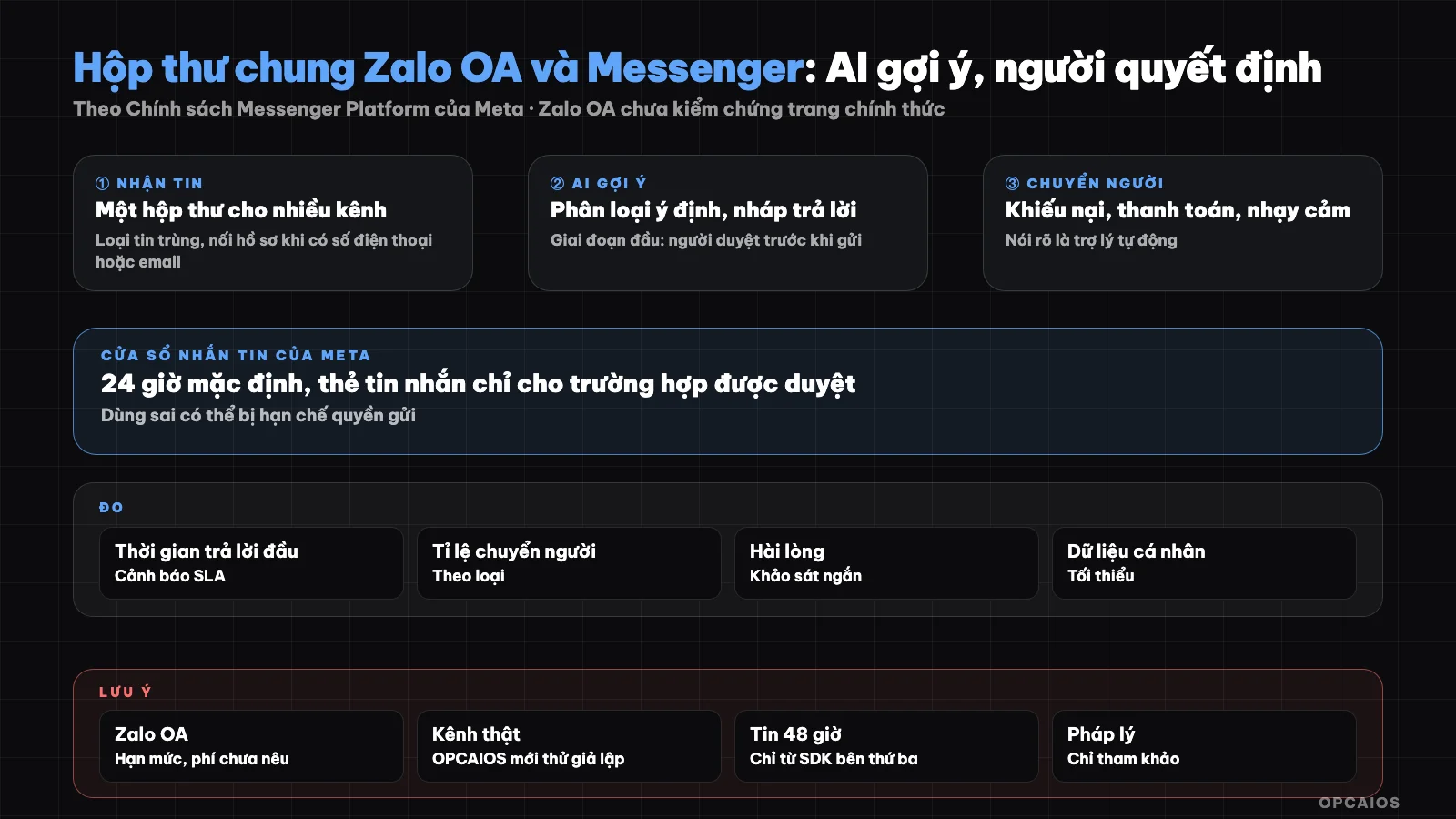
One inbox, AI suggests, human reviews and handles hard cases. Diagram: OPCAIOS.
What is a shared inbox and why do we need it?
A shared inbox is a single place to receive messages from all channels—here, Zalo OA and Messenger—instead of replying separately in each app. When customers message across multiple channels, a solo owner easily misses messages, replies late, or replies twice. A shared inbox solves 3 things:
- Each conversation is tied to a customer record, matched by phone number or email when the customer provides it.
- Every message has a timestamp when received and when replied to, so SLA can be measured.
- There's one place to apply classification rules and handoff logic, like OPCAIOS's internal CRM in 2026.
Example scenario: a customer asks for pricing on Messenger in the morning, then messages again on Zalo OA in the afternoon using the same phone number; the shared inbox links both into one record so the responder doesn't ask again from the start. The inbox is also the foundation for light automation like follow-up reminders. See also system where AI runs on its own and automated sales funnel.
Limits of each platform (only what I've read)
How long can Messenger (Meta) let a business reply to a customer?
Meta's Messenger Platform lets a business reply to a customer within a standard 24-hour messaging window for most user actions. According to Meta's Messenger Platform policy page (read on 25/10/2026), the first message after a Click-to-Messenger ad can extend the window up to 7 days. Outside the window, a business can only send through approved methods. Message tags are for important 1:1 updates. The Human Agent tag gives staff 7 days to reply manually. There's also one-time notification messages, news messages, and sponsored messages. A reply directly to a comment gets one response in 7 days after the comment. Using the wrong tag can restrict sending rights. Example scenario: customer messages at 9 AM, staff replies at noon the next day—that's past 24 hours and must check the Human Agent tag conditions in the documentation, not guess. Don't use tags to send marketing content outside the window.
What limits does Zalo Official Account have?
Zalo Official Account (OA) is a business account for messaging customers on Zalo, but Zalo OA's rate limits and fees are not verified in this post. Zalo's developer documentation page loads via JavaScript so OPCAIOS cannot read the detailed content. A third-party SDK document states that consultation messages can only be sent within 48 hours of the last user interaction, and transaction messages have separate limits; OPCAIOS treats the 48-hour information as not verified from an official source. Zalo's rate limits, fees, and plan terms are also not verified, so this post states no figures. The work has 3 steps. First, read Zalo's OA documentation. Next, read the plans and pricing page. Last, only then design automation, especially for proactive messages sent to customers, which differ from replies when a customer just messaged. For example, a reminder message sent proactively the next day has different conditions than a reply to a message the customer just sent, so it needs separate reading.
Operating Rules
1. AI suggests, person reviews (early phase)
In the early phase, AI only drafts; the reader edits and sends. Only after reading enough drafts and seeing errors become rare should I consider letting AI send automatically for a truly simple set of questions (opening hours, address, order status already in the data). This is a safety recommendation, not a universal benchmark for every business.
2. Intent classification
I assign each conversation a label, for example:
| Label | Handling |
|---|---|
| Asking about product or service info | AI drafts from reviewed documents, person reviews |
| Asking about order status, appointment | Query data then draft, person reviews |
| Want to buy, ask for quote | Transfer to person, link to sales opportunity |
| Complaint, refund request | Transfer to person immediately |
| Payment, bank transfer, invoice | Transfer to person immediately |
| Sensitive (health, legal, threats, personal info) | Transfer to person, do not let AI answer the content |
| Unclear | Ask one clarifying question, if still unclear then transfer to person |
3. What is the transfer-to-person rule and when does it apply?
The transfer-to-person rule is a list of situations that require handing the conversation to a real employee instead of letting AI continue. There are 5 situations for immediate transfer:
- Customer is angry or complaining.
- Content involves money, including payment, refund, and debt.
- Customer asks to speak with a person.
- Question is outside the reviewed documents.
- AI is unsure about the answer two times in a row.
AI must not make up policy, price, or delivery promises. When transferring, write a brief note of the conversation so the recipient does not have to re-read from the start. Example scenario: customer texts "my order hasn't arrived but I was already charged" on Messenger; this conversation is both a complaint and involves money, so transfer to person immediately with a note including order ID and time of message. A shared inbox helps because Zalo OA and Messenger messages sit in the same customer record.
4. How should I set the response time limit (SLA)?
SLA here means the first-response time limit I commit to myself, paired with a warning when overdue. The number is my choice; start with a mark I can actually keep then tighten gradually. Example scenario: reply within 2 hours during business hours, then drop to 1 hour after holding that mark for 4 straight weeks. The process has 3 steps. First, pick a mark based on my actual business hours. Next, turn on alerts when a conversation has no reply after the mark passes. Finally, review the mark every month based on measured first-response times. Outside business hours, automated messages can state the reply schedule, and must be truthful, like "we will reply tomorrow morning at 8am" only if a real person works at that time. With Messenger, remember Meta's 24-hour window when setting SLA, because replying past the window needs a special template.
5. State clearly that this is an automated assistant
The opening greeting should note this is an automated assistant for support, and show how to reach a real person. Do not pretend to be an employee, do not use fake emotion to push buying. This approach also fits the transparency spirit of the platforms, but check each platform's policy for details.
6. Personal data
Messages contain names, phone numbers, addresses, transfer receipt photos. When feeding into an AI model: send only what is needed, hide account numbers and documents, state clearly in privacy policy, give customers a way to withdraw consent for messaging. See 5 rules for data security when using AI. This content is for reference only, not legal advice.
7. Measure response time
Three simple metrics: first-response time, time to close, rate of conversations transferred to person. Add one quality metric: rate of AI drafts heavily edited by person. Measure before turning on auto-send, to know if it is worth it. Check a sample of conversations every week.
OPCAIOS experience
In our internal CRM, OPCAIOS has a shared inbox receiving messages from Zalo OA and Messenger: each conversation is one record, duplicate messages are removed, when a customer leaves a phone or email the conversation links to the customer record, and first-response time is logged to alert when SLA is overdue. We also alert when a new message comes after a pause. A note on honesty: this feature has been tested with simulated messages with signatures, but the real channel needs an OA account, Meta's messaging permission and approved templates, and we do not yet have actual operating numbers to publish. We have not measured AI accuracy and have not yet had AI send automatically.
Frequently Asked Questions
Should AI answer customer questions without a person?
Not at the beginning. Have AI draft replies, have people review them, measure quality for a few weeks before considering sending them automatically for simple question categories with clear documentation.
How long does Messenger give you to reply?
According to Meta's documentation read on October 25, 2026, the standard messaging window on Messenger Platform is 24 hours for most user actions. The first message after a Click-to-Messenger ad can extend up to 7 days. Outside the window, businesses can only send through approved methods like message tags, Human Agent tags (about 7 days specifically for staff doing manual replies), one-time notification messages, news messages, or sponsored messages, each with its own conditions. A separate reply to a comment gets one response within 7 days of that comment. For example, if a customer messages after clicking an ad, a business might have up to 7 days instead of 24 hours, but only for the first message according to the documentation. Check Meta's policy page again before you design, as policies can change, and don't use tags to send promotional content outside the window.
Does Zalo OA have any limits?
We haven't been able to read the official page so we haven't verified the rate limits and fees. Read Zalo's OA documentation before you design proactive messages.
When do I have to hand off to a person?
When there's a complaint, payment or refund involved, sensitive content, the customer demands to speak with someone, or the AI is uncertain. Don't let AI promise things it doesn't have data to promise.
How do I start without spending a lot of effort?
Combine two channels into one place, write approved template response documents, turn on AI drafting with human review, and measure response time for one month. If you need guidance on systematic AI application, see OPCAIOS's AI application training course.
Source: Meta Messenger Platform policy documentation (read October 25, 2026); Zalo OA: official page not accessible, 48-hour information from third-party SDK documentation so not yet verified; unverified: Zalo's rate limits, fees, and package-specific conditions; Experience is from OPCAIOS.
Translated from Vietnamese with AI. Read the original.
Want to apply this in your business?
Book a free 30-minute call (Vietnam time, in English or Vietnamese).