


What is Self-Learning AI Chatbot on Internal Documents (RAG)?
It is a conversational assistant that only answers based on your documents (price lists, procedures, guides, frequently asked questions): the system divides documents into chunks, converts them to vectors, stores them in a vector database, and when a question comes in, it finds relevant chunks and passes them to a language model to answer (see What is RAG?). Dify lets you build this through an interface: create a "Knowledge" (knowledge base), connect it to a chatbot or Chatflow; Supabase can serve as a vector database through the pgvector extension. According to Dify documentation (read on 25/10/2026), self-hosting requires a minimum of 2 CPU cores and 4 GiB RAM, Docker Compose 2.24.0 or later; the VECTOR_STORE variable supports pgvector along with PGVECTOR_* variables. This post guides you through: installing Dify, creating a knowledge base, trying retrieval, building a chatbot, optionally connecting Supabase as a vector store (we have not run this ourselves so we note clearly which parts are unverified), how to test quality and the risks involved. "30 minutes" is the target for a first version if you are already familiar with Docker; we do not promise that.
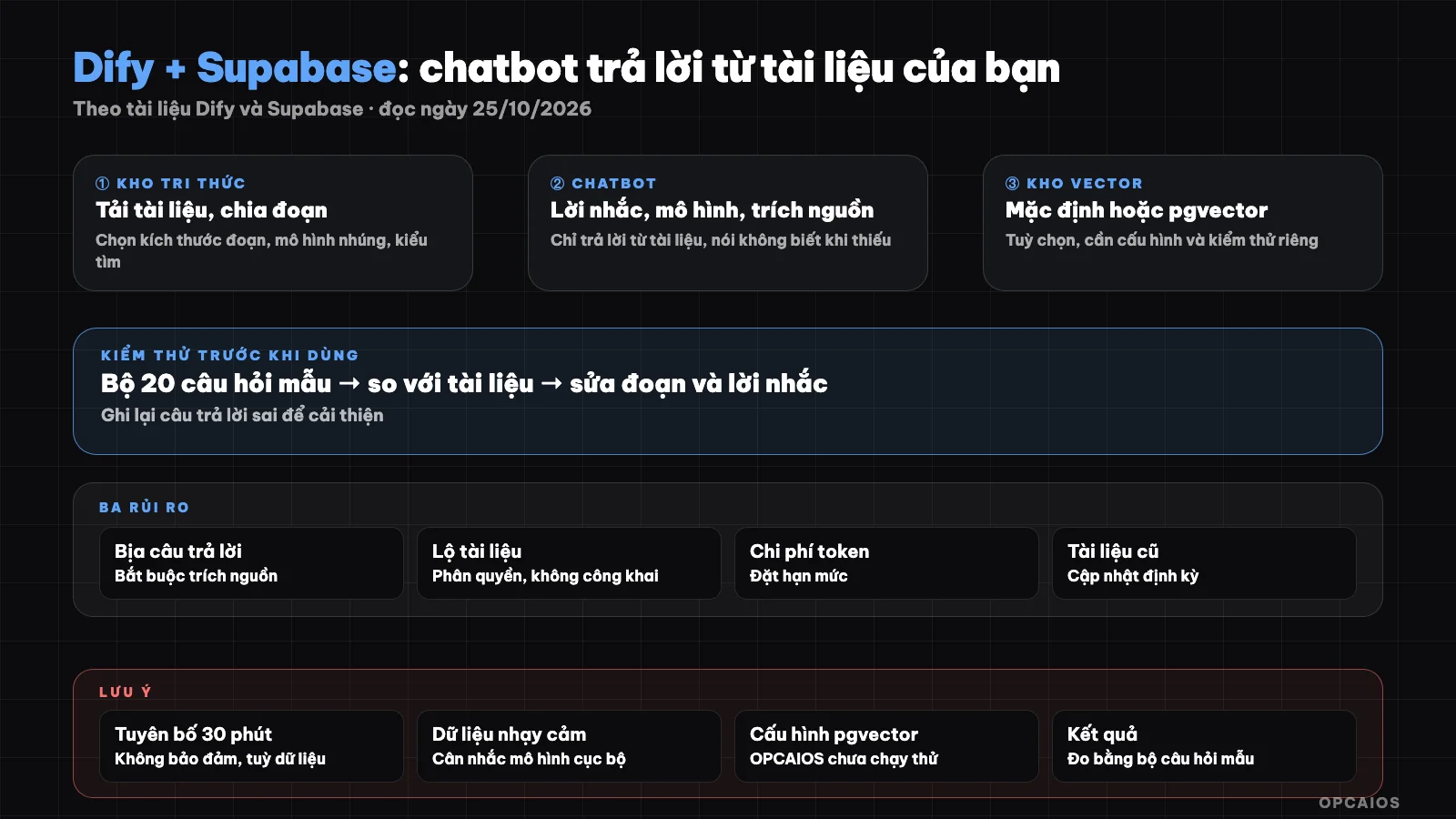
Documents, vectors, retrieval, answers with sources; always test with real questions. Diagram: OPCAIOS.
Step 0: Decide on Scope
- Choose a small, clean set of documents: for example frequently asked questions, price list, delivery procedures. Do not start with an entire disk.
- Keep sensitive documents out: contracts, customer data, passwords should not go into a public chatbot knowledge base.
- Write 20 real questions that customers often ask and the correct answers to test later.
- Choose where to run it: Dify Cloud (has a free Sandbox plan) or self-host; see What is Dify? for pricing.
Step 1: Install Dify with Docker (Self-Hosted)
Installing Dify self-hosted means running the entire platform via Docker Compose on your server. According to Dify documentation (read on 25/10/2026), the server needs at least 2 CPU cores, 4 GiB RAM and Docker Compose 2.24.0 or later. For example, a small VPS is enough to try a first version with a set of 20 sample questions, but actual load needs further measurement. Main commands:
git clone --branch "$(curl -s https://api.github.com/repos/langgenius/dify/releases/latest | jq -r .tag_name)" https://github.com/langgenius/dify.git
cd dify/docker
cp .env.example .env
openssl rand -base64 32   # use the result as DIFY_AGENT_LOCAL_SANDBOX_AUTH_TOKEN in .env
docker compose up -d
docker compose ps
Then open http://<server address>/install to create an admin account. According to the documentation: values in docker/.env override files in docker/envs/; when changing configuration use docker compose down then docker compose up -d; when upgrading you must read the release notes for each version and compare .env.example with .env. Put Dify behind HTTPS and do not expose internal service ports to the Internet (see What is Nginx?).
Step 2: Configure Model Provider and Embedding
In Dify, add a model provider (OpenAI, Anthropic, Google or local models via Ollama) and choose an embedding model for the knowledge base. Note to choose an embedding model with good Vietnamese support; we do not have quality metrics for Vietnamese on each model so test on real documents. Changing the embedding model later requires reindexing.
Step 3: Create a Knowledge Base
According to Dify documentation, there are three approaches: a built-in knowledge base (upload data for Dify to process), a custom knowledge base via pipeline, or connecting an external knowledge base via API. Common steps:
- Create a new knowledge base and upload documents (PDF, text, web pages, etc.).
- Choose how to chunk and the indexing method (high quality or economical), embedding model and retrieval method. The overview page we read does not explain these choices in detail; read the sub-pages of the documentation.
- Test retrieval: use Dify's test tool to type your questions and see which chunks come back; edit documents and chunking until all 20 sample questions find the correct source.
- Add metadata for filtering when needed.
- Update documents regularly; an old knowledge base makes the chatbot answer wrong.
Step 4: Build the Chatbot
- Create a Chatbot or Chatflow application in Dify.
- Connect the knowledge base (with Chatflow use the knowledge retrieval node, which allows categorization, lookup, information extraction and CRM handoff like OPCAIOS's assistant).
- Write the system prompt: answer only from documents; if there is no information then say "I don't have that information yet" and suggest contacting; don't make up prices; maintain brand voice.
- Enable source citations if available and set a greeting and suggested questions.
- Test, then publish as a web app or call via API.
Step 5 (Optional): Use Supabase as Vector Store
Using Supabase as a vector store means having Dify store vectors in Supabase's PostgreSQL via the pgvector extension instead of the default vector store. Dify supports VECTOR_STORE=pgvector with variables per the documentation: PGVECTOR_HOST, PGVECTOR_PORT (default 5432), PGVECTOR_USER (default postgres), PGVECTOR_PASSWORD, PGVECTOR_DATABASE (default dify), PGVECTOR_MIN_CONNECTION and PGVECTOR_MAX_CONNECTION. Notes on how to do it:
- Enable the vector extension in Supabase (Dashboard, Database, Extensions) or via SQL
create extension vector with schema extensions;(per Supabase documentation). - Use a separate database and role for Dify, not the production database admin account; let Dify create its tables in a separate schema or database.
- Set up Dify's
.envwith the variables above (andVECTOR_STORE=pgvector), then restart. - Direct connection or through a pooler: we have not verified that Dify runs smoothly through Supabase's transaction mode pooler; try direct connection first and monitor connection limits.
- Per Dify documentation, if a knowledge base already has an index, the stored index type will override the
VECTOR_STOREsetting; new knowledge bases will follow the new configuration. - The vector dimension must match the embedding model.
We have not run Dify configured to point to Supabase ourselves; the steps above follow both documentations and may need adjustment in practice. If you don't need to share a database, the simpler and safer approach is to let Dify use its default vector store.
Step 6: Test Quality and Security
| Test | How to Do It |
|---|---|
| Correct Source | Run 20 sample questions; compare with answers, record accuracy rate and source citations |
| No Hallucination | Ask things not in the documents; chatbot must say it doesn't know |
| Prompt Injection | Try prompts asking to bypass instructions; see the response |
| Data Leakage | Ask for internal information that shouldn't be public |
| Load | Rate-limit to prevent token cost abuse |
Safety principles: public chatbots should only read public documents; AI-calling apps need rate-limiting per user, keep API keys on the server side and set spend limits.
OPCAIOS's Experience
What is our real-world experience? We self-host Dify (version 1.17.1 as of October 25, 2026) and use it as a "Personal Assistant" on the website: a Chatflow with need categorization, knowledge lookup, contact information extraction and CRM handoff, called through a middleware layer with rate-limiting. Our self-hosted Supabase has the pgvector extension (version 0.8.2) and is used for semantic search on the website, but that part runs on custom code with a small multilingual embedding model, not through Dify. We have not confirmed the vector store configuration Dify is using (we did not manually set the VECTOR_STORE variable per inspection) and have not run Dify pointing to Supabase. We also have not measured the assistant's accuracy rate so we do not publish numbers.
Frequently Asked Questions
What is RAG and why do I need it?
RAG (retrieval-augmented generation) is a technique that lets a language model answer questions based on document excerpts you provide, rather than relying only on the model's built-in knowledge. The process has three steps. First, documents are split into chunks and converted into vectors in a vector store. Next, when a question comes in, the system finds the most relevant chunks. Finally, a model from OpenAI or Anthropic answers using only those chunks and cites the source. This way, the chatbot reduces making up information about prices, procedures, or business policies, and documents can be updated without retraining the model. For example, a chatbot answering shipping policy will read the latest shipping procedure file in Dify's knowledge base. RAG reduces but does not completely eliminate hallucination, so testing is still needed.
What server does Dify need?
Dify self-hosted requires a minimum of 2 CPU cores, 4 GiB RAM, and Docker Compose 2.24.0 or later, according to Dify documentation (read on 25/10/2026). That is the minimum to run it, not a guarantee for many concurrent users; OPCAIOS has not measured maximum load so I'm not stating a number for concurrent users. Checking involves three things. First, run docker compose ps to see that all services are up. Next, open the /install page to create an admin account. Finally, put Dify behind HTTPS via Nginx and do not expose internal service ports to the Internet. For example, if the server also runs n8n or a database, add RAM for those services instead of budgeting for Dify alone.
Do I have to use Supabase?
No; Dify has a default vector store. Supabase is only an option via pgvector.
How do I know if the chatbot is answering correctly?
Prepare a set of 20 sample questions with answers, test them, and record the accuracy rate; then fix the documents and chunking method.
Is it safe for internal documents?
A RAG chatbot is safe for internal documents only when you control access, do not make the internal app public, and understand the model provider's data policy. Three layers need attention. First layer, scope: a public chatbot reads only public documents, while contracts, customer data, and passwords stay out of the knowledge base. Second layer, model: documents are sent to cloud model providers like OpenAI or Anthropic, so you need to read the data terms, or use a local model via Ollama. Third layer, operations: keep the model key on the server side, rate-limit by user, and test for prompt injection. For example, an internal price list should only live in an app behind login. To learn how to build a safe RAG chatbot, see OPCAIOS's AI application training course.
Source: Dify documentation (self-host Docker Compose, environment variables, knowledge), Supabase documentation (pgvector), read on 25/10/2026; have not yet read detailed pages on chunking, indexing, knowledge retrieval nodes; have not yet verified Dify setup with Supabase. Experience is OPCAIOS's own from direct testing.
Translated from Vietnamese with AI. Read the original.
Want to apply this in your business?
Book a free 30-minute call (Vietnam time, in English or Vietnamese).