



What is Ollama?
Ollama is an open-source tool for downloading and running open language models (like Gemma, Qwen, Llama, DeepSeek, Mistral) directly on your computer or server, with a local API for other applications to call into. According to the GitHub repository (accessed 25/10/2026), Ollama is MIT licensed, has around 184.7 thousand stars, runs on macOS, Linux, Windows and Docker, and is built on the llama.cpp project. Data when running locally stays on your machine; Ollama also offers paid cloud models. For example: running a 7B model on a 16 GB RAM machine for 1 hour per day costs no token fees, while the Pro cloud plan costs $20 per month. This post explains what Ollama is, how to install and use it, the API, hardware requirements, cloud plans and pricing, security risks when opening ports to the network, comparison with using cloud APIs, and real experience from OPCAIOS (we run Ollama on servers).
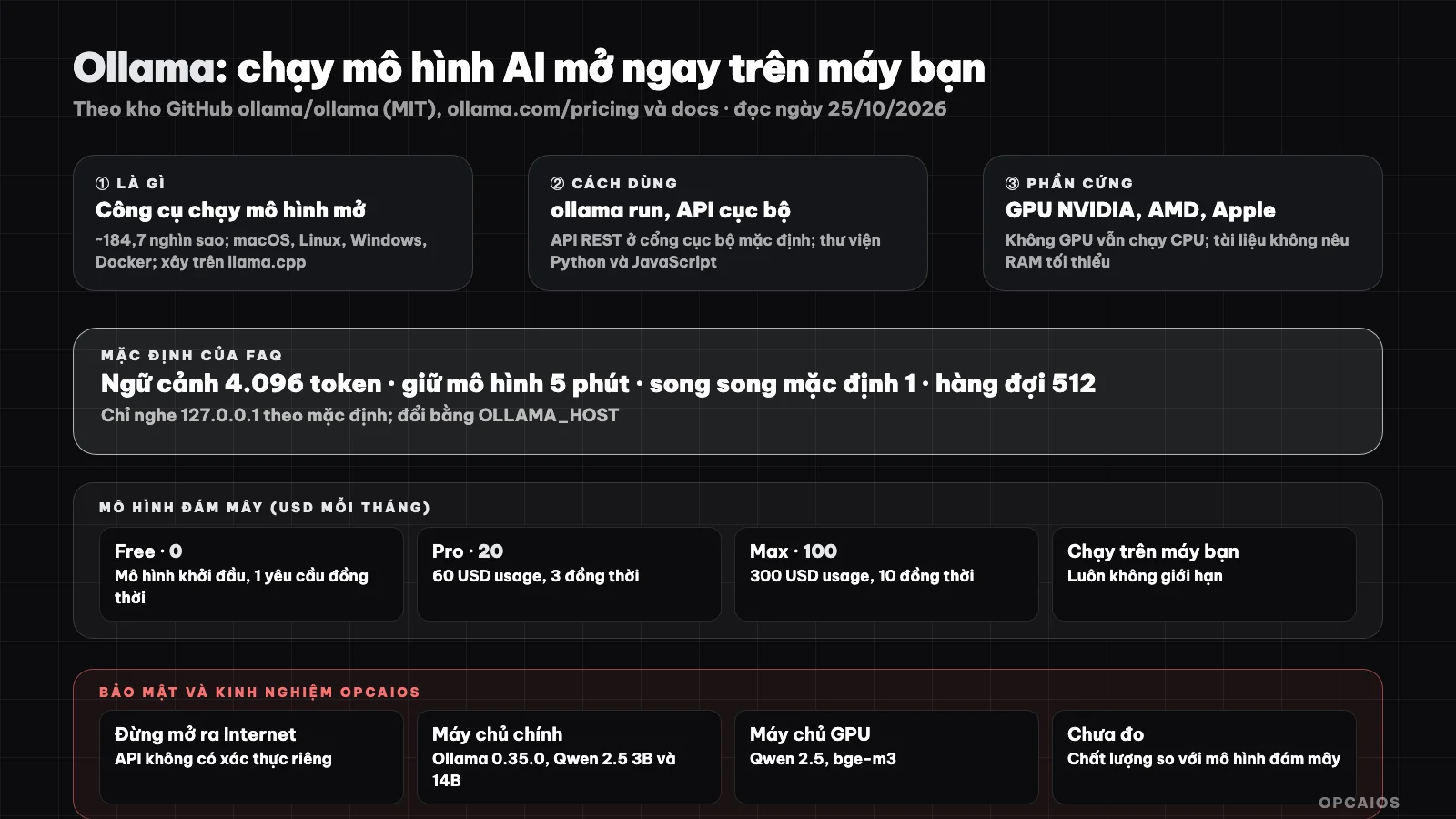
Models run on your machine, data stays on your machine; quality depends on the model and hardware. Diagram: OPCAIOS.
What is Ollama and what is it used for?
Ollama is a tool for running open models locally or on the cloud, with full privacy when running on your machine (according to the GitHub repository, accessed 25/10/2026). Four common uses:
- Chat with open models like Gemma, Qwen or Llama.
- Embed text for semantic search (see What is RAG?).
- Run programming agents or assistants without sending data outside.
- Quickly try new models.
The site mentions integrations: Claude Code, Codex, Copilot CLI, OpenCode and OpenClaw, via the ollama launch command. The sample model in the documentation is Gemma 4; topic tags mention Kimi, GLM, MiniMax, DeepSeek, gpt-oss, Qwen, Llama, Mistral. For the concept of language models, see What is LLM?. Example scenario: a 3-person office embeds 10,000 internal document pages using Ollama in 2 days, keeping 100% of data on machine and paying no token fees to Google or OpenAI.
Installation and how to use
- Install: macOS and Linux with a single shell command (or DMG file on macOS); Windows with PowerShell or installer; Docker with
ollama/ollamaimage (see What is Docker?). - Run a model:
ollama run <model name>(for exampleollama run gemma4) to download and chat; model library at ollama.com/library. - Call from applications: REST API serves locally on port 11434, for example calling the
/api/chatendpoint with model name and message list; official libraries for Python (pip install ollama) and JavaScript (npm i ollama). - Customize: Modelfile to set parameters and system prompt (documentation has a separate reference section).
Example scenario: a 4 GB model takes about 15 minutes to download, and 2 users simultaneously increases needed context memory by about 100% compared to 1 user. According to FAQ: models save to ~/.ollama/models on macOS (change with OLLAMA_MODELS); default context length 4,096 tokens (change with OLLAMA_CONTEXT_LENGTH); model stays in memory for 5 minutes by default (keep_alive); OLLAMA_NUM_PARALLEL defaults to 1 and max queue defaults to 512; parallel requests increase needed context memory.
Hardware requirements
According to Ollama's GPU documentation: NVIDIA needs compute capability 5.0 and up and driver 550 and up (5.0 to 6.2 cards need 570 and up); AMD on Linux needs ROCm v7; Apple uses GPU via Metal; also Vulkan on Windows and Linux. Without suitable GPU, Ollama runs on CPU (slower). Documentation does not state minimum RAM, so we do not give a general number: memory needed depends on model size, quantization, and context length; check model file size in the library and leave spare memory.
Does Ollama have cloud packages and what do they cost?
Ollama is free when running on your own hardware, while cloud models are priced per token with three packages. According to the official pricing page (checked on 25/10/2026, before tax):
- Free $0: a small amount for starter models, 1 concurrent request.
- Pro $20 per month (or $200 per year): includes $60 usage per month and 3 concurrent requests.
- Max $100 per month: includes $300 usage and 10 concurrent requests.
Example pricing: gpt-oss:20b model costs $0.07 per million input tokens and $0.30 per million output tokens. Example calculation: 10 million input tokens plus 2 million output tokens equals $0.70 + $0.60 = $1.30, about 2% of the Pro package's $60 usage. Usage resets monthly and does not carry over. According to the FAQ, with cloud models, prompts and responses are processed to provide the service but are not stored, logged, or used for training (Ollama's claim, unverified); you can disable cloud features with OLLAMA_NO_CLOUD=1.
What security considerations should I keep in mind when using Ollama?
Ollama security is about keeping the local API from being accessed from outside. Example scenario: a server exposing port 11434 to the Internet for 24 hours could be accessed by strangers and have 100% of your GPU claimed. Four points to remember, in order of priority:
- Listens locally by default: according to the FAQ, Ollama binds to 127.0.0.1 port 11434. Change this with
OLLAMA_HOSTto open it to other machines. - Don't expose to the Internet: the Ollama API has no built-in authentication; exposing it publicly means anyone can use your machine. If you need remote access, place it behind a proxy with authentication or SSH tunnel, or VPN (see What is Nginx? and What is VPS?). This is our recommendation based on general principles; the official FAQ does not include this warning.
- Load models from trusted sources and read each model's license when using commercially.
- Resources: running large models can consume all RAM or GPU and may slow down other services on the same machine.
When should I use Ollama?
| Situation | Recommendation |
|---|---|
| Sensitive data, don't want to send outside | Local Ollama |
| Simple tasks, high volume (text embedding, classification) | Suitable, saves token costs |
| Need best reasoning and writing quality | Top models via API; small open models usually perform worse |
| Weak machine, no GPU | Consider cloud API or Ollama's cloud models |
| Want multiple models through one address with redundancy | Add routing like 9Router or OpenRouter |
OPCAIOS experience
We run Ollama for real: as of 25/10/2026, our main server runs Ollama version 0.35.0 (running continuously for over two weeks) with two Qwen 2.5 models sized 3B and 14B; the server has a GPU with Qwen 2.5 (7B and 14B) and the bge-m3 embedding model. On the main server, the service only listens on the local address (checked on 25/10/2026); for the GPU server we could not confirm the port listening method during this check. We did not document specific use cases for each model in this post. We have not measured the quality or speed of local models against cloud models so we do not publish figures, and we have not used Ollama's cloud package.
Read more: Guide to installing Ollama and Open WebUI on your personal computer to use AI 100% free, 5 best tools for running AI locally in 2026.
Frequently asked questions
What is Ollama?
An open source tool for downloading and running open AI models on your machine, with a local API.
Is Ollama free?
Running on your machine is free with no limits (MIT license). Cloud models have Free $0, Pro $20, Max $100 per month.
What configuration do I need to run Ollama?
Depends on the model; NVIDIA GPU, AMD, Apple Silicon make it faster, runs on CPU without GPU. Documentation does not state minimum RAM.
Is Ollama safe?
By default it listens locally so it is safe; don't expose the port to the Internet without authentication.
Can Ollama replace ChatGPT or Claude?
Not completely: open models running locally are usually smaller and perform worse on difficult tasks; suitable for private work or simple tasks. To learn how to choose the right model, see OPCAIOS's AI application training course.
Source: ollama/ollama GitHub repository, ollama.com/pricing, docs.ollama.com (GPU and FAQ), checked on 25/10/2026; stars and prices change quickly; documentation does not state minimum RAM; authentication warning is OPCAIOS's recommendation. Prices before tax. Experience is from OPCAIOS based on direct verification.
Translated from Vietnamese with AI. Read the original.
Want to apply this in your business?
Book a free 30-minute call (Vietnam time, in English or Vietnamese).