



What is Nginx?
Nginx (pronounced "engine-x") is web server software and reverse proxy server software, also used for mail proxy and load balancing. According to Wikipedia, nginx was written by Igor Sysoev in the C language, first released on October 4, 2004, under the BSD 2-Clause license (while the paid version NGINX Plus is proprietary software); the company Nginx, Inc. was founded in 2011 and was acquired by F5 in March 2019 for $670 million. Also according to Wikipedia, as of April 2025, W3Techs data ranks nginx first among web servers with 33.8% of websites. This post explains what nginx is, how it works, common uses (reverse proxy, HTTPS, rate limiting), a sample configuration, common configuration errors from official documentation, and real experience from OPCAIOS when placing nginx in front of a Next.js application.
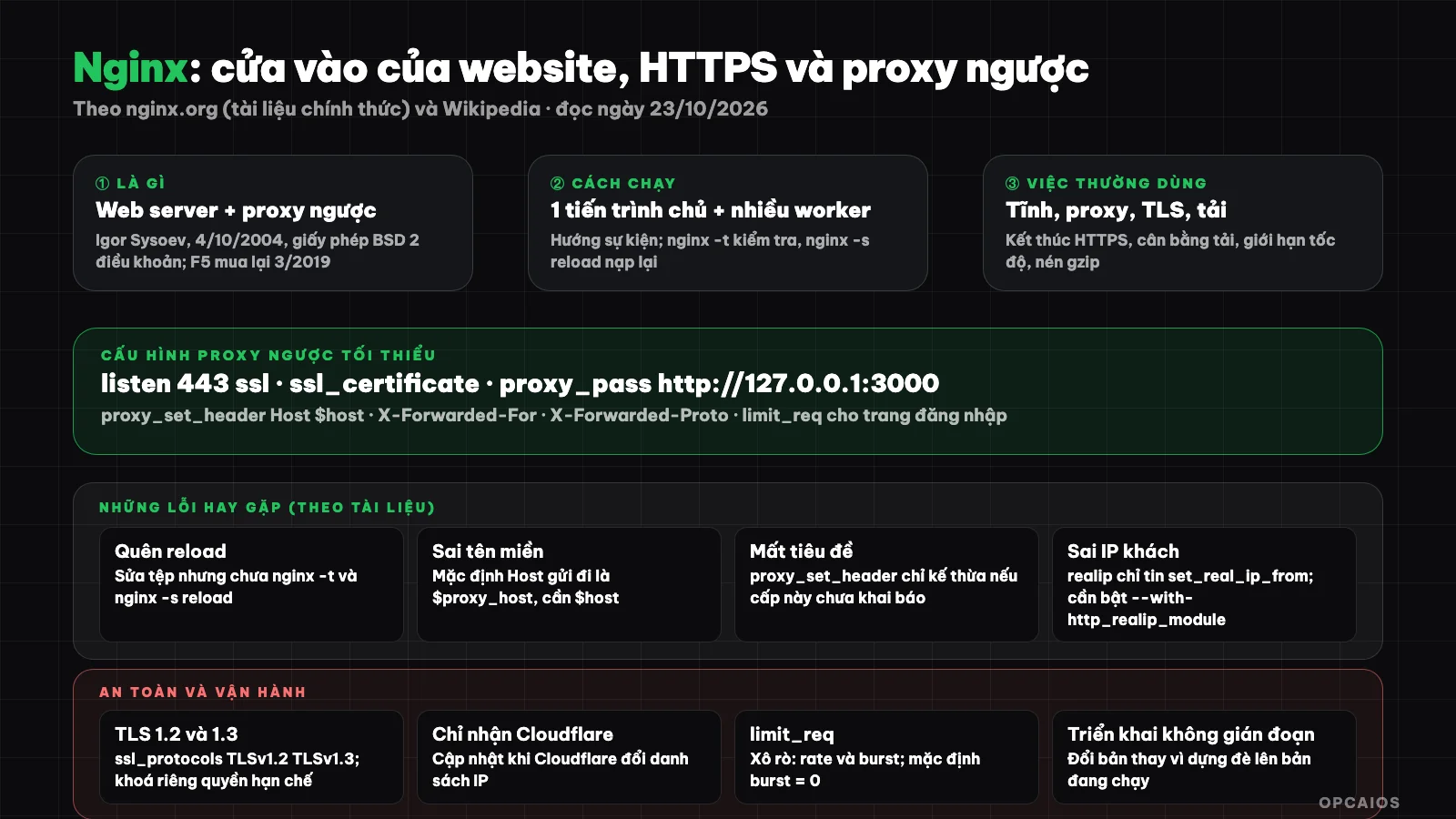
Nginx stands at the gate: terminates HTTPS, applies rate limiting then forwards requests to the application running internally. Diagram: OPCAIOS.
How does Nginx work?
Nginx has one master process and multiple worker processes. According to the official beginner's guide, the master process reads and evaluates the configuration then maintains the worker processes; the worker processes actually handle requests. Nginx uses an event-driven model and operating system mechanisms to distribute requests to worker processes; the number of processes is set in the configuration, either fixed or automatically adjusted based on the number of CPU cores. How nginx and modules work is determined by the configuration file.
Control nginx using the -s parameter: stop (fast shutdown), quit (graceful shutdown), reload (reload configuration) and reopen (reopen log files). Changes in the configuration file only take effect after you send a reload command or restart. Before that, check with nginx -t: according to the documentation, this command checks syntax then tries to open the files referenced in the configuration.
What is Nginx used for?
- Serving static files: images, CSS, JavaScript.
- Reverse proxy: receive requests and forward them to applications running internally (Node.js, PHP-FPM, Python...), return results to the user.
- HTTPS termination: nginx holds the certificate and decrypts TLS, the backend application communicates using plain HTTP usually on the local machine.
- Load balancing: according to proxy documentation, if the domain name in
proxy_passpoints to multiple addresses then nginx uses all of them in round-robin fashion; you can define upstream groups. - Rate limiting: the
limit_reqmodule limits the rate of request processing by a key, for example by IP address. - Content compression (gzip), caching, redirects.
Sample configuration for Node.js or Next.js applications
Below is an example configuration, based on Nginx documentation (read on 23/10/2026); replace the domain name, certificate paths, and port with your own values:
limit_req_zone $binary_remote_addr zone=login:10m rate=5r/m;

server {
    listen 80;
    server_name example.com www.example.com;
    return 301 https://example.com$request_uri;
}

server {
    listen 443 ssl;
    server_name example.com;

    ssl_certificate     /etc/letsencrypt/live/example.com/fullchain.pem;
    ssl_certificate_key /etc/letsencrypt/live/example.com/privkey.pem;
    ssl_protocols       TLSv1.2 TLSv1.3;

    location / {
        proxy_pass http://127.0.0.1:3000;
        proxy_set_header Host              $host;
        proxy_set_header X-Real-IP         $remote_addr;
        proxy_set_header X-Forwarded-For   $proxy_add_x_forwarded_for;
        proxy_set_header X-Forwarded-Proto $scheme;
    }

    location /dang-nhap {
        limit_req zone=login burst=5;
        proxy_pass http://127.0.0.1:3000;
        proxy_set_header Host              $host;
        proxy_set_header X-Forwarded-Proto $scheme;
    }
}
Explanation of the main points according to the documentation:
limit_req_zonedefines a shared memory zone (in the example, 10 MB, rate of 5 requests per minute for each IP);limit_reqapplies that zone to alocationwithburstbeing the number of requests exceeding the limit that are temporarily accepted. The module uses the "leaky bucket" method: requests exceeding the rate are delayed, those exceeding the burst are rejected with an error. By default burst equals 0.ssl_protocols TLSv1.2 TLSv1.3only allows modern TLS versions. According to HTTPS documentation, the server certificate is public information sent to all clients while the private key needs to be stored in a file with restricted permissions but must be readable by the nginx master process.proxy_pass http://127.0.0.1:3000forwards requests to the application listening on an internal address; the application does not need to be exposed to the Internet.
What are common Nginx configuration errors?
Nginx configuration errors are mistakes that make the configuration ineffective or cause the backend application to receive incorrect information. The four most common errors, according to official Nginx documentation (read on 23/10/2026), are:
- Forgetting to reload the configuration: you edited the file but didn't run
nginx -tfollowed bynginx -s reload, so nothing changed. Always verify before reloading. - Application receiving the wrong domain name: by default nginx sets the
Hostheader sent to the backend server as$proxy_host(the address inproxy_pass), not the original domain name the user typed. If your application needs the original domain name, setproxy_set_header Host $host. - Headers lost due to inheritance:
proxy_set_headerdirectives are only inherited from the previous level if no directives are declared at the current level. Therefore thelocation /dang-nhapblock in the example above must re-declare the necessary headers. - Seeing the wrong client IP address when using Cloudflare or another proxy: nginx only sees the IP of the proxy. The
realipmodule changes the client address based onreal_ip_header, but only trusts addresses listed withset_real_ip_from, and must be enabled with the compile parameter--with-http_realip_module(check withnginx -V).
What are certificate and TLS load errors?
Two more errors relate to HTTPS. First, missing certificate chain: the server certificate needs to come with intermediate certificates, so use the fullchain file issued by Let's Encrypt. Second, high TLS load: according to nginx.org's "Configuring HTTPS servers" documentation, you can reduce handshake overhead using a shared SSL session cache with ssl_session_cache shared:SSL:10m, where 1 MB holds about 4,000 sessions and the default timeout is 5 minutes. For example, a Next.js website placed behind nginx with Let's Encrypt certificates should run nginx -t each time you renew the certificate or change the configuration, to avoid loading a broken configuration.
How do I safely put nginx behind Cloudflare?
Putting nginx safely behind Cloudflare means the origin server only accepts connections from Cloudflare and still knows the real client address. First, configure nginx to only accept Cloudflare's IP ranges; the official list of IP ranges, according to Cloudflare, changes over time so you need to update it regularly. Next, use the realip module with real_ip_header and set_real_ip_from to restore the client address, because otherwise nginx only sees Cloudflare's IP. According to nginx.org documentation (read on 23/10/2026), this module must be enabled with the compile parameter --with-http_realip_module, so check your version with nginx -V. Finally, run nginx -t before each reload. For example, when Cloudflare changes its IP list, you need to update both the real IP restoration configuration and the direct access blocking configuration, the way OPCAIOS does with its VPS. See the overview in What is Cloudflare? and server security layer in What is VPS?.
OPCAIOS's experience using nginx
OPCAIOS uses nginx on VPS as the entry point for websites: terminate HTTPS with certificates issued by Certbot, forward requests to a Next.js application managed by pm2 listening on an internal address, and use multiple server blocks for subdomains. Three lessons we learned:
- Only accept Cloudflare at the origin server: an address map (geo map) and a shared configuration snippet make direct access by the VPS's IP get rejected. Consequence: health checks must go through a domain name, and when Cloudflare changes its IP list you must update both the real IP restoration configuration and the blocking configuration.
- Zero-downtime deployment: nginx keeps the website running while the application is built into a new version and switched; there was a period when we built directly on the running version which made old static files disappear causing pages to error for 1 to 2 minutes. When filtering access logs to find this error, remember to filter for code 400 too, not just 404.
- Configuration runs a check before loading: always
nginx -tthenreload, especially when AI helps fix the configuration; see more notes in What is vibe coding?. We do not disclose the filename, paths, or specific addresses of the configuration.
When to use nginx and when to use something else?
Use nginx when you self-operate a server and need a lightweight, durable entry point with detailed configuration for HTTPS, proxy, and rate limiting. Data from W3Techs (read on 23/10/2026), according to Wikipedia, ranks nginx first among web servers with 33.8% of websites as of April 2025, so documentation and configuration examples are very abundant. There are three cases to consider a different approach:
- Small website that doesn't want to manage a server: a managed deployment platform (PaaS) may be enough.
- Need a distribution and protection layer in front: Cloudflare can do this, see What is Cloudflare?.
- Running with Docker: remember the exposed port of the container can bypass the firewall; see What is Docker?.
Example scenario: a two-person team running a Next.js application on a VPS will need nginx to terminate HTTPS, while a static introduction page on a managed platform will not. To set up a VPS from scratch, see What is VPS?.
Frequently Asked Questions
What is Nginx?
It is an open-source web server and reverse proxy software (BSD 2-Clause license) written by Igor Sysoev, released in 2004, used to serve static files, forward requests to applications, terminate HTTPS, perform load balancing, and rate limiting.
What is a reverse proxy and what is it for?
A reverse proxy is a server that stands in front of an application, receives requests from users, forwards them to the application running internally, and returns the results. Nginx does this with the proxy_pass directive; according to Wikipedia (read on 23/10/2026), nginx was written by Igor Sysoev and first released on 4/10/2004. Nginx, Inc. was acquired by F5 in March 2019 for $670 million. The main benefits include:
- HTTPS termination in one place: nginx holds the certificate and decrypts TLS, while the application behind simply communicates HTTP normally on a local address.
- Hide the application from the Internet: Node.js or Next.js only listens on a local address.
- Rate limiting using the
limit_reqmodule, for example 5 requests per minute per IP address on the login page. - Load balancing: according to the nginx proxy documentation at nginx.org, if the domain in
proxy_passpoints to multiple addresses, nginx uses all of them in round-robin fashion.
For example, a Next.js application running on an internal port can stand behind nginx using exactly one location / block, like the sample configuration below.
How do I check nginx configuration before applying it?
Run nginx -t to check syntax and whether the referenced files can be opened, then nginx -s reload to reload the configuration without interrupting requests being processed.
Why does the application behind nginx receive the wrong domain name or IP?
By default nginx sends the Host header as $proxy_host, so you need proxy_set_header Host $host; the client's real IP must be forwarded using headers like X-Forwarded-For or restored using the realip module with a list of trusted addresses.
Do I need nginx if I'm already using Cloudflare?
Not mandatory, but nginx is still useful on the origin server even with Cloudflare. Cloudflare is a distribution and protection layer standing outside, while nginx is the entrance standing right in front of the application on the VPS. Nginx handles three things: terminating HTTPS with a certificate like Let's Encrypt, forwarding requests to a Next.js or Node.js application running internally, and restricting access only from Cloudflare's IP ranges. For example, OPCAIOS uses nginx together with Cloudflare and Certbot for its website, so direct access via the VPS IP is denied. If you want to learn how to build and operate a secure website infrastructure, check out OPCAIOS's AI application training course.
Sources: official nginx.org documentation (Beginner's Guide, ngx_http_proxy_module, ngx_http_limit_req_module, ngx_http_realip_module, Configuring HTTPS servers, Command-line parameters), Wikipedia "Nginx" (history, license, acquisition, W3Techs statistics), read directly on 23/10/2026. Market share statistics are from W3Techs according to Wikipedia and change over time. The sample configuration is an illustrative example; please adjust it to your system. Operating experience is from OPCAIOS.
Translated from Vietnamese with AI. Read the original.
Want to apply this in your business?
Book a free 30-minute call (Vietnam time, in English or Vietnamese).