


Cursor is what? Cursor is an integrated development environment with AI agents developed by Anysphere (San Francisco): the agent can search in source code, edit multiple files, run terminal commands and handle multi-step tasks from natural language instructions. According to Wikipedia, Anysphere was founded by four MIT students in 2022; according to the same source, on 14/8/2026 SpaceX completed the acquisition of Cursor and is integrating it into SpaceXAI. The official pricing page currently shows Free, Plus ($8), Premium ($30), Super ($100) and Ultra ($200) monthly packages, in which third-party models charge separately by usage level. This post explains what Cursor is, main features, pricing packages and what the pricing page doesn't clarify, recognized controversies, how to use it safely and OPCAIOS's experience.
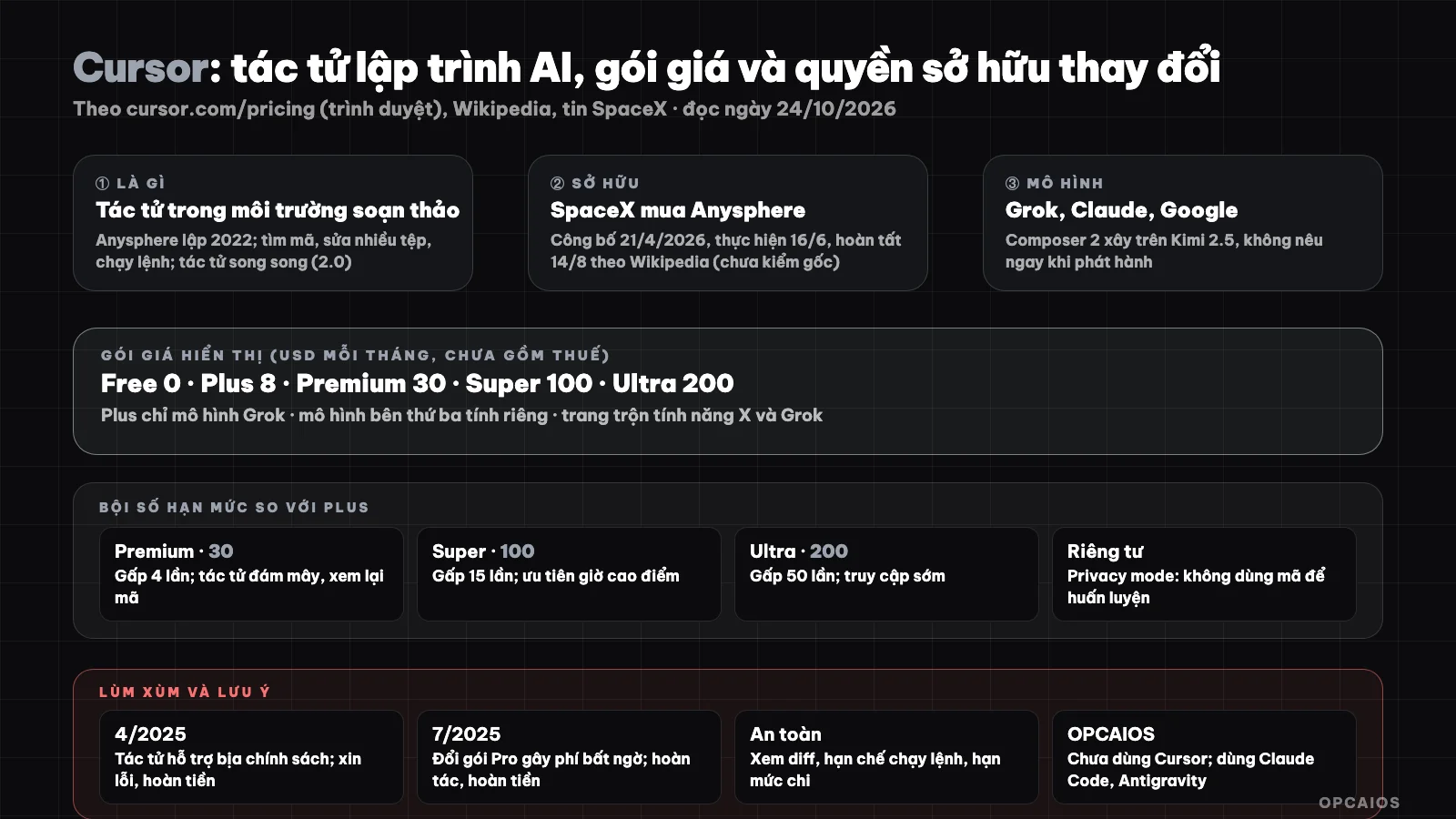
Cursor is a programming agent in an editor environment; pricing and ownership changed during 2026. Diagram: OPCAIOS.
What is Cursor and who owns it?
Cursor belongs to Anysphere, and ownership changed during 2026. According to Wikipedia (article has warnings that some sections may be written by AI and unverified; one detail about the parent company conflicts in the article), Anysphere raised seed funding of 8 million USD in October 2023, Series C 900 million USD in June 2025 (valued at 9.9 billion USD) and Series D 2.3 billion USD in November 2025 (valued at 29.3 billion USD). On 21/4/2026 SpaceX announced purchase rights to Cursor for 60 billion USD or 10 billion USD to partner. On 16/6/2026 SpaceX said it would exercise purchase rights using stock, and records show the transaction completed on 14/8/2026. We have not yet verified these milestones against original announcements. The product includes Cursor (programming agent), Bugbot (reviewing pull requests on GitHub) and enterprise packages. Cursor provides models from Grok, Claude and Google; Cursor's own Composer 2 model (March 2026) was built on Moonshot AI's open-weight Kimi 2.5 model, something the company did not state immediately upon release.
What can Cursor do?
According to Wikipedia and official sources, Cursor has agents that search code, edit files, run commands and work multi-step. Version 2.0 (10/2025) added parallel agents, and agents are available on web, mobile, command line and cloud. The official pricing page read on 24/10/2026 also mentions cloud agents and automation, code saving and AI code review in the Premium $30 package. Hypothetical example: a programmer can assign a task to the agent and view the diff when the agent is done. We have not read detailed feature documentation (project rules, tool connections via MCP, inline code completion) so we don't list details. See also What is Vibe code?.
Cursor's Pricing Plans
Cursor's pricing plans are a table of five individual tiers plus group plans. According to the official pricing page, read via browser on 24/10/2026 (USD per month, excluding tax), the Free tier limits AI usage, Plus at $8 uses only the Grok model, Premium at $30 is 4 times Plus, Super at $100 is 15 times Plus, and Ultra at $200 is 50 times Plus. Third-party models charge separately based on usage. An example scenario: a team of 5 people at the Teams tier of $30 per person would start at $150 per month, not including third-party models. First choose a plan based on usage level, then set a spending cap, and finally review the pricing page again.
Cursor pricing table
| Plan | Price | Main features according to pricing page |
|---|---|---|
| Free | 0 | Limited AI usage: agent requests and chat are limited |
| Plus | 8 | Introductory plan, shared AI usage zone; Grok model only |
| Premium | 30 | 4 times Plus; latest Grok model, cloud agents and automation, code storage and AI code review; third-party models charged at API rates |
| Super | 100 | 15 times Plus; priority access to models during peak hours |
| Ultra | 200 | 50 times Plus; early access to all products and models |
| Teams, Enterprise | from $30 per person; per agreement | Shared usage limits, administration, SSO, analytics (per automated tool reading) |
Notes when reading Cursor's pricing page
Notes when reading the pricing page: the page mixes features from the X and Grok ecosystem (for example the "post, reply, follow" section, "fewer ads") with Cursor features, showing that plans are being consolidated after a transaction; plan names and benefits may change, so check the current page. The page does not specify the exact number of agent requests or code completion limits; it only mentions weekly limit refreshes, the ability to purchase additional capacity, and set spending caps for third-party models. Privacy mode can be turned on in settings or by an administrator; when enabled, according to Cursor, code is not used to train Cursor or the model provider.
Recognized controversies
According to Wikipedia (an article with a warning that some sections may be AI-written and unverified), there are two public incidents regarding pricing and trust. First, in April 2025, an AI support agent named "Sam" fabricated a login policy that caused users to cancel plans; the company apologized and issued refunds. Second, in July 2025, a change to the Pro plan from $20 sparked complaints about unexpected charges; the company apologized, rolled back the limits, and issued refunds. The common lesson: with usage-based billing tools, set a spending cap, review invoices weekly, and separate third-party model costs. We have not verified these two incidents against the company's original statements.
Using Cursor safely
Using a programming agent requires six safety habits:
- 1. Enable privacy mode if code is sensitive intellectual property; read the current data policy.
- 2. Never put secrets in code or prompts; use environment variables (see What is GitHub?).
- 3. Review changes before merging: the agent works on a separate branch, you review the diff.
- 4. Limit command execution permissions, especially auto-run mode without asking (see similar risks in What is Antigravity 2.0?).
- 5. Set a spending cap for third-party models.
- 6. Follow news about ownership and policy since the parent company changed in 2026.
Quick comparison of programming agent usage approaches
| Approach | Example | Best for |
|---|---|---|
| Integrated agent editor | Cursor, Antigravity IDE | Mix manual edits with agent assistance |
| Command-line agent | Claude Code, agy |
Automation, running in CI, scripts |
| Build apps in browser | Bolt, Lovable | Quickly prototype without setup |
See also Top 5 Vibe Coding Tools.
OPCAIOS Experience
We do not use Cursor as our main programming tool: our operating system currently has Claude (with Claude Code) and Antigravity, no Cursor application, so this post is based on official sources and Wikipedia rather than our own experience. According to Claude Code documentation, Claude Code's extension can be installed into Cursor, meaning the two tools can share an editing environment; we have not tried this combination. We have not compared output quality or costs between Cursor and the tools we are currently using.
Read more: Claude Code (or programming agent) for people who don't know how to code; Guide to using Cursor AI and Lovable to build your own Micro-SaaS/Landing Page without knowing code.
Frequently asked questions
What is Cursor?
Cursor is an integrated development environment with an AI agent from Anysphere (San Francisco). The agent can search in source code, edit multiple files, run terminal commands and handle multi-step tasks from natural language instructions. For example (hypothetically), a programmer could ask the agent to rename a function across multiple files and then review the changes before merging.
Is Cursor free?
There is a Free plan with limited AI usage: agent requests and chat are limited, according to the official pricing page read on 24/10/2026. Paid plans, before tax: Plus $8, Premium $30, Super $100 and Ultra $200 per month. Third-party models are charged separately based on usage, so total cost may be higher than the plan price. For example, the $30 Premium plan does not include the third-party model charged at API rates. The pricing page does not state the number of agent requests or specific code completion counts, so check the current page and set a spending limit before using heavily.
Who owns Cursor?
According to Wikipedia, SpaceX completed the acquisition of Anysphere on 14/8/2026; we have not verified the original announcement.
Does Cursor use my code to train?
According to Cursor, when privacy mode is turned on, code is not used for training. Read the current policy and turn on this mode if needed.
Should I use Cursor or Claude Code?
It depends on your habits: Cursor is an editor with an AI agent, while Claude Code is an agent running on the command line. Claude Code's extension can be installed into Cursor (according to Claude Code documentation), so many users use both. We have not tried this combination, have not compared quality or cost between the two tools, so we cannot say which tool is better. The decision process has three steps: first try both with a small task, next record third-party model costs, finally choose the tool that fits your workflow. To learn how to use programming agents safely, see OPCAIOS's AI application training course.
Source: cursor.com/pricing (read via browser on 24/10/2026), Wikipedia "Cursor" (article has a warning that content may be AI-written, some details contradict), search results about SpaceX transaction and Claude Code documentation; have not read feature documentation and original announcements. Prices before tax, subject to change. Experience is OPCAIOS's.
Translated from Vietnamese with AI. Read the original.
Want to apply this in your business?
Book a free 30-minute call (Vietnam time, in English or Vietnamese).