


What is Gemini's Deep Research?
Gemini's Deep Research is a mode in the Gemini app that takes a research question, creates a multi-step plan on its own, finds and reads multiple websites (plus your Gmail, Drive, or files if you choose), then writes a report with citations in a few minutes. According to Google's help page (read on 04/11/2026), a report typically takes around 5 to 10 minutes. This post does not promise accurate or complete reports: speed is the strength, while reliability depends on sources, and citations may not match the content. The post goes through how it works, pricing tiers and limits, exporting to Google Docs and audio, risks, a 5-step verification process, and when to use Gemini Notebook (formerly NotebookLM). General introduction is in the post What is Gemini?.
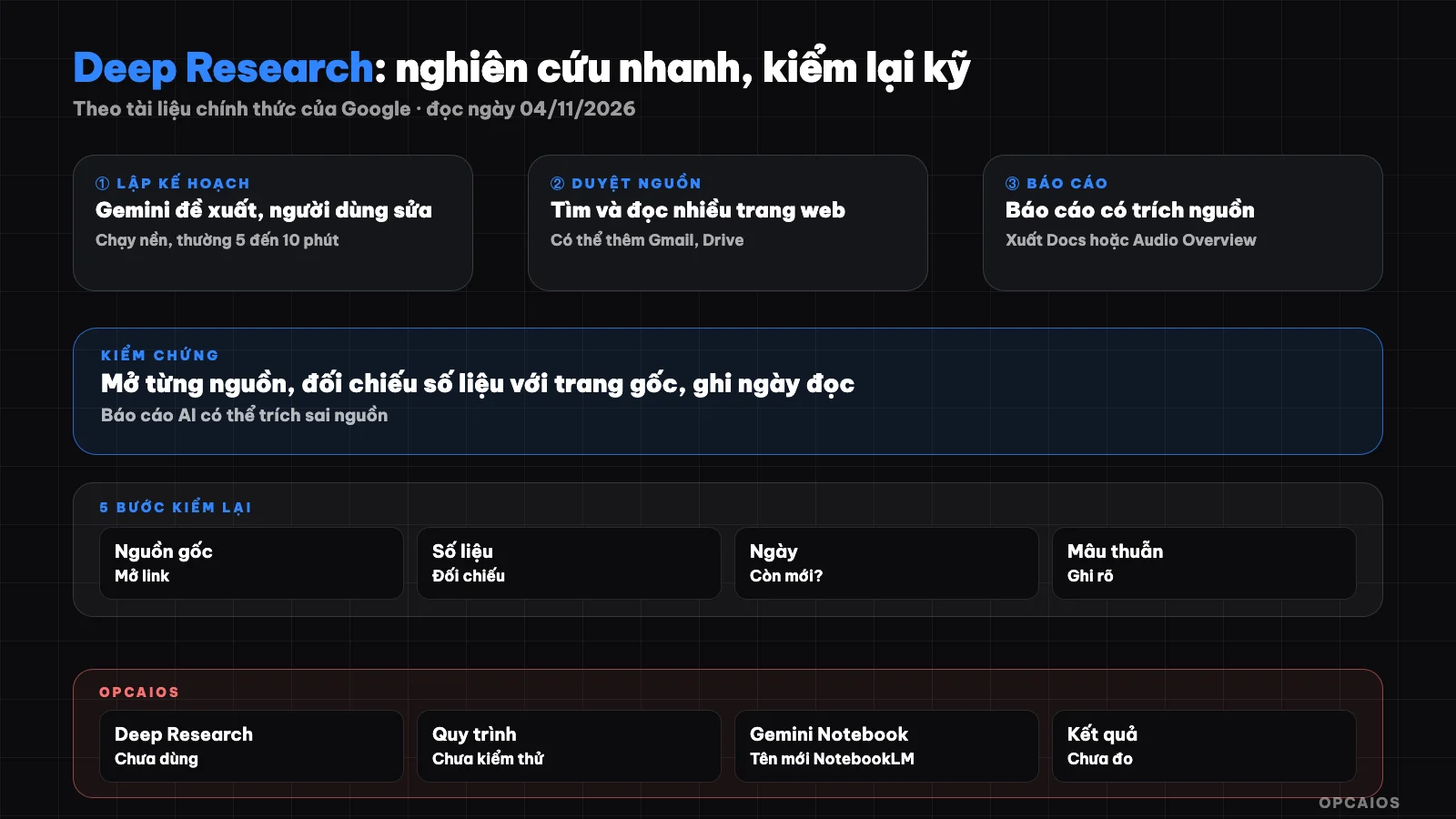
Gemini's Deep Research: plan, browse sources, write report, then user verifies. Diagram: OPCAIOS.
How does Gemini's Deep Research work?
Gemini's Deep Research works in four stages: planning, finding and reading sources, reasoning, writing the report. According to the Deep Research introduction page on gemini.google (read on 04/11/2026), the specifics are:
- Planning: Gemini turns your question into a multi-step research plan. You view and edit the plan before running it.
- Finding and reading: Gemini searches and reads websites; if you choose, it also reads Gmail, Drive, Chat, and uploaded files. Some steps run in parallel, some must run sequentially.
- Reasoning: after each step, Gemini considers what it found, shows thinking progress and the next step.
- Writing the report: Gemini synthesizes into a structured report, checks for contradictions and edits the draft.
The research runs asynchronously: you can leave the app or turn off your device, it keeps running and notifies you when done. Google itself claims Deep Research reads "hundreds" of pages and is better than the old version; that's the provider's claim, we haven't verified it.
How to run a Deep Research report on desktop
Running Deep Research on desktop takes seven steps, according to the post "Use Deep Research in Gemini Apps" (read on 04/11/2026):
- Open gemini.google.com.
- Select Add Files then Deep Research.
- Optional: upload a file or image with your question.
- Optional: select sources under Sources. Uncheck Google Search if you only want to research within your own sources.
- Enter your question and send.
- Read the plan, click Edit plan if you need to change it.
- Click Start research, when the report is done click Open.
Step 6 is the most important: the plan decides what Deep Research will find, so add scope (Vietnam market, recent years) and preferred source types (official pages, government documents). Old reports can only be retrieved if you turn on Keep Activity.
What pricing tier includes Deep Research, what are the limits?
Deep Research is in Gemini's free tier, but paid tiers get higher limits and better models. According to the Deep Research help page (read on 04/11/2026), users must be 18 or older and logged in. Everyone gets to use Thinking; Google AI Pro and Ultra users can choose Pro for higher-quality reports. Limits apply to the number of requests per day and concurrent running requests; Gemini shows remaining requests that day. Summary table from Vietnam pricing page and usage limits page (read same day):
| Tier | Price on Vietnam page | Usage level |
|---|---|---|
| Free | 0 đ/month | Standard |
| Google AI Plus | 132,000 đ/month | 2x standard |
| Google AI Pro | 489,000 đ/month | 4x standard |
| Google AI Ultra | from 2,250,000 đ/month | 5x or 20x Pro depending on tier |
No page states the number of Deep Research reports per day for each tier, so we didn't write a specific number. Pricing can change and may not include tax. The limits page also notes Deep Research may be temporarily unavailable at peak times, users without a paid tier get limited first. See also Gemini free and paid.
Exporting Reports to Google Docs and Audio Versions
Deep Research reports can be exported to Google Docs and converted into audio versions called Audio Overview, according to the help page dated 04/11/2026. The report opens in a Canvas frame, from which there are three options:
- Share & export: share Canvas, export to Docs, or copy the report content.
- Create then Audio Overview: create an audio version in a two-person conversation format. The release notes dated 18/03/2025 note that Audio Overview uses the same technology as NotebookLM, now called Gemini Notebook.
- Create other content: transform the report into interactive content or quizzes within Canvas.
With Google AI Ultra, reports can include charts, diagrams, and interactive simulations, but these are disabled when selecting Gmail or Drive as sources. Exporting to Docs is convenient for verification because you can easily highlight and annotate each claim; audio versions make it harder to spot errors than reading.
What are the risks of Deep Research?
Deep Research has five main risks, and both the introduction page and help page recommend checking the answers again. The list below is an analysis by OPCAIOS based on how the tool works, not measured data:
- Low-quality sources: reports are based on web pages found. Advertisements, aggregate pages that copy content, and forums can be cited as sources on par with official texts.
- Mismatched citations: a sentence has a reference number but the cited page doesn't say exactly that, or only says part of it.
- Outdated data: prices, regulations, market share may come from articles from years ago without the report clearly stating the year.
- Confident tone: the report is long, well-structured, and reads very convincingly even when the background material is weak.
- Unnecessary data exposure: selecting Gmail or Drive as sources means allowing Gemini to read your emails and files; only enable when truly necessary, see 5 data security rules when using AI.
For legal, tax, and medical content, the report is only a starting point, not advice.
Process for Verifying Deep Research Reports in 5 Steps
Verifying a Deep Research report means comparing each important claim against its source before using it. The 5-step process proposed by OPCAIOS, with time not yet measured:
- Filter important claims: export to Docs, highlight sentences you plan to use for decision-making: data, prices, regulations, competitor names. Usually just 5 to 15 sentences, no need to check the entire report.
- Open each citation: for each highlighted sentence, click on the source, find the exact passage on the original page. If not found, mark it "doesn't match."
- Score the source: note the source type: official (government agency, manufacturer website), news, blog, forum. Claims based only on blogs or forums need a second source.
- Check the date: note the publication date of the source. Prices and policies older than 12 months need finding the new version on the official page.
- Write conclusion: at the end of the document write sections "Verified," "Not verified," "Excluded," with the verification date. Only the "Verified" part goes into reports for clients or posts.
Hypothetical example: an online cosmetics store owner asks Deep Research to compare seller fees across platforms; the report comes out in minutes, but each fee level must be checked against each platform's policy page. For regular competitor tracking, Firecrawl and n8n works better.
How is Deep Research different from Gemini Notebook (NotebookLM)?
Deep Research for Gemini finds new sources on the web and writes a report, while Gemini Notebook answers based on the set of sources you've added to the notebook. Gemini Notebook is the new name for NotebookLM as of 16/07/2026 according to Google's blog, and the two tools are growing closer: notebooks can now open within the Gemini app, and Deep Research for Gemini accepts notebooks as a source. According to Google's blog dated 13/11/2025, NotebookLM (when still under its old name) also has its own Deep Research mode under Sources section, select Web then choose Fast Research or Deep Research, and feed the report along with sources into the notebook.
| Criteria | Deep Research in Gemini | Gemini Notebook (NotebookLM) |
|---|---|---|
| Starting point | A question | A set of sources you choose |
| Sources | Web, Gmail, Drive, files, notebooks | Documents in the notebook, can add from web |
| Output | Report in Canvas, export to Docs | Answers, summaries, Audio Overview from sources |
| Best for | Exploring a new topic | Diving deep into curated documents |
Sensible way to combine them: use Deep Research to explore, keep the verified sources from step 3, add them to a notebook to continue asking questions. For details see What is NotebookLM?, an article written under its old name.
OPCAIOS's Experience
OPCAIOS has not used Gemini's Deep Research and has not checked this feature on my account, so this post contains no comments on report quality. What we do relate to is how we treat AI-generated content: automatically created SEO posts on opcaios.org all go through manual review before publishing, and blog posts cite sources with read dates and an "unverified" section at the end, like the source line for this post. Our internal GEO tool checks whether robots.txt blocks Google-Extended; opcaios.org's robots.txt currently does not block it. According to Google, Google-Extended decides whether content is used for Gemini and does not affect Google Search rankings, see What are SEO and GEO.
Frequently Asked Questions
Is Gemini's Deep Research free?
Yes, for users 18 and older who are logged into Gemini. According to the help page read on 04/11/2026, all users can use Thinking for Deep Research, while Google AI Pro and Ultra users can choose Pro and have higher report limits. Google does not publish daily report numbers for each plan on the pages we read; Gemini displays remaining uses for the day. During peak hours, the feature may be temporarily unavailable, and users without a plan are limited first.
How long does a Deep Research report take?
According to the help page, usually between 5 to 10 minutes, with complex topics taking longer. You don't need to wait: leave the conversation or turn off your device, the research keeps running and Gemini notifies you when it's done. Time you should add is the verification step afterward, because that's the decisive step for whether the report is usable or not.
Does Deep Research read my Gmail and Google Drive?
Only if you choose it to. By default, the source is Google Search. Gmail and Drive only appear in the Sources section when you've connected Google Workspace with Gemini, and you can uncheck Google Search to research only in your files. With customer data, contracts, or financial information, only enable that source when truly needed and read Gemini's privacy policy beforehand.
Are citations in Deep Research reports trustworthy?
Citations help you verify faster, but don't prove an opinion is correct. A citation may point to a page that only covers part of the point, an old page, or a low-quality page. Google also recommends checking the answer again. For each opinion you plan to use, open the source, find the exact passage, note the source type and publish date, as in the 5-step process in the post.
Should I use Deep Research or Gemini Notebook for customer research?
Use Deep Research when starting from zero and needing a broad survey: market, competitors, trends. Use Gemini Notebook (formerly NotebookLM) when you already have selected materials like interview notes, surveys, verified reports, and want to ask questions that closely follow those materials. The neat way is to run Deep Research, keep verified sources, put them in the notebook. Want to learn the AI research and verification process for small businesses, see OPCAIOS's AI application training course.
Sources: gemini.google/overview/deep-research; Gemini help: Use Deep Research in Gemini Apps, Gemini Apps usage limits; subscriptions page gemini.google/subscriptions (Vietnam version); release notes gemini.google/release-notes; Google blog on Deep Research in NotebookLM (13/11/2025) and Gemini Notebook (16/07/2026) (read on 04/11/2026). Unverified: daily report numbers by plan, claim of reading "hundreds" of pages, prices including or excluding tax, time to complete the 5-step process. Experience is OPCAIOS's.
Translated from Vietnamese with AI. Read the original.
Want to apply this in your business?
Book a free 30-minute call (Vietnam time, in English or Vietnamese).