



What is Herdr?
Herdr is a terminal multiplexer (a tool that splits and maintains multiple terminal sessions, similar to tmux) designed for AI programming agents like Claude Code, Codex, Cursor, or OpenCode. Herdr keeps terminals running in the background on a server, displays the status of each pane (working, blocked waiting for you, idle) and allows the agents themselves to control the workspace via command line and socket. According to GitHub (read on 10/24/2026), the project is written in Rust, released as a single binary file, licensed under Apache-2.0 and runs on macOS, Linux and Windows (Beta).
This post goes through: 1) the problem Herdr solves; 2) its main features; 3) how to install it; 4) limitations to know about; 5) when to use it. Finally, there's the experience of OPCAIOS, the unit that installed Herdr on Mac. For example, someone running three agents at once on three code branches will see the status of each pane in one window.
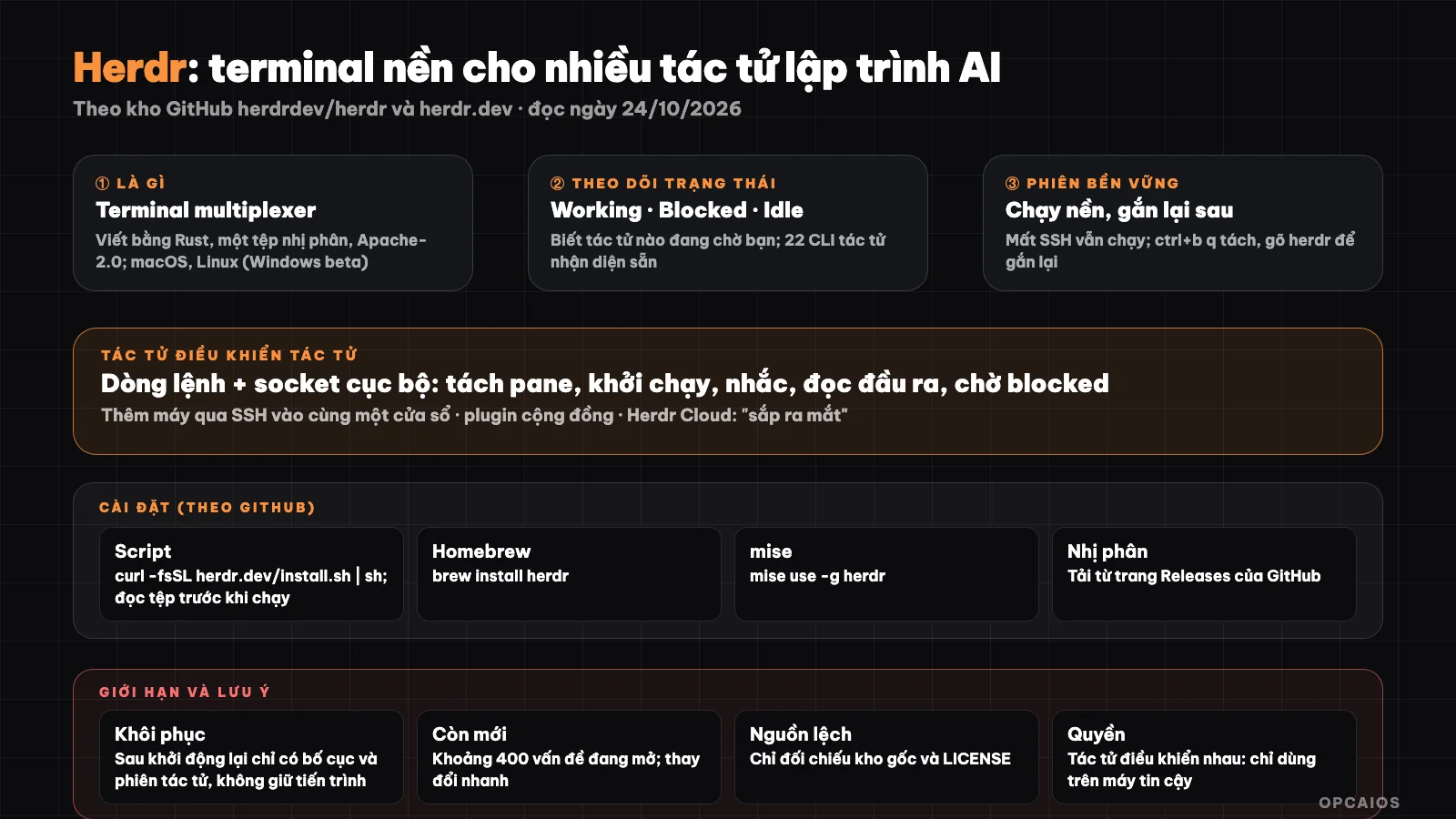
Herdr keeps multiple agents running in the background and shows you which agent needs you. Diagram: OPCAIOS.
What is Herdr and what problem does it solve?
Herdr is a "background runtime environment for programming agents", according to Herdr (read on 10/24/2026): agents run in Herdr's terminals, continue working when you disconnect, and you can reattach from another machine. When running multiple AI programming agents in parallel, each agent on one task or one code branch, users face three problems:
- First, many terminal windows scattered around.
- Next, it's hard to know which agent is waiting for your reply.
- Finally, the session is lost when you shut down or lose network.
Herdr solves all three by keeping the session running in the background, marking the status of each pane and allowing you to reattach the session. Herdr runs agent tools in the tool's own terminal and doesn't wrap or replace Claude Code, Codex or Cursor. For example, when an agent is blocked waiting for confirmation, the agent's pane is flagged so you know you need to input. To understand the context of what agents do, see What is Vibe code?.
What are Herdr's main features?
Herdr has six main features, according to GitHub and Herdr (read on 10/24/2026).
- Persistent sessions (first): terminal continues running when you close the client or lose SSH connection; after restart, Herdr restores the layout and can reattach supported agent sessions.
- Status tracking: each pane is marked working, blocked or idle; a pane that needs your input will be flagged.
- Agent-controlled: command line and local socket allow agents to detach panes, launch and prompt other agents, read output, wait for other agents to reach blocked state.
- Multiple machines: add machines via SSH, view workspace and agents of that machine next to your local machine in one window.
- Keyboard shortcuts and mouse: tmux-style prefix key along with mouse support to click, drag, split panes.
- Plugins (finally): the home page lists over 1,700 community plugins.
The home page lists 22 recognized agent CLIs, including Claude Code, Codex, Cursor, Grok, Copilot and Hermes; agents outside the list still run as in a regular terminal. Herdr Cloud is announced as "coming soon".
Installing Herdr
According to the GitHub repo, there are these ways:
curl -fsSL https://herdr.dev/install.sh | sh
or use Homebrew (brew install herdr) or mise (mise use -g herdr); there are also pre-built binaries on the Releases page. On Windows there's a PowerShell command but it's marked beta. Please read the contents of the install file before running a curl | sh command from the Internet.
Try it out: run herdr; press ctrl+b then q to detach the session, run herdr again to reattach. Names and detailed shortcuts are in the configuration and keyboard documentation.
What limitations does Herdr have?
Herdr is a very new project, so there are five limitations to know about, according to GitHub (read on 10/24/2026).
- First, recovery does not preserve processes: after the server or computer restarts, the original processes no longer exist; only the layout and supported agent sessions are restored.
- Second, Windows is in Beta.
- Third, the project changes rapidly: the repository has hundreds of open issues (around 400 at the time of reading) and star count changes continuously (OPCAIOS read around 45,500; other sources cite different numbers at different times).
- Fourth, information is inconsistent across sources: some aggregate pages list different repositories and licenses; OPCAIOS takes from the original repository
herdrdev/herdrwith Apache-2.0 license, so read the LICENSE file yourself before commercial use. - Finally, permissions for agents: allowing agents to control each other via socket means one agent can launch commands in another's terminal; only use it with projects and machines you trust.
For example, an agent injected with commands could prompt another agent to run dangerous commands.
How is Herdr different from tmux?
Herdr differs from tmux in four ways, according to Herdr (read on 10/24/2026), and the two tools can complement each other.
- Purpose: tmux is a general-purpose multiplexer; Herdr is designed for AI programming agents.
- Agent awareness: tmux doesn't have it; Herdr marks the state as working, blocked, idle.
- Program control: tmux via the tmux command line; Herdr via command line and sockets designed for agents.
- Persistent sessions: both have it; Herdr includes agent session recovery.
For example, someone familiar with tmux can still use tmux-style prefix keys in Herdr, so the learning cost is quite low. First try Herdr with two agents in one session, then decide later whether to switch entirely. Also, both tools keep sessions when you lose connection, so you don't need to drop tmux if you already have habits and custom configuration. If you only use one agent, versatile tmux is usually enough. The comparison is a general description based on features mentioned in the documentation, not measurement.
When should you use Herdr?
You should use Herdr when managing multiple programming agents at once, according to Herdr's description (read on 10/24/2026). There are three suitable situations.
- First, running two or more agents at the same time, each agent on one branch.
- Next, working over SSH on a server (see What is VPS?) and wanting the session not to drop when you lose connection.
- Finally, needing to quickly know which agent is waiting, thanks to the working, blocked, idle status of each pane.
You don't need Herdr yet if you only use one agent in one window. For example, a programmer opening Claude Code and Codex on two branches can see both in one Herdr window, instead of switching between two separate terminal windows. This way reduces missing an agent waiting for confirmation. Whatever tool you use, keep the principle: agents work on separate branches, you review changes before merging (see What is GitHub?). For agent skills and working conventions, see Skill anatomy in Claude Code.
OPCAIOS's experience
OPCAIOS has Herdr installed (version 0.9.3 by version check command) on a Mac used for management, along with one Herdr skill in the Claude Code environment so agents know how to control panes. According to configuration files and local logs, Herdr was installed from early October and has created many session snapshots. We have not formally measured how much time Herdr saves compared to tmux or regular terminal windows, so we don't put efficiency numbers in the post, and have not yet used Herdr Cloud or community plugins.
Frequently Asked Questions
What is Herdr?
It's a terminal multiplexer written in Rust for AI programming agents: it keeps the terminal running in the background, tracks the status of each agent, and lets agents control each other through the command line and sockets.
Is Herdr free?
Herdr uses the Apache-2.0 license, according to GitHub (as of October 24, 2026), and the homepage does not list a price for Herdr. There are three things you need to know about costs. First, Herdr Cloud, a service for connecting machines without needing to configure SSH, was announced as coming soon and has no pricing information yet. Second, individual users can install Herdr through Homebrew (brew install herdr) or mise without seeing any payment step. Third, the real cost lies in the machines running the agents and the subscription plans for agents like Claude Code or Codex, not in Herdr. The limits and prices for each agent vary by provider. The Apache-2.0 license allows commercial use under standard terms, but OPCAIOS recommends reading the LICENSE file in the original repository herdrdev/herdr before using it, since some aggregator sites list different repositories and licenses. For example, a small team running three agents still pays for each agent, while Herdr is just a session management layer.
What agents does Herdr support?
The homepage lists 22 recognized CLI agents such as Claude Code, Codex, Cursor, OpenCode, Grok; other agents still run as they would in a normal terminal.
What operating systems does Herdr run on?
macOS and Linux; Windows is in beta.
Does Herdr replace tmux?
Not necessarily. Herdr focuses on AI agents (status, control between agents); tmux is a general-purpose tool. If you want to learn how to use AI programming agents effectively and safely, see OPCAIOS's AI application training course.
Source: GitHub repository herdrdev/herdr and herdr.dev, read directly on October 24, 2026; installed version taken from the herdr --version command. Star count, plugin count, and features change rapidly. We have not read the socket API documentation and detailed configuration. The experience is from OPCAIOS.
Translated from Vietnamese with AI. Read the original.
Want to apply this in your business?
Book a free 30-minute call (Vietnam time, in English or Vietnamese).