


What is VPS?
VPS (Virtual Private Server) is a virtual machine sold by a hosting provider as a service: it runs your own copy of an operating system and you typically have superuser (root) access to that operating system, so you can install most software that runs on that OS. According to Wikipedia, in many ways a VPS is equivalent to a dedicated physical server but easier to create and configure and cheaper; in return, VPS instances share underlying hardware so performance can be lower depending on the load of other virtual machines. This article explains what VPS is, how it differs from shared hosting and PaaS platforms, how to choose a VPS, a basic security checklist (SSH, firewall, Docker, TLS, Cloudflare), how to operate a website, backups and monitoring, and OPCAIOS's real experience running websites on VPS.
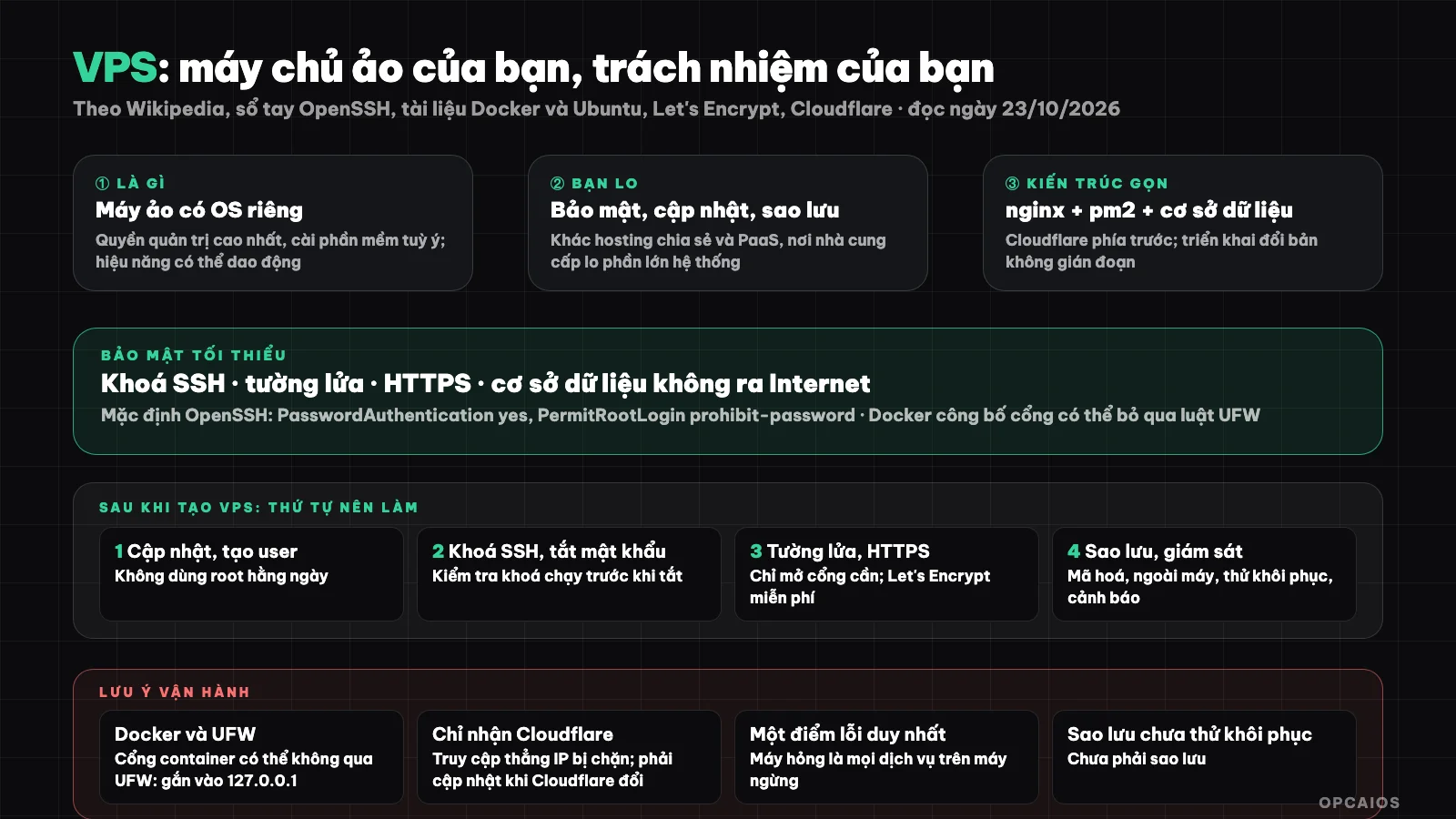
A secure VPS has many layers: only open necessary ports, TLS, database not exposed to the outside network, backups and monitoring. Diagram: OPCAIOS.
What is VPS and how does it work?
VPS is a virtual machine running on a physical server divided up by software called a hypervisor. The hypervisor, according to Wikipedia (read 23/10/2026), creates, reclaims and manages the resources of "guest" operating systems, and each guest typically only sees the resources allocated to it. Because each VPS has its own operating system, the virtual machines are mostly isolated from each other and restart independently. When you rent a VPS, you get three things. First is a private IP address. Next is SSH access, usually on Linux. Finally is the responsibility to install, secure, update and back up yourself. For example, an Ubuntu VPS using nginx and pm2 can run a Next.js website alongside a database, while the provider only handles the hardware and hypervisor underneath. In return, VPS instances share hardware so performance can be lower depending on the load of other virtual machines, according to Wikipedia.
How does VPS differ from shared hosting and PaaS platforms?
The difference is in how much you control and how much you have to manage yourself. The table below is a general description to help you choose a direction, not a comparison of specific providers:
| Criteria | Shared hosting | VPS | PaaS (application platform) |
|---|---|---|---|
| OS control | Limited | High, with admin access | No machine management |
| Who handles OS updates and security | Provider | You | Provider |
| Install software as you like | Limited | Nearly everything that runs on the OS | According to platform model |
| Complexity | Low | Medium to high | Low |
| Suitable for | Simple websites | Multiple services, custom applications, building your own infrastructure | Quick deployment, little operations |
What criteria should you use to choose a VPS?
Choosing a VPS is about matching your application's real needs to six criteria, not following advertised numbers. For example, a Next.js website with a database needs spare RAM and extra storage for builds, based on OPCAIOS's operational experience. Six criteria to check (read 23/10/2026) in order:
- CPU, RAM, disk: Spare RAM for heavy applications.
- Server location: Closer to users means lower latency; for Vietnamese-language websites, consider the nearby region.
- Backups and snapshots: Does the provider have machine-level backups and what do they cost; you should still back up outside.
- Bandwidth and IP addresses: Limits, IPv4 or IPv6.
- Support and stability: How they handle incidents, do they have a public status page.
- Payment method and cycle: Monthly makes it easier to switch providers.
Prices change quickly so this article doesn't quote specific prices; read the current pricing and backup terms before you pay. VPS is cheaper than a dedicated physical server, according to Wikipedia, but performance depends on the load of other virtual machines (according to Wikipedia).
The First Things to Do to Secure a New VPS
Securing a new VPS means closing all entry points before installing applications, because a new VPS connected to the Internet is usually quickly scanned by automated programs. First, do these three foundational things:
- Update the operating system and enable automatic security updates if reasonable.
- Create a separate user and use SSH keys instead of passwords. By default, according to OpenSSH (following OpenBSD),
PasswordAuthenticationisyes,PubkeyAuthenticationisyes, whilePermitRootLoginisprohibit-passwordandMaxAuthTriesis 6. Turn off password login after verifying SSH keys work, and don't use root for daily tasks. - Enable the firewall and open only necessary ports (SSH, 80, 443). On Ubuntu, UFW is a simple tool: open ports with
ufw allowand check withufw status.
Next are Docker, HTTPS and database considerations in the section below (OpenSSH and Ubuntu documentation, read 23/10/2026). For example, a new Ubuntu VPS should have a separate user and SSH keys before opening any ports besides 22, 80 and 443.
What Should You Watch Out for with Docker, HTTPS and Databases?
Then address four remaining points:
- Be careful with Docker and the firewall. UFW and Docker use firewall rules in incompatible ways, according to Docker: when publishing container ports, traffic is redirected before the INPUT and OUTPUT chains that UFW uses, so UFW rules are bypassed. Only publish ports to 127.0.0.1, place the service behind nginx, and control through the
DOCKER-USERchain. - Use HTTPS with valid certificates. According to Let's Encrypt, this is a free, automatic and open certificate authority. OPCAIOS uses Certbot with nginx.
- Don't expose your database to the Internet: keep the database listening only on the internal address; access administrative tools through an SSH tunnel.
- Keep secrets out of source code: environment variables, tight file permissions; see What is GitHub? about not putting secrets in repositories.
What Are the Benefits of Putting Cloudflare in Front of Your VPS?
Cloudflare acts as a reverse proxy standing between users and your server: users talk to Cloudflare, Cloudflare talks to your VPS. See the overview in What is Cloudflare?. A useful layer of protection is to configure your origin server to only accept connections from Cloudflare's IP ranges, so anyone typing directly to your VPS's IP address can't get in. Cloudflare publishes the official list of IPv4 and IPv6 ranges at the cloudflare.com/ips page (marked as the "official" source for these ranges). A drawback to remember: when Cloudflare changes the list, you must update your configuration accordingly, otherwise real users might be blocked.
How Do You Run a Website on a VPS Cleanly?
Running a website on a VPS cleanly means using a lightweight three-layer model: nginx as the web server and TLS terminator, a process manager like pm2 keeping your application running, and a database on the same machine or another. Three things that make operations less painful, according to OPCAIOS's experience (noted in 2026):
- Seamless deployment: build the new version into a separate directory while the old version still serves, then switch to the new one. Previously OPCAIOS built directly on the running version causing the site to error for 1 to 2 minutes. See the test run steps in What is Vibe coding?.
- Back up correctly: encrypt, save outside the machine (different provider or different region), with a schedule and tested recovery, like backups to Google Drive kept for 60 days.
- Monitor and alert: check the website every 5 minutes and alert by phone if it goes down, disk is full or backups are missing; see how to use bots in What is Telegram bot?.
For example, a Next.js website using pm2 behind nginx only needs to swap versions when the build is done, so a broken build doesn't break the running website.
My Experience Running a Website on VPS at OPCAIOS
I run the OPCAIOS website on a VPS alongside a few other internal services: nginx in front, application processes managed by pm2, self-hosted Supabase database (see What is Supabase?), and Cloudflare in front. Here are some things I've learned, without going into sensitive configuration details.
How do OPCAIOS security and access work?
The first two security lessons (noted in 2026):
- A VPS running multiple services compounds risk. An open port forgotten on one service is a gateway to the entire machine. I have a custom firewall script that only opens a few necessary ports, blocks container ports through Docker-specific chains, and admin tools are accessed only through SSH tunnels; after a security review, two admin ports were closed.
- Origin server only accepts Cloudflare: direct access by VPS IP is denied. Operational consequence: health checks must go through the domain, and Cloudflare's IP list needs updating when Cloudflare changes.
How do OPCAIOS deployment, database, backups, and monitoring work?
Four more operational lessons:
- Deployment through zero-downtime version switching: previously I built directly on the running version, causing the site to error for 1-2 minutes; a failed build now doesn't break the website. Also, once I had an issue because an environment config change left only one variable and the site silently reverted to old data, so now after each config file edit I check that all variables are still present.
- Database connection limits: once I ran out of connections at the connection pool port, causing build failures and 502 errors on the website; since then the application uses the connection pool per transaction, and when the database goes down, it alerts my phone.
- Encrypted backups to Google Drive, kept for 60 days and already tested recovery; the decryption password is stored in two places because if I lose both, the backups become unreadable.
- Monitoring: check the website and database every 5 minutes, alert via Telegram when they go down and when they come back up, plus alerts for missing backups or disk running full.
Real Risks and Costs of VPS
Cost is not just rental: it's your time. Main risks include a single point of failure (machine breaks or provider has an outage and everything on the machine stops), security responsibility falls on you, and you have to track updates. If you don't want to run infrastructure yourself, PaaS or managed hosting might be better. If you let an AI agent run commands on your VPS instead, use a minimal privilege account, review destructive commands and have a backup first; see What is MCP?.
Read more: Guide to installing n8n on VPS and automating business processes from A-Z for Solopreneurs; Security review of a one-person website.
Frequently Asked Questions
What is a VPS?
A virtual machine sold by hosting providers as a service, running its own operating system and usually giving you the highest administrative rights to install any software you want.
How is a VPS different from regular hosting?
A VPS gives you control over the operating system and lets you install any software, but you handle security, updates, and backups yourself; shared hosting is simpler but more restrictive.
What should I do first to secure a new VPS?
Update the operating system, create a separate user account, use SSH keys and disable password login, enable a firewall with only necessary ports open, use HTTPS, don't expose databases to the Internet, and watch out that Docker can bypass UFW rules.
Do I need Cloudflare before a VPS?
Not mandatory, but useful: it acts as a reverse proxy to hide your origin server address and can limit your origin server to accept connections only from Cloudflare's IP ranges; you must update the list when Cloudflare changes it.
How do I back up a VPS correctly?
Proper backup means having an encrypted copy outside the machine, on automatic schedule and tested for recovery, based on OPCAIOS experience (as of 2026). A backup you haven't tested for recovery isn't really a backup. First, encrypt the copy before it leaves the machine. Next, store it somewhere other than your provider or in a different region, because the provider's own snapshots are just an added layer. Finally, schedule it and test recovery regularly. For example, OPCAIOS backs up encrypted copies to Google Drive, keeps them for 60 days and has tested recovery; the decryption password is stored in two places because losing both would make the backups unreadable. The system checks the website and database every 5 minutes and alerts via Telegram when they go down, when backups are missing, or when the disk is about to fill up. To learn how to build and operate a safe automated infrastructure, see OPCAIOS's AI application training course.
Sources: Wikipedia "Virtual private server"; OpenSSH manual (sshd_config) at man.openbsd.org; Ubuntu Server documentation on UFW; Docker documentation on packet filtering and firewalls (Docker and ufw sections); Cloudflare's IP range page and Let's Encrypt documentation; read directly on 23/10/2026. Cloudflare Learning blocks automated access so we don't use it directly. The hosting type comparison is general description without detailed sourcing. Operating experience is OPCAIOS's own; we don't publish specific addresses, ports, or configurations.
Translated from Vietnamese with AI. Read the original.
Want to apply this in your business?
Book a free 30-minute call (Vietnam time, in English or Vietnamese).