


What is Manim? Manim is a programming animation engine written in Python by Grant Sanderson, author of the 3Blue1Brown YouTube channel, to create math explanation videos: formula transformations, moving graphs, three-dimensional geometry, all controlled precisely by code. According to the GitHub API (read on 04/11/2026), the 3b1b/manim repository has about 96,100 stars, 7,900 forks, MIT license, created on 22/03/2015 and last pushed on 09/09/2026. The PyPI package for this repository is named manimgl, latest version 1.7.2 released on 13/12/2024, according to PyPI. Manim is completely free, no API key needed. This post explains what Manim can do, how to install it, how it differs from Manim Community Edition, and whether it suits educational content creators.
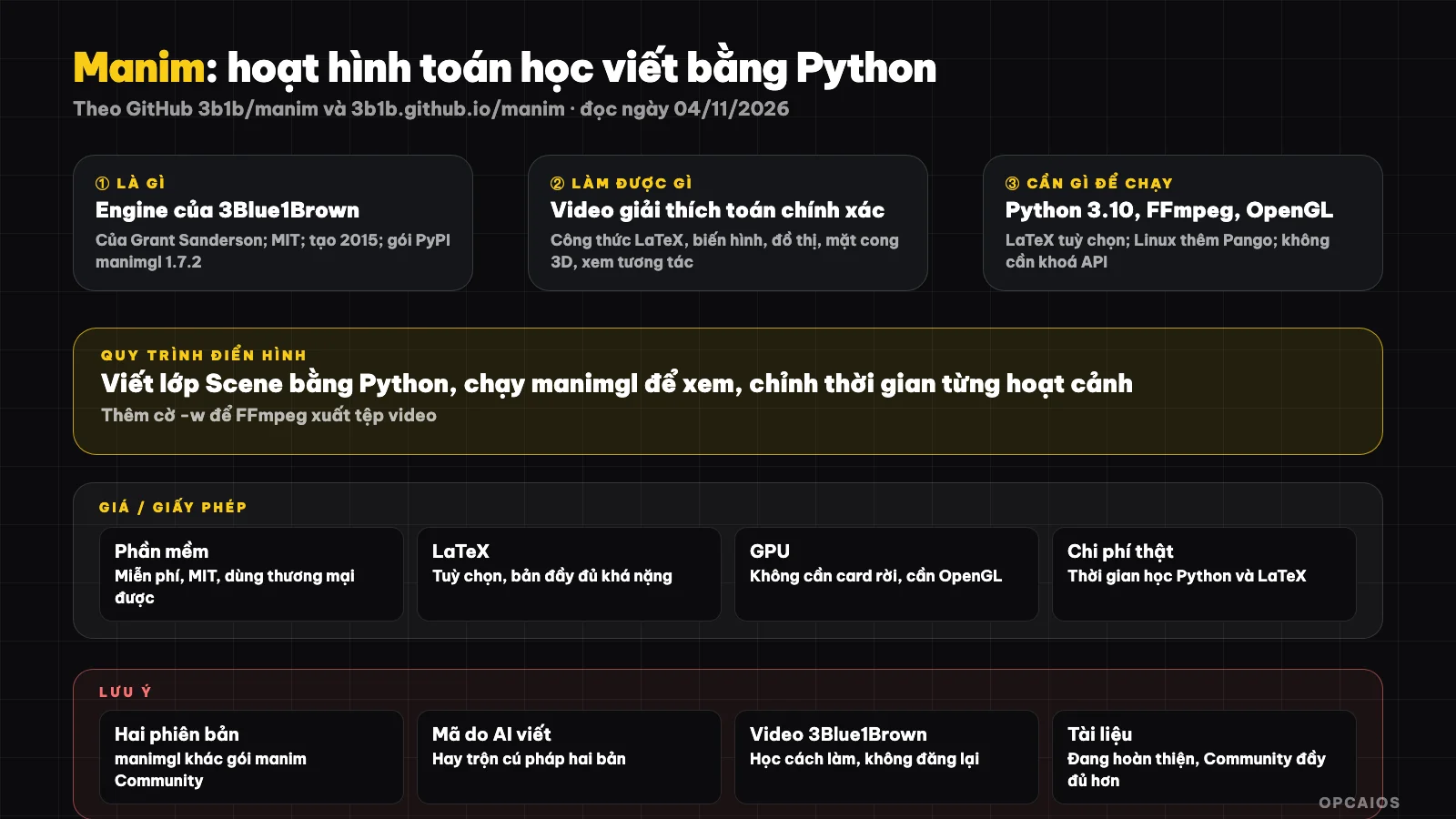
Write scenes in Python, view directly, export video using FFmpeg; the two branches ManimGL and Manim Community use different install commands. Diagram: OPCAIOS.
What is Manim and who created it?
Manim started as a personal project by Grant Sanderson to produce videos for the 3Blue1Brown channel. According to the README (GitHub, read on 04/11/2026), the code for each video on this channel is publicly shared in the separate repository 3b1b/videos, though older video code may not run with the latest version.
The easiest thing to mix up is that there are two Manims. In 2020, a group of programmers split the repository into Manim Community Edition (repository ManimCommunity/manim), aiming for greater stability, testing, easier getting started, and faster community feedback. The 3Blue1Brown repository is now called ManimGL, installed with the manimgl package. The README warns clearly: using the install command for one version on the other will cause errors, so you must choose one version first.
This post is about ManimGL. If you follow a guide online and the command is manim and the class inherits from the manim library, that's usually the Community version.
What can Manim do?
Manim turns Python code into animations precise to the pixel, strongest with mathematics and abstract concepts. The table below restates from the README and official documentation (read on 04/11/2026):
| Feature | Meaning for content creators |
|---|---|
| Scenes written as Python classes | Each video is a Scene class, editing code is editing video |
| LaTeX formulas | Display and transform math formulas beautifully like textbooks |
| Object transformations | One shape, one formula smoothly becomes another |
| Coordinate systems, graphs, 3D surfaces | Examples of CoordinateSystem, Graph, Surface in the documentation |
| Interactive viewing window | Built with OpenGL, view instantly, jump to the nth animation |
| Export video using FFmpeg | Flag -w writes to file, -o writes and opens, -s saves only final frame |
Configure custom_config.yml |
Set output directory, quality, default font |
Official documentation is at 3b1b.github.io/manim, with a Chinese version maintained by the manim-kindergarten community. No drag-and-drop tools: everything is code.
How much does Manim cost, what license, where are the hidden costs?
Manim is free under the MIT license, can be used commercially, no API key or account registration needed. Real cost is time learning Python and disk space for LaTeX. The table below summarizes (before tax, subject to change):
| Item | Details |
|---|---|
| Software | Free, MIT (GitHub API, read on 04/11/2026) |
| Dependencies | Python 3.10+, FFmpeg, OpenGL; Linux also needs Pango |
| LaTeX | Not required; README mentions MacTeX full package around 6GB, lighter BasicTeX option available |
| GPU | Powerful dedicated GPU not needed; machine must support OpenGL to open viewing window |
| Server | None needed; runs entirely on personal machine |
| AI code assistance | Optional; if you ask Claude Code or Codex to write scenes, pay according to your plan |
The biggest hidden cost is the learning curve. One 30-second scene may take dozens of lines of code and many timing adjustments. We haven't measured the time to make one scene.
How do I install Manim?
I install ManimGL using pip with the package name manimgl, not manim. The steps are from the README (GitHub, read on 04/11/2026):
- First, I install Python 3.10+ and FFmpeg; on macOS the README suggests
brew install ffmpeg mactex, on Ubuntu I installffmpegandlibpango1.0-devusing apt. - Next, if I need formulas, I install a LaTeX distribution; the Windows README recommends MiKTeX.
- I install ManimGL and test it:
pip install manimgl
manimgl
- If I want to run sample scenes or modify the library itself, I clone the repository and install it in development mode:
git clone https://github.com/3b1b/manim.git
cd manim
pip install -e .
manimgl example_scenes.py OpeningManimExample
- Finally, I add the
-wflag to write the scene to a video file.
The README recommends using a virtual environment (venv or conda) to avoid package conflicts. On Mac with ARM chips I need to install Cairo separately. We haven't run these commands yet.
Limitations, risks, security and legal
The biggest limitation of ManimGL is stability and documentation. The README itself admits the documentation is "in progress", and it mentions the Community version as the place with the most active contribution ecosystem, with testing and continuous integration. The PyPI package manimgl 1.7.2 has been there since 13/12/2024, so if I want to use the latest changes I have to install from source.
Second, version confusion. This is the most common mistake: tutorials, forum answers, and even AI-generated code often mix ManimGL syntax with Community. When I ask AI to write code, I make it clear I'm using manimgl. See more at AI writes code with wrong version.
Third, code from the 3b1b/videos repository. The code has its own license from that repository, while the videos, images and characters of 3Blue1Brown are subject to copyright. Learning how it's done is fine; recreating the entire video to repost is another matter. Check the license before commercial use; this is not legal advice.
Fourth, system installation. Manim doesn't make network calls, doesn't need keys, security risk is low, but installing LaTeX and graphics libraries on Windows usually takes time.
Compared to other options
The table below is a general description, not a measurement:
| Option | How it differs from ManimGL |
|---|---|
| Manim Community Edition | Same origin, more stable, fuller documentation, larger community; syntax has changed quite a bit |
| Remotion | Video using React, graphics, data, interfaces; not specialized for math formulas |
| Motion Anything | Chat with an agent to create web motion; no coding needed, not specialized for math |
| GeoGebra, Desmos | Drag and drop, instant interaction; hard to build narrative video with scripted motion |
| After Effects | Strong on effects, paid; building precise mathematical motion is very labor-intensive |
When should I use it?
| Situation | Recommendation |
|---|---|
| Making videos explaining math, physics, algorithms | Great fit; this is why Manim was created |
| Newcomer, want documentation and community | Start with Community edition first |
| Want to learn how 3Blue1Brown makes videos | ManimGL plus the 3b1b/videos repository |
| Promotional video, brand effects | Remotion or standard video tools are better suited |
| Don't want to write code | Ask AI to write it, but I still have to read and edit the Python code |
Example (hypothetical): a math teacher writes a Manim scene for a Pythagorean theorem lesson, three squares built on three sides, two smaller shapes cut out and fitted perfectly into the larger one, LaTeX formula appearing gradually in the corner, export a 40-second video to post on YouTube. We haven't measured how long it takes to make this scene.
OPCAIOS experience
We recently added Manim to the Repo list in the Utilities section on opcaios.org after reading the README and checking that the repository is still being maintained; we haven't tested it yet, so this section describes the criteria we use to evaluate, not an assessment after use. First, the repository is still being updated: pushed on 09/09/2026, even though the PyPI package is much older. Second, license: MIT, the most permissive in the video tools category. Third, hidden costs: no required GPU or API, only time to learn Python and LaTeX. Finally, can I replace the tool I'm already using: the content of opcaios.org revolves around AI and OPC models, little mathematics, so Manim is a reference resource for readers doing education more than a daily tool for us. The main risk is confusing the two versions.
Further reading: What is Remotion?, What is Motion Anything?, What is Claude Code?, AI writes Python for Blender, 5 best code-based video tools in 2026.
Frequently Asked Questions
Is Manim free?
Yes. Manim by 3Blue1Brown is under the MIT license (GitHub API, read 04/11/2026), free even for commercial purposes, no account or API key required. You only need Python 3.10 or higher, FFmpeg and OpenGL; LaTeX is optional if you want to display formulas. The real cost is the time spent learning to write scenes in Python. Manim Community Edition is also free and open source.
What's the difference between Manim and Manim Community Edition?
Original Manim (ManimGL) is Grant Sanderson's repository, installed via pip install manimgl, built with OpenGL and has an interactive preview window. Manim Community Edition split off in 2020, installed via the manim package, focused on stability, testing and user-friendly documentation. According to the README, the two versions don't share installation commands and syntax has already diverged, so pick one and only follow that version's guide.
Does Manim need a GPU?
Manim doesn't need a powerful discrete GPU and doesn't run any AI models. ManimGL renders scenes using OpenGL, so your machine needs integrated or discrete graphics with OpenGL support to open the preview window directly; office computers usually meet this requirement. Video export uses FFmpeg running on CPU. Complex 3D scenes or high resolution will take longer to render. We haven't measured rendering speed.
Can I ask AI to write Manim code?
Yes, and this is how many beginners start. You describe the scene in words, ask Claude Code, Codex or a chatbot to write the Scene class, then run it and fix it. Key point to remember: specify clearly whether you're using manimgl or manim Community, because AI often mixes the syntax of both versions. Always test each short scene, read the error messages and feed them back to AI for fixing. This is AI-assisted code writing, not fully automatic.
Is Manim suitable for content creators making educational material in Vietnam?
It suits teachers of math, physics, programming who want accurate animations and their own style. Not for those who need videos fast without touching code. Our advice: start with Community Edition because it has more complete documentation, ask AI to write your first scene, then gradually fix it yourself. Want to learn how to combine AI into content creation and automate your work, check out OPCAIOS's AI application training course.
Source: GitHub 3b1b/manim (README, API, read 04/11/2026: around 96,100 stars, MIT, created 22/03/2015, last push 09/09/2026), PyPI manimgl (version 1.7.2 on 13/12/2024, read 04/11/2026), documentation 3b1b.github.io/manim (read 04/11/2026); not read/not verified: README and star count of ManimCommunity/manim, license of 3b1b/videos repository, After Effects price; star count and prices may change. Experience is OPCAIOS's. This post is not legal advice.
Translated from Vietnamese with AI. Read the original.
Want to apply this in your business?
Book a free 30-minute call (Vietnam time, in English or Vietnamese).