



MCP in Codex is a way for OpenAI's Codex programming agent to call tools and read data from external MCP servers, declared using the codex mcp command or the [mcp_servers.<name>] table in the config.toml file. Besides MCP, Codex has three other extension mechanisms: skill (a guidance package that can include scripts), plugin (a pre-packaged bundle of many things, installed from the plugin marketplace) and hooks (commands that run at specific points in the session lifecycle). This post is based on the Codex documentation at learn.chatgpt.com and the --help output of Codex CLI version 0.162.1, read on 03/11/2026; features may change between versions. This post makes no promises about the safety or effectiveness of any utility and does not provide sample hook configurations because we haven't written any blocking hooks yet. The post includes how to add MCP servers, skills, plugins, hook points, a comparison table, risks, a decision tree and real experience from OPCAIOS. If you're not clear on MCP, first read What is MCP.
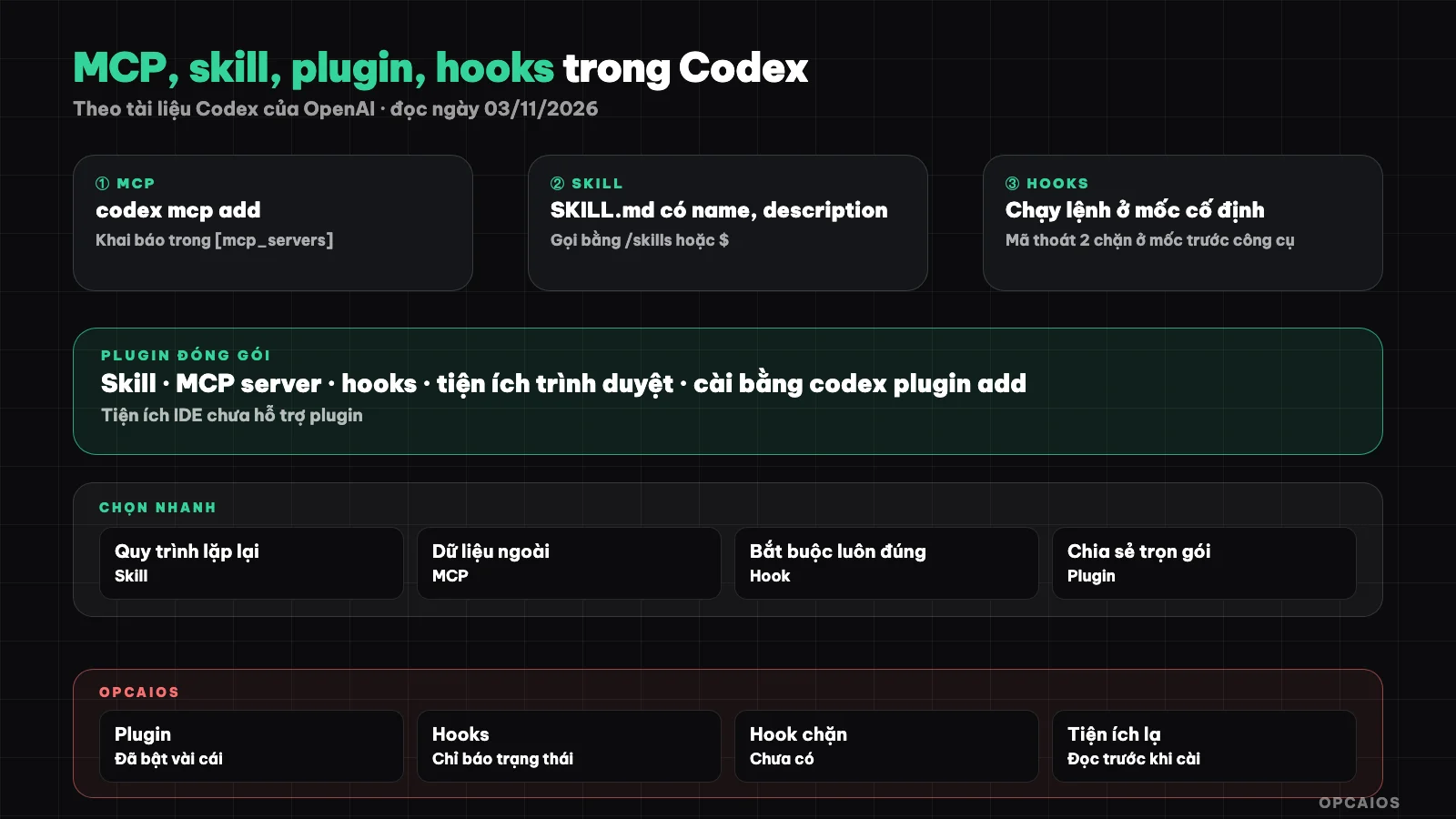
Four mechanisms to extend Codex and where each is declared. Diagram: OPCAIOS.
How do I add an MCP server to Codex using the codex mcp command?
Adding an MCP server to Codex via the command line is the quickest way: the codex mcp add command writes the declaration to ~/.codex/config.toml instead of editing by hand. According to codex mcp --help from Codex CLI 0.162.1 (run on 03/11/2026), the command group includes list, get, add, remove, login and logout. The add command takes a name, then either --url for a streamable HTTP server, or -- followed by a command to start a local server (stdio). The --env KEY=VALUE flag is only for stdio servers, while --bearer-token-env-var is only for HTTP servers and takes the name of an environment variable holding the token, not the token itself. Example from the Codex MCP documentation:
codex mcp add context7 -- npx -y @upstash/context7-mcp
codex mcp list
codex mcp login <server-name>
In Codex's terminal interface, type /mcp to see the servers currently running.
What keys does declaring an MCP server in config.toml include?
Declaration in config.toml gives you more fine-grained control than the add command. According to the Codex MCP page (learn.chatgpt.com/docs/extend/mcp, read on 03/11/2026), each server is a table [mcp_servers.<name>]. A stdio server needs command, and can add args, env, cwd. An HTTP server needs url, and can add bearer_token_env_var and http_headers. Common keys worth knowing: startup_timeout_sec (default 10 seconds), tool_timeout_sec (default 60 seconds), enabled, required, enabled_tools and disabled_tools.
[mcp_servers.context7]
command = "npx"
args = ["-y", "@upstash/context7-mcp"]
tool_timeout_sec = 60

[mcp_servers.vi-du-http]
url = "https://mcp.example.com/mcp"
bearer_token_env_var = "VI_DU_TOKEN"
enabled_tools = ["search"]
The second server is a hypothetical example. The documentation notes that OAuth client secrets if declared will appear in lowercase in the file, so keep the file private and out of git.
What is a skill in Codex and where do I put it?
A skill in Codex is a directory containing a SKILL.md file (guidance with metadata), and can add scripts/, references/ and assets/, helping Codex execute a repeatable process correctly. According to the build-skills page in the Codex documentation (read on 03/11/2026), the start of SKILL.md must have name and description, and skills are based on the open agent skills standard. Codex looks for skills in four layers:
- Repository:
.agents/skillsin the current directory, parent directory and repository root. - User:
$HOME/.agents/skills. - Admin:
/etc/codex/skills. - System: bundled with Codex, includes
skill-creatorandskill-installer.
Call a skill using /skills or type $ with the name; Codex also self-selects a skill when the description matches. Codex only loads names and descriptions first, reading the full SKILL.md when that skill is chosen; the initial list by default takes at most 2% of the context window. So description should make clear when to use it and when not to. The skill concept in general is in the post What is a skill.
How Do Codex Plugins and Plugin Marketplaces Work?
Codex plugins are pre-packaged bundles of multiple capabilities to install once: according to the Plugins page in the Codex documentation (read on 03/11/2026), a plugin can include skills, MCP servers, browser utilities, and hooks. Codex CLI and desktop applications support plugins, but IDE utilities do not yet. There are three ways to install and manage them:
- In Codex CLI, type
/plugins, install from a configured marketplace, then open a new session. - Use the command:
codex plugin add <plugin>@<marketplace>to install,codex plugin listto view,codex plugin removeto uninstall (seecodex plugin --help). - Add your own marketplace:
codex plugin marketplace addaccepts a local path,owner/repo, or Git URL; useupgradeto refresh andremoveto delete.
The Plugins directory has an OpenAI tab, a workspace tab, and a personal tab. For comparison with commands, skills, plugins, and MCP in Claude Code, see the post slash command, skill, plugin or MCP; this post does not repeat that section.
At Which Points Do Hooks in Codex Run?
Hooks in Codex are commands you declare that run automatically at fixed points in a session, different from the guidance in AGENTS.md which is only a suggestion to the model. According to the Hooks page (learn.chatgpt.com/docs/hooks, read on 03/11/2026), Codex has 14 points: SessionStart, SessionEnd, UserPromptSubmit, PreToolUse, PostToolUse, PermissionRequest, PreCompact, PostCompact, SubagentStart, SubagentStop, Stop, Interrupt, PreModelRequest, and PostModelRequest. Hooks are placed in ~/.codex/hooks.json, in the [hooks] table of config.toml, or in .codex/ of the repository; plugins can also carry hooks with them. Three important points:
- Only some points can block actions:
PreToolUsecan reject a command,UserPromptSubmitblocks a prompt,PermissionRequestallows or denies; exit code 2 with a reason is one way to block. PostToolUseblocks only by replacing the result, it does not undo the command that ran; background hooks and points likeSessionEnd,Interruptcannot block.- Hooks not under admin control must be viewed and trusted before running; editing a hook requires trusting it again. Use
/hooksto view, trust, or disable.
Hooks are enabled by default, disable with hooks = false in [features]. For hooks on the Claude Code side, see hooks in Claude Code.
Comparing MCP, Skills, Plugins, and Hooks in Codex
Four mechanisms solve four different problems. Summary table according to documentation read on 03/11/2026:
| Mechanism | Solves What | Declared Where | Who Decides When to Run |
|---|---|---|---|
| MCP server | Lets Codex call tools, read external system data | codex mcp add, [mcp_servers.<name>] |
Model chooses to call tools, based on approval mode |
| Skill | Teaches Codex a repeatable process | SKILL.md in .agents/skills |
You call it with $, or model chooses based on description |
| Plugin | Install package of skills, MCP, hooks at once | /plugins, codex plugin add |
Depends on components inside |
| Hook | Run a command surely at a point, can block | hooks.json, [hooks] |
System, each time that point arrives |
Memory aid: MCP is your hands, skill is your handbook, plugin is a packaged box, hook is a latch.
What Are the Risks of Installing Unfamiliar Utilities for Codex?
The main risk when installing unfamiliar MCP servers, skills, or plugins is giving code from someone else permission to run on your machine and read data that Codex can read. Five specific risks:
- MCP server stdio is a program running on your machine; commands like
npx -ydownload and run the latest package without asking again. - Tool descriptions and results from MCP servers go straight into the model's context, so they can contain prompt injection instructions.
- A skill can come with scripts; Codex runs that script in a sandbox and with current approval, but if you've already granted permission then the script has corresponding rights.
- A plugin bundles many things at once, including hooks that must be viewed and trusted before running.
- Tokens and client secrets declared in
config.tomlare exposed if the file is committed.
Countermeasures: install from sources where you can read the code, lock package versions, use enabled_tools to enable only needed tools, keep tokens in environment variables, maintain strict approval when testing. See also security when using AI to write code.
Decision tree: which mechanism should I use?
Ask in order, stop at the first answer that is "yes":
- Must this happen for certain, regardless of which decision model (block dangerous commands, keep logs)? Use a hook.
- Does Codex need to read or write to an outside system (GitHub, database, calendar)? Use an MCP server.
- Is this a multi-step process you explain often? Write a skill.
- Do you need to move skill, MCP and hook together to another machine or share with a whole team? Package it as a plugin, or install a ready-made plugin.
If it's just a general rule like "reply in Vietnamese", put it in AGENTS.md and that's enough—you don't need any mechanism.
OPCAIOS's experience
OPCAIOS uses Codex CLI version 0.162.x and the Codex desktop app. These things are real, checked on 03/11/2026:
- The plugins that are on, all come from OpenAI's plugin marketplace: browser, visualization, Gmail, Google Calendar, Slack, docs, PDF, spreadsheets and slides. The machine also has Codex's Computer Use app installed. We haven't tracked how often each plugin gets used, so we just say "turned on".
- Codex hooks are set up at the session start, send prompt, before and after tool, permission request, subagent and stop points, but they only report session status to a terminal management tool. No hook blocks commands yet.
- There is a plugin code review folder but it's empty, so we can't say we use Codex for code review regularly.
What we haven't done: we haven't measured whether any plugin saves time, we don't have any protective hooks to replace manual discipline.
Frequently asked questions
If I add an MCP server to Codex CLI, does it work in the desktop app too?
Yes, according to Codex MCP docs I read on 03/11/2026: the desktop app, Codex CLI and IDE tools all share the MCP setup in ~/.codex/config.toml, so adding it once with codex mcp add means all three see it. Only the web version of ChatGPT doesn't read the local config file; web access to MCP tools goes through plugins instead. The setup in .codex/config.toml of a project only works if the project is already trusted.
Can I reuse Claude Code skills in Codex?
Format-wise they're close: both use a folder with SKILL.md containing name and description, and Codex docs say skills follow an open agent skills standard. The difference is where they sit: Codex looks in .agents/skills of the repo and $HOME/.agents/skills, not Claude Code's own folder. A skill that calls one agent's own tools needs fixing; we haven't tested sharing between them.
Can Codex hooks block dangerous commands?
Yes, at the right point. Per the Hooks page I read on 03/11/2026, the PreToolUse hook can reject a command before it runs, and the PermissionRequest hook can reject a permission request; exit code 2 with a reason is one way to block. The PostToolUse hook can't undo a command that already ran. Background hooks can't block anything, and every hook must be trusted before it runs. OPCAIOS hasn't written a blocking hook so I don't have an example.
Should I install a lot of plugins at once?
No, don't just turn on everything you see. Each plugin can come with an MCP server, skills and hooks, which means extra tools for the model to pick from, more description taking up context, and code running on your machine. Turn a plugin on when you have a specific job, read what it contains, check the hooks in /hooks, uninstall it with codex plugin remove when you're done. The docs warn that turning off a plugin in ChatGPT doesn't automatically disconnect its MCP server.
If you don't know how to code, where should you start extending Codex?
Start with AGENTS.md for general rules, then install one official plugin from the OpenAI tab in the Plugins folder for the exact task you need, rather than writing your own MCP server or hook. Once you're comfortable, try $skill-creator to have Codex draft a skill from your description. Save hooks for last because they need shell command knowledge. The post safe workflow for people who can't code has the basics. Want hands-on coaching, check OPCAIOS's AI application training course.
Source: Codex docs at learn.chatgpt.com (pages extend/mcp, build-skills, plugins, hooks; redirected from developers.openai.com/codex) and codex --help, codex mcp --help, codex plugin --help from Codex CLI 0.162.1, read on 03/11/2026. Not yet verified: detailed JSON structure of hooks.json, sharing skills between Codex and Claude Code, plugin behavior in IDE tools in later versions; features may change per release. Experience is OPCAIOS's.
Translated from Vietnamese with AI. Read the original.
Want to apply this in your business?
Book a free 30-minute call (Vietnam time, in English or Vietnamese).