


What is NotebookLM? NotebookLM is a research and note-taking tool from Google Labs, using the Gemini model to summarize, explain, and answer questions based on sources you upload (websites, PDFs, Google Docs, Google Slides, YouTube videos via transcripts). On July 16, 2026, according to Wikipedia, Google renamed the product to Gemini Notebook; other sources say only the name and URL changed, with old links auto-redirecting. This post still calls it NotebookLM because most users search by the old name. The free plan, according to Google (as read on October 25, 2026), allows up to 100 notebooks, each with 50 sources, while paid plans have higher limits.
This post covers: 1) features, including Audio Overviews; 2) limits by plan; 3) how to use it effectively; 4) risks and legal disputes; 5) OPCAIOS experience. For example, someone doing research could upload five PDF reports into one notebook, then ask to compare conclusions and click the original passage to verify.
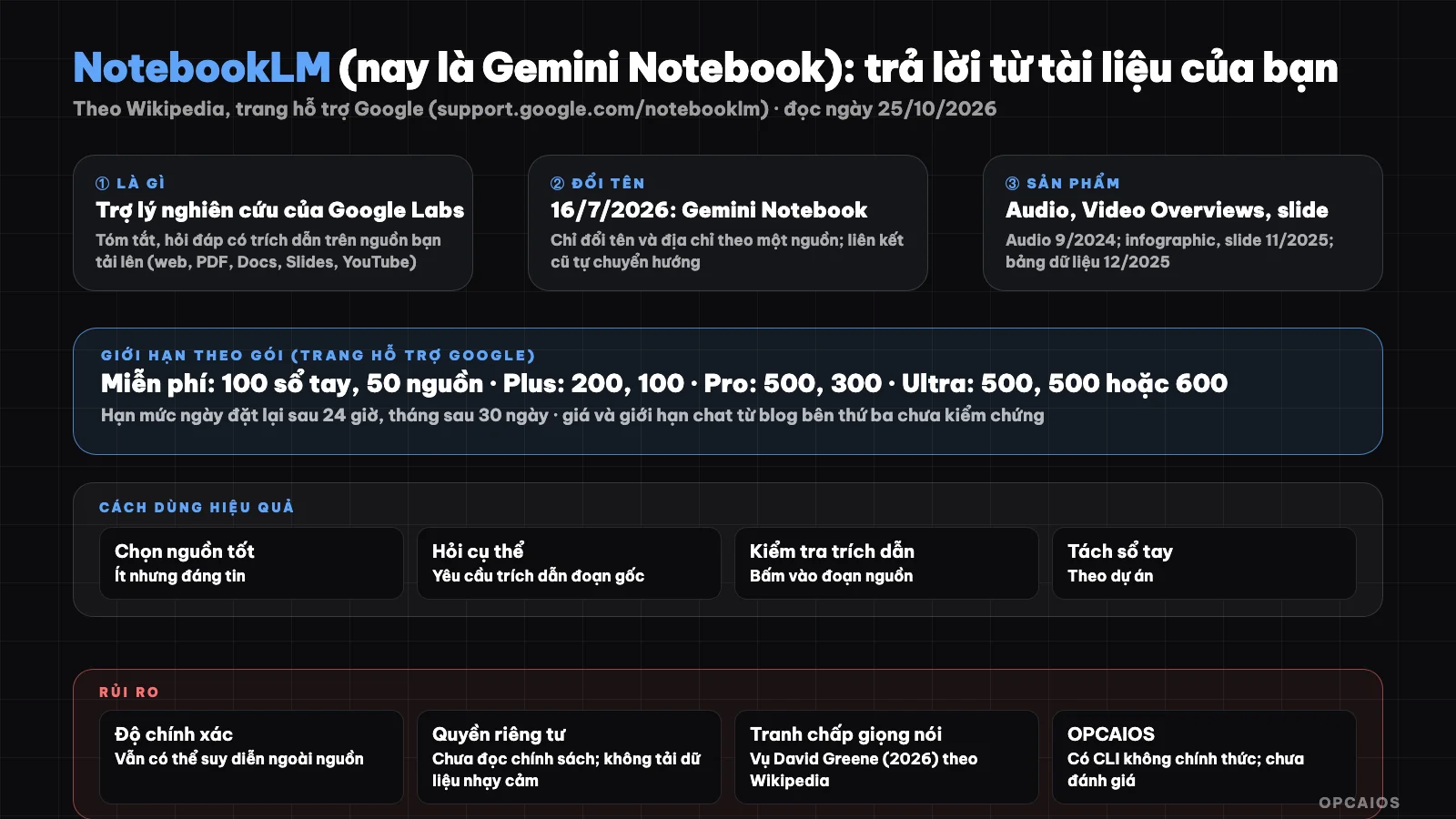
Assistant answers from sources you provide; renamed to Gemini Notebook from July 16, 2026. Diagram: OPCAIOS.
What is NotebookLM and what is its history?
NotebookLM is a research assistant whose answers stick to sources provided by the user, same idea as What is RAG?. Main milestones, according to Wikipedia, include:
- First, 2023: launched as "Project Tailwind", same year renamed to NotebookLM and released in beta.
- October 2024: removed beta label.
- December 2024: launched NotebookLM Plus paid plan for business.
- February 2025: Plus opened to individuals via Google One AI Premium plan.
- Finally, by June 2026: using Gemini 3.5 model; on July 16, 2026 Google renamed it to Gemini Notebook.
The difference from regular chatbots is the answers come from your own documents, so the tool works well for summarizing and Q&A on documents, but not for general knowledge questions. For example, when you upload a set of product specs into a notebook, you ask about the specs and get citations from those exact specs, instead of general answers from the internet. The dates are from Wikipedia, not yet cross-checked with Google's official announcements.
Main features
- Q&A on sources: summarize, explain, answer based on uploaded documents.
- Audio Overviews (9/2024): podcast-style conversation between two AI hosts; Wikipedia critics say it flattens content into a template and carries American cultural context.
- Video Overviews (2025), rolled out to over 80 languages by late 2025; cinematic Video Overviews for AI Ultra users from 3/2026.
- Infographics and slide decks (11/2025, using Nano Banana Pro), data tables (12/2025).
We could not find in the sources we reviewed: mind map feature, Studio section details, and privacy policy on whether your data is used for training or not. Please read Google's policy yourself before uploading sensitive documents.
How many notebooks and sources does NotebookLM limit per plan?
NotebookLM's limits are the number of notebooks per user and the number of sources per notebook, which vary by plan. The Standard free plan, according to Google (as read on October 25, 2026), allows 100 notebooks with 50 sources each. The Plus plan (Google AI Plus) allows 200 notebooks, 100 sources. The Pro plan (Google AI Pro) allows 500 notebooks, 300 sources. The Ultra plan allows 500 notebooks, with 500 sources in the 20 TB plan and 600 sources in the 30 TB plan. Daily limits reset after 24 hours, monthly limits after 30 days. The page does not state daily query limits or Audio and Video Overviews limits. Some third-party blogs cite Plus pricing around $4.99 and Pro around $19.99 per month, limits around 500,000 words per source, but Ultra pricing is inconsistent and we have not verified with the official page, so we do not treat this as firm data. Limits may change at any time.
Limits by plan table
Limits may change:
| Plan | Notebooks per user | Sources per notebook |
|---|---|---|
| Standard (free, Gmail account) | 100 | 50 |
| Plus (Google AI Plus) | 200 | 100 |
| Pro (Google AI Pro) | 500 | 300 |
| Ultra (20 TB plan) | 500 | 500 |
| Ultra (30 TB plan) | 500 | 600 |
How to Use NotebookLM Effectively?
Using NotebookLM effectively means choosing good sources, asking specific questions, and always checking citations, following six steps.
- Step 1: choose few but trustworthy sources like official documents, reports, or transcripts, and name them clearly.
- Step 2: ask specific questions and request citations from the source.
- Step 3: check citations by clicking on the original passage to make sure the answer matches the source intent.
- Step 4: use it for summarizing, comparing, outlining; don't use it instead of reading important documents like contracts.
- Step 5: separate notebooks by project so context doesn't mix.
- Step 6: use Audio Overviews like a preview listen, not like an accurate summary.
For example, with a market research project, you create a separate notebook, upload a few reports from Google or other companies, then ask short questions one by one. If you're building a personal knowledge repository, see What is Second Brain? and What is Obsidian?.
What Risks and Cautions Does NotebookLM Have?
NotebookLM has five groups of risks to know, and according to Wikipedia and Google, many things changed in 2026.
- Accuracy: the model can still summarize wrong or reason beyond the source; always cross-check (see hallucination in What is LLM?).
- Privacy: don't upload contracts, customer data, or secrets until you've read Google's policy; we couldn't read their policy on whether they use data for training.
- Source copyright: only upload documents you have the right to use.
- Voice dispute: according to Wikipedia, in 2026 journalist David Greene sued Google alleging Audio Overviews recreated his voice without permission; Google denied it. We haven't read the lawsuit file.
- Quick changes: names, limits, and plans changed in 2026; check the current page.
For example, before uploading client files, read Google's privacy policy, and if unsure use already anonymized documents.
OPCAIOS Experience
On our work machines we have installed an unofficial command-line tool to control NotebookLM (third-party library, version 0.3.4, with a skill for Claude Code) that lets you create notebooks, add sources, and download products; since it's not Google's product it could break when Google changes the interface or API, and we haven't assessed the quality of its output or its stability. Our knowledge repository also has notes on the process of combining NotebookLM with other tools when building applications. We don't use NotebookLM for customer data and don't have numbers on time saved.
Read more: 5 best second brain tools 2026.
Frequently Asked Questions
What is NotebookLM?
It's Google's research tool that answers and summarizes based on sources you upload; from 16/7/2026 it's called Gemini Notebook.
Is NotebookLM free?
There's a free standard plan: up to 100 notebooks, 50 sources per notebook. Paid plans through Google AI Plus, Pro, Ultra have higher limits.
Does NotebookLM make up information?
It can still be wrong or reason beyond sources; check citations in the original source.
Is uploaded data safe?
We couldn't read the detailed policy; don't upload sensitive data until you've read it.
What are Audio Overviews for?
Listen to summaries like a podcast; not a replacement for accurate summaries. Want to learn how to use AI for research and knowledge management, see OPCAIOS's AI application training course.
Source: Wikipedia "NotebookLM" (read first 100,000 characters, rest not read), Google support page on upgrading (support.google.com/notebooklm), search results about the name change; read 25/10/2026. Limits and price change often; detailed price and limit figures from third parties not verified. Experience is from OPCAIOS.
Translated from Vietnamese with AI. Read the original.
Want to apply this in your business?
Book a free 30-minute call (Vietnam time, in English or Vietnamese).