


What is Second Brain?
Second Brain ("second brain") is a system of digital notes and documents that you build to find, use, and develop what you have learned, instead of trying to remember everything in your head. The most popular method is Building a Second Brain (BASB) by Tiago Forte, which includes a four-step CODE process and PARA organization (Projects, Areas, Resources, Archives). When combined with AI, Second Brain becomes a personal context repository: AI works based on your notes, documents, and rules instead of just relying on general knowledge. Method description taken from Building a Second Brain and Forte Labs (read 24/10/2026).
The post goes through: 1) how CODE and PARA work; 2) how to safely bring AI into the system; 3) common mistakes; 4) OPCAIOS's experience running a knowledge repository for multiple AI agents. For example, a content writer can save ideas in Obsidian, then ask Claude to draft from those same notes.
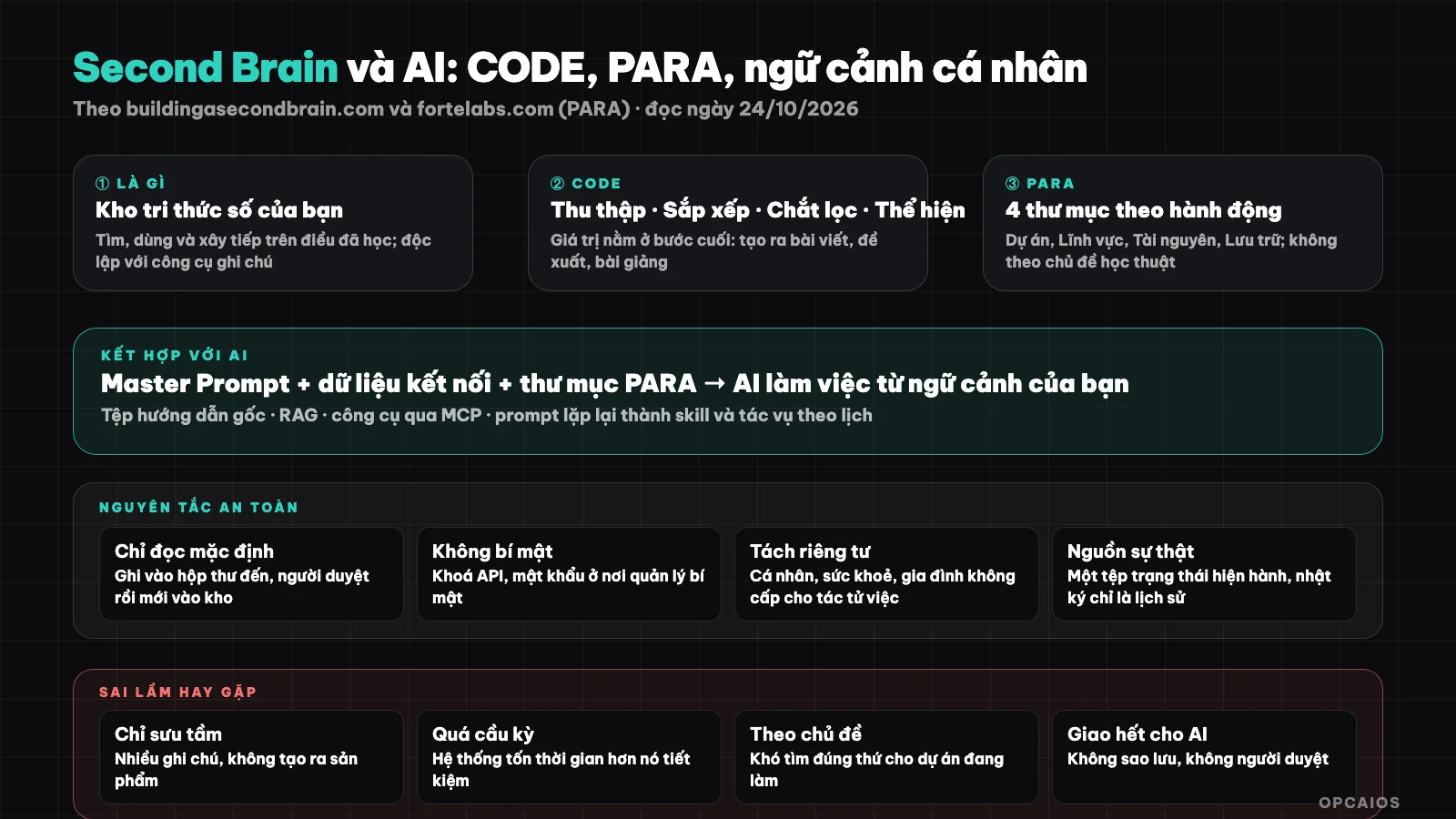
Second Brain is a structured note repository; AI works better when given the right context within it. Diagram: OPCAIOS.
What is Second Brain?
Second Brain ("second brain") is a system of organizing digital information so you can find, use, and build on what you have learned, according to the official Building a Second Brain page. The system is independent of tools and runs on note-taking apps like Notion, Obsidian, or Evernote. Author Tiago Forte says the method is based on "principles that don't change over time." The core idea has two points: 1) the brain is good at creating ideas but poor at storage; 2) therefore storage should be moved outside to a reliable system. For example, instead of remembering every article you've read, you save the worth-keeping passages in Obsidian and find them again when you need to write. First comes the CODE process to handle information, then PARA to organize, finally how to bring AI into the system; these three parts are presented in the sections below.
What steps does the CODE method have?
CODE is the four-step process of Building a Second Brain, according to Tiago Forte at the official page (read 24/10/2026).
- Step 1, Capture: record information from outside worth keeping.
- Step 2, Organize: place it where it's easy to find and use.
- Step 3, Distill: extract the best ideas.
- Step 4, Express: turn ideas into products like writing, speaking, designing, or teaching.
The important point is the final step: Second Brain has value when it creates something like a post, proposal, or lecture, not when you just collect notes. For example, a marketing person reads many articles about advertising, distills them into a few main ideas, then expresses them in Notion or Obsidian as a complete post. A common mistake is stopping at the Capture step, meaning collecting thousands of notes without creating any product.
How does the PARA method organize information?
PARA is the way to organize digital information in Building a Second Brain, dividing everything into four top-level groups, according to Forte Labs (read 24/10/2026).
- Projects: short-term efforts with clear goals, like completing a website design or writing a research report.
- Areas: important parts of work and life that need ongoing attention, like marketing, human resources, health, finance.
- Resources: topics you're interested in and learning, like graphic design, photography, Japanese language.
- Archives: things no longer active but may be useful later, like completed or paused projects.
Finally, the principle the author lays out is to organize by actionable capacity (by projects and goals you're committed to, not by broad topics like "Psychology"), group everything for one project in one place, and keep the system simple. For example, the research report you're writing belongs in Projects, while photography materials you're learning belong in Resources. For text-file note-taking tools, see What is Obsidian?.
How to Combine Second Brain with AI?
Combining Second Brain with AI means letting a language model work from your notes, documents, and files instead of from general knowledge (see What is LLM?). The approach, according to Tiago Forte on his "AI Second Brain" course page (read on 24/10/2026), consists of three components: 1) a "Master Prompt" of 1,000 to 2,000 words; 2) connected data sources; 3) a PARA directory that AI can access. Additionally, the course teaches how to turn repeated prompts into skills and scheduled tasks. This is a description from the course seller, while performance metrics like student numbers, NPS scores, and book sales are self-reported, so OPCAIOS does not verify them. The reason for combining is that language models give generic answers if they lack your context. For example, when instruction files specify your role and priorities, an assistant like Claude can answer more contextually. Two more advanced approaches are RAG (see What is RAG?), which finds relevant passages in your repository and adds them to context, and tools through MCP (see What is MCP?), which lets AI call tools to read and write notes.
Safety Principles When Letting AI Read Your Second Brain
Safety principles when letting AI read your Second Brain are to limit AI's read and write permissions from the start, following five steps below.
- Step 1, read-only by default: only let it write to a draft folder or inbox; you review and then move it to the main repository.
- Step 2, keep no secrets in notes: passwords, API keys, financial information should live in a secrets manager, not in the repository that AI reads.
- Step 3, separate private content: personal folders, health, family should not be shared with agents working on business tasks.
- Step 4, have a source of truth file: a file of current status so AI does not infer from old logs.
- Step 5, verify output: AI summaries of notes can be wrong; cross-check before using for important work.
For example, health and family folders in Obsidian should not be within the scope that Claude or Codex can read when working on business. The read-only-by-default approach, according to Tiago Forte (read on 24/10/2026), is also the principle OPCAIOS applies separately through the above rules.
Common Mistakes
- Collect but do not ship: thousands of notes but create no products.
- Organize too much: the system costs more time than it saves; the PARA author emphasizes keeping it simple.
- Organize by topic instead of action: hard to find what you need for the project you are doing.
- Hand everything to AI: ask AI to clean the repository without backup and review.
- Forget to archive: do not move finished projects to Archives and the repository becomes messy.
OPCAIOS Experience
The personal knowledge repository of the OPCAIOS owner is an Obsidian vault, structured in the spirit of PARA but customized: inbox, areas, resources, archive, and a system folder, with over four thousand Markdown files (file count OPCAIOS counted on the machine, not yet classified). This is not a literal copy of PARA, and OPCAIOS has not compared work speed before and after applying it. Three most useful things for AI in practice: 1) a master instruction file that all agents (Claude Code, Antigravity, Codex) read at the start of each session; 2) a current status file as source of truth; 3) the rule "logs are only historical evidence, do not use them to infer current state." Additionally, every task is logged, and there is a rule never to put secret files in the repository. OPCAIOS has not used the AI Second Brain course, and the above rules are OPCAIOS's own, not a recommendation from Forte Labs.
Frequently Asked Questions
What is a Second Brain?
A system of notes and digital documents that helps you collect, organize, distill, and reuse knowledge; the popular method is Building a Second Brain by Tiago Forte.
How do CODE and PARA differ?
CODE is a four-step process for handling information, while PARA is a way to organize folders, and the two methods complement each other in Building a Second Brain, according to the official website and Forte Labs (accessed 24/10/2026). CODE consists of Capture, Organize, Distill, and Express. PARA consists of four top-level folders: Projects, Areas, Resources, and Archives. First, CODE answers the question of what you do with a new piece of information. Next, PARA answers where that piece of information sits in your system. For example, an article about advertising is captured, placed in the Projects folder of the work you're doing, distilled into a few key points, then expressed as a post. Finally, when the project ends, the article moves to Archives so your system stays organized.
Which app should I use for a Second Brain?
The method is tool-agnostic; the official website mentions Notion, Obsidian, Evernote and other applications. Pick the tool you'll use consistently.
How do I safely combine a Second Brain with AI?
Set permissions to read-only by default, separate private content, don't keep secrets in your notes, use one master instruction file, and verify the output.
Does a Second Brain need to replace my memory?
No; it reduces the burden of memorization but you still need to understand and distill. To learn how to build a knowledge system and automate with AI for your business, see OPCAIOS's AI application training course.
Sources: buildingasecondbrain.com (overview and AI Second Brain course page) and fortelabs.com/blog/para, accessed directly on 24/10/2026; could not access the Wikipedia page on this topic (returned 404). Achievement figures on the course page are self-reported and unverified. We have not read the book. Experience is from OPCAIOS.
Translated from Vietnamese with AI. Read the original.
Want to apply this in your business?
Book a free 30-minute call (Vietnam time, in English or Vietnamese).