



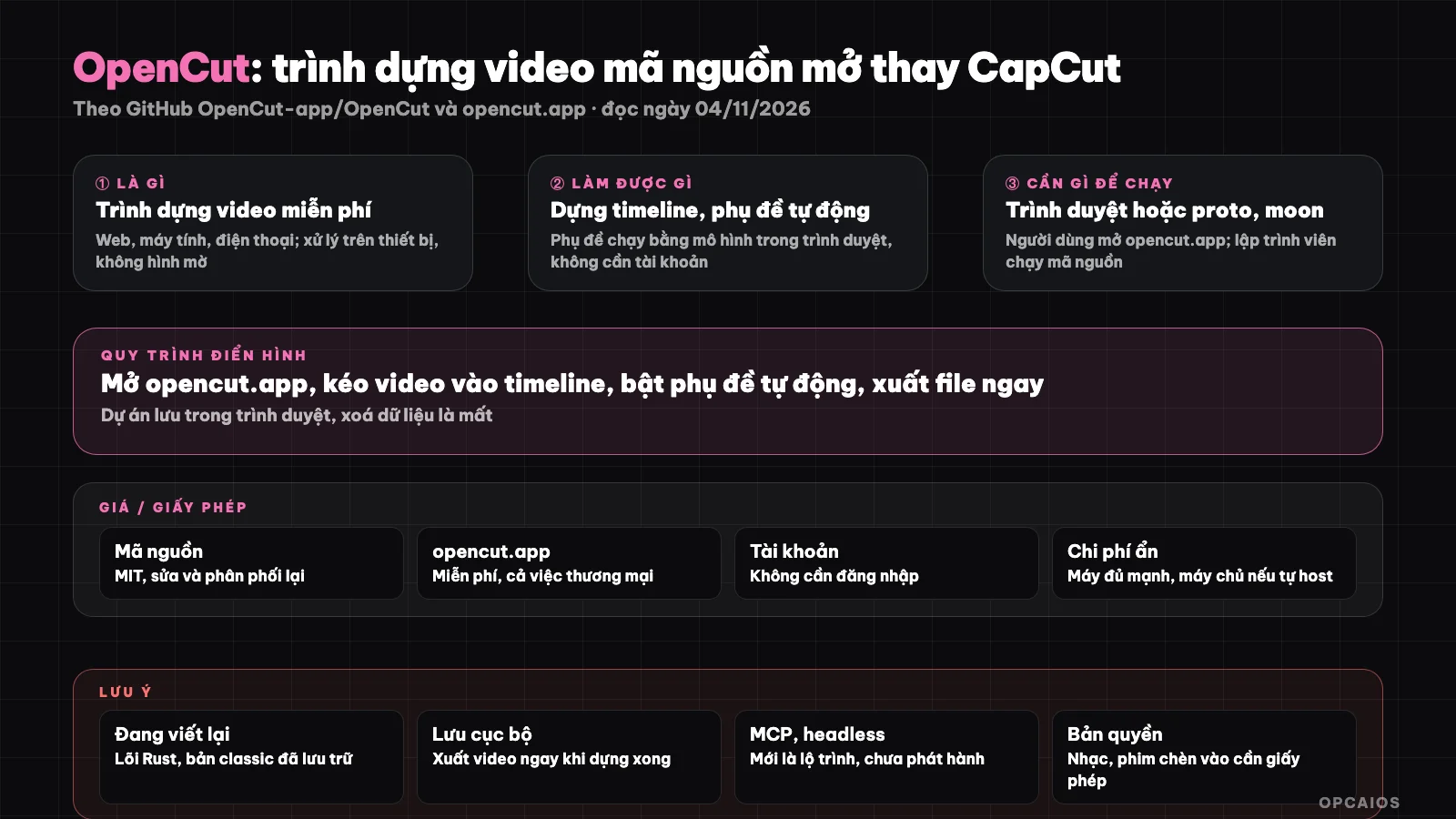
What is OpenCut? OpenCut is a free, open source video editor aimed at replacing CapCut on the web, desktop, and mobile, with an emphasis on video being processed right on your device. According to GitHub (API, read 04/11/2026), the OpenCut-app/OpenCut repository was created on 22/06/2025, has around 97,266 stars and 9,678 forks, uses the MIT license, and is written mainly in TypeScript. One thing to know right away: the README says the project is being rewritten from scratch with a Rust core, while the working version today is the "classic" version running at opencut.app. This post explains what OpenCut can do, the real cost, how to get started, risks when using a project in transition, and how it compares to other options.
OpenCut has two branches: the classic version usable today and the Rust core rewrite being worked on. Diagram: OPCAIOS.
What is OpenCut and who is behind the project?
OpenCut is a timeline video editor, free for both personal and commercial use, developed publicly on GitHub by the OpenCut-app team. The initial goal was to have a simple editor like CapCut but without features locked behind paid tiers and without uploading your videos to a server.
The classic version's README lists three reasons the project came into being. First is privacy: videos stay on the user's device. Next is free basic features, because according to the development team, many of CapCut's basic features have been moved into paid tiers. Finally there is simplicity, which CapCut has shown users need. The project receives funding from fal.ai (a platform for image, video, and audio models), and the classic version once acknowledged support from Vercel's open source program.
Current status matters more than history. According to the README read on 04/11/2026, OpenCut is being completely rewritten. The old code was moved to the opencut-app/opencut-classic repository, which is now in archived status and no longer maintained. The opencut.app page still runs the classic version, while the rewrite is at new.opencut.app until it is ready to replace it. The development team is also not accepting code contributions from outside during the architecture design phase.
What can OpenCut do?
OpenCut today is a video editor running in the browser, saving projects locally, requiring no account, and adding no watermark. The rewrite promises an editor API, third-party plugins, an MCP server for AI agents, and a headless mode for batch editing.
| Feature group | Description according to project documentation |
|---|---|
| Build video in browser | Classic version runs at opencut.app, no install needed |
| Local processing | Terms state video processing happens on device, not uploaded to server |
| Auto captions | Run using a model on device in the browser, can be turned off |
| No account, no watermark | According to opencut.app terms |
| Save projects | Saved in the browser's IndexedDB |
| Rewrite (in progress) | Rust core shared across web, desktop, mobile |
| Plans for automation | Editor API, plugins, MCP server, headless mode, script tab |
The plans section is why many people follow OpenCut. An MCP server (Model Context Protocol) means that later AI agents like Claude Code from Anthropic could call the editor to cut and join video on command, while headless mode allows batch editing without opening the interface. This is the roadmap the project has announced, with no release to verify. You should view them as the direction, not as available features.
How much does OpenCut cost and what are its limits?
OpenCut is free: the source code is under the MIT license and the opencut.app website is free to use, allowing commercial use as well. The main hidden costs are a computer powerful enough to build video in the browser, plus time and a server if you want to self-host.
| Item | Status (as of 04/11/2026) |
|---|---|
| Source code license | MIT, can be modified and redistributed |
| Use on opencut.app | Free, personal and commercial, no watermark |
| Account | Not required, no login |
| Access analytics | Databuddy, counts anonymous page views with privacy policy |
| Storage | Projects live in the browser, clearing browser data means losing them |
| Hidden costs | Powerful enough machine, server if self-hosting, time to monitor rewrites |
Pricing may change; the figures above do not include taxes if there are paid plans later. One practical limit emphasized by the website's terms: since projects are stored in the browser, the OpenCut team has no way to recover them if you accidentally delete the data. Export important videos right after building them. Also, the opencut.app homepage still shows "70k+ stars" while the GitHub API shows around 97,266 stars, meaning the website doesn't update the numbers in real time.
How to get started with OpenCut
The fastest way to start with OpenCut is to open opencut.app in your browser, no installation needed. If you're a developer who wants to follow the rewrite, you install the proto tool then run the commands in the README; this is only for development environments.
- First, regular users open opencut.app, create a project, drag video onto the timeline and export the file when done.
- Next, if you want to see the rewrite, visit new.opencut.app; this is the work-in-progress version, may be missing features.
- Developers install proto (moonrepo's version management tool) according to the README, then run from the repository root:
proto use
moon run web:dev
- Finally, if you need a desktop application, the README points to a separate guide in
apps/desktop/README.mdwith the commandmoon run desktop:dev.
Example (hypothetical): an online shop owner needs to cut three short product videos each week, add music and subtitles. They build on opencut.app, turn on automatic subtitles running on their machine, then export the video right away, no worry about watermarks or uploading video to unfamiliar servers.
Limits, risks and legal notes when using OpenCut
The biggest risk with OpenCut is the transition phase: the classic version is no longer maintained, the rewrite is not yet ready. Also the risk of losing projects stored in the browser and copyright responsibility for content you put in the video.
First, the technical side. The classic version no longer gets bug fixes; if you hit a bug, you will likely have to wait for the new version. The most recent code push to the main repository is 24/09/2026 (GitHub API, read 04/11/2026), mostly building FFmpeg for multiple platforms; the pace of change may be slow while redesigning the architecture. Second, data: the privacy policy (updated 15/03/2026) states that video never leaves the device and only counts anonymous page views via Databuddy, hosting on Vercel. We have not independently verified network traffic. Third, legal: the terms clearly state you keep the rights to content you create and are responsible for how you use it. Music, video clips, images from others still need separate licenses; a free builder doesn't automatically grant those rights. This is reference information, not legal advice, and we have not cross-checked it with Vietnamese law.
OpenCut compared to other options
OpenCut suits people who need a simple, free builder that keeps video on their machine. If you need thick features, built-in templates or code-based building, other options may be a better fit. The table below is general description, not measurement.
| Option | Strengths | Points to consider |
|---|---|---|
| OpenCut | Free, MIT, local processing, no watermark | Being rewritten, classic version no longer maintained |
| CapCut | Many templates, effects, popular | Some features require payment, cloud service |
| OpenReel | Also runs in browser, processes on machine, no watermark | Desktop version still alpha |
| Remotion | Build video with React, can be automated | Requires programming knowledge |
| Video Use | Skills for agents like Claude Code to build video from raw footage | Needs to know how to use agents |
When Should You Use OpenCut?
Use OpenCut when you need basic video editing and cutting, it's free, and you don't want to upload your video to a third-party server. If you need a stable long-term workflow or want to automate with an agent right now, wait for the rewrite or pick another tool.
| Situation | Recommendation |
|---|---|
| Cut and edit short videos, add subtitles | Use opencut.app, export the file right after you're done |
| Sensitive video, don't want to upload online | OpenCut works because it processes on your device |
| Need rich effects and templates | CapCut or professional editing software |
| Want an AI agent to edit video by command | Watch OpenCut's MCP server, for now check out Remotion |
| Want to contribute code | Wait for the team to open contributions, join discussions first |
OPCAIOS's Experience
We recently added OpenCut to the Repo list in the Utilities section on opcaios.org after reading the README and checking that the repository is still being updated; we haven't tested it yet, so this section outlines the criteria we use to consider it, not an evaluation after using it. Four criteria:
- Is the repository still being updated: the main repository has new code as of 09/24/2026, but it's being rewritten; the classic version has been archived.
- License: MIT, open for commercial use too.
- Hidden costs: no software fees; just need a machine powerful enough and time to wait for the new version.
- Can it replace a tool you're already using: for basic short videos it can; for a workflow built by an agent you have to wait for the MCP server launch.
Read more: What is Remotion?, What is MCP?, Create a TikTok Shorts channel with HeyGen, Suno, CapCut, What is VideoLingo?, 6 best automatic short video editing tools 2026.
Frequently Asked Questions
Is OpenCut really free?
Yes. According to the opencut.app terms page read on 11/04/2026, OpenCut is free for both personal and commercial use, with no watermark and no account needed. The source code uses the MIT license, so you can modify and redistribute it. The cost you bear yourself is a computer powerful enough to edit video in your browser, and a server if you want to self-host. If the project has paid plans in the future, check the official page again.
Does OpenCut upload my video to a server?
According to the privacy page updated on 03/15/2026, all editing and processing happens on your device, including automatic subtitles using a model that runs in your browser. Projects are stored in your browser's IndexedDB. OpenCut only counts anonymous visits via Databuddy and uses Vercel to distribute the page. We haven't self-checked network traffic to verify this, so this is a commitment made by the project.
Why is OpenCut being rewritten from scratch?
The README read on 11/04/2026 says the development team is switching to a plugin-centric architecture, with a shared Rust core for web, desktop, and mobile. The goal is to have an API for builders, third-party plugins, an MCP server for AI agents, headless mode for batch editing, and a script tab. The old version moved to the opencut-classic repository, which has been archived. The rewrite runs as a beta at new.opencut.app.
Can OpenCut replace CapCut?
For basic cutting and editing, adding subtitles, and exporting video without a watermark, OpenCut can replace CapCut for many people. With its library of templates, effects, built-in royalty-free music, and rich AI features, CapCut is still more comprehensive. OpenCut's differentiator is the MIT license and local processing. Since it's being rewritten, you should test a few real videos before fully switching your workflow to OpenCut.
Can someone who doesn't know code use OpenCut?
Yes. Someone who doesn't know code just needs to open opencut.app in a browser and edit like any regular editor, no installation, no login. The proto and moon setup in the README is for developers who want to contribute or self-host. Remember to export your video right when you're done because the project runs in your browser. If you want to combine video editing with an AI agent to automate content creation, check OPCAIOS's AI application training course.
Source: GitHub OpenCut-app/OpenCut (README, API, commit list and releases, read on 11/04/2026), GitHub opencut-app/opencut-classic (README, API, read on 11/04/2026), opencut.app (home page, terms, privacy, read on 11/04/2026); not read/not verified: the rewrite interface at new.opencut.app (only the page title is readable), real performance, the local processing commitment (network traffic not measured), the MCP roadmap and headless; star count and pricing may change. The experience is OPCAIOS's.
Translated from Vietnamese with AI. Read the original.
Want to apply this in your business?
Book a free 30-minute call (Vietnam time, in English or Vietnamese).