



What is an "Automatic" TikTok or Shorts Channel Using HeyGen, Suno and CapCut?
It's a short video production process where AI supports three stages: HeyGen creates a virtual presenter or video from a script, Suno generates background music, CapCut combines visuals, adds captions and exports the file. The word "automatic" here should really be understood as semi-automatic: you still have to choose the topic, write or review the script, check each video and post it yourself, because platforms are increasingly requiring AI-generated content labels and restricting repetitive, low-value content. This guide covers A to Z: choosing a niche and script, creating video with HeyGen, music with Suno, finishing in CapCut, posting and measuring, costs, copyright, and OPCAIOS experience. We don't promise your channel will have viewers or revenue.
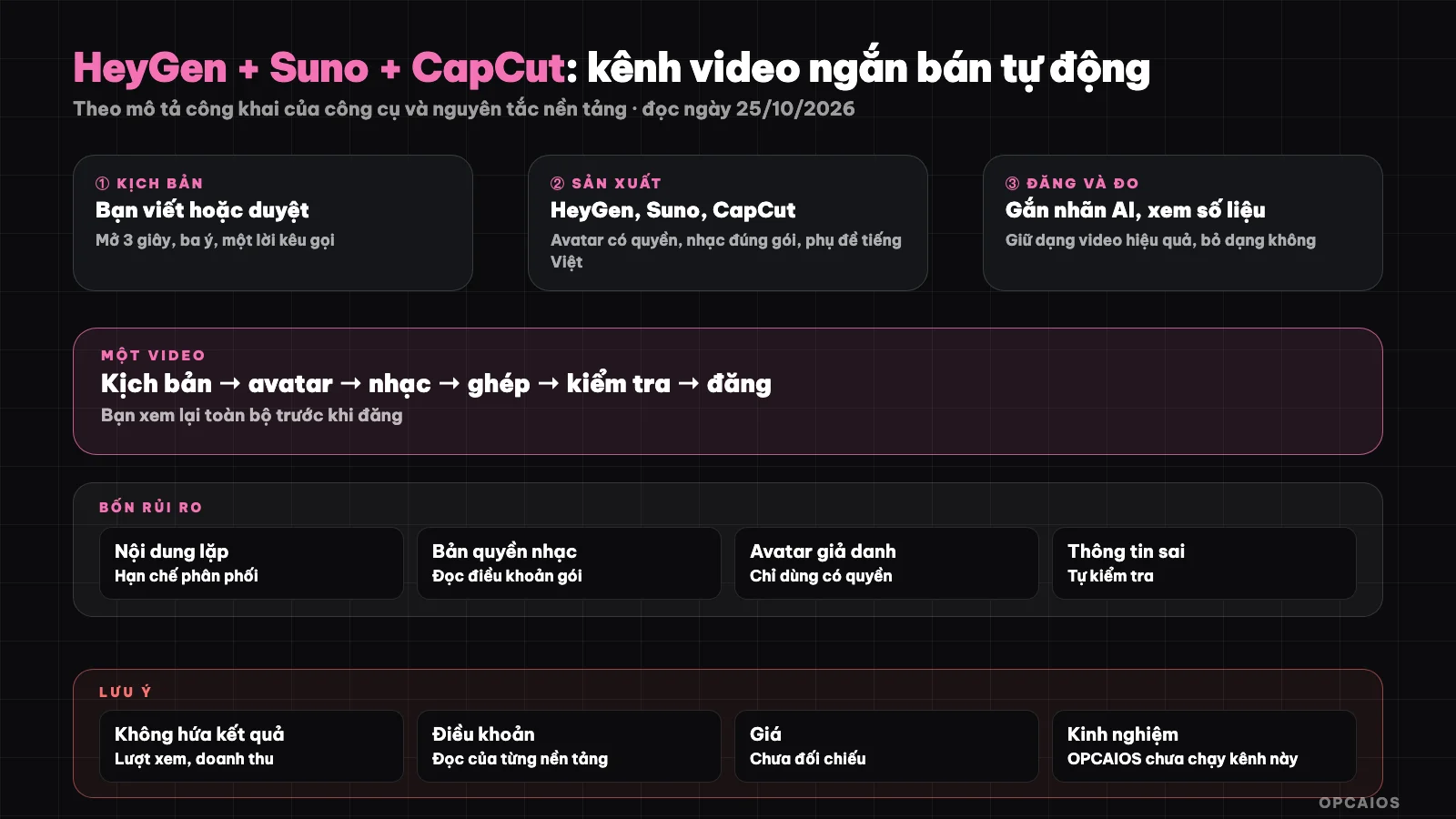
Three AI tools for three stages, but topic, script and moderation are still yours. Diagram: OPCAIOS.
Step 0 and 1: How to Choose a Niche, Goal and Write a Script?
Step 0 is choosing a niche and goal, step 1 is writing the script, the most important part. For niche, choose:
- A narrow niche where you have knowledge (tips on using AI for shop owners, accounting for small businesses...). Generic channels are hard to keep audiences on.
- A clear goal: attract customers for your service or build a brand, rather than "make money from the platform".
- Target audience: what do they ask, what problems do they face.
- Read the terms of TikTok and YouTube Shorts about AI-generated content and repetitive content.
Short videos win in the first 3 seconds and with concrete value. A 30 to 45 second script template includes a 3-second opening that states the problem ("Shop owners often forget this"), a 20 to 30 second content section with 3 short points, and a 5-second close with a call to action. Example scenario: an AI tips channel for shop owners posts 3 videos a week, each 40 seconds. Use AI to draft (see What is LLM?) but you rewrite it in your own voice and verify every fact. See also Turning 1 Long YouTube Video into 10 Posts to repurpose content.
Step 2: How to Create a Presenter with HeyGen?
HeyGen is a platform for creating video with AI avatar and voice-over from text. First choose a presenter, finally export the video. The process has four steps:
- Choose an avatar from the library, or create your own avatar (requires consent of the person appearing; don't create an avatar that looks like someone else without permission).
- Paste the script, choose voice and language; preview Vietnamese pronunciation, especially proper nouns and numbers.
- Choose vertical ratio 9:16, background and scene.
- Export the video and review the whole thing before using it.
According to HeyGen's official pricing page (read 25/10/2026), the Free plan is $0 with 3 videos per month, each up to 1 minute with watermark; Creator plan $29 per month (about $24 if paid yearly); Pro plan $49 per month; Business plan $149 per month. The pricing page doesn't clearly state whether Free videos can be used commercially, so read HeyGen's terms. Pricing changes frequently. Example scenario: with a 40-second script, you preview the voice 2 times before exporting, because pronunciation errors on proper nouns are very hard to fix after editing.
Step 3: How to Create Music with Suno?
Suno is a tool that generates a song or background music from a text description. According to Suno's official pricing page (read 25/10/2026), the Free plan is $0 with 50 credits per day and says "no commercial rights"; Pro plan $8 per month has 2,500 credits and commercial use rights; Premier plan $24 per month has 10,000 credits. The pricing page also reminds you to check the service terms about commercial limits; we haven't read those terms carefully yet. Example: background music without lyrics for a 30-second video. First describe, then choose, finally check rights. The process:
- Describe the style ("light background music, no lyrics, slow tempo, suitable for tutorial video").
- Choose the version you like, download it.
- Check commercial rights according to your plan at the time of creation before using music for a channel that earns money or promotes your service.
- Keep records (creation date, plan, song name) in case of copyright claim.
- Lower the music volume below the voice so viewers hear the speech clearly.
Step 4: How do I finalize in CapCut?
CapCut is a tool for combining video, music, and subtitles; it has desktop, mobile, and web versions, with some AI features (automatic subtitles, ready-made templates). The work to do in order:
- Import HeyGen video, Suno music, illustrations, or your own footage.
- Add Vietnamese subtitles; fix recognition errors (proper names, numbers).
- Cut to the beat: change the image or font size every 2 to 3 seconds to keep attention.
- Add music, lower volume, adjust silent sections.
- Export at 1080×1920, 9:16.
Some templates, effects, and fonts in CapCut may be limited by plan or for personal use only; check the commercial rights of each element you use. For example, a 30-second video changing images every 3 seconds needs about 10 image changes.
Step 5: Label, post, and measure how?
The final step includes labeling, posting, and measuring, with five principles, for example following TikTok and YouTube guidance (see the current version as of October 2026). First is labeling, last is replying to comments:
- Label content made by AI if the platform requires it (TikTok and YouTube both have mechanisms to declare synthetic content; see the current guidance). Do not impersonate a real person.
- Title, description, tags state the true content; do not mislead.
- Post yourself or schedule using the platform's official tools; if you use automatic posting tools, check the terms (see What is Postiz?, What is Typefully?).
- Measure: views in the first 3 seconds, completion rate, saves, shares, comments; each week keep video formats that work, drop ones that don't.
- Reply to comments as a real person; this is where you build relationships.
What is the reference cost?
The cost for three tools can start from $0, according to official pricing pages read on October 25, 2026 and may change:
| Item | Note |
|---|---|
| HeyGen | Free $0 (3 videos per month, with watermark); Creator $29; Pro $49; Business $149 per month |
| Suno | Free $0 (50 credits per day, no commercial rights); Pro $8; Premier $24 per month |
| CapCut | Has a free version; some features need a paid plan (price not yet checked) |
| Time | Script and review take up most of it |
Assumed example: using Suno Pro $8 and HeyGen Creator $29 is $37 per month before tax, not counting CapCut. First try the Free plan, then pay only when you have a stable process. Step 1: make 3 sample videos. Step 2: compare cost with time saved.
Risks to know
| Risk | How to reduce |
|---|---|
| Repetitive, low-value content gets restricted distribution | Each video has its own angle and examples |
| Music and image copyright infringement | Use music with commercial rights, save proof |
| Avatar impersonation | Use only avatars you have rights to |
| Wrong information | Check every fact yourself before posting |
| Platform dependency | Lead viewers to your website and email list |
| Wrong expectations | Do not promise views or revenue |
OPCAIOS experience
We have not used HeyGen, Suno, or CapCut to run a TikTok or Shorts channel, so we have no data on views or revenue from this approach. In content production, we use AI to draft and recycle, but every post goes through a reviewer before posting, and we avoid any promises about results. This post is based on how the tools are described publicly and content principles; we have not run the full chain of three tools ourselves. HeyGen and Suno prices were read from official pricing pages on October 25, 2026, but detailed terms and CapCut pricing have not been checked.
Frequently Asked Questions
Can I create a channel completely automatically?
You shouldn't: the platform restricts repetitive, low-value content; you need to choose topics, review scripts, and check each video.
Can I monetize a channel using Suno music?
It depends on the package and Suno's current terms. According to Suno's official pricing page (read on 25/10/2026), the Free plan states "no commercial rights", while the Pro plan at $8 per month and Premier plan at $24 per month state commercial use rights, with a note to check the terms for limitations. For example, a channel promoting services should use music created on a paid plan, not the Free plan. First, check which plan you're using. Next, read the current terms. Finally, save evidence including creation date, plan, and track name before posting. We haven't thoroughly read the detailed terms so we can't make legal conclusions.
Do I need to label AI content?
Check TikTok and YouTube's current guidelines on synthetic content and disclosure when required.
How long before I get viewers?
No one can answer that in advance; we don't promise timelines or numbers.
Which platform should I start with?
Choose where your audience is already present, then lead them to your website. To learn how to create content systematically with AI, see OPCAIOS's AI application training course.
Source: public descriptions from HeyGen, Suno, CapCut and platform principles; HeyGen and Suno prices read from official pricing pages on 25/10/2026; have not cross-checked CapCut terms and prices in detail; have not fully run through this entire chain myself. Experience is from OPCAIOS.
Translated from Vietnamese with AI. Read the original.
Want to apply this in your business?
Book a free 30-minute call (Vietnam time, in English or Vietnamese).