



What is OpusClip? OpusClip is an AI tool that cuts long videos (podcasts, interviews, webinars, YouTube videos) into multiple short vertical clips suitable for TikTok, Instagram Reels, and YouTube Shorts: AI selects highlights, adjusts aspect ratios, adds dynamic captions, and gives a "virality score". According to the official pricing page (read on 25/10/2026), there are Free plans (with watermark, export saved for 3 days), Starter $15 per month and Pro $29 per month; the page does not state the processing minutes for each plan. For example, an expert holding a long webinar can use OpusClip to select a few clips to post on TikTok. This article has four parts:
- First, what OpusClip is, features and pricing plans.
- Next, the workflow for a one-person company.
- Then, copyright considerations when cutting other people's videos and how to carefully evaluate the "virality score".
- Finally, OPCAIOS's experience.
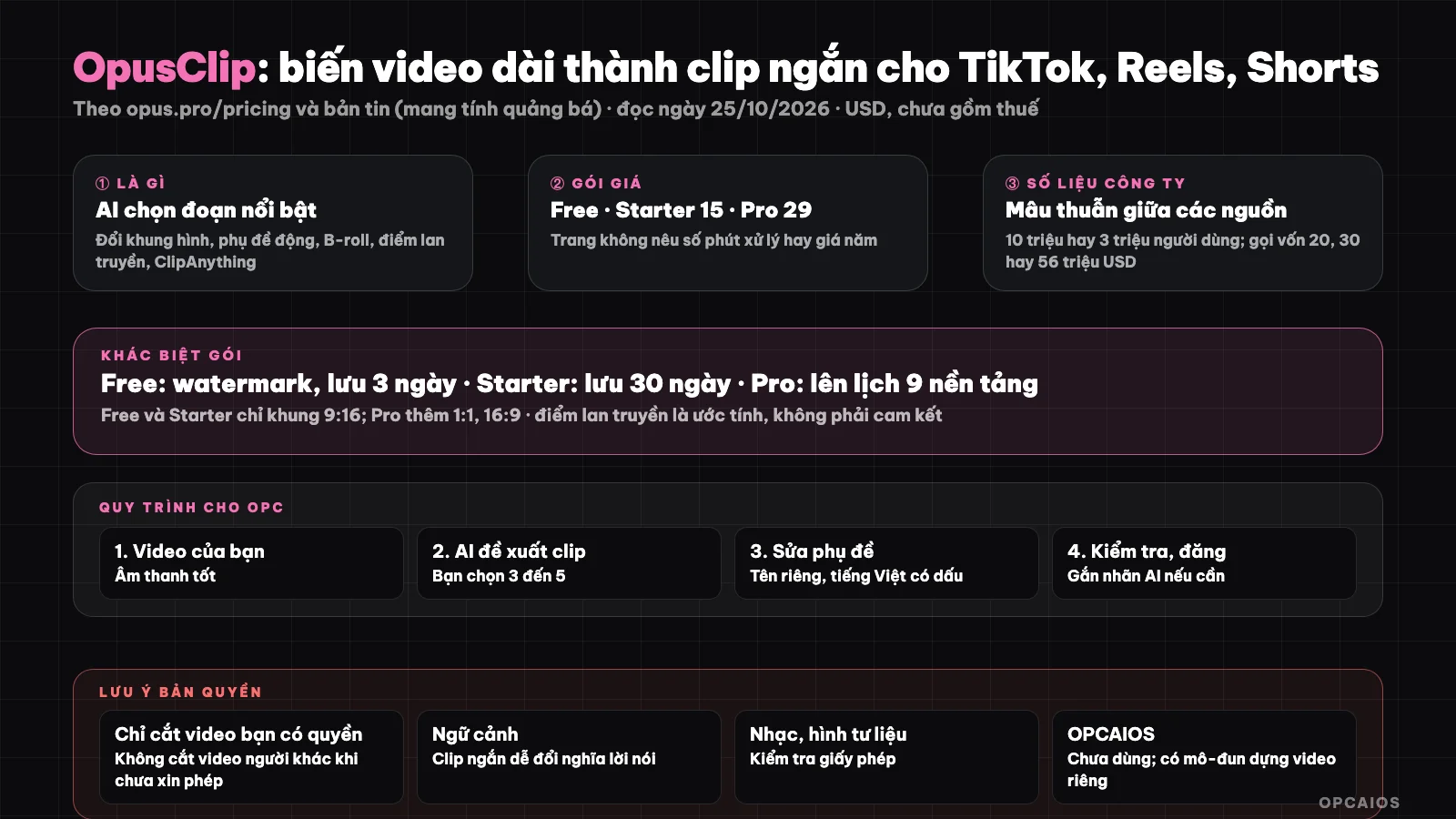
Long video in, many short clips out; you're still the one choosing and reviewing. Diagram: OPCAIOS.
What is OpusClip and what features does it have?
OpusClip is an AI tool that cuts long videos into short clips, and its main feature is selecting highlights. According to posts on the opus.pro blog and newsletters read on 25/10/2026 (all with promotional intent), the features include:
- First, AI extracts highlights, adjusts aspect ratios, adds dynamic captions and B-roll, allowing direct posting to social media.
- Next, each clip gets a "virality" score based on analysis of tens of thousands of viral videos.
- Finally, ClipAnything allows using natural language prompts to find any moment in a video.
The company's own numbers contradict each other: one newsletter recorded over 10 million creators and over 172 million clips, while another profile recorded over 3 million customers, so we don't cite them as fact. On funding, sources mention $20 million (SoftBank Vision Fund 2, March/2025), $30 million (company blog) and total $56 million (an aggregator site); we haven't verified. Hypothetical example: a podcaster can use ClipAnything to find moments mentioning a specific topic. If you make short videos, see more TikTok/Reels Channel Without Showing Your Face.
How much does OpusClip cost?
OpusClip has four plans: Free, Starter, Pro and Business. According to the official pricing page opus.pro/pricing (read on 25/10/2026, USD, before tax), the price levels are as follows:
- First is Free: $0, has watermark, export saved for 3 days, maximum 1080p.
- Next is Starter: $15 per month, export without watermark, saved for 30 days.
- Then is Pro: $29 per month, unlimited storage, schedule posting to multiple social media platforms.
- Finally is Business: by agreement, features like Pro.
The page does not mention yearly pricing, processing minutes per month or credits per plan (only mentions 300 credit limit per month for Zapier integration on Pro plan), so we cannot estimate the cost per clip. Input video length is listed by groups from 1 to 15 minutes. Hypothetical example: someone needing export without watermark and 30-day storage chooses Starter $15. Try the Free plan on one of your videos before paying.
Features table by plan
| Plan | Price | Main points per website |
|---|---|---|
| Free | 0 | Has watermark (caption template); export saved 3 days; maximum 1080p; 9:16 aspect ratio; AI captions |
| Starter | 15 per month | Export without watermark; saved 30 days; highest resolution; 9:16 aspect ratio |
| Pro | 29 per month | Unlimited storage; 9:16, 1:1, 16:9 aspect ratios; schedule posting (YouTube Shorts, TikTok, Instagram, Facebook, LinkedIn, X, Pinterest, Threads, Bluesky) |
| Business | By agreement | Like Pro |
What is the OpusClip workflow for a one-person company?
The workflow is to choose a good source video, let AI suggest clips, then review each clip before posting. Six specific steps:
- First, select your source video (webinar, conversation, course) that already has good audio quality.
- Let AI suggest 10 to 20 clips, then you choose 3 to 5 clips that match your message.
- Edit captions (proper names, terminology, Vietnamese with diacritics) and opening sentences.
- Review each clip: check if excerpts taken out of context could change the meaning of what was said.
- Add AI-generated content labels if the platform requires it and post; use scheduling in the Pro plan or your own tools.
- Measure real results (views, saves, leads), not just virality scores.
Example scenario: from a 60-minute webinar, AI suggests 15 clips and you choose 4 that fit your message. This content reuse framework is covered in One-person marketing department.
Is clipping someone else's video copyright infringement?
It can be, and this is the most important caveat when using OpusClip. Clipping someone else's video to repost can infringe copyright, even if you credit the source; only clip videos you own or have permission to use, and ask permission or use a clear license. Four accompanying notes:
- First, context: short clips are easy to misunderstand; don't excerpt someone else's words in a way that distorts the meaning.
- Next, labeling: according to news read on 25/10/2026, TikTok requires labeling AI-generated content; check the platform's requirements where you post.
- Music, stock footage: verify licenses.
- Finally, virality scores are not a guarantee: these are the company's estimates; we have no independent data on their accuracy.
Versus doing it yourself or other approaches
| Approach | Works for |
|---|---|
| OpusClip | Many long videos needing quick selection of highlights, limited editing time |
| Manual editing (CapCut, DaVinci Resolve) | Need frame-by-frame control, custom cut pacing |
| Custom workflow | Want customization, have coding skills, see What is Remotion? |
OPCAIOS experience
We haven't used OpusClip; our knowledge base has no records of this tool, so this post is based on the official pricing page opus.pro/pricing and news articles read on 25/10/2026. What we do have is a custom video editing module on our website, with three steps:
- First is analysis: cutting silence and transcribing with Whisper (OpenAI).
- Next is AI planning for editing.
- Finally is rendering (see What is Remotion?).
The module serves our internal needs and cannot yet be compared with OpusClip on quality or speed. We also have no data on short-clip effectiveness on our own channels to publish.
Read more: 6 best automatic short video editing tools 2026.
Frequently asked questions
What is OpusClip?
An AI tool that turns long videos into vertical short clips for TikTok, Reels and Shorts, with captions, aspect ratio changes and virality scores.
Is OpusClip free?
There's a Free plan, but it has a watermark and only saves exports for 3 days. According to OpusClip's official pricing page (read on 25/10/2026), paid plans include Starter at $15 per month (watermark-free exports, 30-day save) and Pro at $29 per month (unlimited save, post scheduling). For example, newcomers should try the Free plan on one of their own videos first, then upgrade to Starter or Pro when they need watermark-free exports.
Can I clip someone else's video?
Only if you have the right to; if not, you may infringe copyright. Ask permission.
Are virality scores trustworthy?
Only treat them as suggestions; measure real results on your own channel.
Can it replace a video editor?
Partially: OpusClip does clip selection and basic editing, but messaging and review still need a person. Two things OpusClip does, according to the company's blog (read on 25/10/2026), are selecting highlights and adding dynamic captions. Two things still fall to you: checking if clips quote out of context and measuring real results on your channel. To learn how to build an AI-powered video content workflow, see OPCAIOS's AI application training course.
Source: opus.pro/pricing (read on 25/10/2026), opus.pro blog posts and news articles about fundraising (all promotional in nature, conflicting data, unverified); could not access processing minutes per plan. Prices exclude tax and may change. Experience is from OPCAIOS.
Translated from Vietnamese with AI. Read the original.
Want to apply this in your business?
Book a free 30-minute call (Vietnam time, in English or Vietnamese).