



Programmatic SEO (pSEO) is the way to create many web pages from a fixed template and a structured data table. Each row of data becomes a page targeting a repeated search phrase, for example "[service] in [city]" or "[tool A] versus [tool B]". This post speaks plainly from the start: the number 500 pages in the title is just an example of scale, not a target to follow, and nothing guarantees that 500 pages will rank or get traffic. Google treats generating many pages with no individual value as spam policy violation.
OPCAIOS has never run large-scale pSEO using Airtable, so everything below is a reference process based on official documentation, not measured results. You will have 4 parts: (1) when pSEO is suitable; (2) the Airtable plus AI process; (3) Google's boundaries on scaled content abuse; (4) how to start with 20 to 30 pages and measure with Search Console. First read the boundaries part, because that part decides whether you should do it or not.
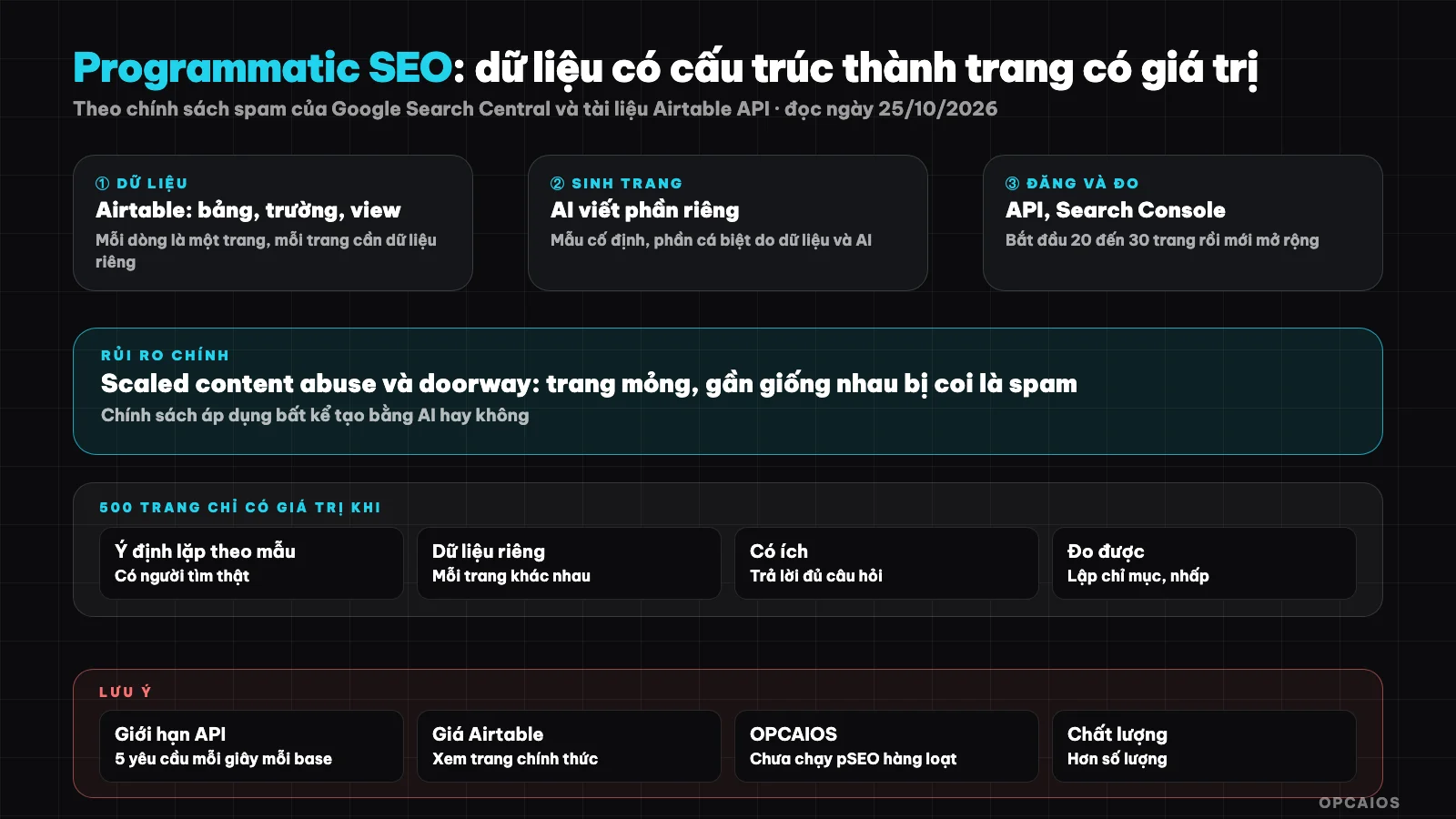
Safe pSEO process: real data, page template, unique content, manual review, test small then measure. Flowchart: OPCAIOS.
When is pSEO suitable?
pSEO is suitable when you have structured data that real users need to look up, and repeated search intent by pattern, meaning many people ask the same type of question but swap out one variable. You need both conditions. First, each row of data must have unique information, for example price, specifications, address, opening hours or terms. Second, each page must answer a real question from the reader. For instance, a comparison table of Airtable versus Notion based on verifiable criteria can become one useful page, but 100 pages of "service in [district]" that differ only in district name are not. A quick check question is: if you remove the place name or product name from any two pages, how are the two remaining pages different in a way helpful to the reader? If the answer is "almost not at all", don't do it.
Table of suitable and unsuitable cases
| Suitable | Unsuitable |
|---|---|
| Price tables, specs, comparisons with real numbers for each item | Only keywords, no data yet |
| Directory with unique info per row (address, hours, terms) | Pages differ only in place name |
| Comparison template of A versus B based on verifiable criteria | AI rewritten content from another source, adds nothing |
| Calculator tool, lookup with different outputs by input | Page only to send visitors to another page |
When does Google treat pSEO as spam?
Scaled content abuse is creating many pages mainly to manipulate ranking instead of helping users. Per Google Search Central spam policy page (read 25/10/2026), the rule applies regardless of whether content is made by human or AI tool. Google gives four examples: (1) use AI to generate many pages with no added value; (2) scrape data then auto-rewrite; (3) merge content from many other pages with nothing added; (4) create many meaningless pages just stuffed with keywords.
Same policy page also covers doorway abuse, which is creating many nearly identical pages for similar queries then push all visitors to one destination. The pattern "service + 500 locations" is very prone to this trap. Example scenario: 200 pages of "air conditioner repair in [district]" that differ only in district name are textbook doorway. Consequences can include pages not indexed, lost ranking or whole site quality dropping. OPCAIOS has no data on specific penalty levels so names no number.
What steps does the process with Airtable and AI include?
The pSEO process with Airtable is a 5-step sequence that transforms a real data table into manually reviewed pages. Airtable is a spreadsheet-style database, suitable for keeping the "source of truth" for pages. Step 1 is the original data table: each row is a future page, the columns are real information with sources and check dates. If there's no real data, don't create a row.
Step 2 is the status field, for example Draft, AI Written, Manually Reviewed, Published, Rejected. Each view filters by one status so you process by small batches. Step 3 is the AI-generated content field: models like ChatGPT or Claude must only use the real data columns to write the introduction, explanation and frequently asked questions for that exact row, and must write "no data available" when a column is missing instead of making things up. Step 4 is manually reviewing each post in the first batch, the step that turns "lazy person" into "person who works systematically". Finally, step 5 is publishing via CMS, static page template or automating with n8n.
What does Airtable's Web API limit?
Airtable's Web API is a REST interface that uses JSON to read and write records from external scripts. According to Airtable (official documentation, read 25/10/2026), you create records using POST https://api.airtable.com/v0/{baseId}/{tableIdOrName} with header Authorization: Bearer <token>, sending an array of records where each element has a fields object.
The rate limit is 5 requests per second per base. Exceeding the limit gives you a 429 error and you must wait 30 seconds before retrying, so scripts written in Python or n8n need retry and wait mechanisms. Airtable also says they can change the limit, including by plan, so read the documentation again before building your process. For example, pushing 500 records where you send a few records each time still fits within this limit if the script knows how to wait. The official pricing page (Airtable) doesn't list record limits or API call quotas in the section OPCAIOS can read, so this post doesn't mention any plan limits. Check your plan before loading 500 rows.
500 pages only have value if each page has its own value
A page should have at least three things that other pages in the same template don't have:
- Own data: numbers, specifications, real conditions specific to that item.
- Own perspective or conclusion: recommendations for whom, unsuitable for whom.
- Own frequently asked questions: drawn from real questions, not generic questions with names changed.
If you only have enough real data for 40 pages, make 40 pages. The number 500 only makes sense when you actually have 500 different datasets. Simple tip: set a minimum threshold (for example number of data columns with value), rows that don't meet it don't get published.
How do I start with 20 to 30 pages?
A small test batch is one publishing run of 20 to 30 pages with the strongest data, used to test the page template before scaling. Step 1 is to pick 20 to 30 rows with the strongest data in your Airtable. Step 2 is to write and manually review each page, filling in any missing AI-written sections. Step 3 is to publish, submit the sitemap to Google Search Console and check whether the pages have been indexed.
Step 4 is to wait long enough to get data, then decide whether to expand, revise the template or stop. Example assumption: a 30-page batch comparing tools, each page with its own pricing table and conclusion, is easier to evaluate than 500 pages posted at once. OPCAIOS doesn't give a standard waiting period because time depends on each site and I don't have verified numbers. Record the publication date of each batch so you can compare later measurements.
How do I measure results using Search Console?
Google Search Console is Google's free tool that shows which pages are indexed and which queries bring users to your pages. First, compare the number of indexed pages with the number of pages submitted and look at the "Discovered - currently not indexed" group. Next, look at the real queries each page appears for, the number of impressions and number of clicks.
A bad signal is a large percentage of pages not getting indexed or impressions staying at zero for a long time. A good signal is individual pages starting to get matching queries. Example assumption: a 30-page batch where only a few pages get indexed is a sign you should revise the template and content, not jump to 500 pages yet. Finally, only scale up when the small batch shows good signals; if the small batch is poor, fix the content instead of increasing the number. According to Google, data in the indexing report is the basis for decision-making (read Search Console documentation 25/10/2026).
OPCAIOS Experience
OPCAIOS has not used Airtable for pSEO at scale or created hundreds of landing pages from templates. What we actually have is an automated SEO article system with a different approach: AI drafts an article each day, but the post must be manually reviewed before publishing—it does not publish itself. We also use internal SEO/GEO tools to check articles, and free keyword data from Search Console along with automatic suggestions. The principle we drew: AI does drafts quickly, but the decision to publish remains with a person. Read more about the system where AI runs on its own and what SEO and GEO are.
If you want to connect data workflow with automation, installing n8n on a VPS is a self-hosted option, and turning a YouTube video into 10 articles shows how to use AI to multiply content while still having a manual review step.
Frequently Asked Questions
Can you get penalized by Google for using AI to write hundreds of pages?
You can be penalized if the pages have no value, but using AI itself is not a violation. According to Google Search Central's spam policy page (read on 25/10/2026), the policy targets mass-generated pages with no value to users and does not distinguish the method of creation. Risk appears when pages lack unique data and do not help readers—for example, 200 pages that differ only in city names. In contrast, 30 pages with real pricing tables, unique conclusions, and unique FAQs are closer to the kind of content Google wants to see. There is no absolute safe formula, and OPCAIOS has no data on penalty levels, so I do not cite any numbers.
How many pages is enough?
There is no right number. Start with 20 to 30 pages with real data, measure with Search Console, then decide. The quantity must follow the amount of actual data and real search demand.
Is Airtable enough for pSEO?
Airtable works for managing data and review status, and has a Web API to read and write records. Limits depend on your plan and you should check the current pricing page yourself, because we cannot verify the specific numbers.
Can you let AI publish on its own?
You should not let AI publish on its own. There needs to be at least a manual review step for the first batch, then continue spot-checking later batches. For example, with a batch of 30 pages, the reviewer reads all 30; for later batches, they can randomly read part of them and increase the review rate if errors appear. Automating publication without quality control is the fastest path to thin pages, and thin pages are exactly the kind of content Google names in its scaled content abuse policy. OPCAIOS does this way with our automated SEO articles: AI drafts each day, but the post publishes only after a reviewer reads it.
How do I learn to build this process properly?
Start with real data and a small batch, then scale gradually. If you need direct guidance, check out OPCAIOS's AI Application Training course.
Source: Google Search Central, Spam policies page (scaled content abuse, doorway abuse); Airtable Web API documentation (introduction, record creation, rate limits); Airtable pricing page (read 25/10/2026); not verified: record and API limits by Airtable plan, penalty level and timeline for Google to evaluate pages; Experience is OPCAIOS's own. This post is for reference only and does not guarantee ranking results.
Translated from Vietnamese with AI. Read the original.
Want to apply this in your business?
Book a free 30-minute call (Vietnam time, in English or Vietnamese).