



What is installing n8n on a VPS? It's running the n8n automation tool on your own private server (usually via Docker), attaching a domain name with HTTPS, then building workflows that connect forms, emails, CRM, spreadsheets and AI together to replace the repetitive work of one company person. According to n8n documentation (read on 25/10/2026), the official installation method uses Docker Compose, requires a DNS A record pointing a subdomain to your server, a .env file, and n8n only serves over HTTPS; data and encryption keys live in a volume. This guide walks through each step: preparing the server, installing n8n with Docker, placing it behind nginx or Traefik, required environment variables, backups and updates, licensing (n8n is not purely open source), five first workflows for a solopreneur, and OPCAIOS experience (we run n8n on a server). Actual setup time depends on your experience; we don't promise a fixed number.
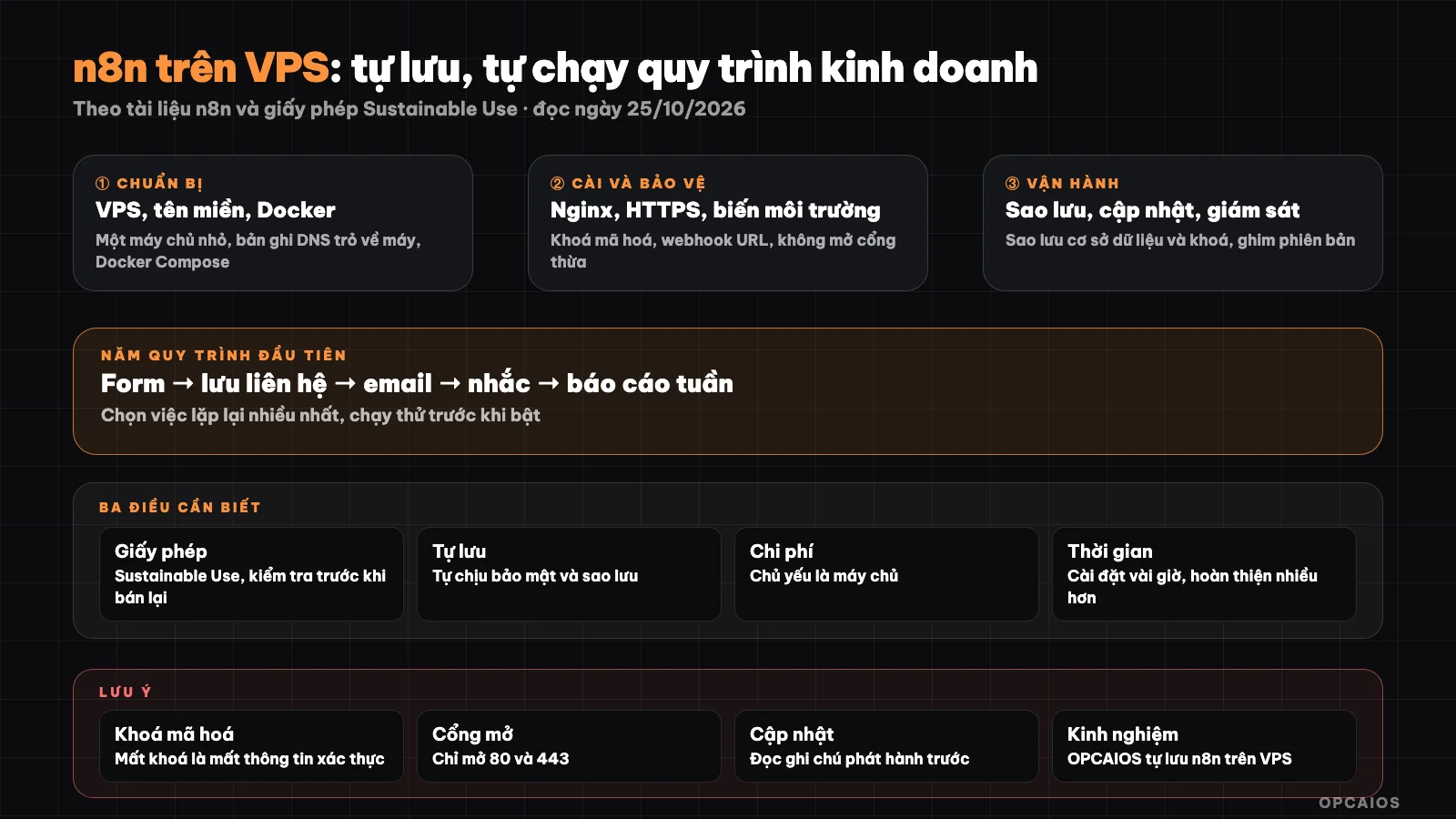
Server, Docker, domain, HTTPS, backups; then workflows. Diagram: OPCAIOS.
Before you start: what do you need?
| Item | Note |
|---|---|
| Linux VPS | See What is a VPS?; choose a plan with enough RAM for n8n and database |
| Domain name | Create an A record for a subdomain (example n8n) pointing to your VPS IP address |
| Docker and Docker Compose | Check with docker --version and docker compose version (see What is Docker?) |
| Email for certificate | Used when issuing HTTPS certificate (Let's Encrypt) |
| Basic SSH knowledge | To log in and run commands |
The n8n documentation does not mention minimum requirements on the page we read; check the Install options section of n8n and leave room for extra resources.
Step 1: Prepare the server
- Log in via SSH, update the operating system, install Docker following the guide for your Linux version.
- Create a non-root user for Docker if possible (
sudo usermod -aG docker ${USER}). - Open ports 80 and 443 in the firewall; do not expose port 5678 to the Internet (see security section).
- Point DNS: create an A record for the subdomain to the server IP; wait for DNS propagation.
Step 2: Install n8n with Docker Compose
Official method per documentation (Docker Compose with Traefik as reverse proxy):
- Create a project directory (
mkdir n8n-compose && cd n8n-compose). - Create a
.envfile withDOMAIN_NAME(root domain),SUBDOMAIN(examplen8n),GENERIC_TIMEZONE(timezone for schedule nodes) andSSL_EMAIL. - Create a
local-filesdirectory (n8n sees it at/files). - Create
compose.yamlwith two services:traefik(issues TLS certificate, opens ports 80 and 443, binds Docker socket read-only) andn8n(imagen8nio/n8n, port 5678 bound only to localhost, Traefik labels per${SUBDOMAIN}.${DOMAIN_NAME}); two volumesn8n_data(mounted at/home/node/.n8n, holds SQLite database and encryption keys) andtraefik_data(certificates). Get the full sample file from n8n documentation page instead of typing it yourself, since Traefik configuration needs to be exact. - Start:
docker compose up -d; stop:docker compose stop. - Open
https://<SUBDOMAIN>.<DOMAIN_NAME>and create an owner account. If you can't access it, check firewall and DNS.
Important environment variables (per documentation)
| Variable | Meaning |
|---|---|
N8N_HOST |
Hostname n8n serves |
N8N_PORT |
5678 |
N8N_PROTOCOL |
https |
N8N_WEBHOOK_URL |
Public address for building webhook URLs (from n8n 2.30.0; older versions use WEBHOOK_URL, now being phased out) |
GENERIC_TIMEZONE, TZ |
Timezone (set Asia/Ho_Chi_Minh if you need Vietnam time) |
NODE_ENV |
production |
N8N_PROXY_HOPS |
1 when running behind a reverse proxy |
Step 3: Use nginx instead of Traefik (how OPCAIOS does it)
If your server already has nginx (see What is Nginx?), you can run n8n listening only on localhost and let nginx handle HTTPS. According to n8n documentation, when standing behind a proxy you set N8N_WEBHOOK_URL=https://n8n.tenmiencuaban.com/ and N8N_PROXY_HOPS=1, and the final proxy must forward the headers X-Forwarded-For, X-Forwarded-Host, X-Forwarded-Proto. The n8n interface also needs to upgrade the connection (WebSocket) through the proxy; this is a requirement per common practice, check the reverse proxy section in n8n documentation and configure Upgrade and Connection in nginx. If you don't set N8N_WEBHOOK_URL correctly, n8n builds the webhook URL wrong (port 5678 instead of 443) and outside services won't be able to call it.
Step 4: Webhooks, test and run live
According to the Webhook node documentation: there is a test URL (works when you click listen for test event, shows data in the editor) and a production URL (only works when the workflow is turned on; see results in the Executions tab). Supports GET, POST, PUT, PATCH, DELETE, HEAD methods; default payload limit 16 MB (change with N8N_PAYLOAD_SIZE_MAX); authentication via Basic, header, JWT; has an IP allowlist. Always enable authentication or check signatures for webhooks receiving sensitive data (see What is a Webhook? and What is an API?).
Step 5: Backup and update
Backing up n8n means protecting two things: workflow data and the encryption key used to read saved credentials. Priority order is backup first, update second, monitor last. For example, before each new image pull, copy the n8n_data volume out to outside the server to have a fallback if the new version breaks.
- Backup the
n8n_datavolume: it contains the encryption key; losing the key means losing the ability to read saved credentials. Add database backup if you use a separate PostgreSQL. Keep a copy outside the server. - Export workflows: export workflows to JSON files and save in Git (see What is GitHub?); don't include credentials in the export file.
- Update: the documentation page we read doesn't have an update command; the common way with Docker Compose is to pull the new image then restart (
docker compose pullanddocker compose up -d), after backing up and reading release notes. We mention this as common practice, not from documentation. - Monitor: add health checks and alerts when n8n stops; use an error workflow (Error Trigger node) to send messages to Telegram.
License: Is n8n free for business?
n8n uses the "Sustainable Use License": according to the license page, you can use and modify for your own internal business purposes or non-commercial use; distributing to others is only allowed for free and non-commercial use; don't remove copyright notices; files with ".ee." belong to a separate Enterprise license. That means using n8n to automate your own work is allowed, but selling n8n as a service or white-labeling it for others is not covered under this license; if you're providing automation services to clients, read the license carefully and ask n8n or a lawyer (this is a summary, not legal advice). See n8n's pricing and plans at What is n8n?.
Five first workflows for a solopreneur
| # | Workflow | Suggested nodes |
|---|---|---|
| 1 | Contact form → CRM or spreadsheet → welcome email | Webhook, spreadsheet or CRM, SMTP |
| 2 | Morning report (new leads, tasks, alerts) sent to Telegram | Schedule Trigger, data nodes, Telegram (see What is a Telegram bot?) |
| 3 | Payment reminders and invoice tracking | Schedule Trigger, spreadsheet, email |
| 4 | Summarize content, draft with AI waiting for approval | HTTP Request to AI model, save draft (see 1-person marketing team) |
| 5 | Alert errors for all other workflows | Error Trigger, Telegram |
Each workflow should have a pause point for you to review before sending to clients and should keep a log. Full example of workflow 1 see Fill Tally form → AI generate report → send email.
Security notes
- Don't expose port 5678 to the Internet; only through HTTPS proxy.
- Enable two-factor authentication and a strong password for the owner account.
- Use separate credentials for each service, least privilege.
- Public webhooks need authentication or signature verification, IP restrictions if possible.
- Don't run arbitrary code from strangers in the Code node.
- Update regularly and read release notes.
OPCAIOS's Experience
We run n8n using Docker on a private server, with a separate PostgreSQL for n8n, behind nginx; a health check on October 25, 2026 showed the service health endpoint returning 200 and the Docker image using the latest tag. We also recorded an operational lesson: a workflow that routes requests from an actor was never imported into n8n, so its endpoint returned 404, which is why our internal documentation notes "check before trusting". For some tasks (like content production tables), we chose to build them in-house on the website rather than use n8n. We have not measured time savings or published workflow counts, and this post does not claim a common set of workflows effective for all businesses.
Frequently Asked Questions
How long does it take to set up n8n on a VPS?
It depends on experience: someone familiar with Docker and DNS can set it up in a day; beginners should allow extra time for DNS, HTTPS and backups. We don't promise a specific number.
What VPS configuration does n8n need?
The n8n documentation page we read (October 25, 2026) did not state minimum requirements, so this post does not give specific numbers. The safe way to choose involves three steps. First, check n8n's Install options section to get the latest information. Next, choose a Linux VPS with enough RAM for n8n, the database and reverse proxy, and leave room to spare rather than choose the tightest tier. Finally, monitor RAM and CPU usage as workflow count grows, then upgrade when needed. For example, if the same VPS also runs a separate PostgreSQL and nginx, account for both services in your RAM needs. OPCAIOS runs n8n using Docker on a private server but has not published resource metrics.
Is n8n free?
n8n self-hosted is free for internal business use under the Sustainable Use license, according to n8n's license file on GitHub (read October 25, 2026), while n8n's cloud plan charges a fee (see What is n8n?). Free software does not mean no cost: you still pay for VPS, domain and operations time. Three key licensing boundaries to remember. First, using n8n to automate your own company's work is allowed. Second, selling n8n as a service or white-labeling it for others is not covered by the license. Third, files with ".ee." fall under a separate Enterprise license. For example, a shop owner running n8n to connect a form to a spreadsheet is within scope; this is a summary, not legal advice.
Use Traefik or nginx?
The official way per n8n documentation uses Traefik as the reverse proxy, while nginx is a reasonable choice when the server already has nginx, as OPCAIOS does. With nginx, you must set three things right. First, the N8N_WEBHOOK_URL variable points to the public domain, otherwise n8n builds the webhook URL wrong with port 5678. Second, the headers X-Forwarded-For, X-Forwarded-Host and X-Forwarded-Proto plus N8N_PROXY_HOPS=1. Third, Upgrade and Connection for WebSocket to work. For example, a webhook from a payment gateway will fail if the URL shown in n8n is still port 5678.
Is it safe to expose n8n publicly?
n8n is only safe when exposed publicly if it runs over HTTPS, has authentication, webhooks verify signatures and it is updated regularly. First, do not open port 5678 to the internet; only open ports 80 and 443 then have nginx or Traefik forward to n8n. Next, enable two-factor authentication for the owner account and use separate credentials with minimum permissions for each service. Then, enable Basic, header or JWT authentication for webhooks receiving sensitive data, per n8n's Webhook node documentation (read October 25, 2026). Finally, back up the n8n_data volume outside the server because it holds encryption keys. For example, a webhook receiving contact forms should have signature verification so strangers cannot create fake leads. To learn how to build a secure automation workflow, see OPCAIOS's AI application training course.
Source: n8n documentation (Docker Compose install, webhook URL, Webhook node) and the Sustainable Use License file on GitHub, read October 25, 2026; did not read the official minimum configuration and update commands. Experience is OPCAIOS's from direct testing.
Translated from Vietnamese with AI. Read the original.
Want to apply this in your business?
Book a free 30-minute call (Vietnam time, in English or Vietnamese).