


Slash command trong Claude Code là lệnh bắt đầu bằng dấu / mà bạn gõ để chạy một việc đã định sẵn, ví dụ /deploy; theo tài liệu chính thức (code.claude.com, đọc ngày 03/11/2026), lệnh tuỳ chỉnh nay đã được gộp vào skill, nên câu hỏi thật sự là chọn giữa skill, subagent, hook, plugin và MCP cho từng nhu cầu. Mỗi thứ cắm vào một chỗ khác nhau của vòng làm việc: skill là hướng dẫn nạp khi cần, subagent là người làm phụ có ngữ cảnh riêng, hook là lệnh chạy chắc chắn khi có sự kiện, MCP là kết nối tới hệ thống bên ngoài, còn plugin là cái hộp đóng gói nhiều thứ trên. Bài này không hứa cấu hình nào "tối ưu", không đưa số token cụ thể vì chi phí ngữ cảnh phụ thuộc từng thiết lập, và không lặp lại cách viết skill hay cài MCP đã có ở các bài khác. Bài gồm định nghĩa ngắn từng loại, bảng so sánh ai kích hoạt, nằm ở đâu, tốn ngữ cảnh thế nào, một cây quyết định đánh số, ví dụ giả định, và kinh nghiệm thật của OPCAIOS.
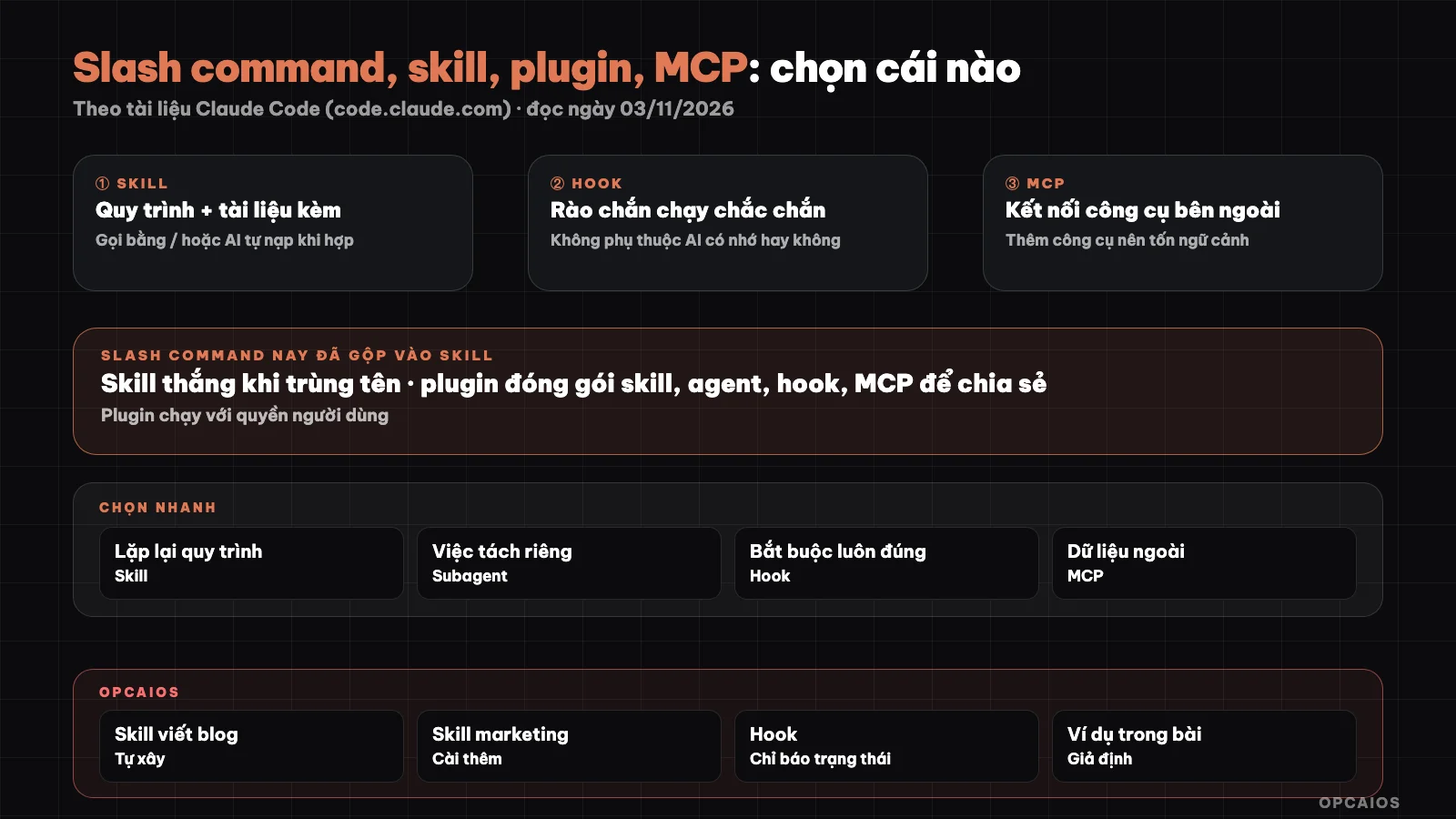
Six types of Claude Code extensions and the questions that lead to each one. Diagram: OPCAIOS.
What is a slash command in Claude Code now?
A slash command is a way to call a procedure by name, and in today's Claude Code a custom command is essentially a skill. The Skills documentation on code.claude.com (read on 03/11/2026) states clearly: both a file .claude/commands/deploy.md and a skill .claude/skills/deploy/SKILL.md create a /deploy and run the same way; the old files in .claude/commands/ still work, and if there's a name conflict the skill wins. Skills have three things that the old commands didn't: a directory to hold supporting files, a frontmatter section to control who can call it, and the ability for Claude to load it automatically when it seems relevant. Besides the commands you write yourself, Claude Code also has built-in commands (like /mcp, /plugin) and bundled skills (like /code-review, /batch). That's why when someone says "write a slash command", in reality you're writing a skill. The detailed way to write a skill is in the post what is a skill and how to use it; an example of a skill installed from outside is in Skill Anatomy of Claude Code; this post only covers choosing which type.
How are skill, subagent, hook, plugin and MCP different?
These five types differ first of all in who decides when they run and how much context space they take up. Short definitions from the "Extend Claude Code" section of the official documentation (read on 03/11/2026):
- Skill: a Markdown file with knowledge, procedure or instructions; you call it with
/<name>or Claude loads it automatically when the description matches what you're doing. - Subagent: its own work loop with its own context window, reads many files then returns only a summary; the definition goes in
.claude/agents/. See what is a subagent. - Hook: a script, HTTP request, MCP tool call, prompt or subagent that Claude Code runs when it reaches a lifecycle event, like after every file edit. See hooks in Claude Code.
- MCP: a protocol that connects Claude to outside services like databases, Slack, web browsers. See what is MCP.
- Plugin: a packaging layer, bundling skills, subagents, hooks and an MCP server into one unit that you install once, with a manifest file at
.claude-plugin/plugin.json.
Also CLAUDE.md is the context always on for each session, meant for rules like "always do X", see what is CLAUDE.md.
Comparison table: who triggers it, where it lives, how much context does it cost?
The table below is compiled from the Extend Claude Code, Skills, Worktrees, and Plugins overview pages of the Claude Code documentation, read on 03/11/2026. The "how much context does it cost" column describes the loading mechanism, not token count.
| Type | Who triggers it | Where it lives | How much context does it cost |
|---|---|---|---|
| Custom command (old) | You type /<name> |
.claude/commands/ |
Like skill |
| Skill | You type /<name> or Claude loads it automatically |
~/.claude/skills/<name>/SKILL.md (personal), .claude/skills/<name>/SKILL.md (project) |
Description present each turn, full text only loads when used |
| Subagent | Claude or you ask to delegate | .claude/agents/ |
Separate window, only summary comes back |
| Hook | Lifecycle event, Claude does not decide | Settings config file | Zero, unless hook returns a result |
| MCP | Claude calls server tool | MCP config, for example .mcp.json for project |
Tool names load at session start, full schema deferred until needed |
| Plugin | Install via /plugin, then each component runs according to its type |
Plugin directory with .claude-plugin/plugin.json |
Cumulative cost of internal components, per session |
Details worth remembering: the documentation says if you set disable-model-invocation: true in the frontmatter, Claude will not call that skill automatically and its description does not take up context; use this for skills with side effects like deployment.
Which type to choose: a 7-question decision tree
The decision tree below goes from cheapest to most expensive question, stopping at the first one you answer "yes" to. The order is based on the "Build your setup over time" table in the Claude Code documentation, restated and condensed:
- Is this a rule Claude must always know, every session? Write it in CLAUDE.md. The documentation recommends keeping this file under 200 lines.
- Must this happen every time, with no thinking from Claude (code formatting, blocking dangerous commands, logging)? Use a hook. A note in CLAUDE.md is only a suggestion; a hook enforces it.
- Does Claude need to read or write a system it cannot see (database, CRM, calendar)? Connect it with MCP.
- Are you pasting the same multi-step workflow into the chat for the third time? Write it as a skill.
- Does that skill have side effects (deployment, sending, deleting)? Add
disable-model-invocation: trueso it only runs when you call it by name. - Is the side work drowning the conversation in results you won't read again (searching the whole codebase, reading dozens of files)? Hand it to a subagent.
- Does a second project or someone else need this exact same setup? Package it as a plugin.
Types can mix: MCP provides the connection, a skill teaches how to use that connection; one skill can run inside a subagent using context: fork.
Example scenario: what should a small shop set up?
Example scenario, not a real person: Lan sells pottery online and uses Claude Code to fix her website and write product descriptions. Applying the decision tree above, a sensible setup has 5 parts:
- CLAUDE.md: "reply in Vietnamese, prices in dong, do not edit the payment page without asking".
- Skill
/write-product-description: workflow for writing descriptions in brand voice, with a file of three best descriptions in the skill folder. - Skill
/deploy-websitewithdisable-model-invocation: true, because deploying a new version is hard to undo. - MCP server connected to inventory database, so Claude reads actual stock numbers instead of Lan typing them in by hand.
- Hook that checks code formatting after every file edit.
Lan does not yet need a plugin, because she has only one project. When she opens a second shop and wants to reuse this exact setup, that is when to bundle the skills, hook, and MCP config into a plugin. She also does not yet need a private subagent: when she needs to hunt for bugs across the whole site, she just tells Claude to hand it to the built-in subagent.
When Should You Install a Plugin, When Should You Avoid It?
You should install a plugin when you want to receive a pre-made setup from someone else with a single command, or when you want to bring your setup across multiple projects. According to the Plugins overview page (read on 03/11/2026), an enabled plugin is part of every session, even sessions you don't use it in: the names and descriptions of every skill and agent that Claude can call itself are in the context of each turn, the plugin's MCP server runs in parallel, its hooks run by event. The plugin runs with your own permissions. Four safe habits:
- Check the context cost estimate section in
/pluginbefore installing, if the plugin marketplace displays it. - Tell the difference between Anthropic's official marketplace and third-party marketplaces; the documentation says plugins at every tier can run code with user permissions.
- Read skills and hooks inside like you would read unfamiliar software.
- Turn off unused plugins instead of leaving them on forever.
A full context also makes Claude worse: documentation warns that vague or overlapping descriptions can cause Claude to load the wrong skill.
OPCAIOS's Experience
OPCAIOS is the website opcaios.org run by one person using a programming agent. What's true about how we use different kinds of extensions:
- Custom skills: for example, a skill for writing blogs that includes workflow, SEO/GEO scoring script, building diagrams, cover images, and inserting drafts. Every AI-written post goes into draft status, only scheduled when the owner approves it.
- Installed skills: many marketing skills installed at the user level, shared across all projects on the machine. We haven't measured how much context these skills take up.
- Subagents: used to write many posts in parallel and edit many old posts in bulk; with a script to compare the original with the edited version before saving.
- Hooks: configured but currently only to report session status to the terminal management tool. We don't have hooks to block dangerous commands or auto-run lint yet.
- Always-true rules live in the user-level instruction file and auto-memory, not in a separate CLAUDE.md of the website repo.
For plugins and MCP sections, this post adds no experience beyond the What is MCP post.
Frequently Asked Questions
Do I need to migrate old custom commands in .claude/commands to skills?
Not required. According to Claude Code's Skills documentation, files in .claude/commands/ still run and create /<name> commands just like skills do. You should migrate when you need to add supporting files alongside, want to control whether Claude can call it automatically through frontmatter, or want Claude to auto-load it when relevant. If you have both an old command and a skill with the same name, the skill takes priority, so delete the old file after migrating to avoid confusion.
Can skills and MCPs replace each other?
No, they solve two different problems and usually work together. MCP gives Claude tools to reach external systems, with the connection and authentication handled by the server. Skills give Claude knowledge and processes, including how to use those MCP tools correctly. For example: MCP connects to a database, while a skill documents your table structure and query templates. For MCP setup, see the post What is MCP.
When should I use hooks instead of writing rules in CLAUDE.md?
When a rule must hold in every case. Claude Code's documentation makes clear that an instruction like "never edit .env files" in CLAUDE.md or a skill is just a request—Claude might interpret it differently. Hooks run on lifecycle events without Claude deciding, so they enforce the rule. Hooks also don't consume context except when returning results. On the other hand, hooks are code running with your permissions, so write and test them carefully.
Does installing many skills make Claude slow or worse?
It can. According to the documentation, the description of every skill Claude can auto-invoke sits in context each turn, so more skills means more space used and more chance of overlap; vague descriptions can make Claude load the wrong skill or miss one. Three ways to reduce it: write specific descriptions, set disable-model-invocation: true on skills that only run when called by name, and turn off unused plugins. The documentation also mentions the /context command to see what context space is being taken up.
What should a newcomer start with?
Start with CLAUDE.md for a few project rules, then add your first skill when you catch yourself typing the same request many times. MCP is only needed when Claude has to read data from another system, hooks when something must happen every time, plugins when you want to reuse across a second project. Following this order, each step has a specific reason instead of installing everything at once. If you want guidance building a setup for your work, check out OPCAIOS's AI application training course.
Source: Claude Code documentation at code.claude.com, pages Extend Claude Code, Skills, Plugins overview and Worktrees, accessed 03/11/2026. Not verified: exact token counts for each extension type, how context costs are calculated in plugin marketplace estimates; features may change by version. Experience is from OPCAIOS.
Translated from Vietnamese with AI. Read the original.
Want to apply this in your business?
Book a free 30-minute call (Vietnam time, in English or Vietnamese).