


What is Postiz?
Postiz is an open-source tool for scheduling and managing social media posts across multiple channels from one place, with content calendar, cross-posting, analytics, team collaboration, public API and AI features. According to the GitHub repository (checked October 25, 2026), Postiz is licensed AGPL-3.0, has around 37.7 thousand stars, and supports channels like Instagram, YouTube, LinkedIn, Reddit, TikTok, Facebook, Pinterest, Threads, X, Slack, Discord, Mastodon and Bluesky. You can self-host for free (running Docker with PostgreSQL and Redis) or use Postiz Cloud from $29 per month. The less talked about part: when self-hosting, you must create developer applications on each platform and wait for their approval, which can take many weeks with Meta, YouTube, TikTok. This post explains what Postiz is, features, pricing, the self-hosting process and its difficulties, risks, comparison with other tools, and OPCAIOS's experience (we once installed and then removed Postiz).
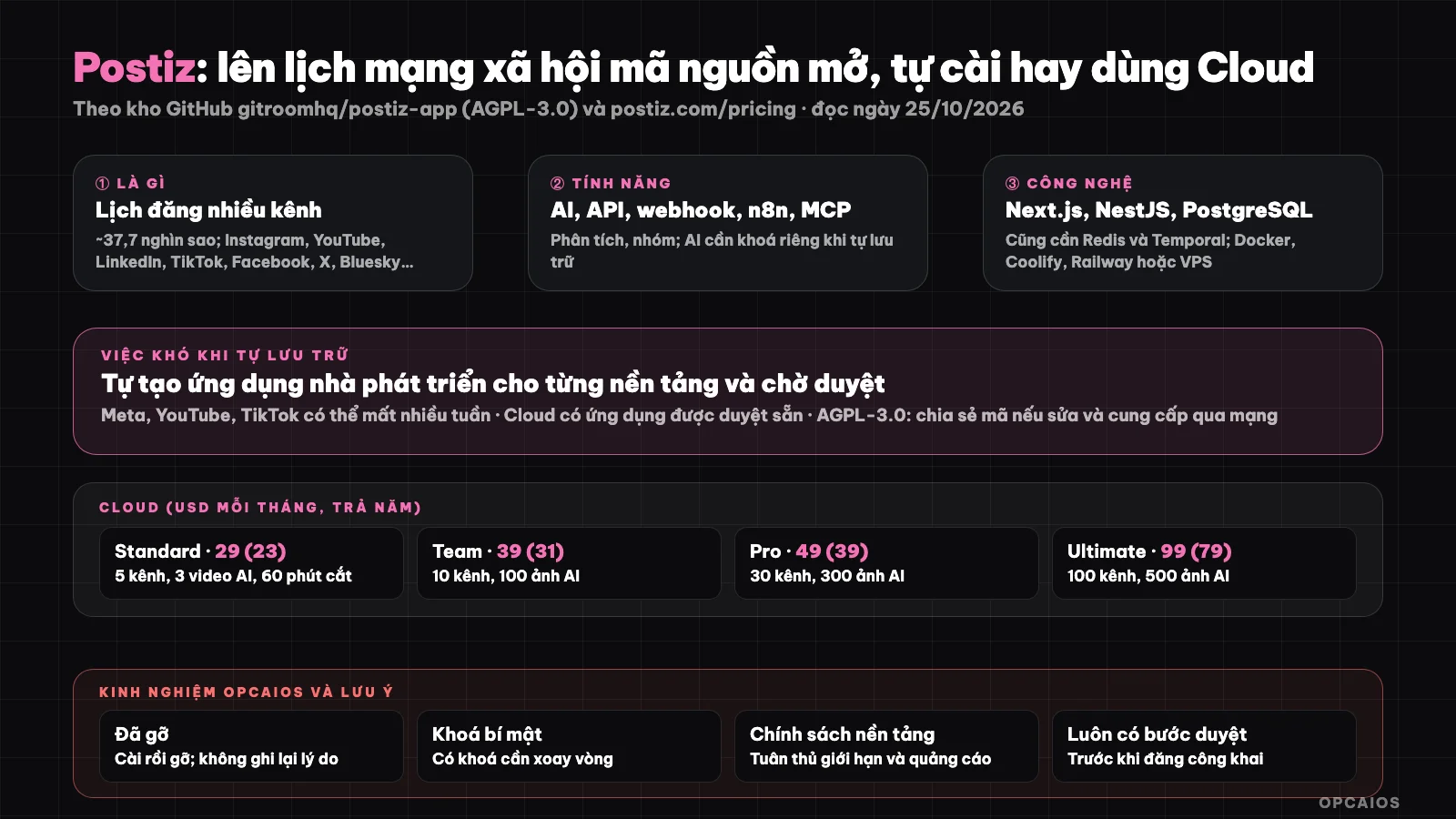
Postiz is free when self-hosted, but you handle developer applications and infrastructure yourself. Diagram: OPCAIOS.
What is Postiz and what can it do?
What can Postiz do? According to the repository page, Postiz introduces itself as "an agent-oriented social media scheduling tool". Core features: scheduling, viewing calendar, cross-posting, repeat posts, comments, delay, post sets, signatures; analytics; team collaboration; public API with webhooks. AI features: post writing assistant, image and video generation with AI, AI video cutting and "smart agents"; self-hosters need API keys from their own AI providers. Automation integrations: n8n, Make and Zapier, plus MCP servers and CLI (see what is n8n? and what is MCP?). Technology: pnpm monorepo, Next.js, NestJS, Prisma (PostgreSQL by default), Temporal and Redis; notifications by email through Resend.
Postiz Cloud pricing
Postiz Cloud has four plans: Standard, Team, Pro and Ultimate. According to Postiz's official pricing page (USD, checked October 25, 2026, not including tax), Standard plan is $29 per month (or $23 when billed yearly) for 5 channels, while Ultimate plan is $99 per month (or $79 when billed yearly) for 100 channels; yearly billing saves around 20% and all plans have a 7-day free trial. The table below lists all four plans:
| Plan | Price per month (billed yearly) | Channels | Posts per month | AI images per month | AI videos per month | Video cutting minutes | Members |
|---|---|---|---|---|---|---|---|
| Standard | 29 (23) | 5 | Unlimited | 0 | 3 | 60 | None |
| Team | 39 (31) | 10 | Unlimited | 100 | 10 | 120 | Unlimited |
| Pro | 49 (39) | 30 | Unlimited | 300 | 30 | 300 | Unlimited |
| Ultimate | 99 (79) | 100 | Unlimited | 500 | 60 | 600 | Unlimited |
According to the repository, the Cloud version has pre-approved platform applications and AI limits managed by them: this is the main reason to pay instead of self-hosting.
Self-hosting: the difficult parts
- Infrastructure: deploy using Docker, Coolify, Railway or VPS; configure PostgreSQL, Redis, file storage and environment variables (see what is Docker?, what is VPS?, what is Coolify?).
- Developer applications for each platform: you must create an application on each network (Meta, YouTube, TikTok, X, LinkedIn…) and get their approval; according to the repository, Meta, YouTube and TikTok can take many weeks.
- AI API keys: to use AI features you need keys from providers.
- Maintenance: update versions, backups, handle platform API changes.
- AGPL-3.0 license: if you modify and provide the service over the network, you have an obligation to share source code; read it carefully or ask an expert.
- Tokens and secrets: Postiz stores login tokens for your channels; protect your server, grant minimum permissions, rotate keys regularly.
Risks and Considerations
- Platform policies: automatic posting via legitimate API differs from user simulation; comply with each network's terms, especially rate limits and ad content.
- AI content: should be labeled and moderated; see Faceless TikTok/Reels Channel.
- Wrong posting damages brand: always have a review step before public posting.
- Platform API dependency: platforms can change or revoke access; keep your original content elsewhere.
- Hidden costs: setup time, app approval, and maintenance; compare against Cloud pricing.
Quick Comparison
| Approach | Suitable for |
|---|---|
| Postiz Cloud | Want to use immediately, many channels, don't want to request platform app approval |
| Postiz self-hosted | Have infrastructure skills, want data control, accept waiting for app approval |
| Typefully | Focus on writing and posting to X, LinkedIn, Threads and a few other networks, few channels |
| Build your own posting tool | Want deep integration into your system; accept maintenance burden |
OPCAIOS Experience
We once set up Postiz on our infrastructure then removed it: according to internal status documentation, Postiz falls in the "removed, no longer running" service group (from September to October 2026). We didn't record the removal reason in reviewed documents so this post doesn't state why; a note from a review cycle also mentioned rotating an OpenAI key that was tied to Postiz, showing self-hosting requires managing secrets. Our website currently has a content production dashboard and integration with third-party scheduling, but we haven't tested it with real accounts, so posting remains mostly manual or semi-manual. We have no data on effectiveness or cost compared to Postiz Cloud.
Read more: 5 Best Social Media Scheduling Tools 2026.
Frequently Asked Questions
What is Postiz?
Postiz is an open-source tool for scheduling and managing social media posts across multiple channels from one place. According to the GitHub repository gitroomhq/postiz-app (accessed October 25, 2026), the tool uses the AGPL-3.0 license and supports channels like Instagram, YouTube, LinkedIn, TikTok, Facebook, Threads, X, Mastodon, and Bluesky. Main features include content calendar, cross-posting, recurring posts, analytics, team collaboration, public API with webhooks, and an AI assistant. There are two ways to use it: self-hosting for free using Docker with PostgreSQL and Redis, or paying for Postiz Cloud starting at $29 per month. For example, a solo business owner who only needs to post on LinkedIn and X might choose Cloud to avoid having to request platform app approvals.
Is Postiz free?
Postiz is free when self-hosted under the AGPL-3.0 license, but the software isn't free of effort: you need a server, PostgreSQL, Redis, and must create developer applications for each platform. According to Postiz's official pricing page (accessed October 25, 2026), Cloud starts at $29 per month, or $23 per month if paid annually, and all plans include a 7-day free trial. Choosing between them involves two steps. First, calculate the cost of setup time, waiting for app approvals, and maintenance. Next, compare with Cloud pricing: if you only need a few channels, $29 is usually much cheaper than many hours of work. This is a reference calculation; OPCAIOS doesn't have actual cost comparison data between the two approaches.
Is self-hosting Postiz difficult?
Self-hosting Postiz is more difficult on the platform side than the server side. The server side requires Docker, PostgreSQL, Redis, file storage, and environment variables—familiar work for anyone who has managed a VPS. The platform side is different: you must create developer applications on each network like Meta, YouTube, TikTok, X, LinkedIn, and wait for their approval, which according to the Postiz codebase can take many weeks for Meta, YouTube, and TikTok. You also need a separate API key for AI features if you want to use the AI functionality, plus maintenance, backups, and protection of login tokens for each channel. For example, if you need Instagram and TikTok urgently this week, Postiz Cloud with pre-approved applications is the more practical choice.
What social networks does Postiz support?
Instagram, YouTube, LinkedIn, Reddit, TikTok, Facebook, Pinterest, Threads, X, Slack, Discord, Mastodon, Bluesky, and some others according to the codebase.
Should I use AI to post automatically?
You should not have AI post completely automatically; keep a reviewer and label AI content when needed. First, wrong posts damage brand reputation and are hard to undo. Second, each network like Meta, TikTok, or X has its own terms about frequency, advertising content, and automation. Third, AI content can be generic or make up facts. Safe approach: first AI drafts the post, next a person edits the tone and checks facts, then schedule it through Postiz. For example, use n8n or Postiz's MCP to feed drafts into the calendar, but keep the posting step manual. To learn how to build content workflows and post with AI, see OPCAIOS's AI application training course.
Source: GitHub repository gitroomhq/postiz-app and postiz.com/pricing, accessed October 25, 2026; star count changes frequently. Prices do not include tax and may change. Experience is from OPCAIOS according to internal status documents; reason for removal unclear.
Translated from Vietnamese with AI. Read the original.
Want to apply this in your business?
Book a free 30-minute call (Vietnam time, in English or Vietnamese).