


What is TencentDB Agent Memory?
TencentDB Agent Memory is an open-source "memory hub" developed by Tencent's TencentDB team that transforms conversations, documents, and source code into four types of reusable assets (Chat Memory, Skill, Wiki, CodeGraph) for multiple AI agents like Claude Code, Codex, and Hermes to share. According to GitHub API (read on 04/11/2026), the TencentCloud/TencentDB-Agent-Memory repository was created on 07/04/2026, has around 30,400 stars, is written mainly in TypeScript, and the latest code push was on 03/11/2026. The LICENSE file lists MIT license, and the latest release is v2.0.3 (26/10/2026). This article explains what the tool does, where the hidden costs lie, how to install it according to official documentation, data risks when placing a proxy between agent and model, and when someone working alone should consider it.
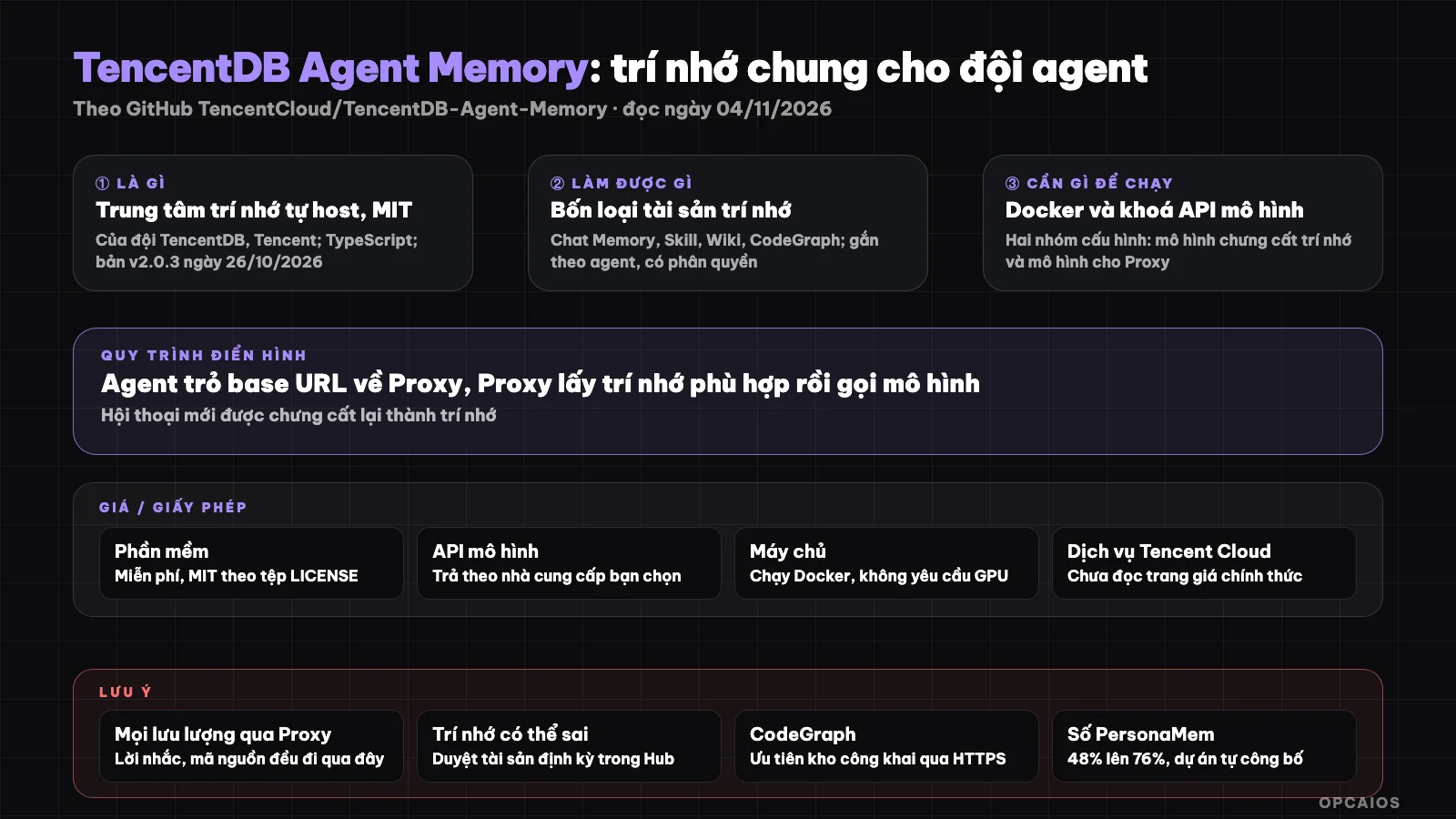
Agents point API address to Proxy, Proxy retrieves relevant memory then calls the model. Diagram: OPCAIOS.
What is TencentDB Agent Memory and who created it?
TencentDB Agent Memory is a trio of self-hosted services (Memory Core, Memory Hub, Proxy) that help agents avoid relearning project context in each new session. The project belongs to the TencentCloud organization on GitHub, the LICENSE file records Tencent copyright 2026 and MIT license.
The original idea, according to the README (read on 04/11/2026), came from a practical question: how to reduce repetition when using agents. If project context has been explained once, the next session should not need to explain it again. So "memory" here is broader than chat history: any information that helps the next agent avoid starting from scratch gets saved, organized, and reused. The difference compared to many other memory libraries is the connection approach: agents only need to change their API address (base URL) to Proxy, no plugins, hooks, or MCP servers needed. The README lists agents with available guides: DeepSeek Harness, Claude Code, Codex, CodeBuddy, WorkBuddy, Hermes, and OpenClaw. The project also gives clear credit: the CodeGraph part uses code from colbymchenry's codegraph repository, the Skill part uses some code from Hermes Agent (Nous Research), and the Wiki layer draws inspiration from Andrej Karpathy's "LLM Wiki" idea.
What can TencentDB Agent Memory do?
TencentDB Agent Memory consolidates four types of memory assets into a permission-controlled dashboard, then attaches each type to each agent according to role. Agents only receive the memory they are granted, and only when the current question needs it.
| Feature | Description according to README (read on 04/11/2026) |
|---|---|
| Chat Memory | Saves preferences, events, decisions; stores across four layers L0 raw conversation, L1 facts, L2 context, L3 profile |
| Skill | Extracts reusable procedures from conversations and tool calls, with versions, execution steps, verification rules |
| Wiki | Transforms product documentation, specifications, operations manuals into structured pages and linked graphs |
| CodeGraph | Indexes symbols, files, function call relationships and influence paths of the code repository |
| Memory Hub | Dashboard to create teams, create agents, browse, share, attach assets to agents |
| Permissions | Four visibility levels: private, team, restricted (ACL by person, role, agent) and agent |
| Retrieval | BM25, vector and RRF, limit on item count, character count, time to prevent context window overflow |
The README has an example suited to a one-person company model: set up a "team" with you as decision-maker, one research agent, one coding agent, one testing agent, each agent gets attached different memory sets. Example (hypothetical): the testing agent gets Chat Memory about past bugs and Skill pre-release checklist, while the coding agent gets product Wiki and the project's CodeGraph.
Price, License, and Hidden Costs
TencentDB Agent Memory is free software under the MIT license, but it won't run without a language model. The real costs come from the model API for memory distillation, the model API that Proxy forwards through, and a server running three containers.
| Item | Details (read 04/11/2026) |
|---|---|
| Software | Free, MIT per LICENSE file; GitHub API shows NOASSERTION because the file has an additional preamble from Tencent |
| Model for memory | Needs an OpenAI-compatible model (endpoint, key, model name); you pay according to your chosen provider |
| Model for Proxy | A second config group, can reuse the first one; every agent call goes through here |
| Server | A machine that runs Docker; README states no minimum specs, no GPU required |
| Storage | SQLite in a volume by default; MongoDB is an experimental option, disabled by default |
| Tencent Cloud managed services | Haven't read the official pricing page, so this post doesn't cover pricing |
Model API prices exclude tax and may vary by provider. Also, distilling L1, L2, L3 and building Wiki running in the background with the model consumes tokens even when you're not directly asking anything.
How do I install TencentDB Agent Memory?
Installing TencentDB Agent Memory per the README means cloning the repo, filling in two model config groups in the .env file, then running a startup script that brings up all three services. The script has an interactive mode and checks the connection to the model before running.
git clone https://github.com/TencentCloud/TencentDB-Agent-Memory.git
cd TencentDB-Agent-Memory/deploy/global-images
cp .env.example .env
./start-all.sh
- First, prepare Docker and a model API key compatible with OpenAI; the README badge notes Node 22.16 if you run the source code.
- Next, run
./start-all.sh: per INSTALL.md, the script asks for thememorygroup andproxygroup, tests the connection for each group, writes to.env, then brings up three containers. - On first run, the script creates an admin account, generates a random user key and prints a ready-made command block to set
ANTHROPIC_BASE_URLandANTHROPIC_AUTH_TOKENso you can open Claude Code through the Proxy. - Finally, open the dashboard at
http://localhost:8125, create a team, create an agent and upload documents or code repos.
Users on v1.x or v0.x need a separate data migration tool that the README points to. We haven't run the steps above; this is a summary from the official docs.
Limits, Risks, Security, and Personal Data
The biggest risk of TencentDB Agent Memory lies in the Proxy design itself: every prompt, source code, and agent tool result goes through this service before reaching the model. Whoever controls the machine running Proxy controls your entire working context.
Five points to consider before using it in production. First, data goes through two places: your self-hosted machine and the model provider of both config groups, so internal documents, customer info or secret keys accidentally pasted into a conversation could be distilled into long-term memory. Second, auto-extracted memory can be wrong, so you need to review assets periodically in Memory Hub. Third, the README itself states the limits: Wiki and CodeGraph build asynchronously so you need to wait; CodeGraph prioritizes public repos via HTTPS, private repos and SSH keys are still being worked on; attaching memory to agents is still mostly manual. Fourth, the project is very new and changes fast: the repo has around 891 open issues (GitHub API, 04/11/2026), the README still says "current version v2.0.0" while the releases page has reached v2.0.3. Finally, if you store other people's personal information, you're responsible under data protection rules where you operate; this section is for reference only, not legal advice.
On performance numbers, the README states that on the PersonaMem benchmark the score went from 48% to 76% when tools were enabled. This is a number published by the project and hasn't been independently verified.
Compared to other options
TencentDB Agent Memory belongs to the "memory for agents" category, but differs in that it targets multiple agents with access control. The table below is a general description, not a measurement.
| Option | Strengths | Weaknesses |
|---|---|---|
| TencentDB Agent Memory | Four asset types, access control, memory tied to agents, no MCP needed | Self-host three services, all traffic goes through Proxy |
| Chat history and instruction files like CLAUDE.md | Simple, transparent, you write it yourself | No self-storage, hard to share across multiple agents |
| Regular RAG (e.g. Dify) | Good for Q&A on documents | No Skills, doesn't understand source code relationships |
| Memory libraries like Honcho | Compact, embed in application | Requires integration code, few team management tools |
| Obsidian note vault | Human-readable, durable | Agent must be told which files to read, doesn't auto-update |
When to use it?
TencentDB Agent Memory makes sense when you run multiple agents on the same project and waste time re-explaining context. If you only use one agent, a good instruction file is usually enough.
| Situation | Recommendation |
|---|---|
| One person, one agent, small project | Use CLAUDE.md or Obsidian notes first |
| Multiple agents (Claude Code, Codex, Hermes) on the same codebase | Worth trying on a side project |
| Need agent to understand code impact chains when making edits | Try CodeGraph on a public repo first |
| Sensitive customer data, contracts | Only run on machines you control, carefully consider model provider |
| Don't know Docker and command line | Not yet, learn the basics first |
OPCAIOS experience
We added TencentDB Agent Memory to the Repo list in the Tools section on opcaios.org after reading the README and checking that the repository is still maintained; we haven't run it yet, so this section lists the criteria we use to consider it, not an evaluation after use. First, the repository is actively maintained: code pushed on 03/11/2026, version v2.0.3 on 26/10/2026. Next, MIT license per the LICENSE file, open enough for internal use. Then, hidden costs: two groups of model APIs plus background storage running, so you must set limits before trying. Finally, does it replace what we're doing now: our main knowledge repository is an Obsidian vault, readable by eye and reviewed by people; a Proxy standing between agent and model is a major change to data flow, needs testing on a side project first before trusting.
Read more: What is an AI agent?, What is RAG?, What is CLAUDE.md?, What is Honcho?, 5 best memory tools for AI agents 2026.
Frequently Asked Questions
Is TencentDB Agent Memory free?
The software is free under the MIT license, stated in the LICENSE file of the repository on GitHub (read on 04/11/2026). You self-host it using Docker and pay nothing to Tencent. However, the tool needs a language model to store memory and build a Wiki, and the Proxy needs a model behind it to relay agent requests, so you still pay for API calls depending on which provider you choose. We haven't read the pricing page for the management service on Tencent Cloud, so we don't list that price.
Does TencentDB Agent Memory need a GPU?
The README doesn't require a GPU. The three services run in containers, with the heavy lifting being API calls to an OpenAI-compatible model. If you point the configuration group to a model running locally, then you need a GPU. The README doesn't state minimum machine specs, so start on your personal machine or a small server and monitor memory when building a Wiki or CodeGraph for large repositories.
How do I use TencentDB Agent Memory with Claude Code?
According to INSTALL.md (read on 04/11/2026), after ./start-all.sh finishes, the script prints two environment variables: ANTHROPIC_BASE_URL pointing to the Proxy and ANTHROPIC_AUTH_TOKEN as the newly generated user key. You set these two variables and open Claude Code as usual; the Proxy injects appropriate memory into the prompt and relays it to the configured model. No need to install MCP or hooks. Note that the model actually answering is the one in the proxy group, not necessarily the one you normally use.
How is TencentDB Agent Memory different from RAG?
RAG answers the question "what did we find in the documents". TencentDB Agent Memory, according to the README, also answers "who uses this, what version is still valid, which agent should handle it". Beyond retrieving passages, the tool has Skills extracted from past work, CodeGraph understands function call relationships, and display modes for private, team, and restricted for each asset. If you only need Q&A on documents, a simple RAG system usually suffices.
Can someone who doesn't know code use TencentDB Agent Memory?
It's hard. Installation requires the command line, Docker, .env files, and understanding of base URL and API keys. The Memory Hub dashboard has an interface, but creating users, teams, and attaching assets still demands understanding how agents work. Beginners should start with a prompt guide file for the agent and a note repository, then move to automatic memory management once they see where repetition lies. To learn that foundation step by step, see OPCAIOS's AI application training course.
Source: GitHub TencentCloud/TencentDB-Agent-Memory (README, INSTALL.md, LICENSE, release page, API, read on 04/11/2026: around 30,400 stars, MIT, version v2.0.3), project page tencentcloud.github.io/TencentDB-Agent-Memory (only the description section readable); not read or verified: pricing page for managed service on Tencent Cloud, PersonaMem improvement 48% to 76% as the project reports; star count and pricing may change. Experience is from OPCAIOS. This post is not legal advice.
Translated from Vietnamese with AI. Read the original.
Want to apply this in your business?
Book a free 30-minute call (Vietnam time, in English or Vietnamese).